1. Einführung und Endeview
This manual provides comprehensive instructions for the setup, operation, maintenance, and troubleshooting of your InFocus IN3124 Projector. Designed for clarity and ease of use, this guide will help you maximize your projector's performance and longevity.
The InFocus IN3124 is a high-performance projector featuring XGA (1024 x 868) native resolution, 4800 lumens of brightness, and a 3000:1 contrast ratio, making it suitable for various presentation environments. Its portable design allows for flexible placement and usage.
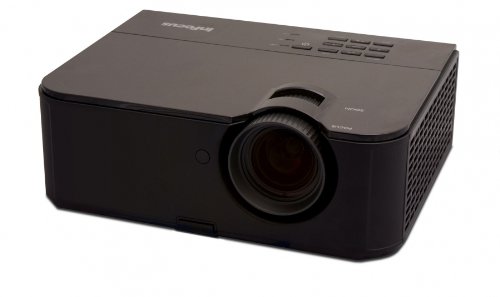
Abbildung 1: Vorderseite view of the InFocus IN3124 Projector, highlighting the main lens and the top-mounted control panel.
2. Einrichtung
2.1 Auspacken
Nehmen Sie den Projektor und sämtliches Zubehör vorsichtig aus der Verpackung. Prüfen Sie, ob alle in der Packliste aufgeführten Komponenten vorhanden sind. Bewahren Sie die Originalverpackung für späteren Transport oder Lagerung auf.
2.2 Platzierung
Position the projector on a stable, level surface. Ensure adequate ventilation around the unit to prevent overheating. Maintain a clear path between the projector lens and the projection screen or surface. The optimal projection distance will vary based on the desired screen size.
2.3 Stromversorgung anschließen
- Schließen Sie das Netzkabel an den Stromeingang des Projektors an.
- Stecken Sie das andere Ende des Netzkabels in eine geerdete Steckdose.
2.4 Anschließen von Eingangsquellen
The IN3124 projector supports various input sources. Connect your video source (e.g., computer, DVD player) to the appropriate input port on the projector. Common ports include VGA and HDMI (if available on your specific model).
- VGA: Use a VGA cable to connect to a computer's video output.
- HDMI: Use an HDMI cable for digital video and audio (check projector for HDMI port availability).
3. Bedienungsanleitung
3.1 Ein-/Ausschalten
- So schalten Sie das Gerät ein: Drücken Sie den Ein-/Ausschalter am Bedienfeld des Projektors oder auf der Fernbedienung. Die Betriebsanzeigeleuchte leuchtet auf.
- So schalten Sie das Gerät aus: Press the power button twice. The projector will enter a cooling cycle before shutting down completely. Do not unplug the projector during the cooling cycle.
3.2 Fokus und Zoom einstellen
Rotate the focus ring on the projector lens until the image appears sharp and clear. Use the zoom ring (if present) to adjust the image size to fit your screen.
3.3 Auswahl der Eingangsquellen
Press the "Source" or "Input" button on the projector's control panel or remote control to cycle through available input sources (e.g., VGA, HDMI). Select the input corresponding to your connected device.
3.4 Menu Navigation and Keystone Correction
Use the menu buttons on the projector or remote to access the On-Screen Display (OSD). Navigate through the menu options to adjust settings such as brightness, contrast, color, and keystone correction. Keystone correction helps to square the image if the projector is not perfectly perpendicular to the screen.
4. Wartung
4.1 Reinigung der Linse
Reinigen Sie die Projektorlinse vorsichtig mit einem weichen, fusselfreien Tuch, das speziell für optische Oberflächen entwickelt wurde. Verwenden Sie keine Scheuermittel und üben Sie keinen übermäßigen Druck aus, da dies die Linse zerkratzen kann.
4.2 Reinigung der Luftfilter
Regularly check and clean the projector's air filters to ensure proper airflow and prevent overheating. Refer to the projector's specific filter access instructions. Use a soft brush or vacuum cleaner to remove dust accumulation.
4.3 Literamp Ersatz
Der Projektor lamp hat eine begrenzte Lebensdauer. Wenn die lamp life indicator appears or the image becomes dim, the lamp may need replacement. Consult the full service manual or manufacturer's webWebsite für detaillierte Informationenamp Austauschverfahren und kompatible Lamp models. Always allow the projector to cool down completely before attempting lamp Ersatz.
4.4 Speicherung
Bei längerer Nichtbenutzung sollte der Projektor an einem kühlen, trockenen Ort, geschützt vor direkter Sonneneinstrahlung und extremen Temperaturen, aufbewahrt werden. Verwenden Sie die Originalverpackung oder eine Schutzhülle, um Staub und Beschädigungen zu vermeiden.
5. Fehlerbehebung
This section addresses common issues you might encounter with your InFocus IN3124 Projector. For more complex problems, contact customer support.
- Kein Bild angezeigt:
- Vergewissern Sie sich, dass der Projektor eingeschaltet ist und die Betriebsanzeige dauerhaft leuchtet.
- Verify that the input source cable (VGA, HDMI) is securely connected to both the projector and the source device.
- Wählen Sie die richtige Eingangsquelle mithilfe der Schaltfläche „Quelle“ aus.
- Check if the source device is outputting a signal.
- Dim or Faded Image:
- Adjust brightness and contrast settings in the OSD menu.
- Stellen Sie sicher, dass die lamp is not nearing the end of its lifespan.
- Clean the projector lens and air filters.
- Check the projection mode (e.g., Eco mode might reduce brightness).
- Das Bild ist unscharf:
- Stellen Sie den Fokusring am Projektorobjektiv ein.
- Stellen Sie sicher, dass die Projektionsfläche eben ist und der Projektor stabil steht.
- Check the resolution settings of your source device to match the projector's native resolution.
- Fernbedienung funktioniert nicht:
- Ersetzen Sie die Batterien in der Fernbedienung.
- Stellen Sie sicher, dass sich keine Hindernisse zwischen der Fernbedienung und dem Infrarotempfänger des Projektors befinden.
- Richten Sie die Fernbedienung direkt auf den Projektor.
6. Spezifikationen
The following table outlines the key technical specifications for the InFocus IN3124 Projector:
| Besonderheit | Spezifikation |
|---|---|
| Modellnummer | IN3124 |
| Bildschirmauflösung (nativ) | XGA (1024 x 868) |
| Helligkeit | 4800 Lumen |
| Kontrastverhältnis | 3000:1 |
| Anzeigetyp | LCD, LCoS |
| Artikelgewicht | 8.16 Pfund (3.7 kg) |
| Produktabmessungen (L x B x H) | 12.83 x 10.43 x 4.8 Zoll (32.59 x 26.49 x 12.19 cm) |
| Besonderheit | Tragbar |
7. Garantie und Support
For detailed warranty information, please refer to the warranty card included with your product packaging or visit the official InFocus webDie Garantie deckt in der Regel Herstellungsfehler für einen bestimmten Zeitraum ab Kaufdatum ab.
If you encounter issues that cannot be resolved using the troubleshooting guide, or require technical assistance, please contact InFocus customer support. Contact details can usually be found on the manufacturer's webauf der Website oder in Ihrer Produktdokumentation.


