Einführung
Thank you for choosing the SoundBot SB510 HD Water Resistant Bluetooth Shower Speaker. This manual provides essential information for setting up, operating, and maintaining your speaker to ensure optimal performance and longevity. Designed for convenience and durability, this speaker allows you to enjoy your favorite audio content in various environments, including the shower, without concern for water exposure.
Zu den Hauptmerkmalen gehören:
- Wasserabweisendes Design: Built to withstand steam, splashes, and humidity, ideal for bathroom use.
- Freisprechen: Integrated microphone and control buttons for answering and ending calls.
- Tragbar und leicht: Compact design for easy transport and use on the go.
- Erweiterte Spielzeit: Up to 6 hours of continuous audio playback on a single charge.
- Stabile Bluetooth-Verbindung: Reliable streaming up to 33 feet from your device.
- Einfach zu bedienende Bedienelemente: Tactile buttons designed for operation even with wet hands.

The SoundBot SB510 HD speaker, showcasing dank seines wasserabweisenden Designs.
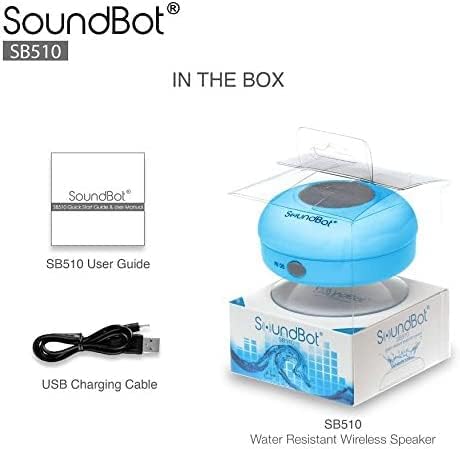
Lieferumfang
Your SoundBot SB510 HD package includes the following items:
- 1 x SoundBot SB510 Water Resistant Bluetooth Shower Speaker
- 1 x Benutzerhandbuch
- 1 x USB-Ladekabel

Included components: speaker, USB charging cable, and user guide.
Aufstellen
Aufladen des Lautsprechers
Before first use, fully charge your SoundBot SB510 HD speaker. A full charge takes approximately 3 hours and provides up to 6 hours of playtime.
- Suchen Sie den Ladeanschluss an der Seite des Lautsprechers, der normalerweise durch eine Gummiklappe geschützt ist.
- Verbinden Sie das schmale Ende des mitgelieferten USB-Ladekabels mit dem Ladeanschluss des Lautsprechers.
- Verbinden Sie das größere Ende des USB-Kabels mit einer USB-Stromquelle (z. B. einem USB-Anschluss am Computer oder einem USB-Netzteil).
- Die LED-Anzeigeleuchte leuchtet während des Ladevorgangs und erlischt oder ändert ihre Farbe, wenn der Akku vollständig geladen ist.

The speaker connected to its USB charging cable.
Bluetooth-Kopplung
Pair your speaker with your Bluetooth-enabled device (smartphone, tablet, laptop) to begin wireless audio streaming.
- Stellen Sie sicher, dass der Lautsprecher geladen und ausgeschaltet ist.
- Halten Sie die Ein-/Aus-Taste (⏻) on the speaker until the LED indicator light begins to flash rapidly, indicating it is in pairing mode.
- Aktivieren Sie auf Ihrem Gerät Bluetooth und suchen Sie nach verfügbaren Geräten.
- Select "SB510" from the list of found devices.
- Once successfully paired, the LED indicator light on the speaker will stop flashing and remain solid blue. You will also hear an audible confirmation.
- Der Lautsprecher hat eine drahtlose Reichweite von bis zu 10 Metern (33 Fuß).
The speaker's control panel, used for initiating Bluetooth pairing.
Bedienungsanleitung
Lautsprechersteuerung
The SoundBot SB510 HD features intuitive buttons for easy control of your audio and calls:
| Taste | Funktion (kurzer Druck) | Funktion (langes Drücken) |
|---|---|---|
| ⏻ (Leistung) | N / A | Ein-/Ausschalten |
| ⏵⏸ (Wiedergabe/Pause) | Musik abspielen/pausieren | N / A |
| ⏮ (Previous/Volume Down) | Vorheriges Lied | Lautstärke runter (-) |
| ⏭ (Next/Volume Up) | Nächstes Lied | Lauter (+) |
| 📞 (Telefon) | Anruf annehmen/beenden | N / A |

Detaillierte view von den Bedienknöpfen des Lautsprechers und deren Funktionen.
Anrufe tätigen und empfangen
The built-in microphone allows for hands-free communication:
- Anruf annehmen: Wenn ein Anruf eingeht, drücken Sie die 📞 button once to answer.
- Anruf beenden: Drücken Sie während eines Anrufs die Taste 📞 button once to end the conversation.
- Wahlwiederholung: Drücken Sie zweimal die 📞 -Taste, um die letzte Nummer erneut zu wählen.
Wartung
To ensure the longevity and optimal performance of your SoundBot SB510 HD speaker, follow these maintenance guidelines:
- Wasserbeständigkeit: The speaker is IPX4 water resistant, meaning it is protected against splashing water from any direction. It is suitable for use in showers or near pools, but it should nicht be submerged in water. Ensure the charging port cover is securely closed when not charging to maintain water resistance.
- Reinigung: Reinigen Sie den Lautsprecher mit einem weichenamp Mit einem Tuch abwischen. Verwenden Sie keine Scheuermittel oder Lösungsmittel, da diese die Oberfläche oder interne Bauteile beschädigen können.
- Lagerung: Bewahren Sie den Lautsprecher bei Nichtgebrauch an einem kühlen, trockenen Ort auf. Vermeiden Sie extreme Temperaturen.
- Pflege des Saugnapfes: For best adhesion, ensure the surface where you attach the suction cup is clean, smooth, and dry. Periodically clean the suction cup with water to remove any dust or residue.

The speaker's water-resistant design allows for use in wet environments.
Fehlerbehebung
If you encounter any issues with your SoundBot SB510 HD speaker, please refer to the following common troubleshooting steps:
| Problem | Mögliche Ursache | Lösung |
|---|---|---|
| Der Lautsprecher lässt sich nicht einschalten. | Schwache Batterie. | Laden Sie den Lautsprecher vollständig auf (ca. 3 Stunden). |
| Kopplung mit dem Gerät nicht möglich. | Speaker not in pairing mode; Bluetooth off on device; device too far. | Ensure speaker is in pairing mode (flashing LED). Turn on Bluetooth on your device. Move device closer to speaker (within 33 ft). Forget previous pairings on your device and try again. |
| Kein Ton oder geringe Lautstärke. | Lautstärke am Lautsprecher oder Gerät zu niedrig; Lautsprecher nicht angeschlossen. | Increase volume on both the speaker and your connected device. Ensure speaker is successfully paired and connected. |
| Klangverzerrung. | Gerät zu weit entfernt; Störungen. | Move your device closer to the speaker. Avoid obstacles between the speaker and device. Reduce interference from other wireless devices. |
| Der Saugnapf hält nicht. | Surface is dirty, wet, or not smooth. | Clean and dry the surface thoroughly. Ensure the surface is smooth (e.g., tile, glass). Clean the suction cup itself. |
Technische Daten
Detailed technical specifications for the SoundBot SB510 HD speaker:
| Besonderheit | Beschreibung |
|---|---|
| Modellname | SB510 HD |
| Artikelmodellnummer | SB510-BLU |
| Konnektivitätstechnologie | Bluetooth, USB |
| Drahtlose Kommunikationstechnologie | Bluetooth |
| Bluetooth-Reichweite | Bis zu 33 Fuß (10 Meter) |
| Wasserbeständigkeit | IPX4 (wasserbeständig) |
| Lautsprechertyp | Desktop / Portable |
| Maximale Lautsprecherausgangsleistung | 3 Watt |
| Audioausgabemodus | Stereo |
| Akkulaufzeit | 6 Stunden |
| Ladezeit | 3 Stunden |
| Akku-Typ | 1 Lithium-Ionen-Akku erforderlich |
| Eingebautes Mikrofon | Ja |
| Technische Daten | 3.5"T x 3.5"B x 2.3"H |
| Artikelgewicht | 1.59 Unzen |
| Material | Kunststoff, Gummi |
Garantie und Support
The SoundBot SB510 HD Water Resistant Bluetooth Shower Speaker comes with a Limited Warranty. For specific details regarding warranty coverage, duration, and terms, please refer to the warranty information provided in the original product packaging or contact SoundBot customer support directly.
For technical assistance, troubleshooting beyond this manual, or warranty claims, please visit the official SoundBot website or contact their customer service department. Contact information can typically be found on the product packaging or the SoundBot webWebsite.


