1. Einleitung
This manual provides instructions for the installation, operation, and maintenance of your greencycle TN570 Black Toner Cartridge. This cartridge is designed as a compatible replacement for Brother TN570 and TN540 series toner cartridges.

Figure 1: greencycle TN570 Black Toner Cartridge
Kompatible Druckermodelle:
The greencycle TN570 toner cartridge is compatible with a range of Brother laser printers, including:
- DCP Series: DCP-8040, DCP-8040D, DCP-8045D, DCP-8045DN
- HL Series: HL-5100, HL-5130, HL-5140, HL-5140LT, HL-5150D, HL-5150DLT, HL-5170D, HL-5170DLT, HL-5170DN, HL-5170N, HL-5170DNLT
- MFC Series: MFC-8120, MFC-8220, MFC-8440, MFC-8440D, MFC-8640D, MFC-8840, MFC-8840D, MFC-8840DN
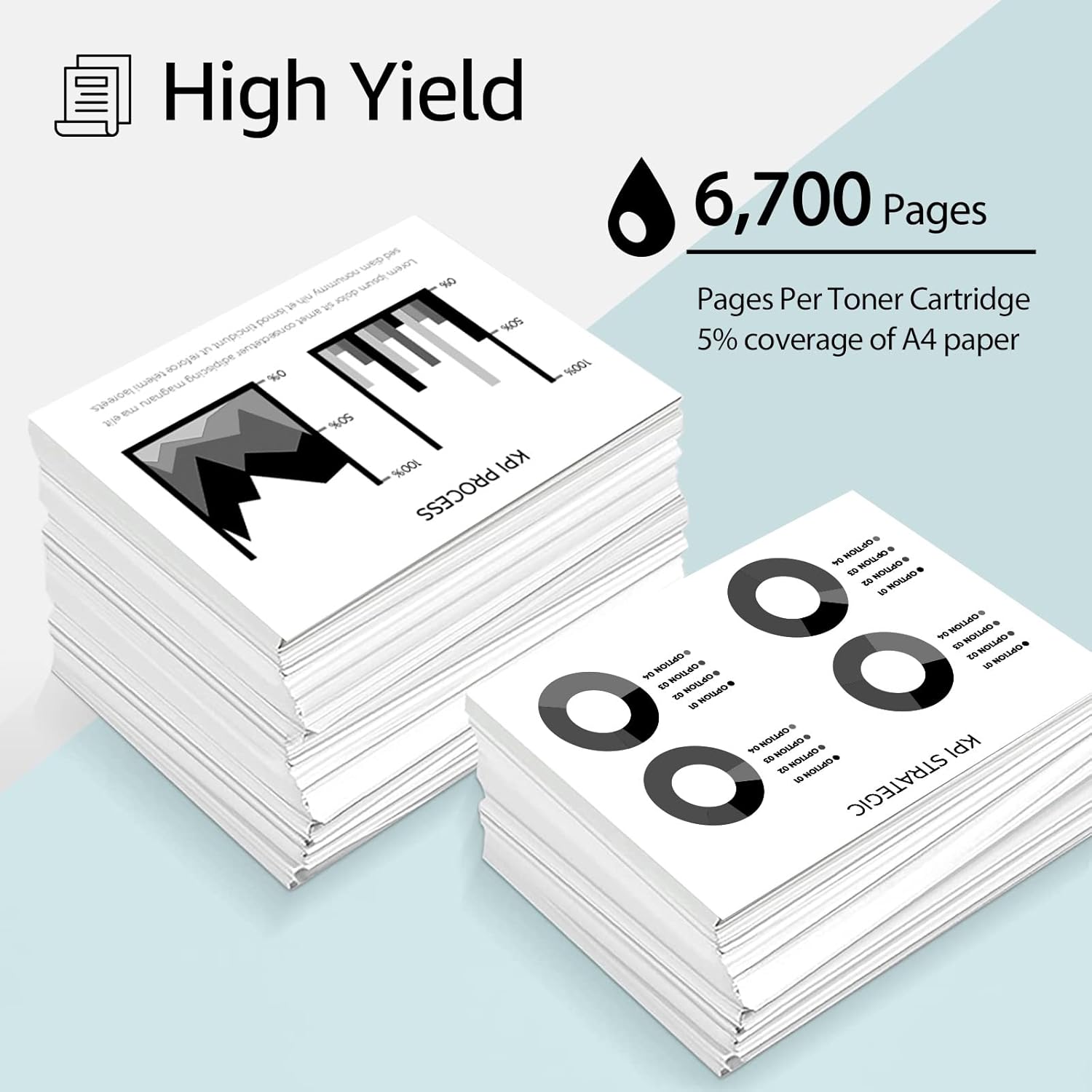
Figure 2: Compatible Printer Models for greencycle TN570
2. Einrichtung und Installation
Follow these steps to properly install your new greencycle TN570 toner cartridge into your Brother laser printer.
- Bereiten Sie die Kartusche vor: Gently shake the toner cartridge horizontally from side to side several times. This action helps to evenly distribute the toner powder inside the cartridge, ensuring consistent print quality.
- Schutzabdeckung entfernen: Locate and remove the orange protective cover or sealing strip from the toner cartridge. Handle the cartridge carefully to avoid touching the drum unit.
- Insert into Drum Unit: Install the toner cartridge firmly into the correct position within the printer's drum unit. Ensure it clicks into place securely.
- Install Drum Unit into Printer: With the toner cartridge now seated in the drum unit, insert the entire drum unit assembly into your printer. Close any printer covers or doors.
- Drucken starten: Your printer should now be ready for use. You can perform a test print to confirm proper installation.

Figure 3: Toner Cartridge Installation Steps
Video 1: Installation Guide for greencycle Toner Cartridge. This video demonstrates the process of installing a greencycle toner cartridge and drum unit into a compatible printer, ensuring proper setup for printing.
3. Bedienungsanleitung
Once installed, the greencycle TN570 toner cartridge operates seamlessly with your compatible Brother laser printer.
Seitenleistung:
The greencycle TN570 Black Toner Cartridge is designed for high yield, providing approximately 6,700 Seiten. This yield is based on 5% coverage of Letter Size Paper, which is a standard industry measurement.

Figure 4: High Page Yield of greencycle TN570
Druckqualität:
This toner cartridge is manufactured with quality materials, including refined toner powder, a smooth OPC (Organic PhotoConductor) drum, and robust rollers. These components work together to produce clear, crisp, and bold text and graphics, suitable for various documents.
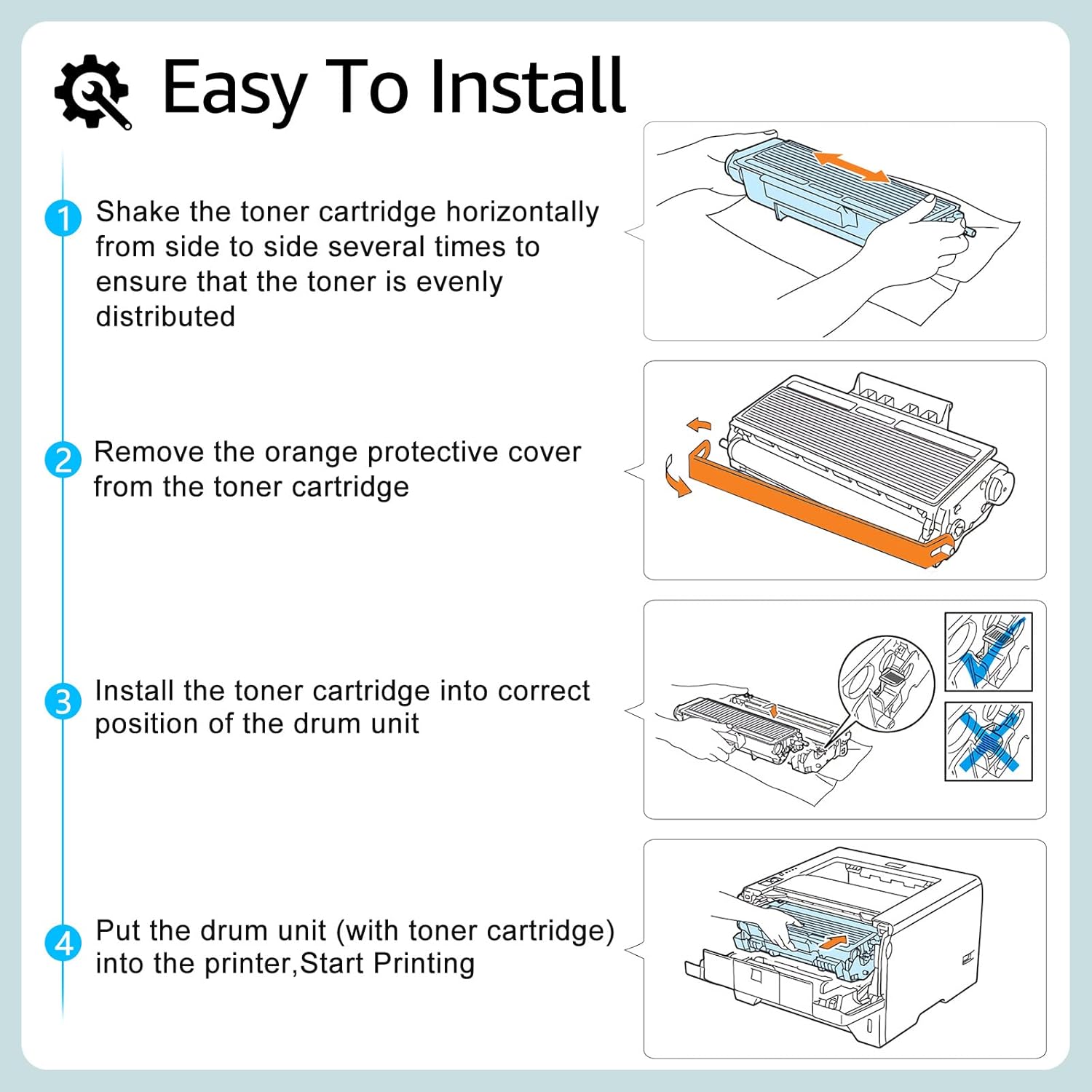
Abbildung 5: Bspample of Excellent Printing Effect
4. Wartung
Proper handling and storage can extend the life and maintain the quality of your toner cartridge.
- Lagerung: Nicht verwendete Tonerkartuschen sollten in ihrer originalen, versiegelten Verpackung an einem kühlen, trockenen Ort, fern von direkter Sonneneinstrahlung und extremen Temperaturen, aufbewahrt werden.
- Handhabung: Avoid touching the green drum surface of the cartridge, as oils from your skin can cause print quality issues. If you accidentally touch it, gently wipe it with a dry, lint-free cloth.
- Druckerreinigung: Periodically clean the inside of your printer according to your printer's manufacturer guidelines to prevent toner buildup and maintain optimal performance.

Figure 6: Premium Components for Quality Performance
5. Fehlerbehebung
If you encounter any issues with your greencycle TN570 toner cartridge, refer to the following common problems and solutions:
| Problem | Mögliche Ursache | Lösung |
|---|---|---|
| Light or Faded Prints | Toner not evenly distributed; low toner level; printer settings. | Gently shake the toner cartridge horizontally several times. Check printer settings for toner density. If the issue persists, the cartridge may be nearing its end of life. |
| Streaks or Blotches on Prints | Contaminated drum unit; toner buildup; damaged drum. | Clean the corona wire inside the drum unit (refer to your printer's manual). Ensure no foreign objects are inside the printer. If the drum is damaged, it may need replacement. |
| Drucker erkennt Patrone nicht | Cartridge not seated correctly; protective cover not fully removed. | Remove and re-install the toner cartridge and drum unit, ensuring it clicks into place. Verify all protective packaging has been removed. Restart the printer. |
| Papierstaus | Incorrect paper loading; paper type not supported; printer rollers dirty. | Ensure paper is loaded correctly and is within the printer's specifications. Clean printer rollers if necessary. |
6. Spezifikationen
| Besonderheit | Detail |
|---|---|
| Produktmodell | greencycle TN570 |
| Farbe | Schwarz |
| Seitenleistung | Ungefähr 6,700 Seiten (bei 5% Abdeckung) |
| Besonderheit | Hohe Ausbeute |
| Kompatible Druckermodelle | Brother DCP-8040, DCP-8045D, HL-5130, HL-5140, HL-5150D, HL-5170DN, HL-5170DNLT, MFC-8220, MFC-8840DN, and others listed in Introduction. |
| Technische Daten | 14.1 x 6.7 x 4.2 Zoll |
| Artikelgewicht | 1.76 Pfund |
| Im Lieferumfang enthaltene Komponenten | Tonerkartusche |
7. Garantie und Support
For information regarding returns or replacements, please refer to the retailer's return policy at the point of purchase. Typically, a 30-day return/replacement policy is offered.
For further assistance or technical support, please contact greencycle customer service through the platform where the product was purchased or visit the official greencycle store page for contact details.


