1. Einleitung
The Intel NUC DE3815TYKHE is a compact, fanless mini PC designed for various applications, including thin clients, digital signage, and embedded solutions. This kit provides a flexible platform with support for a 2.5-inch storage drive, offering a customizable computing experience in a small form factor.
2. Packungsinhalt
Überprüfen Sie, ob alle Artikel in Ihrem Paket vorhanden sind:
- Intel NUC DE3815TYKHE Unit
- Netzteil
- VESA Mounting Bracket (with screws)
- Kurzanleitung (falls enthalten)
3. Körperliche Übergriffeview
3.1 Frontplatte
The front panel provides essential connectivity and controls.

Bild 1: Front view of the Intel NUC DE3815TYKHE. This image displays the compact, fanless design of the unit, highlighting the power button and a single blue USB 3.0 port on the front for easy access.
- Netzschalter: Dient zum Ein- und Ausschalten des Geräts.
- USB 3.0-Anschluss: Zum Anschluss von Hochgeschwindigkeits-USB-Geräten.
3.2 Rückseite
The rear panel houses various ports for display, network, and peripherals.

Bild 2: Hinteren view of the Intel NUC DE3815TYKHE. This image details the available rear ports, including VGA, HDMI, two USB ports, an Ethernet port, and a headphone/microphone jack, along with the power input.
- VGA-Anschluss: Zum Anschluss an ältere Monitore oder Projektoren.
- HDMI-Anschluss: For connecting to modern displays with audio support.
- USB 2.0-Anschlüsse (x2): Zum Anschluss von Standard-USB-Geräten.
- Ethernet-Anschluss (RJ-45): Für kabelgebundene Netzwerkverbindungen.
- Kopfhörer-/Mikrofonbuchse: Für Audio-Ein- und Ausgänge.
- Gleichstromeingang: Zum Anschließen des Netzteils.
3.3 Interne Komponenten
Accessing the internal components is necessary for memory and storage installation.
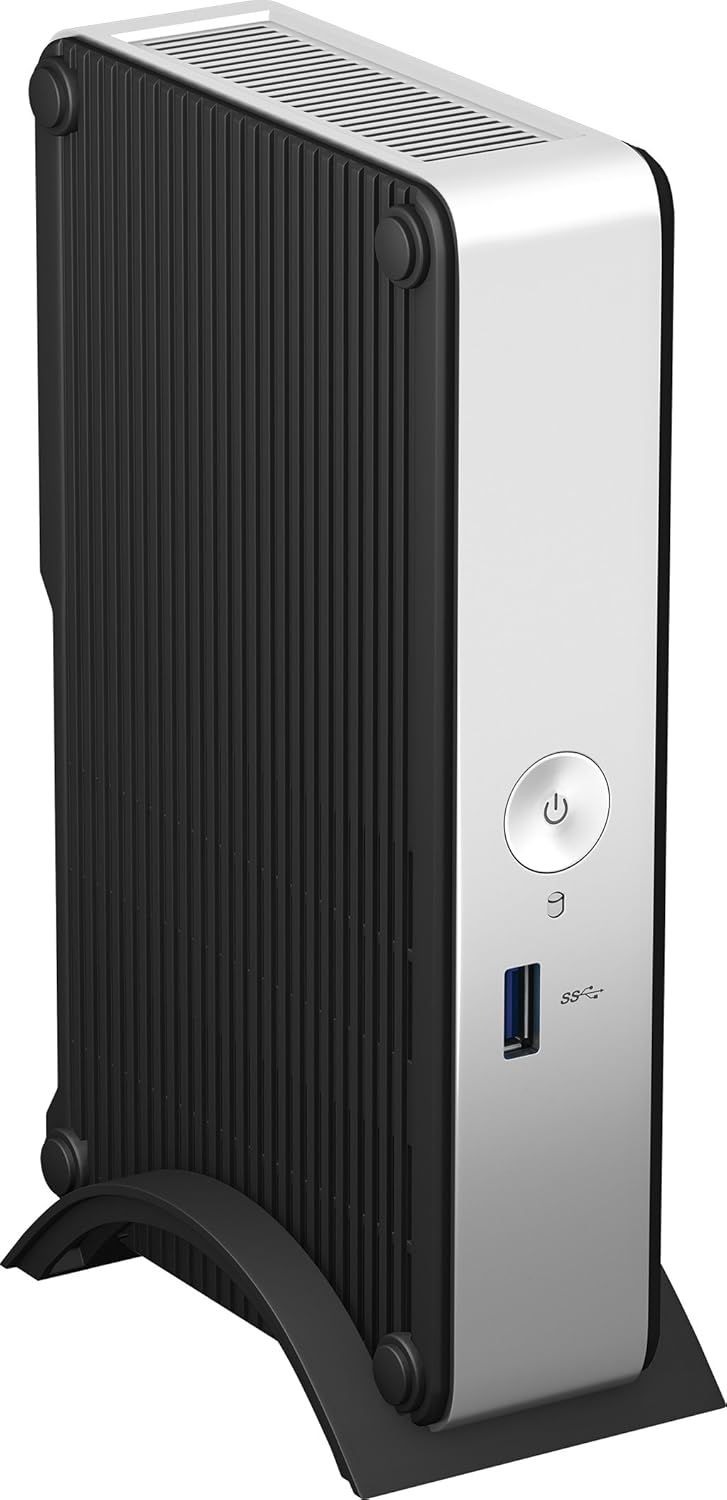
Bild 3: Intel NUC DE3815TYKHE unit displayed alongside its internal motherboard. This view illustrates the compact size of the main unit and the layout of the internal components, including the processor, memory slot, and connectors for storage.
- DDR3L SODIMM Slot: For installing system memory.
- 2.5-inch Drive Bay: For installing a SATA HDD or SSD.
- Drahtlose Antennen: Built-in for wireless connectivity.
- eMMC-Speicher: 4GB embedded storage for operating system or data.
4. Einrichtung
Follow these steps to prepare your Intel NUC for operation.
4.1 Einbau des Arbeitsspeichers (RAM)
- Unscrew and remove the bottom cover of the NUC unit.
- Locate the DDR3L SODIMM slot on the motherboard.
- Align the notch on the SODIMM module with the notch in the slot.
- Insert the module at a 45-degree angle and press down until the retaining clips snap into place.
4.2 Installing a 2.5-inch Storage Drive
- With the bottom cover removed, locate the 2.5-inch drive bay.
- Connect the SATA data and power cables from the NUC to your 2.5-inch HDD or SSD.
- Secure the drive within the bay using the provided screws (if applicable).
- Bringen Sie die Bodenabdeckung wieder an und befestigen Sie sie mit Schrauben.
4.3 Anschließen von Peripheriegeräten
- Anzeige: Connect your monitor to the HDMI or VGA port.
- Tastatur und Maus: Schließen Sie Tastatur und Maus über USB an beliebige freie USB-Anschlüsse an.
- Netzwerk: For wired internet, connect an Ethernet cable to the RJ-45 port. For wireless, ensure antennas are clear.
- Audio: Connect headphones or speakers to the audio jack if needed.
4.4 Einschalten
- Connect the AC power adapter to the DC power input on the rear panel.
- Stecken Sie das Netzteil in eine Wandsteckdose.
- Press the power button on the front panel to turn on the NUC.
5. Installation des Betriebssystems
The Intel NUC DE3815TYKHE supports multiple operating systems. You will need to install your preferred OS onto the internal eMMC storage or the 2.5-inch drive you installed.
- Prepare a bootable USB drive with your chosen operating system (e.g., Windows, Linux).
- Connect the USB drive to a USB port on the NUC.
- Power on the NUC and enter the BIOS/UEFI setup (usually by pressing F2 during boot) to configure the boot order.
- Befolgen Sie die Anweisungen auf dem Bildschirm, um das Betriebssystem zu installieren.
6. Wartung
The fanless design of the Intel NUC DE3815TYKHE minimizes maintenance requirements.
- Reinigung: Periodically wipe the exterior with a soft, dry cloth. Avoid using liquid cleaners directly on the unit.
- Belüftung: Ensure the ventilation slots are not obstructed to allow for proper passive cooling.
- Software-Updates: Keep your operating system and drivers updated for optimal performance and security.
7. Fehlerbehebung
Sollten Probleme auftreten, beachten Sie bitte die folgenden gängigen Schritte zur Fehlerbehebung.
- Kein Strom: Stellen Sie sicher, dass das Netzteil fest mit dem NUC und einer funktionierenden Steckdose verbunden ist. Testen Sie die Steckdose mit einem anderen Gerät.
- Kein Bildschirm: Verify that the monitor is powered on and correctly connected to the NUC's HDMI or VGA port. Try a different cable or monitor if possible.
- Betriebssystem startet nicht: Check the boot order in the BIOS/UEFI settings. Ensure the installed storage drive is detected and contains a valid operating system.
- Periphere Verbindungen nicht erkannt: Ensure USB devices are properly seated in the ports. Try a different USB port or device.
- Keine Netzwerkverbindung: For wired connections, check the Ethernet cable and router. For wireless, ensure Wi-Fi is enabled in the OS and the NUC is within range of a network.
8. Spezifikationen
| Besonderheit | Detail |
|---|---|
| Modellname | DE3815TYKHE |
| Prozessor | Intel Atom Processor (e.g., E3815) |
| RAM | 4 GB DDR3L 1333 (SODIMM slot for expansion) |
| Interner Speicher | 4GB eMMC (embedded MultiMediaCard) |
| Speichererweiterung | Internal 2.5-inch SATA HDD/SSD bay |
| Grafik | Intel Integrated Graphics |
| Videoausgang | HDMI, VGA |
| USB-Anschlüsse | 1x USB 3.0 (vorne), 2x USB 2.0 (hinten) |
| Audio | Kombibuchse für Kopfhörer/Mikrofon |
| Netzwerk | Ethernet (RJ-45), Built-in Wireless Antennas |
| Design | Lüfterlos |
| Betriebssystemunterstützung | Multiple OS options (e.g., Windows, Linux) |
| Farbe | Metallic gray plastic ring with black sides |
9. Garantie und Support
Informationen zur Garantie und zum technischen Support finden Sie auf der offiziellen Intel-Website. webBesuchen Sie die Website oder wenden Sie sich an Ihre Verkaufsstelle. Bewahren Sie Ihren Kaufbeleg für Garantieansprüche auf.
- Online-Hilfe: Besuchen Intel Support for DE3815TYKHE for drivers, downloads, and troubleshooting resources.
- Kontakt: Refer to the Intel support page for contact options.


