Einführung
This manual provides comprehensive instructions for the setup, operation, and maintenance of your Genius SW-2.1 355 Speaker System. Please read this manual thoroughly before using the product to ensure proper functionality and to maximize your listening experience.
Sicherheitshinweise
Beachten Sie die folgenden Sicherheitsvorkehrungen, um Schäden am Gerät oder Verletzungen zu vermeiden:
- Die Lautsprecher dürfen weder Wasser noch Feuchtigkeit ausgesetzt werden.
- Vermeiden Sie es, die Lautsprecher in der Nähe von Wärmequellen oder in direktem Sonnenlicht aufzustellen.
- Sorgen Sie für ausreichende Belüftung rund um den Subwoofer, um eine Überhitzung zu vermeiden.
- Verwenden Sie nur das mit dem Gerät mitgelieferte Netzteil.
- Versuchen Sie nicht, das Gerät selbst zu öffnen oder zu reparieren. Überlassen Sie alle Wartungsarbeiten qualifiziertem Fachpersonal.
- Außerhalb der Reichweite von Kindern aufbewahren.
Packungsinhalt
Überprüfen Sie, ob alle Artikel im Paket vorhanden sind:
- 1 x Subwoofer-Einheit
- 2 x Satellitenlautsprecher
- 1 x Audio input cable (3.5mm stereo jack)
- 1 x Netzteil
- 1 x Benutzerhandbuch (dieses Dokument)
Produkt überview
The Genius SW-2.1 355 Speaker System consists of a subwoofer and two satellite speakers designed to deliver clear audio and powerful bass for your multimedia needs.
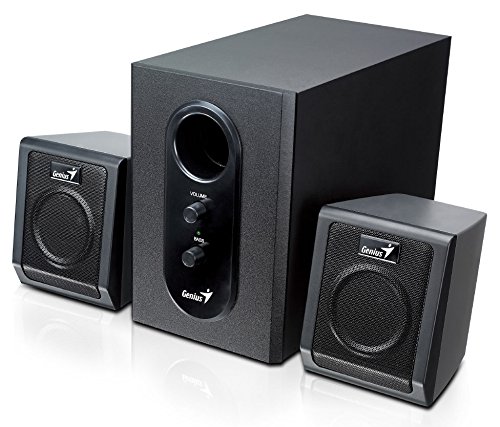
This image displays the Genius SW-2.1 355 Speaker System. It features a central, larger subwoofer unit with volume and bass control knobs on its front panel, and two smaller satellite speakers positioned on either side. All components are black.
Komponenten:
- Subwoofer: The main unit housing the bass driver and control panel.
- Satellitenlautsprecher: Zwei kompakte Lautsprecher für mittlere und hohe Frequenzen.
- Bedienfeld: Located on the subwoofer, featuring Volume and Bass adjustment knobs.
Aufstellen
- Positionierung der Lautsprecher: Place the subwoofer on the floor or a sturdy surface. Position the satellite speakers on either side of your listening area, facing towards you for optimal stereo separation.
- Anschluss von Satellitenlautsprechern: Connect the cables from the two satellite speakers to the corresponding output jacks on the rear of the subwoofer unit. Ensure a secure connection.
- Audioquelle anschließen: Connect one end of the 3.5mm audio input cable to the "Audio In" jack on the subwoofer. Connect the other end to the audio output jack (e.g., headphone jack) of your computer, MP3 player, smartphone, or other audio source.
- Strom anschließen: Plug the power adapter into the DC input jack on the subwoofer. Then, plug the power adapter into a standard electrical outlet.
- Einschalten: Turn on the speaker system using the power switch, usually integrated with the volume knob.
Betrieb
- Ein-/Ausschalten und Lautstärkeregelung: The main knob on the subwoofer controls both power and overall volume. Rotate clockwise to turn on and increase volume; rotate counter-clockwise to decrease volume and turn off.
- Basseinstellung: Use the "Bass" knob on the subwoofer to adjust the level of low-frequency sound. Rotate clockwise to increase bass, and counter-clockwise to decrease it, according to your preference.
- Lautstärke der Audioquelle: For optimal sound quality, set the volume on your audio source (computer, phone, etc.) to about 75% and then use the speaker system's volume control for fine adjustments.
Wartung
- Reinigung: Use a soft, dry cloth to clean the surfaces of the speakers. Do not use liquid cleaners or abrasive materials.
- Lagerung: Wenn Sie die Lautsprecher über einen längeren Zeitraum lagern, trennen Sie sie vom Stromnetz und bewahren Sie sie an einem kühlen, trockenen Ort auf.
- Kabelmanagement: Achten Sie darauf, dass die Kabel nicht verheddert oder eingeklemmt werden, um Beschädigungen zu vermeiden.
Fehlerbehebung
| Problem | Mögliche Ursache | Lösung |
|---|---|---|
| Kein Ton |
|
|
| Verzerrter Ton |
|
|
| Schwacher Bass |
|
|
Technische Daten
| Besonderheit | Detail |
|---|---|
| Modellname | SW-2.1 355 |
| Lautsprechertyp | 2.1 Channel Multimedia Speaker System (Bookshelf, Satellite, Subwoofer) |
| Gesamtausgangsleistung | 10 Watts RMS (5W Subwoofer + 2.5W x 2 Satellites) |
| Material | Wood (Subwoofer) |
| Konnektivitätstechnologie | Kabelgebunden (3.5-mm-Audioeingang) |
| Kompatible Geräte | MP3 Player, Personal Computer, Smartphones, Tablets, Televisions |
| Bedienelemente | Lautstärke, Bass |
| Stromquelle | DC |
| Artikelgewicht | 2.78 kg |
| Verpackungsabmessungen | 39.6 x 25 x 18.4 cm |
Garantie und Support
Genius products are designed for reliability and performance. For information regarding warranty coverage, technical support, or service inquiries, please refer to the warranty card included with your product or visit the official Genius webBewahren Sie Ihren Kaufbeleg als Kaufnachweis auf.


