1. Einleitung
This manual provides detailed instructions for the proper use, setup, and maintenance of your Genius HS-920BT Bluetooth Headset. Please read this manual thoroughly before using the device to ensure optimal performance and longevity.
The Genius HS-920BT is a versatile Bluetooth headset designed for wireless audio streaming and hands-free communication with compatible devices such as smartphones, tablets, and PCs.
2. Packungsinhalt
Überprüfen Sie, ob alle Artikel in Ihrem Paket vorhanden sind:
- Genius HS-920BT Bluetooth Headset
- USB-Ladekabel
- Multi-language User Manual (this document)
3. Produktüberschreitungview
The HS-920BT headset features an adjustable headband and comfortable earcups, integrating controls for audio playback and call management.
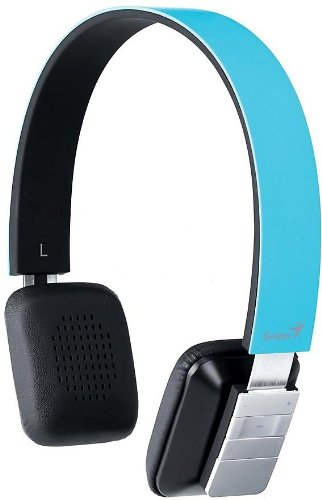
Figure 1: Genius HS-920BT Bluetooth Headset (Blue)
This image displays the Genius HS-920BT Bluetooth Headset in blue, viewed from an angle, highlighting its adjustable headband and earcup design.
Hauptmerkmale:
- Wireless Bluetooth connectivity for audio and calls (A2DP support)
- Integrated rechargeable Lithium-Ion battery
- Eingebautes Mikrofon für freihändige Kommunikation
- On-ear controls for volume adjustment, track skipping (AVRCP support)
- Verstellbares Kopfband für bequeme Passform
- 40 mm driver units for clear sound
4. Einrichtung
4.1 Aufladen des Headsets
Before initial use, fully charge the headset. Use the provided USB charging cable.
- Verbinden Sie das schmale Ende des USB-Ladekabels mit dem Ladeanschluss am Headset.
- Verbinden Sie das größere Ende des USB-Kabels mit einem USB-Anschluss, der Strom liefert (z. B. Computer, USB-Netzteil).
- The LED indicator on the headset will illuminate during charging and change color or turn off when fully charged. Refer to the headset's LED behavior for specific indications.
Eine vollständige Aufladung dauert in der Regel etwa 2-3 Stunden.
4.2 Koppeln mit einem Bluetooth-Gerät
To use the HS-920BT wirelessly, you must pair it with your Bluetooth-enabled device.
- Einschalten: Press and hold the Power button on the headset until the LED indicator flashes, usually alternating blue and red, indicating pairing mode.
- Bluetooth aktivieren: On your smartphone, tablet, or PC, enable Bluetooth functionality.
- Suchen nach Geräte: In your device's Bluetooth settings, search for available devices. The headset should appear as "HS-920BT".
- Auswählen und Koppeln: Select "HS-920BT" from the list. If prompted for a passcode, enter "0000" (four zeros).
- Bestätigung: Once paired, the headset's LED indicator will typically flash blue slowly, and your device will confirm the connection.
The headset will automatically attempt to reconnect to the last paired device when powered on, if that device's Bluetooth is active and within range.
5. Bedienungsanleitung
The HS-920BT features intuitive controls located on the earcup.

Figure 2: Earcup Controls of HS-920BT
This image shows a close-up of the right earcup of the Genius HS-920BT Bluetooth Headset, detailing the control buttons for power, volume, and track navigation.
5.1 Ein-/Ausschalten
- Einschalten: Halten Sie den Ein-/Ausschalter etwa 3 Sekunden lang gedrückt, bis die LED-Anzeige blau blinkt.
- Ausschalten: Halten Sie den Netzschalter etwa 3 Sekunden lang gedrückt, bis die LED-Anzeige erlischt.
5.2 Musikwiedergabe
- Abspielen/Pause: Drücken Sie einmal die Play/Pause-Taste.
- Nächster Titel: Press the "Next Track" button (usually marked with a forward arrow).
- Vorheriges Lied: Press the "Previous Track" button (usually marked with a backward arrow).
5.3 Anrufmanagement
- Anruf annehmen/beenden: Press the Multi-function button (often the same as Play/Pause) once during an incoming call to answer, or once during a call to end it.
- Anruf ablehnen: Halten Sie die Multifunktionstaste während eines eingehenden Anrufs etwa 2 Sekunden lang gedrückt.
- Wahlwiederholung letzte Nummer: Drücken Sie die Multifunktionstaste zweimal, wenn Sie nicht telefonieren.
5.4 Lautstärkeregelung
- Lautstärke erhöhen: Drücken Sie die Lauter-Taste (+).
- Lautstärke verringern: Drücken Sie die Leiser-Taste (-).
6. Wartung
Die richtige Pflege gewährleistet die Langlebigkeit Ihres Headsets.
- Reinigung: Reinigen Sie das Headset mit einem weichen, trockenen Tuch. Verwenden Sie keine Scheuermittel oder Lösungsmittel.
- Lagerung: Bewahren Sie das Headset an einem kühlen, trockenen Ort fern von direkter Sonneneinstrahlung und extremen Temperaturen auf.
- Batteriepflege: Um die Akkulaufzeit zu verlängern, vermeiden Sie häufiges vollständiges Entladen des Akkus. Laden Sie das Headset regelmäßig auf, auch wenn Sie es längere Zeit nicht benutzen.
- Wassereinwirkung: Das Headset ist nicht wasserdicht. Vermeiden Sie den Kontakt mit Wasser oder übermäßiger Feuchtigkeit.
7. Fehlerbehebung
If you encounter issues with your HS-920BT headset, refer to the following common solutions:
| Problem | Mögliche Lösung |
|---|---|
| Das Headset lässt sich nicht einschalten. | Ensure the battery is charged. Connect the headset to a power source using the USB cable. |
| Das Headset konnte nicht mit einem Gerät gekoppelt werden. |
|
| Kein Ton oder geringe Lautstärke. |
|
| Die Gesprächsqualität ist schlecht. |
|
8. Spezifikationen
| Modellname: | HS-920BT |
| Drahtlose Technologie: | Bluetooth |
| Treibereinheiten: | 40 mm |
| Batterie: | Eingebauter wiederaufladbarer Lithium-Ionen-Akku |
| Steuerungstyp: | Volume Control, Track Navigation, Call Management |
| Mikrofon: | Eingebaut |
| Unterstützte Profiles: | A2DP, AVRCP |
| Hardware-Plattform: | PC, Smartphone, Tablet |
| Artikelgewicht: | 110 Gramm |
| Abmessungen (LxBxH): | 13.6 x 17.3 x 2.9 cm |
9. Garantie und Support
For warranty information and technical support, please refer to the warranty card included with your product or visit the official Genius webBewahren Sie Ihren Kaufbeleg als Kaufnachweis auf.
For further assistance, you may contact Genius customer service through their official channels.


