1. Einleitung
This manual provides essential instructions for the setup, operation, and maintenance of your Cisco Remanufactured IP Conference Phone 8831. This device is designed to deliver high-quality audio conferencing for medium to large conference rooms.
Zu den Hauptmerkmalen gehören:
- 360-Grad-Abdeckung: Optimized for rooms up to 1140 square feet.
- Full-Duplex Wideband Audio (G.722): Ensures superior high-definition audio performance for clear two-way communication.
- Abnehmbares Bedienfeld: Allows for flexible placement and viewing of the display independently from the speaker unit.
- Verbesserte Sicherheit: Utilizes 128K Advanced Encryption Standard (AES) for private and secure business-grade audio communications.
2. Wichtige Sicherheitshinweise
Please read and follow these safety guidelines to prevent damage to the device and ensure user safety:
- Das Telefon darf weder Wasser noch Feuchtigkeit ausgesetzt werden.
- Vermeiden Sie es, das Telefon in der Nähe von Wärmequellen oder in direktem Sonnenlicht aufzustellen.
- Use only the power adapter and cables supplied with the device.
- Versuchen Sie nicht, das Telefon selbst zu öffnen oder zu reparieren. Überlassen Sie alle Reparaturen qualifiziertem Fachpersonal.
- Sorgen Sie für eine ausreichende Belüftung rund um das Gerät.
3. Packungsinhalt
Überprüfen Sie, ob Ihr Paket die folgenden Artikel enthält:
- Cisco IP Conference Phone 8831 main unit (CP-8831-K9-RF)
- Abnehmbares Bedienfeld
- Anschlusskabel
- Power Adapter (if applicable, or designed for Power over Ethernet)
4. Produktkomponenten
The Cisco IP Conference Phone 8831 consists of a main speaker unit and a detachable control panel.
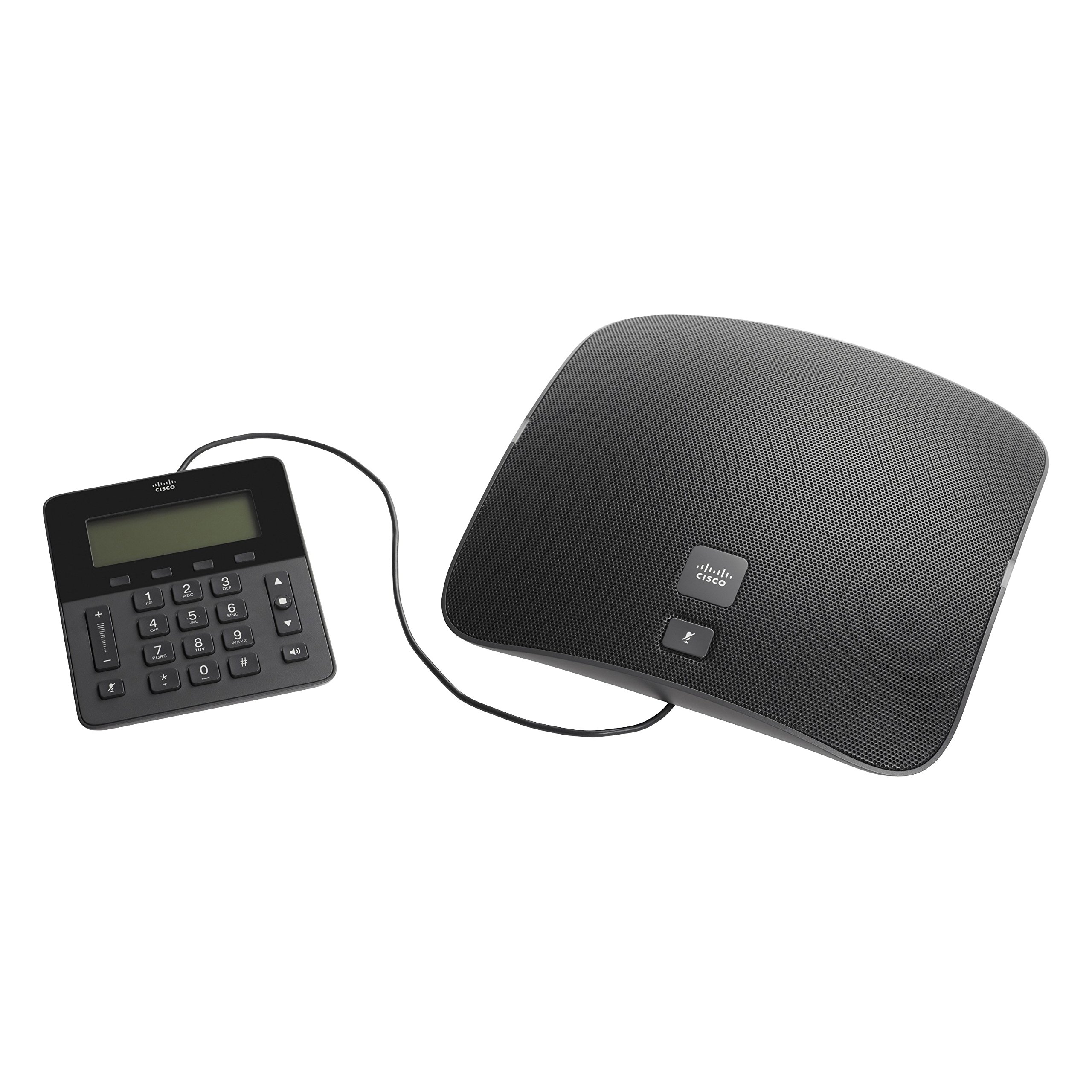
Figure 1: Cisco IP Conference Phone 8831 Overview
This image displays the Cisco IP Conference Phone 8831, consisting of two main parts: the large, oval-shaped speaker unit on the right and the smaller, rectangular control panel on the left. Both components are black and connected by a cable. The speaker unit features a perforated grille for audio output and a Cisco logo with a mute button. The control panel includes a digital display, a numeric keypad, navigation buttons, volume controls, and a mute button.
4.1. Main Speaker Unit
The main speaker unit houses the primary microphone and speaker components, providing 360-degree audio coverage. It typically includes a mute button and the Cisco branding.
4.2. Systemsteuerung
The detachable control panel features a display screen, a numeric keypad for dialing, navigation buttons, and dedicated buttons for call control (e.g., volume up/down, mute, speakerphone). This panel connects to the main unit via a cable, allowing for flexible placement.
5. Einrichtung und Installation
Follow these steps to set up your Cisco IP Conference Phone 8831:
- Auspacken: Entnehmen Sie vorsichtig alle Komponenten aus der Verpackung.
- Anschluss-Bedienfeld: Connect the control panel to the main speaker unit using the provided cable.
- Stromanschluss:
- If using Power over Ethernet (PoE), connect an Ethernet cable from a PoE-enabled switch or injector to the Ethernet port on the main unit.
- If using an AC power adapter, connect the adapter to the main unit and then plug it into a power outlet.
- Netzwerkverbindung: Connect an Ethernet cable from your network to the Ethernet port on the main unit.
- Erster Systemstart: The phone will power on and begin its boot-up sequence. This may take a few minutes as it connects to your network and registers with your Cisco Unified Communications Manager or SIP-based VoIP service.
- Konfiguration: Once registered, the phone is ready for use. Additional configuration may be required by your system administrator.
6. Grundlegende Bedienung
6.1. Einen Anruf tätigen
- Lift the control panel (if applicable) or ensure the speakerphone is active.
- Wählen Sie die gewünschte Nummer über die Zifferntastatur.
- Drücken Sie die Anruf button (or equivalent on-screen prompt).
6.2. Einen Anruf annehmen
Wenn das Telefon klingelt, drücken Sie die Taste Antwort button (or equivalent on-screen prompt) to accept the call.
6.3. Lautstärke anpassen
Verwenden Sie die Lauter (+) Und Lautstärke runter (-) buttons on the control panel to adjust the speaker volume during a call or the ringer volume when idle.
6.4. Mikrofon stummschalten
Drücken Sie die Stumm button (microphone icon) on either the main speaker unit or the control panel to mute your microphone. Press it again to unmute.
6.5. Einen Anruf beenden
Drücken Sie die Anruf beenden button (or equivalent on-screen prompt) to terminate an active call.
7. Pflege und Wartung
To ensure the longevity and optimal performance of your conference phone:
- Reinigung: Use a soft, dry, lint-free cloth to clean the exterior surfaces. Do not use liquid cleaners, aerosols, or solvents.
- Lagerung: Bewahren Sie das Telefon an einem kühlen, trockenen Ort fern von direkter Sonneneinstrahlung und extremen Temperaturen auf.
- Handhabung: Behandeln Sie das Gerät vorsichtig, um ein Fallenlassen oder physische Beschädigungen zu vermeiden.
8. Fehlerbehebung
If you encounter issues with your Cisco IP Conference Phone 8831, refer to the following common solutions:
| Problem | Mögliche Lösung |
|---|---|
| Das Telefon lässt sich nicht einschalten. |
|
| Kein Wählton oder keine Anrufe möglich. |
|
| Schlechte Audioqualität. |
|
| Control panel display is blank. |
|
9. Technische Daten
| Besonderheit | Detail |
|---|---|
| Modellnummer | CP-8831-K9-RF |
| Marke | Cisco |
| Artikelgewicht | 5.05 Pfund (ca. 2.29 kg) |
| Technische Daten | 0.39 x 0.39 x 0.39 Zoll (ca. 1 x 1 x 1 cm) - Hinweis: Bei diesen Maßen handelt es sich offenbar um Platzhalterwerte, die möglicherweise nicht die tatsächliche Produktgröße widerspiegeln. |
| Farbe | Schwarz |
| Telefontyp | Corded IP Conference Phone |
| Stromquelle | Corded Electric (PoE or AC Adapter) |
| Kompatible Geräte | Cisco Unified Communications Manager, Business Edition, SIP-based VoIP services |
| Konferenzschaltungsfunktion | Basic |
| Audiofunktionen | Full-Duplex Two-Way Wideband (G.722) Hands-Free Speaker |
| Abdeckungsbereich | Up to 1140 square feet (360-degree) |
| Sicherheit | 128K Advanced Encryption Standard (AES) |
| Ursprungsland | China |
| Datum der ersten Verfügbarkeit | 22. Oktober 2014 |
10. Garantie und Support
10.1. Limited Hardware Warranty
This Cisco Remanufactured IP Conference Phone 8831 typically comes with a 1 Jahr eingeschränkte Hardwaregarantie. Please refer to your purchase documentation for specific terms and conditions regarding warranty coverage.
10.2. Technischer Support
For technical assistance, troubleshooting beyond this manual, or warranty claims, please contact Cisco support or your authorized reseller. You can find more information and support resources on the official Cisco webWebsite:


