Produkt überview
The Contour Flip Pillow is a versatile 10-in-1 wedge pillow designed to provide gentle, plush elevation and support for various body positions. It is suitable for back, knees, legs, or stomach support, offering comfort and relief for a wide range of uses.

Image: The Contour Flip Pillow, a white pillow featuring a wedge shape with an attached cylindrical roll, designed for versatile support.
This hypo-allergenic fiber-filled pillow is soft and luxurious, adapting to your needs whether you are reading, sleeping, or relaxing. Its unique design allows it to transform into multiple configurations to enhance your comfort.
Installationsanweisungen
The Contour Flip Pillow may ship in a compressed state to optimize packaging. Upon arrival, it is essential to allow the pillow to fully expand to its intended size and plushness.
- Auspacken: Nehmen Sie das Kissen vorsichtig aus der Verpackung.
- Expandieren: Place the pillow in a clothes dryer on a low heat setting for up to 30 minutes. This process helps to fluff the fiber fill and restore the pillow's original shape and volume.
- Überprüfen: After drying, ensure the pillow has fully expanded and is free of any remaining compression marks.
Your Contour Flip Pillow is now ready for use.
Operating Positions (10-in-1 Versatility)
The Contour Flip Pillow is engineered for maximum versatility, offering 10 different positions to suit various comfort and support needs. Below are common configurations and their benefits:

Abbildung: Ein illustratives Diagramm zeigtasing the ten different ways the Contour Flip Pillow can be used for upper body, leg, and sitting support.
Upper Body Support
Aufrechte Position
For comfortable back support while sitting up in bed or on a sofa. Ideal for reading or watching television.

Image: A woman comfortably seated upright in bed, utilizing the Flip Pillow for back support while reading.
Relaxed Position
The built-in headrest offers great support for a more reclined, relaxed posture. Perfect for lounging.

Image: A woman in a relaxed, slightly reclined position in bed, supported by the Flip Pillow, reading a book.
Schräge Position
For those who need to sleep slightly elevated, such as for acid reflux or respiratory comfort. The pillow provides a gentle incline.
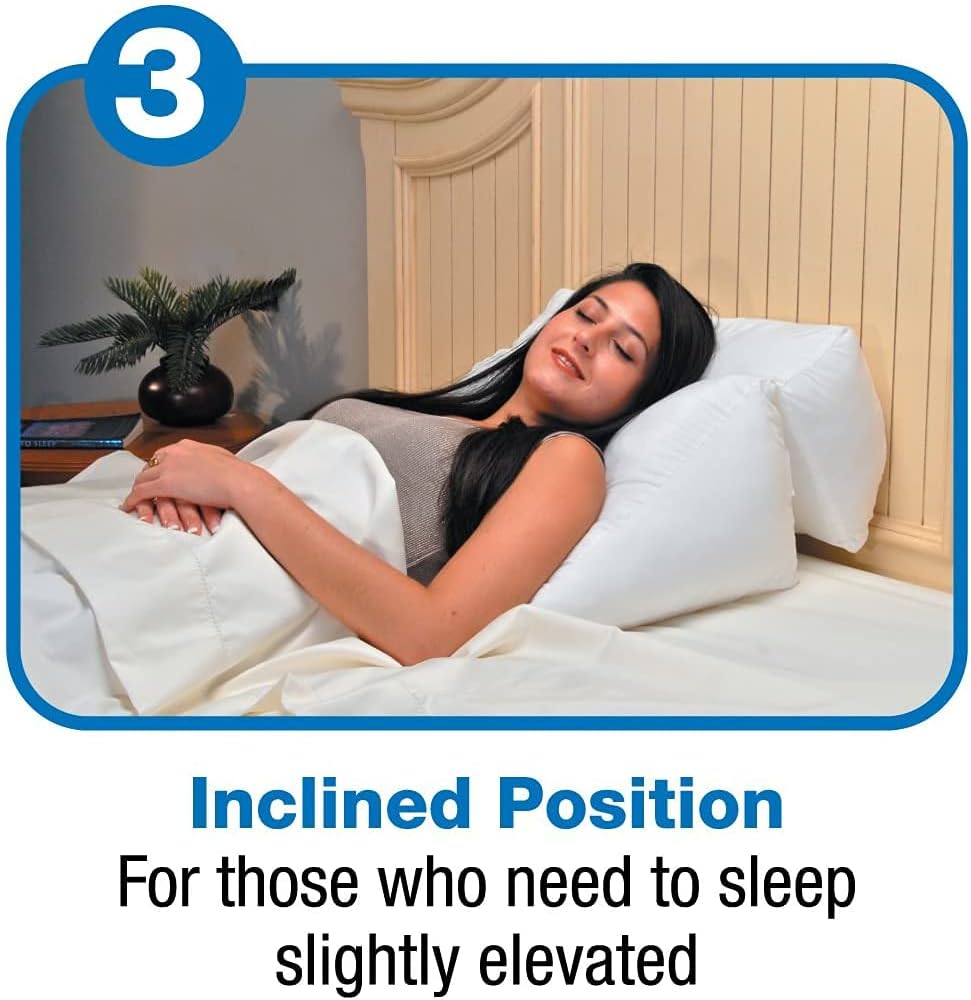
Image: A woman sleeping comfortably in an inclined position in bed, supported by the Flip Pillow for gentle elevation.
Schlafposition
Provides great head and neck support for a comfortable night's sleep. Can be used as a traditional pillow or for side sleeping.

Image: A woman sleeping on her side in bed, with the Flip Pillow cradling her head and neck for support.
Stomach Reading/Sleeping
When lying on your stomach, the pillow props you up, cradles your elbows, and supports your forearms, making reading or using devices more comfortable. It can also be adjusted for stomach sleeping.

Image: A woman lying on her stomach in bed, using the Flip Pillow to comfortably prop up her upper body and support her arms while reading a book.
Leg and Knee Support
Elevated Knees
Place the pillow under your knees to gently elevate them, which can help ease discomfort in the lower back and promote relaxation.

Image: A woman lying on her back in bed, with the Flip Pillow positioned under her knees to provide elevation and ease back muscles.
Elevate Legs/Feet
Use the pillow to elevate your legs and feet, which can help soothe swollen feet and ankles, improve circulation, and reduce fatigue.
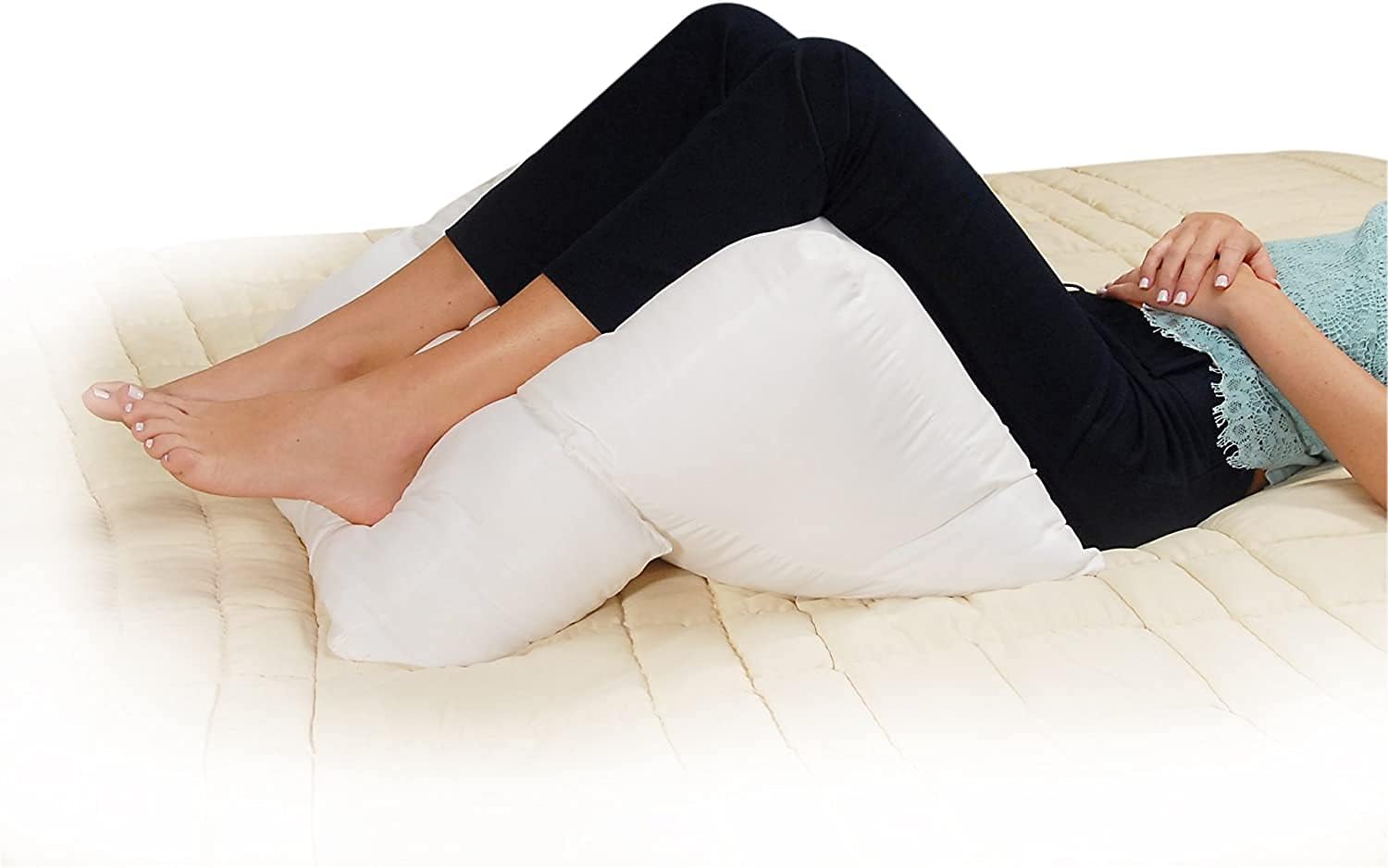
Image: A woman lying in bed, using the Flip Pillow to elevate her lower legs and feet, providing comfort and soothing relief.
Andere Verwendungen
Seated Lumbar Support
The pillow can be placed in a chair to cushion your seat and provide comfortable lumbar support for your lower back, whether at work or home.
Dorm/Study Aid
Its versatile design makes it an ideal study aid for students, providing comfortable support for reading or working in bed or on the floor.
Gaming/Relaxation
Provides comfortable support for various leisure activities, including playing video games on the floor or relaxing on a sofa.
Wartung und Pflege
Proper care of your Contour Flip Pillow will ensure its longevity and continued comfort.
- Reinigung: The pillow is machine washable. Refer to the care label for specific washing instructions.
- Trocknen: Tumble dry on a low heat setting. Ensure the pillow is completely dry before use to prevent mildew.
- Schutzhüllen: Consider using a washable, custom-fitted protective cover (sold separately) to keep your pillow clean and extend its lifespan.
Fehlerbehebung
Most issues with the Contour Flip Pillow relate to its initial expansion or maintaining its shape. If you encounter any problems, please refer to the following:
- Kissen nicht vollständig aufgeblasen: If the pillow appears flat or not as plush as expected after unpacking, place it in a clothes dryer on a low heat setting for up to 30 minutes. This will help the fiber fill to fluff up and regain its full volume.
- Loss of Loft: Over time, continuous use may cause the pillow to lose some of its loft. Fluffing the pillow regularly and occasionally placing it in a dryer on low heat can help restore its plushness.
For any other concerns not addressed here, please contact Contour Customer Care.
Technische Daten
| Besonderheit | Detail |
|---|---|
| Marke | Kontur |
| Modellnummer | 30 bis 600 V |
| Maße | 19 Zoll L x 20 Zoll B |
| Artikeldicke | 8 Zoll |
| Füllmaterial | Polyester |
| Stoffart | Polyester |
| Pillow Type | Bed Pillow |
| Form | Keil |
| Artikelfestigkeit | Plüsch |
| Pflegehinweise | Maschinenwäsche |
| Artikelgewicht | 3 Pfund |
| UPC | 737709004625 |
| Ursprungsland | USA |
Garantie und Support
Contour Products is committed to providing high-quality materials and workmanship. If a product fails to meet expectations, exchanges or replacements may be offered.
- Manufacturer Policy: We take pride in the high quality materials & workmanship of our products. If a product fails to meet expectation, we offer exchanges/replacements.
- Kundenservice: The Contour Customer Care Team is available Monday - Friday from 8:30 AM - 5:00 PM EST.
- Kontaktinformationen: For support or inquiries, please visit the official Contour Store on Amazon or contact the seller, ContourLiving, directly through Amazon's platform.


