1. Einleitung
This manual provides detailed instructions for the setup, operation, and maintenance of your Intermec EasyCoder PX4i Thermal Transfer Printer. The PX4i is a robust and flexible industrial printer designed for high-volume label printing, offering monochrome output at a resolution of 203 dpi and speeds up to 12 inches per second. Please read this manual thoroughly before using the printer to ensure safe and efficient operation.
2. Produktmerkmale
- Hochgeschwindigkeitsdruck: Capable of printing at speeds up to 12 inches per second.
- Hohe Auflösung: Delivers clear monochrome prints at 203 dpi.
- Flexibles Medienhandling: Supports various media types including black mark, continuous label, fanfold, gap, general identification label, notch, roll fed, tag, and ticket.
- Ethernet-Konnektivität: Integrated Ethernet for network integration.
- Programmierbar: Designed for optimized printing operations and streamlined deployment.
- Langlebiges Design: Industrial-grade construction for demanding environments.
3. Packungsinhalt
Verify that all items listed below are included in your printer package. If any items are missing or damaged, contact your supplier immediately.
- Intermec EasyCoder PX4i Thermal Transfer Printer
- Netzkabel
- Labels (Included Components)
- User Documentation (This manual)
4. Sicherheitshinweise
Always observe the following safety precautions to prevent injury and damage to the printer:
- Stellen Sie sicher, dass der Drucker auf einer stabilen, ebenen Fläche steht.
- Schließen Sie den Drucker an eine geerdete Steckdose an.
- Do not operate the printer in wet or excessively humid conditions.
- Halten Sie Hände und lose Kleidung während des Betriebs von beweglichen Teilen fern.
- Vor jeglichen Wartungs- oder Reinigungsarbeiten die Stromzufuhr unterbrechen.
- Verwenden Sie nur zugelassene Ersatzteile und Zubehör.
5. Einrichtung
5.1 Auspacken
- Nehmen Sie den Drucker vorsichtig aus der Verpackung.
- Entfernen Sie sämtliches Verpackungsmaterial, Klebebänder und Schutzfolien.
- Bewahren Sie die Originalverpackung für späteren Transport oder Lagerung auf.
5.2 Stromversorgung anschließen
- Stellen Sie sicher, dass sich der Netzschalter des Druckers in der Position AUS befindet.
- Schließen Sie das Netzkabel an die Strombuchse des Druckers an.
- Stecken Sie das andere Ende des Netzkabels in eine geerdete Steckdose.
5.3 Medien laden (Beschriftungen)
The PX4i printer supports various label types. Follow these general steps to load your labels:

Bild: Vorderseite view of the Intermec EasyCoder PX4i printer, showing a label being fed out of the front slot. The control panel with an LCD screen and numeric keypad is visible on the top front.
- Öffnen Sie die Medienabdeckung des Druckers.
- Place the roll of labels onto the media supply spindle, ensuring it unwinds correctly.
- Feed the leading edge of the labels through the media guides and under the printhead assembly.
- Adjust the media guides to fit the width of your labels snugly but without binding.
- Close the media cover. The printer may automatically calibrate to the new media.
5.4 Connecting to a Computer/Network
The PX4i offers Ethernet connectivity for network integration.
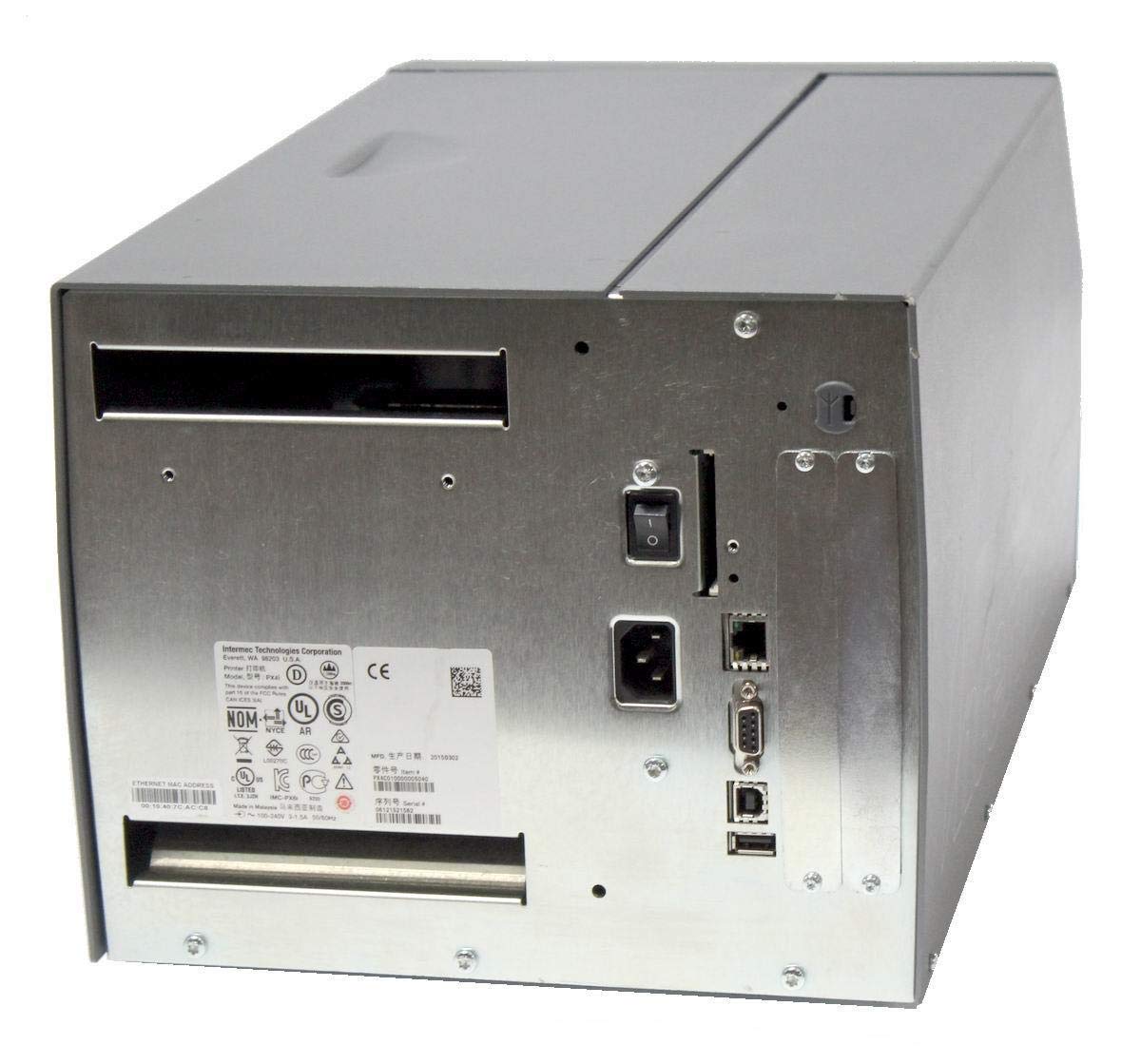
Bild: Rückseite view of the Intermec EasyCoder PX4i printer, displaying the power inlet, power switch, Ethernet port, serial ports, and USB ports. The metallic casing is clearly visible.
- Locate the Ethernet port on the rear of the printer.
- Connect a standard Ethernet cable from the printer to your network router or switch.
- For direct connection to a computer, use an appropriate USB or serial cable if supported by your system and printer configuration.
- Refer to the printer's network configuration guide for setting up IP addresses and other network parameters.
6. Bedienung
6.1 Bedienfeld vorbeiview
The front control panel provides access to printer functions and status information.
Image: Close-up of the Intermec EasyCoder PX4i control panel, featuring an LCD display, navigation buttons (up, down, left, right, enter), and a numeric keypad with function keys like Pause, Feed, and Clear.
- LCD Anzeige: Zeigt den Druckerstatus, Menüoptionen und Fehlermeldungen an.
- Navigationstasten: Dient zum Durchblättern von Menüs und Auswählen von Optionen.
- Numerische Tastatur: For entering data or selecting numbered options.
- Pause-Taste: Der Druckvorgang wird vorübergehend gestoppt.
- Feed-Button: Ein Label wird gefördert.
- Setup-Taste: Accesses printer configuration menus.
6.2 Grundlegendes Drucken
- Stellen Sie sicher, dass der Drucker eingeschaltet und mit Ihrem Computer oder Netzwerk verbunden ist.
- Open the document or application from which you wish to print labels.
- Select the Intermec PX4i printer from your printer list.
- Configure print settings such as label size, orientation, and quantity as needed.
- Initiate the print job. The printer will begin feeding and printing labels.
6.3 Adjusting Print Settings
Advanced print settings can be adjusted through the printer's control panel or via the printer driver on your computer. These settings include print darkness, print speed, label gap sensing, and more. Consult your printer driver documentation for software-based adjustments.
7. Wartung
Regelmäßige Wartung gewährleistet optimale Leistung und verlängert die Lebensdauer Ihres Druckers.
7.1 Reinigung des Druckkopfs
The printhead should be cleaned regularly, especially if print quality degrades.
- Schalten Sie den Drucker aus und trennen Sie das Netzkabel.
- Öffnen Sie die Druckkopfeinheit.
- Using a lint-free cloth or a printhead cleaning pen moistened with isopropyl alcohol, gently wipe the printhead surface from center to edge.
- Allow the printhead to dry completely before closing the assembly and reconnecting power.
7.2 Replacing Media and Ribbon
When the label roll or thermal transfer ribbon (if used) runs out, replace it promptly.
- Turn off the printer and open the media cover.
- Remove the empty label roll and/or used ribbon core.
- Install a new roll of labels and/or a new ribbon, following the loading instructions in Section 5.3.
- Ensure media and ribbon are properly tensioned and aligned.
- Schließen Sie die Medienabdeckung.
8. Fehlerbehebung
This section addresses common issues you might encounter with your PX4i printer.
- Drucker lässt sich nicht einschalten: Check power cord connection, power outlet, and printer's power switch.
- Keine Druckausgabe: Verify printer is online, connected to the computer/network, and has media loaded. Check for error messages on the LCD.
- Schlechte Druckqualität: Clean the printhead (Section 7.1). Adjust print darkness settings. Ensure correct media and ribbon are used.
- Etiketten werden nicht korrekt zugestellt: Check media loading (Section 5.3) and ensure media guides are properly adjusted. Calibrate media sensors if necessary.
- Fehlermeldungen: Refer to the printer's LCD display for specific error codes and consult the full Intermec PX4i technical manual for detailed explanations and solutions.
9. Spezifikationen
| Besonderheit | Beschreibung |
|---|---|
| Modellname | PX4i |
| Artikelmodellnummer | PX4C010000000020 |
| Drucktechnologie | Thermotransfer |
| Druckfarbe | Einfarbig |
| Maximale Druckgeschwindigkeit | 12 in/s (Monochrome) |
| Maximale Druckauflösung | 203 dpi |
| Konnektivitätstechnologie | Ethernet |
| Maximale Mediengröße | 12 Zoll |
| Im Lieferumfang enthaltene Komponenten | Labels |
| Controllertyp | Druckknopf |
| Hersteller | INTERMEC INDUSTRIAL PRINTERS |
| Verpackungsabmessungen | 23.25 x 15.5 x 15.25 Zoll; 36.2 Pfund |
10. Garantie und Support
The Intermec EasyCoder PX4i Thermal Transfer Printer comes with a standard manufacturer's warranty. For specific warranty terms and conditions, please refer to the warranty card included with your product or visit the official Intermec (Honeywell) support website. For technical assistance, troubleshooting beyond this manual, or to inquire about service, please contact Intermec customer support or your authorized dealer.
Online-Ressourcen: For the latest drivers, firmware updates, and additional documentation, please visit the official Intermec support portal.


