1. Produktüberschreitungview
The Brodit 805048 ProClip is a vehicle-specific mounting platform designed to securely attach a device holder in your car. This product is a two-part solution; a separate device-specific Brodit holder must be acquired to complete the mounting system. The ProClip offers an optimal solution for integrating mobile devices such as smartphones, GPS units, and tablets into your vehicle's interior, enhancing ergonomics, visibility, and discretion.
It is directly compatible with all Brodit device holders, which are designed to screw onto the ProClip. This system improves comfort and safety by positioning your mobile device closer to you for easier access and manipulation. Unlike suction cup mounts, the ProClip is more discreet and elegant, enhancing visibility by keeping the windshield clear. Installation is quick, typically under 1 minute, and requires no drilling into the dashboard, ensuring no alteration to your vehicle's interior. Each ProClip is tailored to a specific car model, guaranteeing a perfect fit and can be removed without leaving any marks.
Hauptmerkmale:
- Two-Part Solution: Requires a separate device-specific Brodit holder.
- Fahrzeugspezifisches Design: Ensures perfect integration and fit for your vehicle's dashboard.
- Non-Damaging Installation: Installs in minutes without tools or drilling, utilizing dashboard gaps.
- Enhanced Ergonomics & Safety: Positions devices optimally for easy access and improved road visibility.
- Removable Without Trace: Can be removed cleanly without leaving marks on the dashboard.
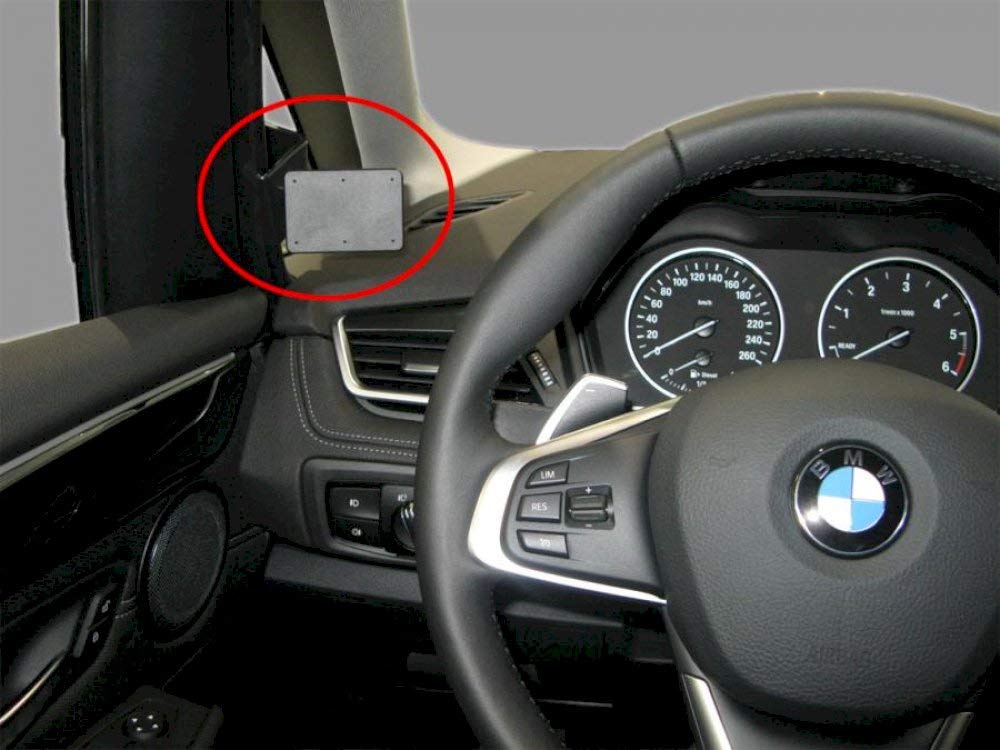
Figure 1: Brodit 805048 ProClip Vehicle Holder. This image displays the ProClip unit, designed for secure dashboard mounting.
2. Einrichtung und Installation
The Brodit ProClip is designed for quick and easy installation without the need for special tools or drilling. Ensure your vehicle's dashboard is clean and dry before beginning the installation process.
Required Items (Sold Separately):
- Brodit 805048 ProClip Vehicle Holder (this product)
- Device-specific Brodit holder (e.g., for smartphone, GPS, tablet)
Installationsschritte:
- Montageort bestimmen: Refer to the specific instructions provided with your Brodit ProClip for the exact mounting location in your vehicle. The ProClip is designed to fit into existing gaps or seams on your dashboard.
- Saubere Oberfläche: Use a clean cloth to wipe down the area where the ProClip will be installed to ensure optimal adhesion and a secure fit.
- Position the ProClip: Carefully position the ProClip according to the vehicle-specific instructions. The edges of the ProClip are designed to slide into dashboard seams.
- Sichern Sie den ProClip: Gently press the ProClip firmly into place. Some models may require a slight prying tool (often included with the ProClip) to create a small gap for insertion. Ensure all clips are fully engaged and the ProClip is stable.
- Attach Device Holder: Once the ProClip is securely installed, align your device-specific Brodit holder with the pre-drilled holes on the ProClip. Use the screws provided with your device holder to firmly attach it to the ProClip. Do not overtighten.
- Teststabilität: After installation, gently test the stability of the entire mounting system before placing your device.
Note: The exact installation procedure may vary slightly depending on your specific vehicle model. Always consult the detailed instructions included with your Brodit ProClip.
3. Bedienungsanleitung
Once the Brodit ProClip and your device-specific holder are securely installed, using the system is straightforward.
- Gerät einsetzen: Carefully place your mobile device (smartphone, GPS, tablet) into the device-specific holder. Ensure it is seated firmly and securely.
- Anpassen Viewing-Winkel: If your device holder features a swivel or tilt mechanism, adjust the viewing angle for optimal visibility and comfort without obstructing your view der Straße.
- Gerät entfernen: To remove your device, gently unclip or slide it out of the holder, following the specific instructions for your device holder.
Always ensure your device is securely mounted before driving. Avoid adjusting the device holder while the vehicle is in motion.
4. Wartung
The Brodit ProClip requires minimal maintenance to ensure its longevity and proper function.
- Reinigung: Periodically wipe the ProClip and device holder with a soft, damp cloth to remove dust and grime. Avoid using harsh chemicals or abrasive cleaners, as these can damage the material.
- Befestigungselemente prüfen: Occasionally check that all screws attaching the device holder to the ProClip are snug. Retighten if necessary, but do not overtighten.
- Auf Schäden prüfen: Regularly inspect the ProClip for any signs of wear, cracks, or damage. If damage is observed, consider replacing the unit to ensure secure mounting.
5. Fehlerbehebung
If you encounter issues with your Brodit ProClip, refer to the following common problems and solutions:
| Problem | Mögliche Ursache | Lösung |
|---|---|---|
| ProClip feels loose after installation. | Not fully engaged in dashboard seams; incorrect model for vehicle. | Ensure all clips are fully inserted into dashboard gaps. Verify the ProClip model number matches your vehicle's make, model, and year. Re-install carefully. |
| Device holder wobbles on the ProClip. | Screws are loose; device holder not fully compatible. | Tighten the screws connecting the device holder to the ProClip. Ensure you are using a genuine Brodit device holder designed to screw onto the ProClip. |
| Difficulty inserting ProClip into dashboard. | Dashboard seams are tight; incorrect angle of insertion. | Refer to the vehicle-specific instructions for precise insertion points and angles. A plastic prying tool (if available) can help create a small gap. Do not force the ProClip, as this may damage the dashboard. |
6. Spezifikationen
| Besonderheit | Detail |
|---|---|
| Marke | Brodit |
| Modellnummer | 805048 |
| Produktname | ProClip Vehicle Holder |
| Artikelgewicht | 90 g |
| Produktabmessungen (L x B x H) | 20 x 5 x 12 cm |
| Material | (Not specified in input, typically high-grade ABS plastic) |
| Installationsmethode | Clip-on, no drilling required |
| Kompatibilität | Vehicle-specific (requires separate device-specific Brodit holder) |
7. Garantie und Support
Garantieinformationen:
Brodit products typically come with a manufacturer's warranty covering defects in materials and workmanship. For specific warranty terms, duration, and conditions applicable to your Brodit 805048 ProClip, please refer to the official Brodit website or the documentation included with your purchase. Warranty details may vary by region and retailer.
Kundendienst:
If you require assistance with installation, troubleshooting, or have questions regarding your Brodit ProClip, please contact Brodit customer service or your authorized retailer. You can usually find contact information on the official Brodit webWebsite:
- Brodit Official WebWebsite: www.brodit.com
- Kontaktinformationen: Refer to the "Contact Us" or "Support" section on the Brodit webWebsite für Telefonnummern, E-Mail-Adressen oder Online-Supportformulare.
When contacting support, please have your product model number (805048) and vehicle details readily available.


