1. Einleitung
Thank you for choosing the Avidsen 107104 Digital Multimeter. This compact, handheld device is designed for measuring various electrical parameters, including DC voltage, AC-Voltage, DC current, and resistance. It features a 3.5-digit digital display for clear readings and double insulation for enhanced safety. Please read this manual thoroughly before use to ensure proper operation and to prevent potential hazards.
2. Sicherheitshinweise
Beachten Sie beim Gebrauch des Multimeters stets die folgenden Sicherheitsvorkehrungen:
- Doppelisolierung: The multimeter features double insulation for user protection. Do not attempt to bypass or modify this safety feature.
- Messkategorien: This device is rated CAT III 300V and CAT II 500V. Ensure that the measurement category and voltage rating are appropriate for the circuit being tested.
- Prüfleitungen prüfen: Before each use, inspect the test leads for any damage to the insulation or exposed metal. Do not use damaged leads.
- Do Not Exceed Maximum Input Values: Refer to the specifications section for maximum input values for each function. Exceeding these limits can damage the meter and pose a safety risk.
- Absicherung: The multimeter is protected by fuses (500mA 500V Fastrapid and 10A 500V Fastrapid). If a fuse blows, replace it only with a fuse of the specified type and rating.
- Batteriestand: Ensure batteries are adequately charged. A low battery indicator may affect measurement accuracy.
- Umgebungsbedingungen: Operate the multimeter within the specified operating temperature range (0°C to +40°C).
- Richtiger Anschluss: Always connect the common (COM) test lead first, then the live test lead. Disconnect the live test lead first, then the common test lead.
- Vermeiden Sie nasse Bedingungen: Do not use the multimeter in wet or damp Umgebungen.
3. Produktüberschreitungview
The Avidsen 107104 Digital Multimeter features a clear digital display, a rotary function switch, and input jacks for test leads.

Abbildung 1: Front view of the Avidsen 107104 Digital Multimeter, showing the display, rotary switch, and input terminals.
Schlüsselkomponenten:
- Digitaler Bildschirm: 3.5-digit LCD for displaying measurement values, with automatic polarity indication. Maximum display: 1999.
- Drehfunktionsschalter: Used to select the desired measurement function and range (e.g., DCV, ACV, DCA, Resistance, Diode, Continuity).
- Eingangsbuchsen:
- COM (Common) Jack: For the black (negative) test lead.
- VΩmA-Buchse: For the red (positive) test lead when measuring voltage, Widerstand oder Stromstärke bis zu 200 mA.
- 10A-Buchse: For the red (positive) test lead when measuring current up to 10A. Note: Maximum 10 seconds every 10 minutes for 10A measurements.
- Testsonden: Two insulated test probes (red and black) are included for making connections to the circuit under test.
4. Einrichtung
4.1 Einlegen der Batterie
The Avidsen 107104 Multimeter operates on two 3V AAA batteries (included). To install or replace batteries:
- Stellen Sie sicher, dass das Multimeter ausgeschaltet ist.
- Suchen Sie die Abdeckung des Batteriefachs auf der Rückseite des Geräts.
- Use a screwdriver to remove the screw securing the battery compartment cover.
- Entfernen Sie vorsichtig die Abdeckung.
- Legen Sie zwei 3V AAA-Batterien ein und achten Sie dabei auf die richtige Polarität (+ und -), wie im Batteriefach angegeben.
- Bringen Sie die Batteriefachabdeckung wieder an und sichern Sie sie mit der Schraube.
Note: An accumulator level indicator is present to show battery status. Replace batteries when the indicator shows low power to maintain measurement accuracy.
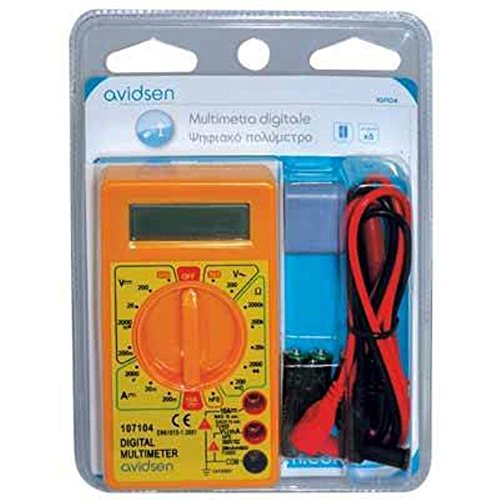
Abbildung 2: Avidsen 107104 Digital Multimeter shown in its retail packaging, which includes the multimeter, test leads, and batteries.
5. Bedienungsanleitung
Before taking any measurements, ensure the test leads are securely plugged into the correct input jacks.
5.1 Messen der Gleichspannungtage (V=)
- Stecken Sie die rote Messleitung in die VΩmA-Buchse und die schwarze Messleitung in die COM-Buchse.
- Set the rotary switch to the desired DCV range (e.g., 200m, 2000m, 20, 200, 500). If the voltagDa e unbekannt ist, beginnen Sie mit dem höchsten Bereich und verringern Sie ihn nach Bedarf.
- Schließen Sie die Messspitzen an das zu messende Bauteil oder den zu messenden Stromkreis an.
- Lesen Sie den Bandtage-Wert auf der Digitalanzeige.
5.2 Messen der Wechselspannungtage (V~)
- Stecken Sie die rote Messleitung in die VΩmA-Buchse und die schwarze Messleitung in die COM-Buchse.
- Set the rotary switch to the desired ACV range (e.g., 200, 500). If the voltage ist unbekannt, beginne mit dem höchsten Bereich.
- Schließen Sie die Messspitzen an die Wechselstromspannung an.tagDie Quelle.
- Lesen Sie den Bandtage-Wert auf der Digitalanzeige.
5.3 Messung des Gleichstroms (A=)
- Für Ströme bis zu 200 mA: Stecken Sie die rote Messleitung in die VΩmA-Buchse und die schwarze Messleitung in die COM-Buchse.
- Für Ströme bis zu 10 A: Insert the red test lead into the 10A jack and the black test lead into the COM jack. Caution: Do not measure more than 10 seconds every 10 minutes when using the 10A range.
- Set the rotary switch to the desired DCA range (e.g., 2000µ, 20m, 200m, 10A).
- Turn off the power to the circuit. Open the circuit where the current is to be measured.
- Schließen Sie das Multimeter in Reihe mit dem Stromkreis an.
- Schalten Sie den Stromkreis ein.
- Lesen Sie den aktuellen Wert auf der Digitalanzeige ab.
- Turn off the power, disconnect the multimeter, and restore the circuit.
5.4 Widerstandsmessung (Ω)
- Stecken Sie die rote Messleitung in die VΩmA-Buchse und die schwarze Messleitung in die COM-Buchse.
- Set the rotary switch to the desired Resistance range (e.g., 200, 2000, 20k, 200k, 2000k).
- Ensure the circuit or component to be measured is de-energized.
- Verbinden Sie die Testsonden mit dem Bauteil.
- Lesen Sie den Widerstandswert auf der Digitalanzeige ab.
5.5 Diodentest ( )
)
- Stecken Sie die rote Messleitung in die VΩmA-Buchse und die schwarze Messleitung in die COM-Buchse.
- Set the rotary switch to the Diode test position.
- Schließen Sie die rote Messspitze an die Anode und die schwarze Messspitze an die Kathode der Diode an. Eine Durchlassspannungtage drop (typically 0.5V to 0.8V for silicon diodes) will be displayed.
- Vertauschen Sie die Messspitzen. Das Display sollte bei einer intakten Diode „OL“ (Open Loop) anzeigen.
5.6 Kontinuitätsprüfung ()
- Stecken Sie die rote Messleitung in die VΩmA-Buchse und die schwarze Messleitung in die COM-Buchse.
- Set the rotary switch to the Continuity test position.
- Verbinden Sie die Prüfspitzen mit dem Bauteil oder dem Schaltkreis.
- If the resistance is below a certain threshold (typically around 50Ω), the multimeter will emit an audible beep, indicating continuity. The display will also show the resistance value.
6. Wartung
6.1 Reinigung
Löschen Sie den Fall mit Anzeigeamp Reinigen Sie das Multimeter mit einem Tuch und einem milden Reinigungsmittel. Verwenden Sie keine Scheuermittel oder Lösungsmittel. Stellen Sie sicher, dass das Multimeter vor Gebrauch vollständig trocken ist.
6.2 Batteriewechsel
Hinweise zum Batteriewechsel finden Sie in Abschnitt 4.1. Tauschen Sie die Batterien umgehend aus, sobald die Anzeige für niedrigen Batteriestand erscheint, um genaue Messwerte zu gewährleisten.
6.3 Sicherungswechsel
If the multimeter fails to measure current, the fuse may be blown. To replace a fuse:
- Stellen Sie sicher, dass das Multimeter ausgeschaltet und die Messleitungen abgeklemmt sind.
- Remove the battery compartment cover (refer to 4.1).
- Carefully locate the fuse(s) inside the compartment.
- Die durchgebrannte Sicherung vorsichtig entfernen.
- Replace it only with a fuse of the exact specified type and rating:
- For VΩmA input: 500mA 500V Fastrapid (FØ 5 x 20 mm)
- For 10A input: 10A 500V Fastrapid (FØ 5 x 20 mm)
- Setzen Sie den Batteriefachdeckel wieder auf und befestigen Sie ihn.
7. Fehlerbehebung
| Problem | Mögliche Ursache | Lösung |
|---|---|---|
| Keine oder nur schwache Anzeige | Leere oder schwache Batterien | Replace batteries (see Section 4.1) |
| "OL" (Überlastung) angezeigt | Der Eingangswert überschreitet den gewählten Bereich oder die maximale Kapazität des Messgeräts. | Select a higher range or ensure input is within meter's limits. |
| Falsche oder instabile Messwerte | Low battery, poor test lead connection, incorrect range selection, external interference | Replace batteries, check connections, select appropriate range, move away from strong electromagnetic fields. |
| Cannot measure current | Blown fuse, incorrect test lead connection (e.g., using VΩmA jack for 10A measurement) | Check and replace fuse (see Section 6.3), ensure test lead is in the correct current jack (VΩmA or 10A). |
8. Spezifikationen
- Anzeige: 3.5-digit LCD, Max. 1999, with automatic polarity indication.
- Messrate: 2-3 updates per second.
- Energiequelle: 2 x 3V AAA batteries (included).
- Sicherungen:
- 500mA 500V Fastrapid (for VΩmA input)
- 10A 500V Fastrapid (for 10A input)
- Doppelisolierung: Ja.
- Sicherheitsbewertung: CAT III 300V, CAT II 500V.
- Betriebstemperatur: 0°C bis +40°C.
- Lagertemperatur: -10°C bis +50°C.
- Abmessungen: 126 mm x 70 mm x 27 mm.
- Gewicht: Approximately 210g (with batteries).
- Funktionen: DC-Voltage, AC-Voltage, DC Current, Resistance, Diode Test, Continuity Test.
9. Garantie und Support
Avidsen products are manufactured to high-quality standards. For warranty information or technical support, please refer to the warranty card included with your product or visit the official Avidsen webBewahren Sie Ihren Kaufbeleg als Kaufnachweis auf.


