Einführung
The Ultimate Ears ROLL is a powerful, portable wireless Bluetooth speaker designed for robust use in various environments. It delivers 360-degree sound with deep bass and features a waterproof and shockproof design, making it suitable for outdoor adventures and poolside enjoyment. This manual provides essential information for setting up, operating, maintaining, and troubleshooting your UE ROLL speaker.

Bild: Vorderseite view of the Ultimate Ears ROLL speaker in Sugarplum color, featuring prominent yellow plus and minus symbols for volume control.
Aufstellen
1. Laden Sie den Lautsprecher auf
Before initial use, fully charge your UE ROLL speaker. The charging port is located on the back of the speaker, protected by a waterproof flap.
- Locate the waterproof flap on the back of the speaker.
- Carefully open the flap to reveal the micro USB charging port.
- Connect the provided micro USB cable to the speaker and a compatible USB power source.
- Allow the speaker to charge until the charging indicator light shows a full charge. A full charge typically takes less than an hour with a 2A charger.
- Um die Wasserdichtigkeit zu erhalten, muss die wasserdichte Klappe nach dem Aufladen sicher verschlossen sein.
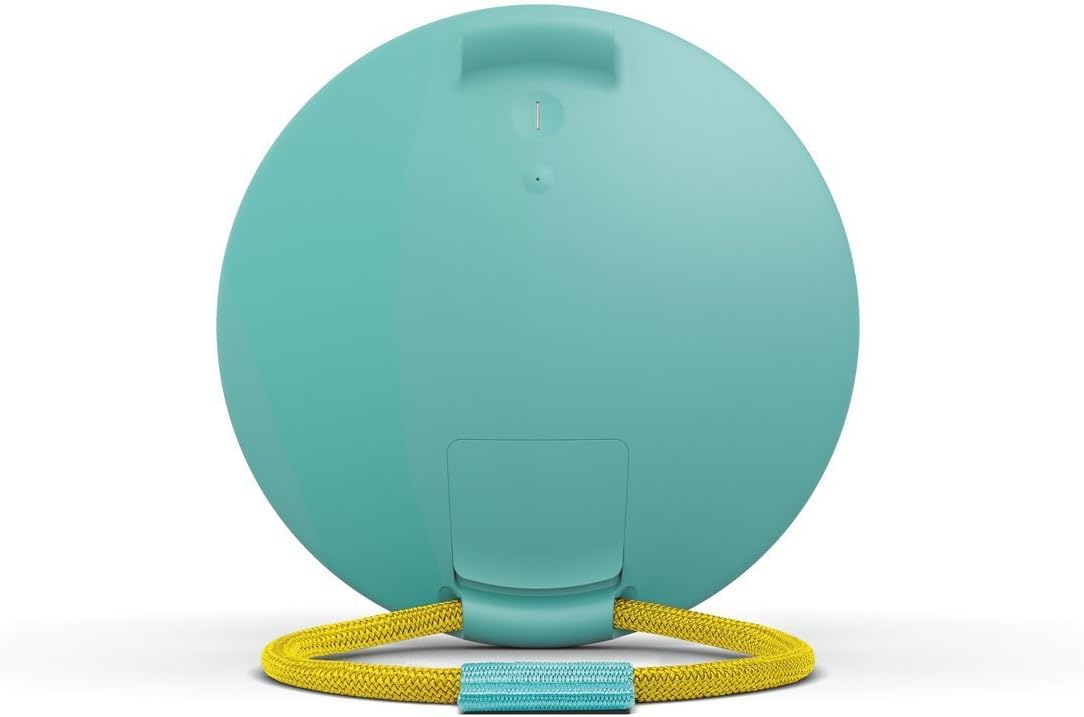
Bild: Rückseite view of the UE ROLL speaker with the protective flap opened, revealing the micro USB charging port and auxiliary input.
2. Bluetooth-Kopplung
The UE ROLL can pair with up to 8 Bluetooth devices.
- Press the power button on the back of the speaker to turn it on.
- Press and hold the Bluetooth button (located near the power button) until you hear an audible tone, indicating the speaker is in pairing mode.
- On your mobile device (smartphone, tablet, or computer), navigate to the Bluetooth settings.
- Select "UE ROLL" from the list of available devices to complete the pairing process.
3. UE ROLL Companion App
Enhance your speaker experience by downloading the UE ROLL companion app, available for Apple and Android mobile devices. The app allows for equalizer adjustments, volume control, power management, pairing with a second UE speaker for stereo or dual sound, and firmware updates.
Bedienungsanleitung
Bedienelemente
The UE ROLL features simple, intuitive controls:
- Lautstärke erhöhen/verringern: Large '+' and '-' symbols on the front of the speaker control the volume.
- Netzschalter: Located on the back of the speaker.
- Bluetooth-Pairing-Taste: Located on the back, near the power button.

Image: Diagram illustrating the power button, one-touch Bluetooth connection button, and the large volume up/down controls on the speaker's surface.
Besondere Merkmale
- Waterproof (IPX7 Rated): The speaker is designed to withstand immersion in water up to 1 meter for 30 minutes. Ensure all ports are securely sealed by the waterproof flap before exposing the speaker to water. The speaker also floats, allowing for music playback in water.
- Bungee Cord: The integrated marine-grade bungee cord allows you to attach the speaker to various objects like bikes, backpacks, or shower rods.
- Verdoppeln: Use the UE ROLL app to pair your speaker with another Ultimate Ears speaker for enhanced sound, either in stereo or dual mode.
- Multi-Host: Two different devices can be paired to the speaker simultaneously, allowing for seamless music control between users.
- Überprüfung des Batteriestands: Press the '+' and '-' volume buttons simultaneously to hear an audible announcement of the current battery charge level in 10% increments.
- Alarmfunktion: Set an alarm through the UE ROLL app to play your favorite music from a streaming service.

Image: Infographic highlighting the UE ROLL's features, including IPX7 waterproofing, 9-hour battery life, app integration, and 360-degree sound from two drivers and two tweeters.
Offizielles Produktvideo
Video: Ein offizielles Produktvideo präsentiertasing the Ultimate Ears ROLL speaker's durability and versatility in various outdoor and water-based activities, highlighting its waterproof and portable design.
Wartung
- Reinigung: The speaker can be cleaned with warm, soapy water. Ensure the waterproof flap covering the ports is securely closed before cleaning.
- Waterproof Flap: Regularly inspect the waterproof flap for any signs of wear or damage. Ensure it forms a tight seal when closed to maintain the speaker's water resistance. Avoid excessive force when opening or closing the flap to prevent damage.
- Firmware-Updates: Keep your speaker updated with the latest firmware via the UE ROLL companion app to ensure optimal performance and access to new features.
Fehlerbehebung
- Kein Strom: Stellen Sie sicher, dass der Lautsprecher vollständig aufgeladen ist. Schließen Sie ihn an eine Stromquelle an und lassen Sie ihn mindestens 30 Minuten lang aufladen, bevor Sie versuchen, ihn wieder einzuschalten.
- Probleme mit der Bluetooth-Konnektivität:
- Ensure the speaker is in pairing mode (audible tone after pressing the Bluetooth button).
- Überprüfen Sie, ob Bluetooth auf Ihrem Mobilgerät aktiviert ist.
- Move the speaker closer to your device; the maximum wireless range is 65 feet.
- Entfernen Sie das Gerät aus den Bluetooth-Einstellungen Ihres Telefons und versuchen Sie, es erneut zu koppeln.
- Starten Sie sowohl den Lautsprecher als auch Ihr Mobilgerät neu.
- Sound Distortion at High Volume: While the speaker is designed for clear sound, some distortion may occur at maximum volume levels, especially with certain audio tracks. Try reducing the volume slightly.
- Reduzierte Akkulaufzeit: Battery performance can degrade over time with extensive use. Ensure the speaker is fully charged before each use. Environmental conditions and usage patterns can also affect battery life.
Technische Daten
| Besonderheit | Detail |
|---|---|
| Modellname | ROLLEN |
| Artikelmodellnummer | 984-000517 |
| Marke | Ultimative Ohren |
| Lautsprechertyp | Im Freien |
| Besonderheit | Wasserdicht |
| Empfohlene Verwendung | Musik |
| Kompatible Geräte | iPhone, Android |
| Surround Sound-Kanalkonfiguration | 1.0 |
| Farbe | Sugarplum |
| Im Lieferumfang enthaltene Komponenten | Speaker, Battery, Bungee Cord |
| Artikelgewicht | 11.7 Unzen (331.7 g) |
| Wasserbeständigkeit | Wasserdicht (IPX7) |
| Maximale Reichweite | 65 Fuß (Bluetooth) |
| Kontrollmethode | App |
| Drahtlose Kommunikationstechnologie | Bluetooth |
| Lautsprechergröße | 14.1 Centimeters (Diameter) |
| Stromquelle | Batteriebetrieben (1 A-Batterie im Lieferumfang enthalten) |
| Audiotreibertyp | Dynamischer Treiber |
| Maximale Lautsprecherausgangsleistung | 25 Watt |
| Technische Daten | 5.3 x 5.3 x 1.6 Zoll |
| Datum der ersten Verfügbarkeit | 16. Juni 2015 |
Garantieinformationen
The Ultimate Ears ROLL speaker comes with a Limited Warranty. For specific terms and conditions, please refer to the warranty documentation included with your product or visit the official Ultimate Ears support webWebsite.
Unterstützung
For further assistance, technical support, or product inquiries, please contact Ultimate Ears customer service:
- Telefon: 646-454-3200
- Online-Hilfe: Besuchen Sie die Ultimate Ears Store on Amazon für Produktinformationen und Supportressourcen.


