1. Einleitung
The Motorola Solutions HKLN4606 Remote Speaker Microphone is designed to enhance communication efficiency for users of compatible Motorola business two-way radios. This accessory allows for convenient communication without needing to remove the radio from a belt or holster, providing flexibility and ease of use in various work environments.
It features an external speaker, a microphone, a Push-to-Talk (PTT) button, and an adjustable spring clip for secure attachment.
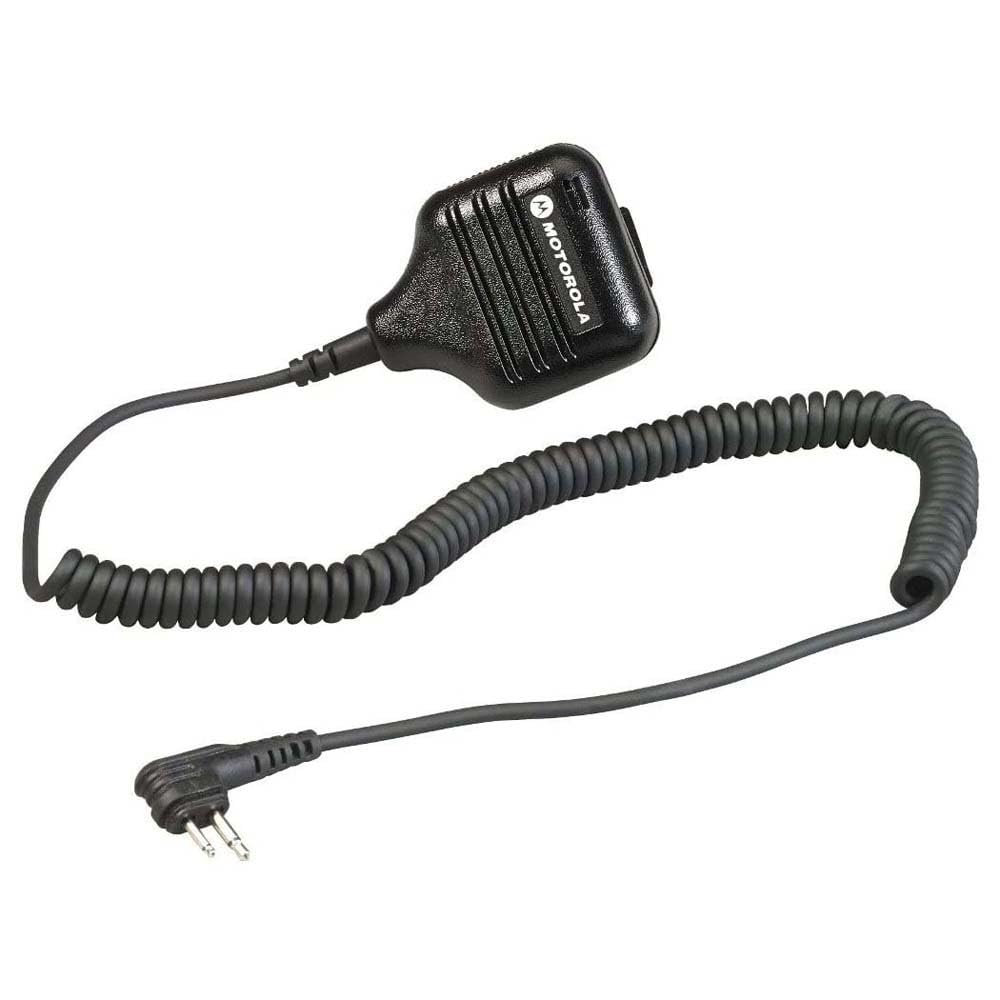
Abbildung 1: Motorola Solutions HKLN4606 Remote Speaker Microphone. This image displays the black remote speaker microphone with its coiled cord and two-pin connector.
2. Lieferumfang
Prüfen Sie nach dem Öffnen der Verpackung, ob folgende Artikel enthalten sind:
- Motorola Solutions HKLN4606 Remote Speaker Microphone unit
Note: The main unit includes the speaker, microphone, Push-to-Talk button, adjustable spring clip, coiled cord, and radio connector.
3. Einrichtung und Installation
- Identify Compatible Radio: Ensure your two-way radio is compatible with the HKLN4606. This microphone is designed for Motorola CLS, DLR, RM, and RDX Series Business Radios.
- Locate Accessory Port: Turn off your radio. Locate the accessory port on the side of your compatible Motorola two-way radio.
- Mikrofon anschließen: Align the two-pin connector of the HKLN4606 Remote Speaker Microphone with the radio's accessory port. Gently push the connector firmly into the port until it is securely seated.
- Sicheres Mikrofon: Use the adjustable spring clip on the back of the microphone to attach it to your clothing (e.g., lapel, collar, shoulder strap) in a position that allows for clear audio transmission and reception.
- Radio einschalten: Turn on your radio. The radio should now recognize the connected accessory.
For optimal performance, ensure the connection is secure and the microphone is positioned correctly.
4. Bedienungsanleitung
The HKLN4606 Remote Speaker Microphone simplifies communication by allowing you to transmit and receive audio directly through the accessory.
- Audio empfangen: When your radio receives a transmission, the audio will be heard through the speaker on the remote microphone.
- Audioübertragung (Push-to-Talk - PTT):
- Press and hold the large Push-to-Talk (PTT) button located on the side of the microphone.
- Speak clearly into the microphone, keeping it approximately 2-3 inches from your mouth.
- Lassen Sie die PTT-Taste los, um die Übertragung zu beenden und in den Empfangsmodus zurückzukehren.
- Lautstärke anpassen: Adjust the volume using the controls on your connected two-way radio. The remote speaker microphone does not have independent volume controls.
- Positionierung: Ensure the microphone is positioned to capture your voice clearly and that the speaker is audible to you. The adjustable clip allows for flexible placement.
5. Pflege und Wartung
Proper care will extend the life and performance of your HKLN4606 Remote Speaker Microphone.
- Reinigung: Wischen Sie das Mikrofon mit einem weichen, fusselfreien Tuch ab.amp Mit einem Tuch abwischen. Keine scharfen Chemikalien oder Scheuermittel verwenden. Das Gerät vor Gebrauch vollständig trocknen.
- Lagerung: Store the microphone in a cool, dry place when not in use. Avoid extreme temperatures.
- Handhabung: Avoid dropping the unit or subjecting it to strong impacts. Do not pull on the cord excessively, as this can damage internal wiring or the connector.
- Wassereinwirkung: This device is not waterproof. Avoid exposing it to rain, splashes, or immersion in water.
6. Fehlerbehebung
| Problem | Mögliche Ursache | Lösung |
|---|---|---|
| No audio from speaker microphone. |
|
|
| Cannot transmit (PTT button unresponsive). |
|
|
| Schlechte Audioqualität (Rauschen, undeutlich). |
|
|
If troubleshooting steps do not resolve the issue, please contact Motorola Solutions customer support.
7. Spezifikationen
| Besonderheit | Detail |
|---|---|
| Modellname | HKLN4606 |
| Marke | Motorola-Lösungen |
| Mikrofon-Formfaktor | Handgerät |
| Konnektivitätstechnologie | Verdrahtet |
| Steckertyp | M03 (Two-pin) |
| Kompatible Geräte | Motorola CLS, DLR, RM, RDX Series Business Radios |
| Material | Plastik |
| Farbe | Schwarz |
| Artikelabmessungen (L x B x H) | 5.3 x 2.4 x 10.9 Zoll (13.46 x 6.1 x 27.69 cm) |
| Artikelgewicht | 3.99 Unzen (113 Gramm) |
| Besonderheit | Adjustable Spring Clip |
| Stromquelle | Corded Electric (powered by radio) |
| UPC | 748091000447 |
| Hersteller | Motorola Solutions Business Radios |
8. Garantie und Support
For information regarding the warranty coverage for your Motorola Solutions HKLN4606 Remote Speaker Microphone, please refer to the warranty documentation provided with your original purchase or visit the official Motorola Solutions webWebsite.
If you require technical assistance, troubleshooting beyond this manual, or warranty service, please contact Motorola Solutions customer support. Contact details can typically be found on the official Motorola Solutions weboder über Ihren autorisierten Händler.
Wichtig: Motorola recommends purchasing only from authorized dealers to ensure genuine products and valid warranty support.


