1. Einleitung
The Alpine IVA-W520E is a full-featured 2DIN DVD player solution designed for in-car entertainment and media. It integrates advanced video and audio technologies, including a 7-inch LED touchscreen and a Burr-Brown 24-bit DAC, to deliver high-quality sound and clear images. This manual provides essential information for the proper installation, operation, and maintenance of your IVA-W520E unit.
2. Sicherheitshinweise
Bitte lesen Sie alle Sicherheitshinweise sorgfältig durch, bevor Sie das Gerät installieren oder in Betrieb nehmen. Die Nichtbeachtung dieser Anweisungen kann zu Verletzungen oder Schäden am Gerät oder Fahrzeug führen.
- Professionelle Installation empfohlen: Due to the complexity of car audio-visual systems, professional installation is highly recommended to ensure proper wiring and functionality.
- Energiequelle: Schließen Sie das Gerät nur an eine 12V DC-Stromversorgung mit negativer Masse an.
- Vermeiden Sie Ablenkungen: Do not operate the unit's controls or view video content while driving, as this can lead to accidents. Always pull over to a safe location before making adjustments.
- Belüftung: Sorgen Sie für ausreichende Belüftung rund um das Gerät, um eine Überhitzung zu vermeiden. Blockieren Sie die Belüftungsöffnungen nicht.
- Feuchtigkeit und Flüssigkeiten: Keep the unit away from moisture and liquids. Do not expose it to rain or water.
- Reinigung: Verwenden Sie zum Reinigen ein weiches, trockenes Tuch. Vermeiden Sie Scheuermittel oder Lösungsmittel.
3. Packungsinhalt
Vergewissern Sie sich vor der Installation, dass alle Artikel im Paket enthalten sind:
- Alpine IVA-W520E Head Unit
- Strom-/Lautsprecherkabelbaum
- Montagezubehör (Schrauben, Halterungen)
- Trimmring
- Benutzerhandbuch (dieses Dokument)
- Garantieinformationen
4. Einrichtung und Installation
4.1. Installationsrichtlinien
Eine fachgerechte Installation ist für optimale Leistung und Sicherheit unerlässlich. Es wird dringend empfohlen, das Gerät von einem qualifizierten Fachmann installieren zu lassen.
- Batterie abklemmen: Vor Beginn jeglicher elektrischer Arbeiten muss der Minuspol der Fahrzeugbatterie abgeklemmt werden, um Kurzschlüsse zu vermeiden.
- Montage: Securely mount the unit in the vehicle's double-DIN opening using the provided mounting brackets and screws. Ensure it is stable and does not obstruct any vehicle controls.
- Verdrahtung: Connect the power harness, speaker wires, and other input/output cables according to the wiring diagram provided in the separate installation guide. Pay close attention to ground connections.
- Antenna and External Devices: Connect the radio antenna and any external devices such as a reverse camera or external amplifizierer.
4.2. Ersteinrichtung
After installation, reconnect the battery and power on the unit for the first time.
- Sprachauswahl: Folgen Sie den Anweisungen auf dem Bildschirm, um Ihre bevorzugte Sprache auszuwählen.
- Uhrzeit und Datum: Set the correct time and date for accurate display.
- Audioeinstellungen: Adjust basic audio settings such as volume, balance, and fader.
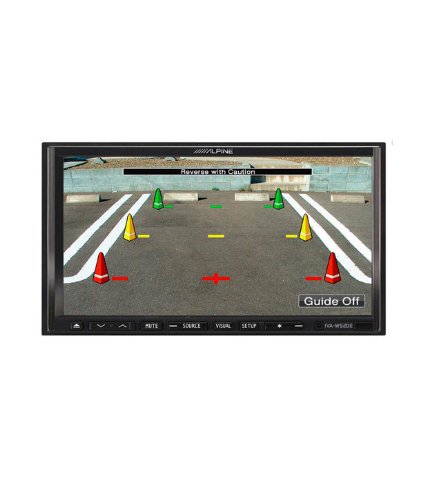
Abbildung 4.1: Bspample of the IVA-W520E displaying a reverse camera feed, showing parking guidelines. This feature aids in safe vehicle maneuvering.
5. Bedienung des Gerätes
5.1. Touchscreen- und Tastensteuerung
The IVA-W520E features a responsive 7-inch LED touchscreen for primary control, supplemented by physical buttons for quick access to common functions.
- Touch-Screen: Navigate menus, select sources, and control playback by touching the screen.
- Lautstärkeregelung: Use the dedicated volume buttons or on-screen controls to adjust audio levels.
- Quellentaste: Press to cycle through available audio/video sources (Radio, DVD, USB, iPod, AUX, Bluetooth).
- Stummschaltfläche: Temporarily mutes the audio output.
- Setup-Taste: Greifen Sie auf das Systemeinstellungsmenü zu.
5.2. Audiowiedergabe
The unit supports various audio formats and sources, enhanced by its Burr-Brown 24-bit DAC for superior sound quality.
- USB-Audio: Connect a USB device containing audio files. The unit will display track information and allow navigation through folders.
- iPod/iPhone Connectivity: Connect your iPod or iPhone for direct audio playback and control.
- DVD/CD-Wiedergabe: Insert a DVD or CD into the disc slot for audio or video playback.
- Radio-Tuner: Access AM/FM radio stations.
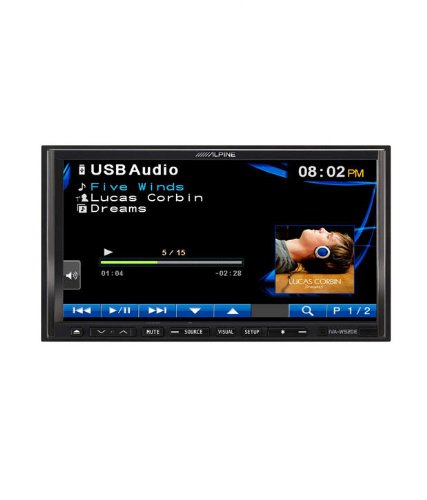
Figure 5.1: The IVA-W520E displaying the USB Audio interface, showing current track, artist, and playback controls. This allows for easy navigation of digital music files.
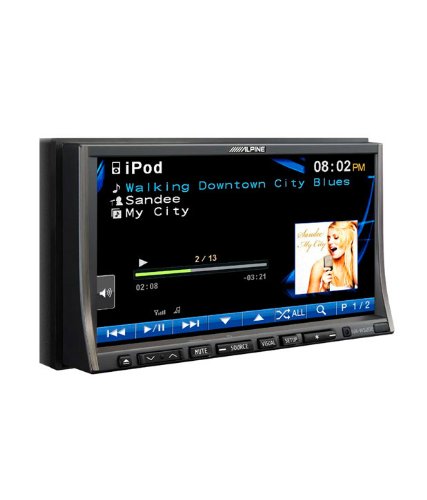
Figure 5.2: The IVA-W520E displaying the iPod interface, showing a list of songs and album art. This demonstrates seamless integration with Apple devices for music playback.
5.3. Videowiedergabe
The 7-inch LED screen provides enhanced image quality with higher resolution, better contrast, and improved color reproduction compared to standard LCD screens.
- DVD Video: Insert a video DVD for playback. Ensure the parking brake safety wire is correctly connected for video to display while the vehicle is stationary.
- Externer Videoeingang: The unit supports external video sources, such as a reverse camera or other video devices.
5.4. Bluetooth-Konnektivität
The IVA-W520E is upgradable for Bluetooth hands-free system functionality, allowing for safe and convenient communication while driving.
- Paarung: Refer to the separate Bluetooth module manual (if applicable) for pairing instructions with your mobile phone.
- Freisprechen: Tätigen und empfangen Sie Anrufe direkt über das Gerät.
- Audio-Streaming: Streamen Sie Audio von Ihrem Bluetooth-fähigen Gerät.
5.5. Navigation System (Upgradable)
The unit is designed to be upgradable with a navigation system. Consult your Alpine dealer for compatible navigation modules and installation.
6. Wartung
Regular maintenance helps ensure the longevity and optimal performance of your Alpine IVA-W520E.
- Bildschirmreinigung: Gently wipe the touchscreen with a soft, lint-free cloth. For stubborn smudges, slightly dampen the cloth with water or a screen-specific cleaner. Do not spray cleaner directly onto the screen.
- Disc-Steckplatz: Keep the disc slot free of dust and debris. Avoid inserting bent, scratched, or irregular discs.
- Allgemeine Reinigung: Use a soft, dry cloth to wipe the unit's exterior. Avoid harsh chemicals or abrasive materials.
7. Fehlerbehebung
If you encounter issues with your IVA-W520E, refer to the following common problems and solutions:
| Problem | Mögliche Ursache | Lösung |
|---|---|---|
| Kein Strom | Durchgebrannte Sicherung, falsche Verkabelung, lose Verbindung. | Check vehicle fuses and unit's fuse. Verify power and ground wiring connections. Ensure battery is connected. |
| Kein Ton | Volume too low, mute activated, speaker wiring issue, incorrect source selected. | Lautstärke erhöhen. Stummschaltung deaktivieren. Lautsprecheranschlüsse prüfen. Richtige Audioquelle auswählen. |
| Disc-Fehler | Dirty, scratched, or incompatible disc. | Clean the disc. Try a different, known-good disc. Ensure disc format is supported. |
| Video wird (während der Fahrt) nicht angezeigt | Parking brake safety wire not connected or incorrectly connected. | This is a safety feature. Video playback is disabled while the vehicle is in motion. Ensure the parking brake wire is correctly connected to the vehicle's parking brake circuit. |
| Probleme mit der Bluetooth-Kopplung | Bluetooth module not connected, phone not in pairing mode, interference. | Ensure optional Bluetooth module is correctly installed. Put phone in pairing mode. Move closer to the unit. |
If the problem persists after trying these solutions, please contact your authorized Alpine dealer or customer support.
8. Spezifikationen
Key technical specifications for the Alpine IVA-W520E:
- Modell: IVA-W520E
- Anzeigegröße: 7 Zoll (18 cm)
- Anzeigetyp: LED LCD Touchscreen
- Auflösung: 480 x 272 Pixel
- Audio-DAC: Burr-Brown 24-bit
- Kompatible Geräte: Smartphone (via USB/iPod, Bluetooth upgradable)
- Besondere Merkmale: Touchscreen, Bluetooth (upgradable)
- Audioausgabemodus: Lautsprecher
- Hersteller: alpin
- Als Erstes verfügbar: 20. August 2015
9. Garantie und Support
For detailed warranty information, please refer to the warranty card included with your product package or visit the official Alpine webBewahren Sie Ihren Kaufbeleg als Kaufnachweis auf.
For technical support, service, or inquiries about compatible accessories and upgrades (such as navigation modules or Bluetooth kits), please contact your authorized Alpine dealer or visit the Alpine customer support portal online.
Alpine Official WebWebsite: www.alpine.com


