1. Einleitung
This manual provides detailed instructions for the setup, operation, and maintenance of your Zmodo Mini WiFi 720p HD Wireless Indoor Home Video Security Camera. Please read this manual thoroughly before using the device to ensure proper functionality and safety. This camera is designed for indoor surveillance, offering 720p HD video, two-way audio, and remote access capabilities.
2. Produktüberschreitungview
Familiarize yourself with the components of your Zmodo Mini WiFi Camera.

Bild 2.1: Zmodo Mini WiFi Camera mounted on a wall, showing its compact design and lens. This image illustrates the camera's appearance and typical indoor placement.

Bild 2.2: Zmodo Mini WiFi Camera held in a person's hand, demonstrating its small and portable size. This helps visualize the camera's dimensions.
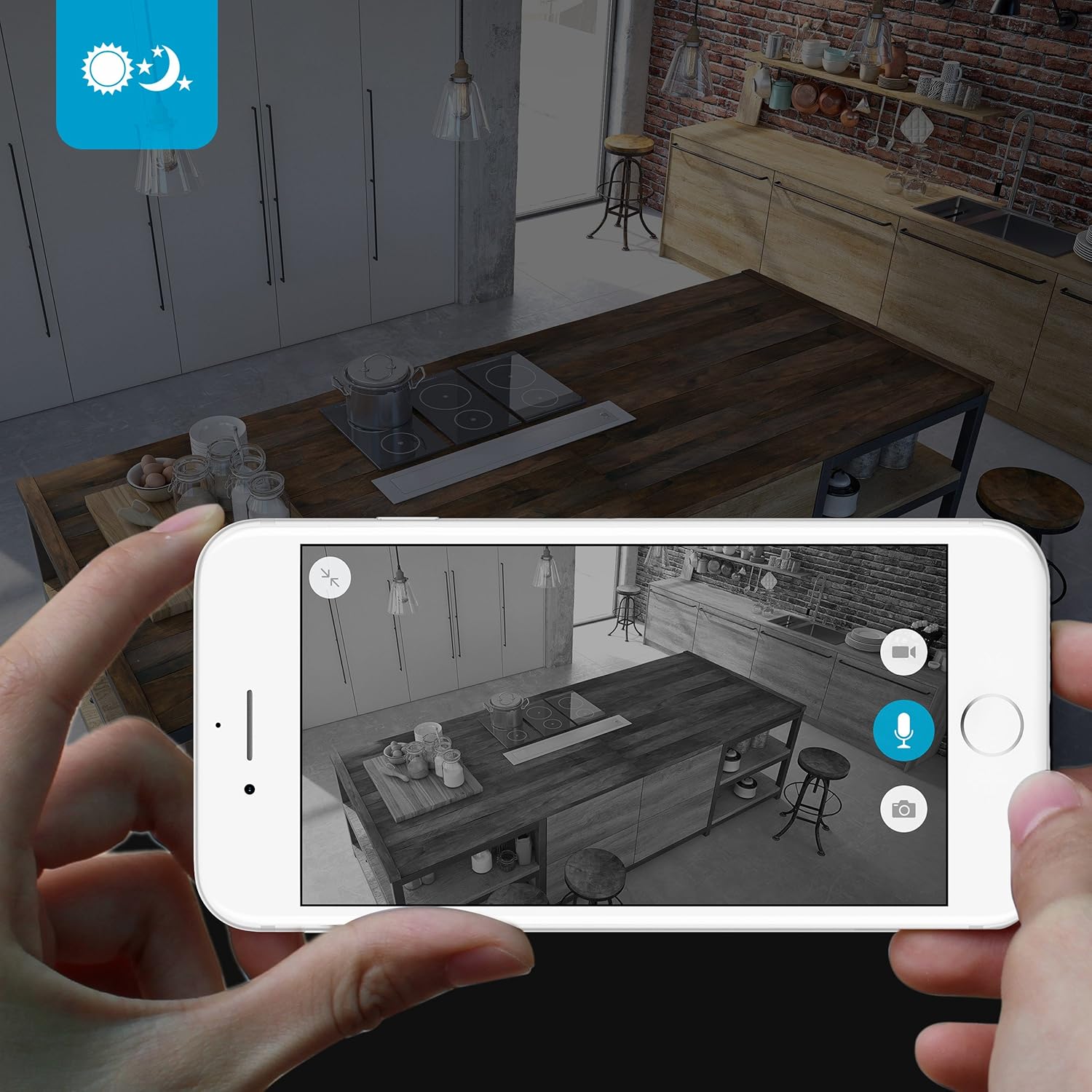
Bild 2.3: Zmodo Mini WiFi Camera displayed with its power adapter and a quick guide. This shows the main items included in the product package.
2.1 Packungsinhalt
- Zmodo Mini WiFi Camera
- Netzteil
- Kurzanleitung
3. Einrichtungsanweisungen
3.1 App-Download
Zu kontrollieren und view your camera, download the MeShare app. Suchen nach "MeShare" in the Apple App Store (for iOS 6 and up) or Google Play Store (for Android 2.3 and up).
3.2 Einschalten
- Schließen Sie das Netzteil an den Stromeingang der Kamera an.
- Stecken Sie das Netzteil in eine normale Steckdose.
- Wait for the camera's indicator light to show a specific status (refer to the app for light status meanings during setup).
3.3 Network Connection (SmartLink)
The camera uses 2.4GHz Wi-Fi for connectivity. It is not compatible with 5GHz networks.
- Open the MeShare app and create an account or log in.
- Befolgen Sie die Anweisungen in der App, um ein neues Gerät hinzuzufügen.
- Select the SmartLink setup option. The app will guide you through connecting the camera to your home Wi-Fi network.
- Ensure your mobile device is connected to the 2.4GHz Wi-Fi network you intend to connect the camera to during setup.
4. Bedienungsanleitung
4.1 Live View und Fernzugriff
Access your camera's live 720p HD video feed from anywhere using the MeShare app on your Android, iPhone, or iPad device. You can also access it via a web Browser bei user.meshare.com/user/login.

Bild 4.1: A laptop, tablet, and smartphone simultaneously displaying live video feeds from Zmodo cameras. This illustrates the multi-device remote access capability.
4.2 Zwei-Wege-Audio
The camera features two-way audio, allowing you to listen to the environment around the camera and speak through its built-in speaker using the MeShare app.
4.3 Bewegungserkennung
The camera is equipped with a motion sensor that can detect movement. You can configure motion alerts within the MeShare app to receive notifications when motion is detected.

Bild 4.2: A smartphone screen showing a Zmodo alert for motion detected, with video clips available for review. This demonstrates the motion alert feature.
4.4 Nachtsicht
The camera provides clear surveillance even in low-light conditions with its night vision capabilities, offering a range of up to 30 feet. It automatically switches between color day mode and black & white night mode using infrared light.

Bild 4.3: A smartphone screen showing a black and white night vision view from the Zmodo camera in a kitchen setting. This illustrates the camera's low-light performance.
4.5 Weitwinkel View
The camera features a 115° wide-angle lens, allowing for a broad view of your indoor space.

Bild 4.4: A smartphone screen showing a wide-angle view from the Zmodo camera in a bedroom, capturing a broad area. This highlights the 115-degree field of view.
5. Wartung
5.1 Reinigung der Kamera
- Stellen Sie sicher, dass die Kamera vor der Reinigung ausgeschaltet ist.
- Verwenden Sie ein weiches, trockenes Tuch, um das Kameragehäuse vorsichtig abzuwischen.
- Verwenden Sie für die Linse ein speziell für optische Geräte entwickeltes Linsenreinigungstuch, um Kratzer zu vermeiden.
- Flüssige Reinigungsmittel oder Aerosolsprays dürfen nicht direkt auf die Kamera aufgetragen werden.
5.2 Umweltaspekte
- Diese Kamera ist nur für die Verwendung in Innenräumen konzipiert.
- Vermeiden Sie es, die Kamera direkter Sonneneinstrahlung oder der Nähe von Wärmequellen auszusetzen.
- Keep the camera away from moisture and extreme temperatures.
6. Fehlerbehebung
6.1 Häufige Probleme und Lösungen
- Kamera verbindet sich nicht mit WLAN: Ensure your Wi-Fi network is 2.4GHz. Verify your Wi-Fi password. Try restarting your router and the camera.
- Schlechte Videoqualität: Überprüfen Sie Ihre Internetverbindungsgeschwindigkeit. Stellen Sie sicher, dass die Kameralinse sauber und frei von Verunreinigungen ist.
- Kein Ton oder verzerrter Ton: Verify microphone and speaker settings in the MeShare app. Ensure there are no physical obstructions blocking the microphone or speaker.
- Bewegungsalarme funktionieren nicht: Check motion detection settings in the MeShare app. Ensure notifications are enabled for the app on your mobile device.
- Kamera offline: Check if the camera is powered on. Verify your Wi-Fi network is active and stable. Try restarting the camera.
7. Spezifikationen
| Besonderheit | Beschreibung |
|---|---|
| Modellnummer | WAUBMAKGCUVDD |
| Auflösung der Videoaufnahme | 720p HD |
| Konnektivitätstechnologie | Drahtlos (Wi-Fi 2.4 GHz) |
| Zwei-Wege-Audio | Ja |
| Weitwinkel | 115° |
| Nachtsichtbereich | Bis zu 30 Fuß (Infrarot) |
| Bewegungssensor | Ja (Nur Bewegungsalarm) |
| Stromquelle | Wechsel-/Gleichstrom (5 Volt, 5 Watt) |
| Verwendung im Innen- und Außenbereich | Innenbereich |
| Abmessungen (L x B x H) | 7 x 2.1 x 4.5 Zoll |
| Artikelgewicht | 12 Unzen |
| Kompatible Geräte | Video Monitor (Android, iPhone, iPad) |
8. Garantie und Support
For warranty information or technical support, please refer to the official Zmodo website or contact Zmodo customer service directly. Keep your purchase receipt for warranty claims.
Weitere Unterstützung finden Sie unter Zmodo Store on Amazon.


