Einführung
The ASTRO Gaming A40 TR Headset and MixAmp Pro TR are designed to provide a high-fidelity audio experience for gaming on PlayStation 4 and PC. The A40 TR headset offers user customization, allowing transformation from an open-back to a closed-back noise-canceling headset with optional Mod Kits. The MixAmp Pro TR features all-digital components for clear, interference-free audio and voice communication, with customizable settings via the ASTRO Command Center software.

Image: The ASTRO Gaming A40 TR Headset and MixAmp Pro TR, showcasing both components together. The headset is black with gold accents, and the MixAmp is a compact black unit with control dials.
Packungsinhalt
Bitte überprüfen Sie, ob alle unten aufgeführten Artikel in Ihrer Produktverpackung enthalten sind:
- ASTRO A40 TR Headset
- ASTRO MixAmp Pro TR
- A40 TR Inline Mute Cable (2.0m)
- TOSlink Optical Cable (3.0m)
- Micro-USB Cable (3.0m)
- Digital Daisy Chain Cable (0.5m)
- Swappable Microphone
Aufstellen
Verbindung zu PlayStation 4 (PS4) herstellen
- Verbinden Sie TOSlink Optical Cable from the MixAmp Pro TR's OPTICAL port to the PS4's Optical Out port.
- Verbinden Sie Micro-USB-Kabel from the MixAmp Pro TR's USB port to an available USB port on the PS4.
- Verbinden Sie A40 TR Inline Mute Cable from your A40 TR Headset to the headset port on the front of the MixAmp Pro TR.
- Navigieren Sie auf Ihrer PS4 zu Settings > Sound and Screen > Audio Output Settings.
- Satz Primärer Ausgangsanschluss Zu Digitaler optischer Ausgang).
- Wählen Dolby Digital (Bitstream) for the audio format.
- Gehe zu Einstellungen > Geräte > Audiogeräte.
- Satz Eingabegerät Zu USB Headset (ASTRO MixAmp Pro TR).
- Satz Ausgabegerät Zu USB Headset (ASTRO MixAmp Pro TR).
- Anpassen Lautstärkeregelung (Kopfhörer) bis maximal.
- Satz Ausgabe über Kopfhörer Zu Chat-Audio or Alles Audio as preferred.
Anschließen an den PC
- Verbinden Sie Micro-USB-Kabel from the MixAmp Pro TR's USB port to an available USB port on your PC.
- Verbinden Sie A40 TR Inline Mute Cable from your A40 TR Headset to the headset port on the front of the MixAmp Pro TR.
- On your PC, ensure the MixAmp Pro TR is selected as the default playback and recording device in your sound settings.
- Laden Sie die ASTRO Command Center software from the official ASTRO Gaming website to customize settings, update firmware, and manage EQ presets.
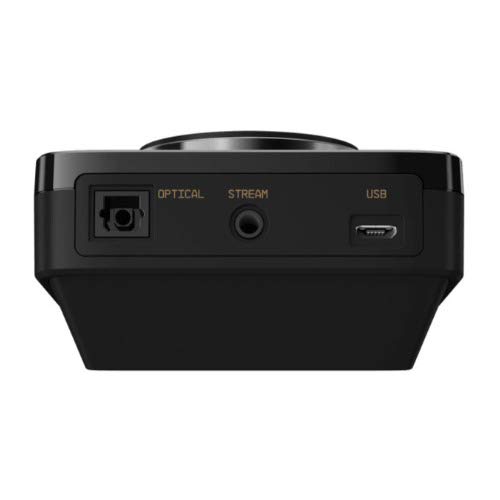
Bild: Rückseite view of the ASTRO MixAmp Pro TR, highlighting the Optical, USB, AUX, and Stream ports for various connections.
Operating the MixAmp Pro TR
Die MischungAmp Pro TR provides intuitive controls for managing your audio experience:
- Master-Lautstärkeregler: The large dial on the left controls the overall volume of your headset. Rotate clockwise to increase volume, counter-clockwise to decrease.
- Game/Voice Balance Dial: The smaller dial on the right allows you to adjust the balance between game audio and voice chat.
- Rotate towards "GAME" to prioritize game audio.
- Rotate towards "VOICE" to prioritize voice chat.
- EQ Presets Button: Located in the center, this button cycles through four customizable equalizer presets. The active preset is indicated by the illuminated icon (star, headphone, etc.). These presets can be configured using the ASTRO Command Center software.
- Dolby Button: Activates or deactivates Dolby Surround Sound. When active, the Dolby logo will illuminate.
- Mikrofon-Stummschalttaste: Located on the A40 TR Inline Mute Cable, this switch mutes or unmutes your microphone. When muted, the MixAmp's volume dials will typically glow red.
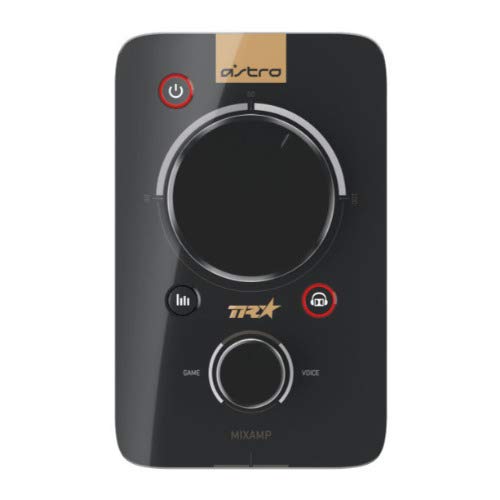
Bild: Oben view of the ASTRO MixAmp Pro TR, showing the large master volume dial, the smaller game/voice balance dial, and the EQ preset buttons.
Wartung
- Reinigung: Use a soft, dry cloth to clean the headset and MixAmpVermeiden Sie scheuernde Reinigungs- und Lösungsmittel.
- Lagerung: Store the headset and MixAmp an einem kühlen, trockenen Ort, geschützt vor direkter Sonneneinstrahlung und extremen Temperaturen.
- Kabelpflege: Behandeln Sie die Kabel vorsichtig, um Beschädigungen zu vermeiden. Vermeiden Sie scharfe Knicke und starkes Ziehen.
- Ohrpolster: Periodically check ear cushions for wear and tear. Replacement cushions are available from ASTRO Gaming.
Fehlerbehebung
If you encounter issues with your ASTRO Gaming A40 TR Headset or MixAmp Pro TR, try the following solutions:
| Problem | Lösung |
|---|---|
| Kein Ton vom Headset. |
|
| Mikrofon funktioniert nicht. |
|
| Verzerrte oder schlechte Audioqualität. |
|
For more detailed troubleshooting, please refer to the official ASTRO Gaming support resources.
Technische Daten
- Modellnummer: 939-001511
- Frequenzgang: 20 - 20,000 Hz
- Nennimpedanz: 48 Ohm
- Kopfbanddruck: 2.6N
- Produktabmessungen: 9.06 x 13.87 x 4.33 Zoll
- Artikelgewicht: 1.06 Pfund
- Konnektivität: Optisch, USB
- Kompatibilität: PlayStation 4, PC
Garantie und Support
For detailed warranty information and product support, please visit the official ASTRO Gaming webWebsite oder konsultieren Sie die bereitgestellte Dokumentation:
Ensure you register your product on the ASTRO Gaming website for the latest updates and support.


