Einführung
Welcome to the user manual for your new Sunstech DEDALOIII MP3 Player. This compact and lightweight device is designed for portable audio enjoyment, featuring 4GB of storage, an FM radio, and a voice recorder. This manual provides essential information on setting up, operating, maintaining, and troubleshooting your device to ensure optimal performance and longevity.
1. Produktüberschreitungview
Familiarize yourself with the components of your Sunstech DEDALOIII MP3 Player.

Abbildung 1.1: Vorderseite View of the Sunstech DEDALOIII MP3 Player with Earphones. This image displays the front of the black MP3 player, showing its 1.1-inch LCD screen, the circular navigation pad with 'M' (Menu), 'Play/Pause', 'Previous/Rewind', 'Next/Fast Forward', and 'VOL' (Volume) buttons. The included black earphones are visible to the left, connected to the player.

Abbildung 1.2: Zurück View of the Sunstech DEDALOIII MP3 Player. This image shows the rear of the MP3 player, highlighting the integrated clip for easy attachment to clothing. Visible on the side are the 'ON/OFF' switch, the headphone jack, and the microphone input ('MIC'). Product details like "DEDALO III 4GB" and "FM frequency: 87.5-108MHz" are printed on the back.
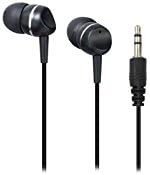
Figure 1.3: Included Earphones. Eine Nahaufnahme view of the black in-ear earphones that come with the DEDALOIII MP3 player. The 3.5mm audio jack is also visible, indicating standard connectivity.
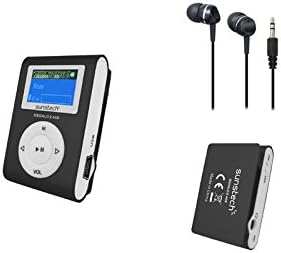
Abbildung 1.4: Vollständiger Packungsinhalt. This image displays the Sunstech DEDALOIII MP3 player, its included earphones, and a view of the player's back with the clip, illustrating the compact design and essential accessories.
Packungsinhalt:
- Sunstech DEDALOIII MP3 Player
- Schwarze Kopfhörer
- USB Charging/Data Transfer Cable
- Benutzerhandbuch (dieses Dokument)
2. Erste Schritte (Einrichtung)
2.1 Aufladen des Geräts
Before first use, fully charge the MP3 player. Connect the included USB cable to the micro USB port on the player and the other end to a USB port on your computer or a compatible USB wall adapter. The battery indicator on the screen will show charging status. A full charge typically takes approximately 2-3 hours.
2.2 Verbindung zu einem Computer herstellen und übertragen Files
- Stellen Sie sicher, dass der MP3-Player eingeschaltet ist.
- Connect the player to your computer using the supplied USB cable.
- Der Player wird auf Ihrem Computer als Wechseldatenträger angezeigt.
- Ziehen Sie Ihre MP3- oder WMA-Audiodatei per Drag & Drop in das Fenster. filein den Speicherordner des Spielers.
- Einmal file Die Übertragung ist abgeschlossen. Trennen Sie das Gerät sicher vom Computer, bevor Sie das USB-Kabel abziehen.
2.3 Erstes Einschalten
Locate the 'ON/OFF' switch on the side of the device. Slide the switch to the 'ON' position to power on the MP3 player. The screen will illuminate, and the main menu will appear.
3. Grundlegende Bedienung
3.1 Ein-/Ausschalten
- So schalten Sie das Gerät ein: Schieben Sie den 'EIN/AUS'-Schalter in die Position 'EIN'.
- So schalten Sie das Gerät aus: Schieben Sie den 'EIN/AUS'-Schalter in die Position 'AUS'.
3.2 Navigation und Menü
Use the circular navigation pad to move through menus and control playback:
- M (Menü)-Taste: Press to enter the main menu or go back to the previous menu/screen.
- Wiedergabe-/Pause-Taste (Mitte): Press to play or pause audio. In menus, press to confirm selection.
- Pfeile nach links/rechts: Navigate left/right in menus, skip tracks during playback. Hold to fast forward/rewind.
- VOL (Lautstärke)-Taste: Press to adjust volume. Use the left/right arrows to increase or decrease volume.
3.3 Playing Music (MP3/WMA)
- Wählen Sie im Hauptmenü „Musik“ oder „Audio“.
- Navigieren Sie durch Ihre Ordner und files mit den Pfeiltasten.
- Press the Play/Pause button to select and begin playback of a song.
- Use the Left/Right arrows to skip to the previous or next track.
- Press the VOL button to adjust volume, then use Left/Right arrows.
3.4 Using FM Radio
- Wählen Sie im Hauptmenü „FM-Radio“.
- The player will automatically scan for available stations or display the last tuned station.
- Use the Left/Right arrows to manually tune or scan for the next/previous station.
- Press the M button to access radio options, such as auto-scan or saving presets.
3.5 Sprachaufzeichnung
- From the main menu, select "Recorder" or "Voice".
- Press the Play/Pause button to start recording. The built-in microphone will capture audio.
- Press the Play/Pause button again to stop recording.
- Recordings are saved automatically and can be accessed from the "Recordings" folder.
3.6 ID3 Tag and Lyrics Display
When playing music, the DEDALOIII supports ID3 tag display, showing information such as song title, artist, and album. If lyrics are embedded in the audio file, they may also be displayed on the screen.
3.7 Entzerrungsmodi
The player offers 6 equalization modes to customize your audio experience. Access these settings through the music playback menu. Options typically include Normal, Pop, Rock, Classical, Jazz, and Bass.
4. Wartung
4.1 Reinigung
Wipe the device with a soft, dry, lint-free cloth. Do not use abrasive cleaners, solvents, or spray directly onto the device. Keep the screen clean to ensure clear visibility.
4.2 Batteriepflege
- Vermeiden Sie häufiges vollständiges Entladen des Akkus.
- Laden Sie das Gerät regelmäßig auf, auch wenn es nicht benutzt wird, um die Batterieleistung zu erhalten.
- Setzen Sie das Gerät keinen extremen Temperaturen aus, da dies die Batterieleistung beeinträchtigen kann.
4.3 Speicherung
When not in use for extended periods, store the MP3 player in a cool, dry place, away from direct sunlight and excessive dust. Ensure the battery has some charge before storing.
5. Fehlerbehebung
| Problem | Mögliche Ursache | Lösung |
|---|---|---|
| Gerät lässt sich nicht einschalten. | Batterie ist leer. | Laden Sie das Gerät mit dem mitgelieferten USB-Kabel vollständig auf. |
| Übertragung nicht möglich files zum Gerät. | Incorrect USB connection; device not recognized by computer. | Ensure the USB cable is securely connected. Try a different USB port or restart your computer. Ensure the device is powered on. |
| Kein Ton aus den Kopfhörern. | Volume is too low; earphones not properly connected; faulty earphones. | Increase the volume. Ensure earphones are fully plugged into the jack. Test with another pair of earphones. |
| FM-Radio: Rauschen oder schlechter Empfang. | Schwaches Signal; Störungen. | Move to an area with better reception. The earphone cable acts as an antenna, ensure it is fully extended. |
| Das Gerät friert ein oder reagiert nicht mehr. | Softwarefehler. | Slide the 'ON/OFF' switch to 'OFF' and then back to 'ON' to perform a soft reset. |
6. Spezifikationen
| Besonderheit | Detail |
|---|---|
| Marke | Sunstech |
| Modell | DEDALOIII |
| Speicherkapazität | 4 GB (4096 MB) |
| Bildschirmgröße | 1.1 inches (LCD) |
| Unterstützte Audioformate | MP3, WMA |
| Unterstützte Funkbänder | FM |
| Akku-Typ | Lithium Polymer (rechargeable via micro USB) |
| Abmessungen (L x B x H) | 2 x 3 x 4.7 cm |
| Gewicht | 20 g |
| Besondere Merkmale | Compact design with clip, voice recording, ID3 tag/lyrics display, 6 equalization modes. |
| Kompatible Geräte | Personalcomputer |
7. Garantie und Support
Your Sunstech DEDALOIII MP3 Player comes with a standard manufacturer's warranty. Please refer to the warranty card included in your package for specific terms and conditions. For technical support, service, or further inquiries, please contact Sunstech customer service through their official webWebsite oder die Kontaktinformationen, die Sie mit Ihren Kaufunterlagen erhalten haben.
Hinweis: Bewahren Sie Ihren Kaufbeleg als Kaufnachweis für Garantieansprüche auf.


