1. Einleitung
This manual provides essential information for the safe and efficient installation, operation, and maintenance of the IBM 39Y7405 2320W BladeCenter Power Supply. Please read this manual thoroughly before using the product and retain it for future reference. This power supply is designed for use within compatible IBM BladeCenter chassis to provide reliable power to server blades and other components.
2. Sicherheitshinweise
WARNING: Risk of Electric Shock. Do not open the power supply unit. Refer all servicing to qualified service personnel.
- Always disconnect the power cord from the electrical outlet before installing, removing, or servicing the power supply.
- Ensure that the BladeCenter chassis is properly grounded.
- Betreiben Sie das Netzteil nicht in feuchter oder trockener Umgebung.amp Bedingungen.
- Überprüfen Sie, ob die Eingangslautstärketage and frequency match the specifications listed on the power supply label.
- Avoid blocking ventilation openings on the power supply or chassis.
3. Produktüberschreitungview
The IBM 39Y7405 is a high-efficiency 2320-watt power supply designed for IBM BladeCenter systems. It provides redundant power capabilities to ensure continuous operation and system stability. The unit features hot-swap capability, allowing for replacement without system downtime.
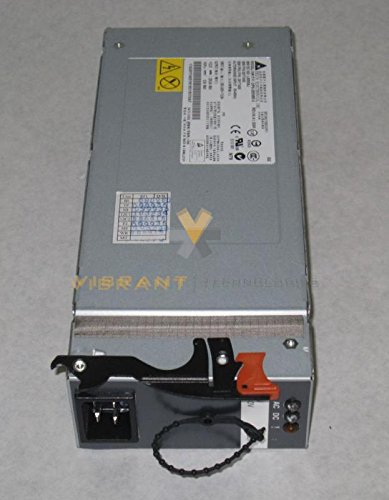
Abbildung 1: Front view of the IBM 39Y7405 2320W BladeCenter Power Supply, showing its connectors and ventilation.
4. Einrichtung und Installation
Follow these steps to install the IBM 39Y7405 power supply into a compatible BladeCenter chassis:
- Vorbereitung: Ensure the BladeCenter chassis is powered off and disconnected from the main power source if this is the initial installation or if all power supplies are being replaced. For hot-swap replacement, ensure the system is in a state that supports hot-swapping.
- Bucht finden: Identify an available power supply bay in the BladeCenter chassis.
- Netzteil anschließen: Carefully slide the power supply into the designated bay until it clicks securely into place. Ensure the latch mechanism engages.
- Netzkabel anschließen: Connect the appropriate power cord to the power supply's input receptacle and then to a grounded electrical outlet.
- Installation überprüfen: After installation, observe the power supply's status indicator LEDs to confirm proper operation. Refer to the 'Operating Instructions' section for LED status meanings.
5. Bedienungsanleitung
Once installed and connected, the IBM 39Y7405 power supply operates automatically. The primary indicators for its status are the LEDs located on the front panel.
- Green LED (Power OK): A solid green light indicates that the power supply is functioning correctly and providing power to the system.
- Amber LED (Fault): A solid amber light indicates a fault condition. Refer to the 'Troubleshooting' section for potential causes and solutions.
- Keine LED: If no LEDs are illuminated, the power supply may not be receiving input power or may have experienced a critical failure.
For detailed system status, consult the BladeCenter management interface.
6. Wartung
Regelmäßige Wartung trägt dazu bei, die Langlebigkeit und optimale Leistung Ihres Netzteils zu gewährleisten.
- Reinigung: Periodically inspect the power supply's ventilation openings for dust accumulation. Use compressed air to gently clear any dust, ensuring the system is powered off and unplugged before cleaning. Do not use liquid cleaners.
- Inspektion: Visually inspect power cords for any signs of damage (fraying, cuts). Ensure all connections are secure.
- Umgebungsbedingungen: Ensure the operating environment maintains appropriate temperature and humidity levels as specified for the BladeCenter chassis.
7. Fehlerbehebung
This section provides solutions to common issues you might encounter with the IBM 39Y7405 power supply.
| Problem | Mögliche Ursache | Lösung |
|---|---|---|
| Power supply LEDs are off. | No input power; power cord disconnected; critical internal failure. | Check power cord connection to both the power supply and the electrical outlet. Verify the outlet has power. If issue persists, replace the power supply. |
| Amber Fault LED is illuminated. | Internal fault; over-temperature; over-current; fan failure. | Check chassis ventilation. Ensure ambient temperature is within operating limits. If the fault persists, replace the power supply. |
| System instability or unexpected shutdowns. | Insufficient power capacity; failing power supply. | Ensure enough power supplies are installed for the system load. Check other power supplies for fault indicators. Consider replacing the suspected faulty unit. |
If you are unable to resolve an issue using the troubleshooting steps above, contact IBM support for further assistance.
8. Spezifikationen
| Besonderheit | Spezifikation |
|---|---|
| Modellnummer | 39Y7405 |
| Marke | IBM |
| Ausgang Wattage | 2320 Watt |
| Eingangswatttage | 2320 Watt |
| Artikelgewicht | 5 Pfund (2.27 kg) |
| Kompatible Geräte | Personal Computer (IBM BladeCenter systems) |
| UPC | 046655466402 |
| Hersteller | IBM |
9. Garantie und Support
This IBM product is covered by a limited warranty. For specific warranty terms and conditions, please refer to the documentation provided with your original BladeCenter chassis or visit the official IBM support webBewahren Sie Ihren Kaufbeleg für Garantieansprüche auf.
For technical support, service, or to report issues, please contact IBM support through their official channels. You can typically find contact information on the IBM website or through your authorized IBM reseller.
IBM-Support WebWebsite: https://www.ibm.com/support