1. Einleitung
The Aduro Amplify LED Wireless Speaker, model BSP15, is a portable audio device designed for wireless music playback and hands-free calling. It features integrated LED lighting with multiple settings to enhance the audio experience. This manual provides instructions for the proper setup, operation, and maintenance of your speaker.
Was ist in der Box:
- Aduro Amplify LED Wireless Speaker (BSP15)
- Ladekabel
2. Sicherheitshinweise
- Do not expose the speaker to water or moisture. This product is not water-resistant.
- Avoid extreme temperatures. Do not place near heat sources or in direct sunlight for extended periods.
- Versuchen Sie nicht, den Lautsprecher zu zerlegen oder zu verändern. Dies kann zum Erlöschen der Garantie und zu Schäden führen.
- Verwenden Sie ausschließlich das mitgelieferte Ladekabel oder ein zertifiziertes gleichwertiges Kabel.
- Außerhalb der Reichweite von Kindern aufbewahren.
3. Produktmerkmale
- Kabellose Verbindung: Verbindet sich mit Smartphones, Tablets und anderen Bluetooth-fähigen Geräten.
- Easy-Touch Pairing: Simplifies the process of connecting to your device.
- Integriertes Mikrofon: Allows for hands-free phone calls.
- Hochwertige Tonausgabe: Liefert klaren und lauten Klang.
- Multiple LED Settings: Offers various light modes to complement your audio experience.
4. Kontrollen überview
The Aduro Amplify speaker features intuitive controls located on the top panel for easy access to functions.
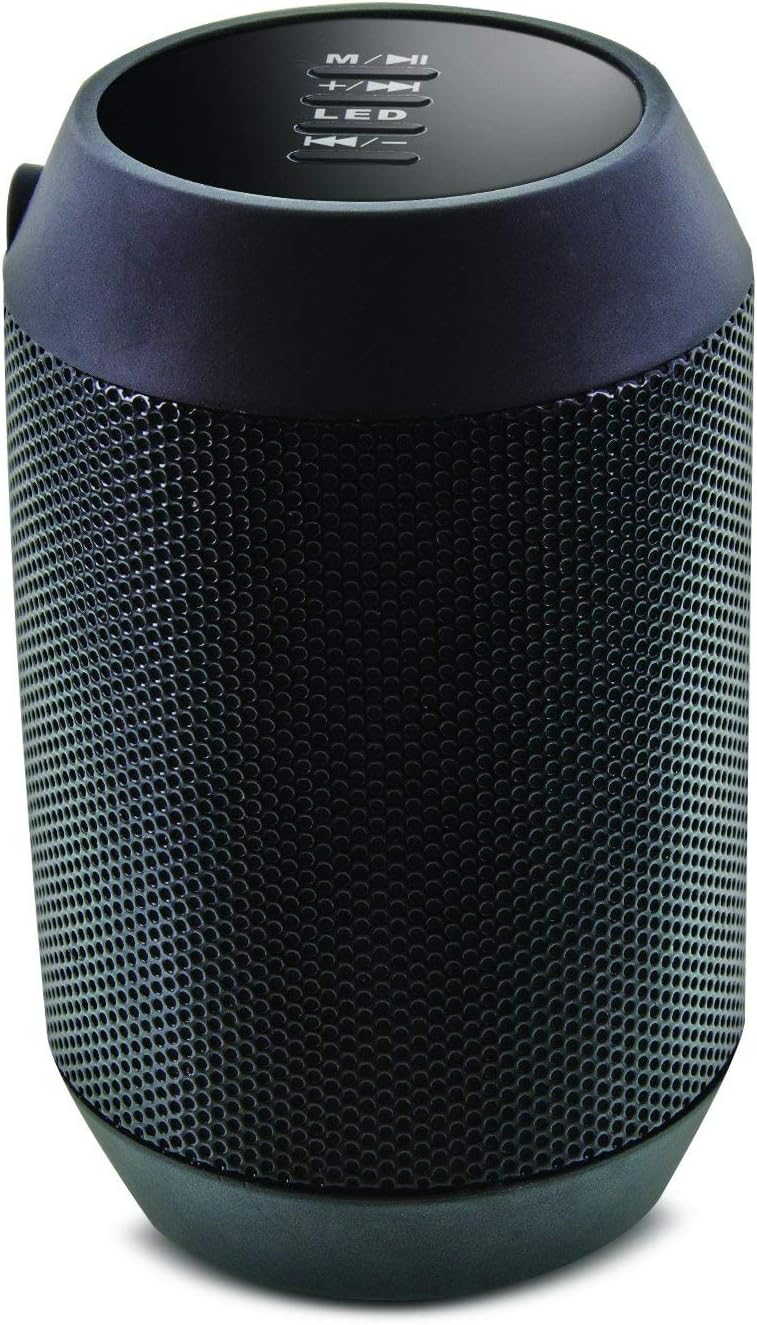
Bild: Oben view of the Aduro Amplify speaker, highlighting the control panel. From top to bottom, buttons include: M/▶█ (Mode/Play/Pause), +/▶▶ (Volume Up/Next Track), LED (LED Mode Control), ◀◀/- (Volume Down/Previous Track).
- M/▶█ Button: Press to switch between modes (e.g., Bluetooth, AUX). Press and hold to power on/off. Short press to Play/Pause music.
- +/▶▶ Button: Kurz drücken, um die Lautstärke zu erhöhen. Gedrückt halten, um zum nächsten Titel zu springen.
- LED-Taste: Press to cycle through different LED light modes.
- ◀◀/- Button: Kurz drücken, um die Lautstärke zu verringern. Gedrückt halten, um zum vorherigen Titel zu springen.
5. Einrichtungsanweisungen
5.1 Aufladen des Lautsprechers
Before first use, fully charge the speaker. Connect the provided charging cable to the speaker's charging port and the other end to a USB power source (e.g., computer USB port, USB wall adapter). The LED indicator will show charging status and turn off or change color when fully charged.
5.2 Ein-/Ausschalten
- So schalten Sie das Gerät ein: Halten Sie die M/▶█ button for approximately 3 seconds until you hear an audible prompt or see the LED indicator light up.
- So schalten Sie das Gerät aus: Halten Sie die M/▶█ button for approximately 3 seconds until you hear an audible prompt or the LED indicator turns off.
5.3 Bluetooth-Kopplung
So verbinden Sie Ihren Lautsprecher mit einem Bluetooth-fähigen Gerät:
- Ensure the speaker is powered on and in Bluetooth pairing mode. The LED indicator will typically flash rapidly, indicating it is ready to pair.
- On your smartphone, tablet, or other device, navigate to the Bluetooth settings.
- Aktivieren Sie Bluetooth und suchen Sie nach verfügbaren Geräten.
- Select "Aduro BSP15" (or similar name) from the list of found devices.
- Once paired, the speaker will emit an audible confirmation, and the LED indicator will typically stop flashing and remain solid.
- Der Lautsprecher versucht beim Einschalten automatisch, die Verbindung zum zuletzt gekoppelten Gerät wiederherzustellen.
5.4 Kabelverbindung (AUX)
For devices without Bluetooth, you can use a 3.5mm audio cable (not included) to connect to the speaker's AUX input port. Once connected, the speaker should automatically switch to AUX mode. If not, press the M/▶█ button to cycle to AUX mode.
6. Bedienungsanleitung
6.1 Audio wiedergeben
- Abspielen/Pause: Drücken Sie kurz die M/▶█ Taste.
- Lautstärke erhöhen: Drücken Sie kurz die +/▶▶ Taste.
- Lautstärke runter: Drücken Sie kurz die ◀◀/- Taste.
- Nächster Titel: Halten Sie die +/▶▶ Taste.
- Vorheriges Lied: Halten Sie die ◀◀/- Taste.
6.2 Freisprechanrufe
Bei Verbindung über Bluetooth ermöglicht das im Lautsprecher integrierte Mikrofon freihändiges Telefonieren.
- Anruf annehmen: Drücken Sie kurz die M/▶█ Taste drücken, wenn ein Anruf eingeht.
- Anruf beenden: Drücken Sie kurz die M/▶█ -Taste während eines Anrufs.
- Anruf ablehnen: Halten Sie die M/▶█ Taste drücken, wenn ein Anruf eingeht.
6.3 LED Light Settings
Drücken Sie die LED button to cycle through the available light modes. The speaker offers various visual effects, including pulsating lights that react to music.
7. Wartung
7.1 Reinigung
Reinigen Sie den Lautsprecher mit einem weichen, trockenen Tuch. Verwenden Sie keine Scheuermittel, Alkohol oder andere chemische Lösungsmittel, da diese die Oberfläche beschädigen können.
7.2 Speicherung
Bei längerer Nichtbenutzung sollte der Lautsprecher an einem kühlen, trockenen Ort, geschützt vor direkter Sonneneinstrahlung und extremen Temperaturen, aufbewahrt werden. Um die Lebensdauer des Akkus zu verlängern, wird empfohlen, ihn regelmäßig aufzuladen.
8. Fehlerbehebung
- Der Lautsprecher lässt sich nicht einschalten:
Stellen Sie sicher, dass der Akku geladen ist. Schließen Sie das Ladekabel an und versuchen Sie es nach einigen Minuten erneut. - Kopplung mit Bluetooth-Gerät nicht möglich:
Ensure the speaker is in pairing mode (LED flashing). Make sure Bluetooth is enabled on your device and it is within range (typically 10 meters/30 feet). Turn both devices off and on again, then try pairing. Ensure no other devices are currently connected to the speaker. - Kein Ton oder geringe Lautstärke:
Check the volume levels on both the speaker and your connected device. Ensure the speaker is correctly paired or the AUX cable is fully inserted. If using AUX, ensure the correct mode is selected. - LED-Leuchten funktionieren nicht:
Press the LED button to cycle through modes. If still unresponsive, power cycle the speaker.
9. Spezifikationen

Abbildung: Seite view of the Aduro Amplify LED Wireless Speaker, showing its cylindrical design and speaker grille.
| Modellname | BSP15 |
| Artikelmodellnummer | LU4-01-BSP15 |
| Marke | Aduro |
| Material | Plastik |
| Lautsprechertyp | Subwoofer |
| Besondere Merkmale | Built-in Microphone, Portable |
| Konnektivitätstechnologie | Kabellos (Bluetooth) |
| Drahtlose Kommunikation | Bluetooth |
| Audioausgabemodus | Stereo |
| Maximale Lautsprecherausgangsleistung | 5 Watt |
| Kontrollmethode | Berühren |
| Technische Daten | 6"T x 3.8"B x 3.5"H |
| Artikelgewicht | 6.7 Unzen |
| Wasserbeständigkeit | Nicht wasserfest |
| Stromquelle | Kabelgebundenes Elektrogerät (zum Aufladen) |
10. Garantie und Support
10.1 Eingeschränkte Garantie
This Aduro product is covered by a limited warranty against defects in materials and workmanship under normal use. The duration and terms of the warranty may vary. Please refer to the warranty card included with your purchase or contact Aduro customer support for specific details.
10.2 Kundendienst
For technical assistance, warranty claims, or product inquiries, please contact Aduro customer support. Contact information can typically be found on the manufacturer's official webauf der Website oder auf der Produktverpackung.
Manufacturer: Aduro


