Einführung
The ZOOZ ZSE40 4-in-1 Sensor is a versatile Z-Wave Plus device designed to enhance your smart home system. It integrates four key functions into a single compact unit: motion detection, ambient light sensing, temperature monitoring, and humidity measurement. This sensor provides real-time data to your compatible Z-Wave hub, enabling advanced automation scenarios and environmental monitoring.
This manual provides detailed instructions for the installation, operation, and maintenance of your ZSE40 sensor.

Image: The ZOOZ ZSE40 4-in-1 Sensor alongside its product packaging.
Hauptmerkmale
- Bewegungserkennung: Erkennt Bewegungen innerhalb seines Sichtfelds view for security or automation.
- Umgebungslichtsensor: Measures light levels to trigger lighting scenes or adjust blinds.
- Temperaturüberwachung: Provides accurate temperature readings for climate control.
- Feuchtigkeitsmessung: Monitors humidity levels for environmental comfort and control.
- Z-Wave Plus-zertifiziert: Ensures broad compatibility with Z-Wave hubs.
- Tamper Alerts: Notifies you if the sensor is disturbed or removed from its mounting.
- AES 128-bit Signal Encryption: Enhances security of communication.

Image: Visual representation of the ZSE40's key features including quick motion reports, low profile design, tamper alerts, and AES 128-bit signal encryption.
Setup und Installation
1. Stromversorgung des Sensors
The ZSE40 sensor is battery-powered. To install the battery:
- Drehen Sie die Rückseite des Sensors vorsichtig gegen den Uhrzeigersinn, um ihn zu öffnen.
- Insert the CR123A battery (not included) into the battery compartment, ensuring correct polarity (+/-).
- Replace the back cover by aligning the marks and twisting clockwise until it clicks into place.
2. Kopplung mit einem Z-Wave-Hub
The ZSE40 sensor must be paired with a compatible Z-Wave hub (e.g., Hubitat, HomeSeer, Home Assistant, SmartThings Hub) to function within your smart home system.
- Put your Z-Wave hub into inclusion (pairing) mode. Refer to your hub's instruction manual for specific steps.
- Bring the ZSE40 sensor close to your Z-Wave hub.
- Press the Z-Wave button on the sensor (usually located inside the battery compartment or on the side) three times quickly. The LED indicator on the sensor will flash to confirm inclusion mode.
- Once successfully paired, the LED will stop flashing and remain solid for a moment, or your hub will confirm the device has been added.
- If pairing fails, repeat the process. You may need to exclude the sensor first if it was previously paired or if the inclusion failed multiple times.
Notiz: This sensor is not supported by Wink, Nexia, Piper, Vivint, ADT Pulse, 2GIG, Qolsys, or any other smart home alarm panel. Your voice control speaker is NOT a Z-Wave hub.

Image: A smartphone displaying the SmartThings application interface, showing the ZOOZ sensor's integration and data.
3. Montage des Sensors
The ZSE40 sensor offers flexible mounting options to suit various environments:
- Wandhalterung: Use the included bracket and screws to attach the sensor to a wall.
- Eckhalterung: The bracket can be adapted for corner installation, providing a wider field of view zur Bewegungserkennung.
- Deckenmontage: Mount the sensor on the ceiling for overhead motion detection.
- Alternatively, the sensor can be placed on a flat surface without mounting.
Ensure the sensor is placed in a location where it can effectively monitor the desired area for motion, and where temperature/humidity readings are representative of the space.
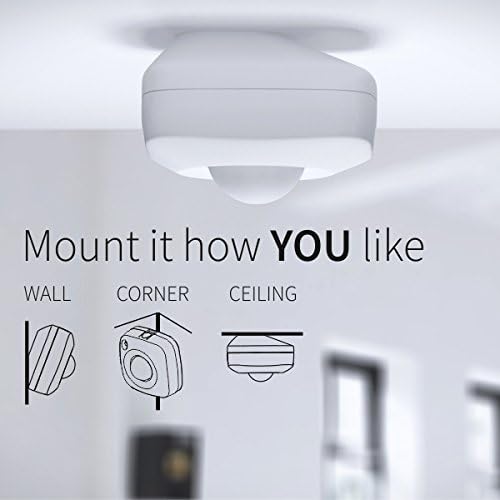
Image: Illustrations demonstrating how the ZSE40 sensor can be mounted on a wall, in a corner, or on the ceiling.
Bedienung des Sensors
Once paired with your Z-Wave hub, the ZSE40 sensor will automatically begin reporting data for its four functions. You can access and utilize this data through your hub's interface or associated smart home applications.
- Bewegungserkennung: The sensor will report motion events to your hub. This can be used to trigger lights, security alerts, or other automations.
- Lichtsensor: The sensor measures ambient light in Lux. This data can be used to adjust lighting levels, control blinds, or optimize energy usage.
- Temperatursensor: Provides real-time temperature readings. Useful for climate control, triggering HVAC systems, or monitoring room conditions.
- Feuchtigkeitssensor: Reports relative humidity levels. Can be used to activate humidifiers or dehumidifiers to maintain optimal indoor air quality.
Many Z-Wave hubs allow you to customize the reporting intervals and sensitivity settings for each sensor type. Refer to your hub's documentation for advanced configuration options.

Abbildung: Illustratives Beispielamples of how the ZSE40 sensor can automate home functions, such as turning on floor heating when temperature drops or activating a fan when humidity rises.

Image: A smartphone screen showing the ZOOZ 4-in-1 sensor's readings for motion, humidity, light, and battery status within a smart home application.
Wartung
Batteriewechsel
The sensor is powered by a CR123A battery. When the battery level is low, your Z-Wave hub will typically report a low battery warning. To replace the battery:
- Twist the back cover counter-clockwise to open the sensor.
- Entfernen Sie die alte Batterie.
- Setzen Sie eine neue CR123A-Batterie ein und achten Sie dabei auf die richtige Polarität.
- Replace the back cover by twisting clockwise until it locks.
After replacing the battery, it may take some time for your hub to update the battery status. You can often force an update by manually waking the device (e.g., by pressing the Z-Wave button once).
Reinigung
To clean the sensor, gently wipe the exterior with a soft, dry cloth. Do not use abrasive cleaners, solvents, or immerse the device in water.
Fehlerbehebung
- Sensor kann nicht mit dem Hub gekoppelt werden:
- Ensure your hub is in inclusion mode.
- Bring the sensor closer to the hub during pairing.
- Try excluding the sensor first (even if it was never paired) and then re-attempt inclusion.
- Verify battery is correctly installed and charged.
- Sensor meldet keine Daten:
- Batteriestand prüfen.
- Stellen Sie sicher, dass sich der Sensor in Reichweite Ihres Z-Wave-Hubs oder eines Z-Wave-Repeaters befindet.
- Wake up the sensor manually by pressing its Z-Wave button once.
- Check your hub's device settings for reporting intervals.
- Ungenaue Temperatur-/Feuchtigkeitsmesswerte:
- Ensure the sensor is not placed near heat sources, vents, or in direct sunlight.
- Allow time for the sensor to acclimate to its environment.
- Probleme mit der Bewegungserkennung:
- Verify the sensor's placement covers the desired area.
- Adjust PIR sensitivity settings in your hub's interface if available.
- Stellen Sie sicher, dass keine Hindernisse den Sensor blockieren. view.
Technische Daten
| Besonderheit | Detail |
|---|---|
| Modellnummer | ZSE40 |
| Stromquelle | Battery Powered (CR123A) |
| Z-Wellen-Frequenz | 908.42 MHz (USA) |
| Betriebstemperatur | 0 °C - 40 °C (32 °F - 104 °F) |
| Technische Daten | 2.25"T x 2.25"B x 1"H |
| Artikelgewicht | 0.32 Unzen (9.07 g) |
| Maximale Reichweite | 30 Meters (Z-Wave range, line of sight) |
| Kompatible Hubs | Hubitat, HomeSeer, Home Assistant, SmartThings Hub |
Garantie und Support
ZOOZ provides lifetime tech support for its products. If you encounter any issues or have questions regarding your ZSE40 sensor, please contact ZOOZ customer support.
For the most up-to-date warranty information and support resources, please visit the official ZOOZ website or refer to the contact details provided with your product.
Kontaktinformationen:
- Web: www.getzooz.com
- E-Mail: ask@getzooz.com