1. Einleitung
This manual provides detailed instructions for the installation, operation, and maintenance of your Alpine CDE-163BT Advanced Bluetooth CD Receiver. Please read this manual thoroughly before using the unit to ensure proper operation and to prevent damage. Keep this manual for future reference.
The Alpine CDE-163BT is a versatile car stereo receiver featuring advanced Bluetooth connectivity for hands-free calling and audio streaming, CD playback, USB input, and FM/AM tuner capabilities. It is designed to deliver high-quality audio performance and user-friendly control.
2. Einrichtung und Installation
2.1 Packungsinhalt
Vor Beginn der Installation prüfen Sie bitte, ob alle Komponenten vorhanden sind:
- Alpine CDE-163BT Head Unit
- Kabelbaum
- Mounting Sleeve and Trim Ring
- Mikrofon für Bluetooth-Freisprechanrufe
- Benutzerhandbuch (dieses Dokument)
- Montagezubehör (Schrauben, Halterungen)
2.2 Schaltplan
Refer to the wiring diagram provided with the unit's installation guide for specific connections. Key connections include:
- Leistung: Yellow (constant 12V), Red (switched 12V), Black (ground).
- Referenten: White/White-Black (Front Left), Gray/Gray-Black (Front Right), Green/Green-Black (Rear Left), Purple/Purple-Black (Rear Right).
- Antenne: Blue (power antenna/amp(Fernbedienung zum Einschalten des Verstärkers).
- Mikrofon: Schließen Sie das mitgelieferte Mikrofon an den dafür vorgesehenen Eingang an, um freihändig telefonieren zu können.
Vorsicht: Incorrect wiring can cause damage to the unit or vehicle's electrical system. If you are unsure about any wiring connections, consult a qualified professional installer.
2.3 Erstes Einschalten
Schalten Sie nach der Installation die Zündung Ihres Fahrzeugs ein. Das Gerät sollte sich einschalten. Folgen Sie den Anweisungen auf dem Bildschirm für die Ersteinrichtung, z. B. zur Sprachauswahl oder Uhrzeiteinstellung.
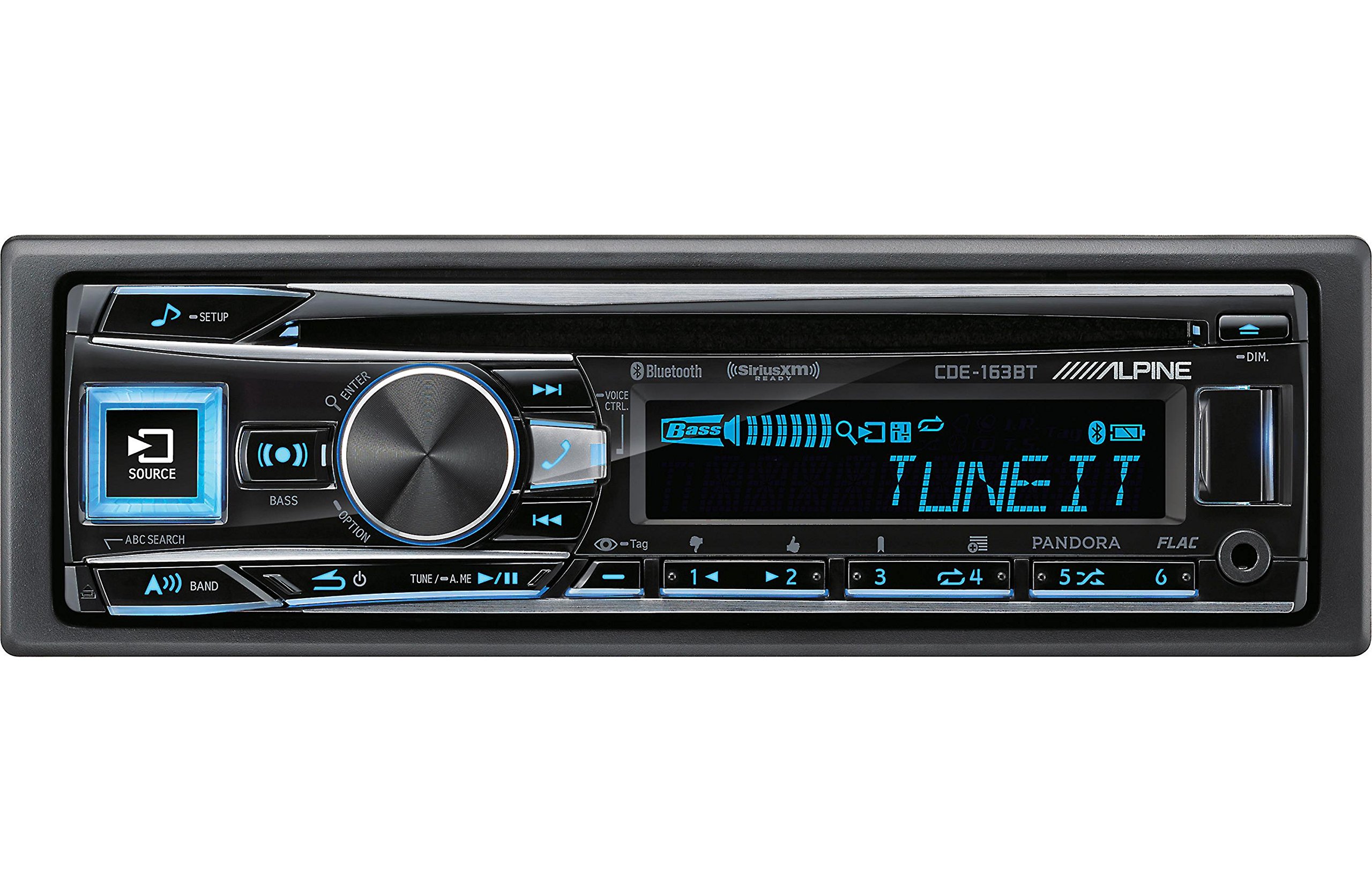
Figure 2.3.1: Front panel of the Alpine CDE-163BT receiver. This image displays the main controls, including the large rotary knob, source button, setup button, and display screen showing "TUNEIT" and "Bass" indicators.
3. Bedienung
3.1 Bedienelemente an der Vorderseiteview
Familiarize yourself with the main controls on the front panel:
Abbildung 3.1.1: Ausführlich view of the Alpine CDE-163BT front panel. Key controls include the SOURCE button (left, illuminated), SETUP button (top left), large central rotary knob for volume and selection, BASS/OPTION button, VOICE CTRL button, and various preset/track skip buttons along the bottom.
- SOURCE-Taste: Selects the audio source (CD, Tuner, USB, Bluetooth Audio, AUX).
- SETUP-Taste: Accesses the main setup menu for system adjustments.
- Rotary Knob (Volume/ENTER): Turns to adjust volume. Press to confirm selections in menus.
- BASS/OPTION Button: Provides quick access to bass settings or other options depending on the current mode.
- VOICE CTRL Button: Activates voice control features on connected smartphones.
- BAND-Taste: Switches between FM1, FM2, FM3, and AM bands in tuner mode.
- TUNE/A.ME/II Buttons: Used for manual tuning, auto memory, and play/pause functions.
- Track Skip/Preset Buttons (1-6): Used for skipping tracks or selecting radio presets.
- DIM-Taste: Passt die Displayhelligkeit an.
3.2 Ein-/Ausschalten und Quellenauswahl
- Zum Einschalten des Geräts ON, press any button (e.g., SOURCE or the Rotary Knob).
- Zum Einschalten des Geräts AUS, press and hold the power button (often integrated with the TUNE/A.ME button).
- Drücken Sie die QUELLE button repeatedly to cycle through available audio sources: CD, Tuner, USB, Bluetooth Audio, AUX.
3.3 Lautstärkeregelung
Rotate the large central Drehknopf Im Uhrzeigersinn drehen, um das Volumen zu erhöhen, gegen den Uhrzeigersinn, um das Volumen zu verringern.
3.4 Audioeinstellungen
Drücken Sie die BASS/OPTION button or navigate through the SETUP menu to adjust audio settings such as Bass, Treble, Balance (left/right), and Fader (front/rear). Use the Rotary Knob to adjust values and press it to confirm.
3.5 Radiobetrieb (FM/AM-Tuner)
- Select "Tuner" as the source using the QUELLE Taste.
- Drücken Sie die BAND Taste zum Umschalten zwischen den FM1-, FM2-, FM3- und AM-Bändern.
- Manuelle Abstimmung: Drücken Sie die MELODIE buttons (◀ / ▶) to manually tune frequencies.
- Suche nach Tuning: Halten Sie die MELODIE Tasten zur automatischen Suche nach dem nächsten starken Sender.
- Voreingestellte Sender: Um einen Sender zu speichern, stellen Sie die gewünschte Frequenz ein und halten Sie dann eine der nummerierten Speichertasten (1–6) gedrückt, bis Sie einen Signalton hören. Um einen gespeicherten Sender aufzurufen, drücken Sie einfach die entsprechende nummerierte Taste.
3.6 CD-Wiedergabe
- Legen Sie eine CD in den CD-Schacht ein. Das Gerät schaltet automatisch auf CD-Wiedergabe um und beginnt mit der Wiedergabe.
- Use the ◀ / ▶ buttons to skip tracks.
- Drücken Sie die TUNE/A.ME/II button for Play/Pause.
- Drücken Sie die ABC SEARCH button to search for tracks by name.
3.7 Bluetooth-Konnektivität
The CDE-163BT features built-in Bluetooth for hands-free calling and audio streaming.
3.7.1 Koppeln eines Bluetooth-Geräts
- Stellen Sie sicher, dass Bluetooth auf Ihrem Mobilgerät aktiviert ist.
- On the CDE-163BT, go to the SETUP menu and select "Bluetooth Setup".
- Choose "Pairing" or "Device Search".
- On your mobile device, search for available Bluetooth devices and select "Alpine CDE-163BT".
- Confirm the pairing code if prompted. Once paired, the Bluetooth icon on the receiver's display will illuminate.
3.7.2 Freisprechfunktion
- When a call comes in, the unit will display the caller ID. Press the EINGEBEN button (Rotary Knob) to answer.
- Um einen Anruf zu beenden, drücken Sie die EINGEBEN erneut die Taste.
- Use the supplied microphone for clear communication.
- Drücken Sie die VOICE CTRL button to activate your smartphone's voice assistant.
3.7.3 Bluetooth-Audiostreaming
- Select "Bluetooth Audio" as the source.
- Start playback on your paired mobile device. Audio will stream through the receiver.
- Use the ◀ / ▶ buttons on the receiver to skip tracks.
3.8 USB-Wiedergabe
- Connect a USB storage device (e.g., USB flash drive) to the USB port.
- Select "USB" as the source. The unit will automatically detect and begin playing compatible audio files (including FLAC format).
- Use the ◀ / ▶ buttons to skip tracks.
- The unit supports various audio formats.
3.9 Pandora and SiriusXM Ready
- Pandora: Connect your iPhone or Android smartphone via USB or Bluetooth and launch the Pandora app. Select Pandora as the source on the receiver to control the app.
- SiriusXM: This unit is SiriusXM Ready. An optional SiriusXM Connect Vehicle Tuner and subscription are required for satellite radio reception. Connect the tuner and select SiriusXM as the source.
3.10 Anzeigeeinstellungen
- Drücken Sie die DIM button to adjust the display brightness.
- Access the SETUP menu to customize display colors for buttons and the screen.
4. Wartung
4.1 Reinigung des Geräts
Wischen Sie die Frontplatte mit einem weichen, trockenen Tuch ab. Bei hartnäckigen Flecken dampen the cloth lightly with water. Avoid using harsh chemicals, abrasive cleaners, or solvents as they can damage the finish.
4.2 Disc-Pflege
Handle CDs by their edges. Keep discs clean and free of scratches. If a disc is dirty, wipe it gently from the center outwards with a soft, lint-free cloth. Do not use solvents or abrasive cleaners on discs.
5. Fehlerbehebung
If you experience issues with your CDE-163BT, refer to the table below for common problems and solutions.
| Problem | Mögliche Ursache | Lösung |
|---|---|---|
| Kein Strom | Falsche Verkabelung; durchgebrannte Sicherung; Zündung ausgeschaltet. | Check power connections; Replace fuse; Turn vehicle ignition on. |
| Kein Ton | Lautstärke zu niedrig; Stummschaltung aktiviert; Falsche Lautsprecherverkabelung; Amplifier aus. | Lautstärke erhöhen; Stummschaltung deaktivieren; Lautsprecheranschlüsse prüfen; Prüfen ampleistung des Verstärkers. |
| Bluetooth stellt keine Verbindung her | Device not in pairing mode; Bluetooth off on phone; Interference. | Ensure phone Bluetooth is on and discoverable; Re-attempt pairing; Move closer to unit. |
| CD skips or won't play | Dirty or scratched disc; Disc inserted incorrectly. | Clean disc; Insert disc correctly; Try a different disc. |
| USB-Gerät nicht erkannt | Inkompatibles Format; Beschädigtes USB-Gerät; Lose Verbindung. | Sicherstellen files are compatible; Try a different USB device; Reconnect USB device. |
Sollte das Problem nach Anwendung dieser Lösungsansätze weiterhin bestehen, wenden Sie sich bitte an den Alpine-Kundendienst.
6. Spezifikationen
Below are the technical specifications for the Alpine CDE-163BT Advanced Bluetooth CD Receiver:
- Modellnummer: 79380
- Produktabmessungen: 5 x 11 x 10 Zoll
- Artikelgewicht: 4.05 Pfund (4.1 Pfund)
- Drahtlose Kommunikationstechnologien: Bluetooth
- Konnektivitätstechnologien: Bluetooth
- Besondere Merkmale: Eingebautes Bluetooth, FM-Tuner
- Weitere Anzeigefunktionen: Kabellos
- Farbe: SCHWARZ
- Hersteller: alpin
- Konnektivitätstechnologie: Bluetooth
- Kompatible Geräte: Smartphone
- Steckertyp: 3.5-mm-Klinke, USB
- Audioausgabemodus: Mono, Stereo
- Konfiguration der Surround-Sound-Kanäle: 4 Kanäle
- Wastage: 200 Watt
- Datum der Erstveröffentlichung: 19. Januar 2016
7. Garantie und Kundendienst
7.1 Garantieinformationen
Alpine products are manufactured to the highest quality standards. This product is covered by a limited warranty. Please refer to the separate warranty card included with your purchase for specific terms, conditions, and duration of coverage. Retain your proof of purchase for warranty claims.
7.2 Kundendienst
For technical assistance, troubleshooting beyond this manual, or warranty service, please contact Alpine customer support:
- WebWebsite: Besuchen Sie die offizielle Alpine-Website. webWebsite mit Support-Ressourcen, FAQs und Kontaktformularen.
- Telefon: Siehe Alpine website or your warranty card for regional customer service phone numbers.
- Autorisierte Servicezentren: For repairs, locate an authorized Alpine service center through the official webWebsite.
When contacting support, please have your product model number (CDE-163BT) and serial number ready.