
Produkt überview
This manual provides essential information for the proper use and maintenance of your Mars Replacement Controller for the Original Xbox system. This controller is designed to offer a familiar gaming experience, serving as a direct replacement for your existing or worn Original Xbox controllers. It features a classic layout with ten buttons, a D-pad, and two joysticks, built for durability and extended gameplay sessions.
Installationsanweisungen
Follow these steps to connect your new controller to your Original Xbox console:
- Locate Controller Port: Identify an available controller port on the front of your Original Xbox console. The Original Xbox typically has four controller ports.
- Controller anschließen: Align the proprietary connector of the Mars Replacement Controller with the chosen port on the console. Gently push the connector firmly into the port until it clicks into place.
- Konsole einschalten: Turn on your Original Xbox console. The controller should be automatically recognized by the system.
- Testfunktionalität: Once the console is on, test all buttons, joysticks, and the D-pad to ensure proper functionality before starting a game.
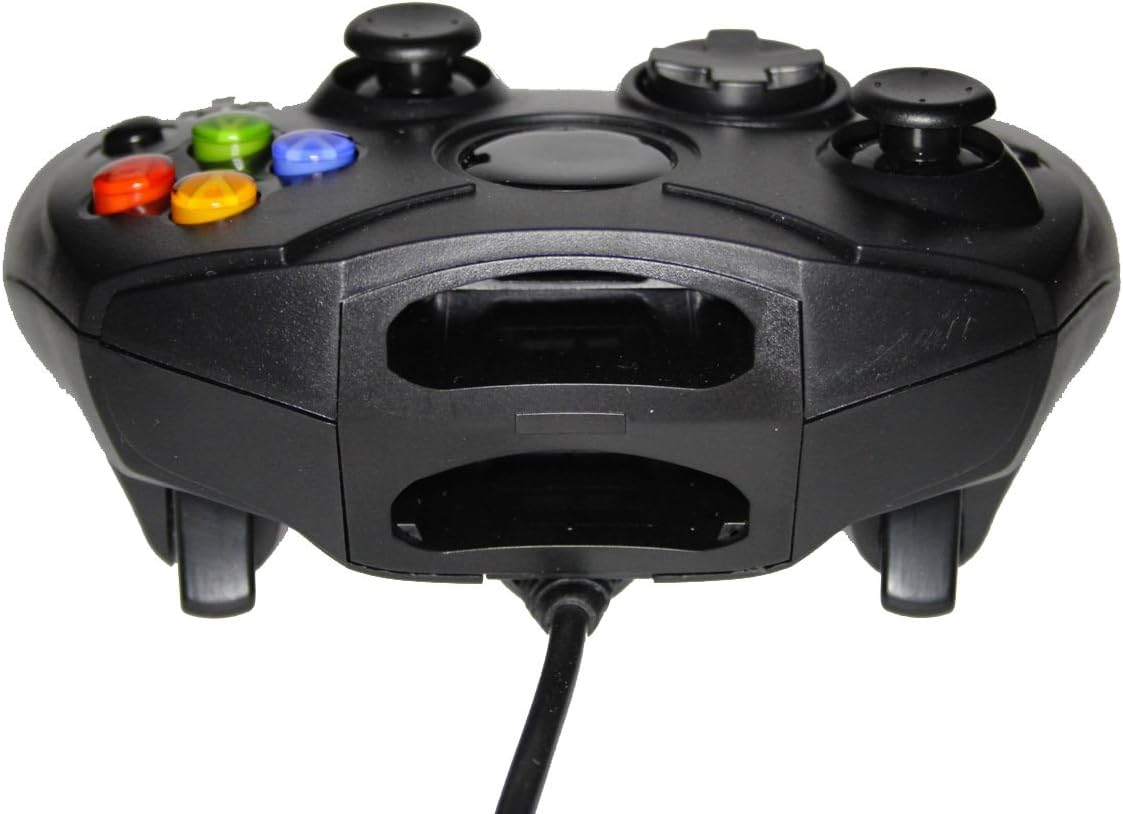
Abbildung 1: Vorderseite view of the controller, highlighting the proprietary Xbox connector and memory card slots.
Bedienung Ihres Controllers
The Mars Replacement Controller features the standard button layout for the Original Xbox, providing intuitive control for your games.

Abbildung 2: Oben view of the controller, displaying the button layout.
Tastenfunktionen:
- A-, B-, X-, Y-Tasten: Primary action buttons, typically used for jumping, attacking, interacting, or confirming selections.
- D-Pad (Richtungspad): Used for precise directional input, menu navigation, or specific in-game actions.
- Linker und rechter Analogstick: Provide 360-degree movement and camera control. Pressing them down often activates additional functions (L3/R3).
- Black and White Buttons: Auxiliary action buttons, often used for secondary actions or specific game mechanics.
- Start-Taste: Typically used to pause games, access in-game menus, or confirm selections.
- Zurück-Schaltfläche: Often used to access maps, inventories, or return to previous menus.
- Left and Right Triggers: Analog triggers on the underside of the controller, commonly used for acceleration, braking, or firing weapons.
Specific button assignments may vary depending on the game. Refer to your game's instruction manual for detailed control schemes.
Pflege und Wartung
To ensure the longevity and optimal performance of your Mars Replacement Controller, follow these care guidelines:
- Reinigung: Wischen Sie den Controller regelmäßig mit einem weichen, trockenen Tuch ab. Bei hartnäckigem Schmutz leicht andrücken.ampen the cloth with water or a mild, non-abrasive cleaner. Avoid excessive moisture, especially near buttons and ports.
- Lagerung: Store the controller in a clean, dry place away from direct sunlight, extreme temperatures, and excessive dust. Avoid wrapping the cable too tightly around the controller to prevent damage.
- Handhabung: Lassen Sie den Controller nicht fallen und setzen Sie ihn keinen starken Stößen aus. Ziehen Sie beim Trennen des Kabels von der Konsole nicht ruckartig daran; fassen Sie immer den Stecker selbst an.
- Flüssigkeitsexposition: Keep the controller away from liquids. Spills can cause internal damage and void any potential warranty.
Fehlerbehebung
Sollten Sie Probleme mit Ihrem Controller haben, beachten Sie bitte die folgenden häufig auftretenden Probleme und Lösungen:
| Problem | Mögliche Lösung |
|---|---|
| Controller antwortet nicht. |
|
| Buttons or joysticks are unresponsive or sticky. |
|
| Controller disconnects intermittently. |
|
Wenn das Problem nach dem Ausprobieren dieser Lösungen weiterhin besteht, wenden Sie sich bitte an den Kundensupport.
Technische Spezifikationen
| Besonderheit | Detail |
|---|---|
| Technische Daten | 7 x 5.6 x 2.4 Zoll |
| Artikelgewicht | 3.99 Unzen |
| Kompatible Geräte | Original Xbox Console |
| Controllertyp | Gamepad |
| Konnektivität | Wired (Proprietary Xbox Connector) |
| Farbe | Schwarz |
| Hersteller | Mars Devices |
Garantieinformationen
This Mars Replacement Controller is covered by a manufacturer's warranty. For specific details regarding warranty duration, coverage, and claims procedures, please refer to the official Mars Devices webBesuchen Sie die Website oder kontaktieren Sie direkt den Kundendienst. Bewahren Sie Ihren Kaufbeleg zur Überprüfung der Garantie auf.
Kundenservice
For further assistance, technical support, or inquiries regarding your Mars Replacement Controller, please contact Mars Devices customer support. Contact information can typically be found on the product packaging or the official Mars Devices webWebsite.
Online-Ressourcen: Mars Devices Store on Amazon


