1. Einleitung
The Brydge 7.9 Keyboard is designed to enhance the functionality of your iPad Mini (2019) or iPad Mini 4, transforming it into a versatile laptop-like device. This keyboard features a full QWERTY layout with backlit keys and dedicated iOS function keys, providing a comfortable and efficient typing experience. Constructed from 100% high-grade aluminum, it offers durability and a premium aesthetic that complements your iPad.
The patented hinges allow for a 180-degree viewing angle, securing your iPad in various positions. The keyboard connects wirelessly via Bluetooth and can be easily detached when not needed. Its slim and lightweight design ensures portability without compromising on build quality.

This manual provides detailed instructions for setting up, operating, and maintaining your Brydge 7.9 Keyboard.
2. Sicherheitshinweise
- Setzen Sie die Tastatur keinen Flüssigkeiten oder extremen Temperaturen aus.
- Avoid dropping or subjecting the keyboard to severe impacts.
- Außerhalb der Reichweite von Kindern aufbewahren.
- Verwenden Sie ausschließlich das mitgelieferte Ladekabel oder ein zertifiziertes gleichwertiges Kabel.
- Do not attempt to disassemble or repair the keyboard yourself. This may void the warranty.
3. Lieferumfang
- Brydge 7.9 Keyboard
- USB-Ladekabel
- Benutzerhandbuch (dieses Dokument)
4. Einrichtung
4.1 Anschließen Ihres iPads
- Ensure your iPad Mini (2019) or iPad Mini 4 is clean and free of debris.
- Gently align the iPad with the hinges of the Brydge keyboard.
- Carefully slide the iPad into the hinges until it is securely seated. The hinges are designed to hold the iPad firmly.

4.2 Aufladen der Tastatur
Before initial use, fully charge your Brydge keyboard. Connect the provided USB charging cable to the charging port on the keyboard and the other end to a USB power adapter (not included) or a computer's USB port. The charging indicator light will show the charging status.
4.3 Bluetooth-Kopplung
- Turn on the Brydge keyboard by pressing the power button.
- Gehen Sie auf Ihrem iPad zu Einstellungen > Bluetooth.
- Stellen Sie sicher, dass Bluetooth auf Ihrem iPad aktiviert ist.
- On the Brydge keyboard, press and hold the Bluetooth key (often indicated by a Bluetooth symbol) for a few seconds until the Bluetooth indicator light flashes.
- On your iPad, select 'Brydge Keyboard' from the list of available devices.
- Follow any on-screen prompts to complete the pairing process. The indicator light on the keyboard will turn solid to confirm a successful connection.
5. Bedienung der Tastatur
5.1 General Typing
The Brydge 7.9 Keyboard provides a full QWERTY layout for comfortable and efficient typing. Keys offer a responsive tactile feedback.
5.2 Hintergrundbeleuchtete Tasten
The keyboard features backlit keys with three adjustable brightness levels. To adjust the backlight, press the dedicated backlight key (often indicated by a sun or light bulb icon) repeatedly to cycle through the brightness settings or turn the backlight off.
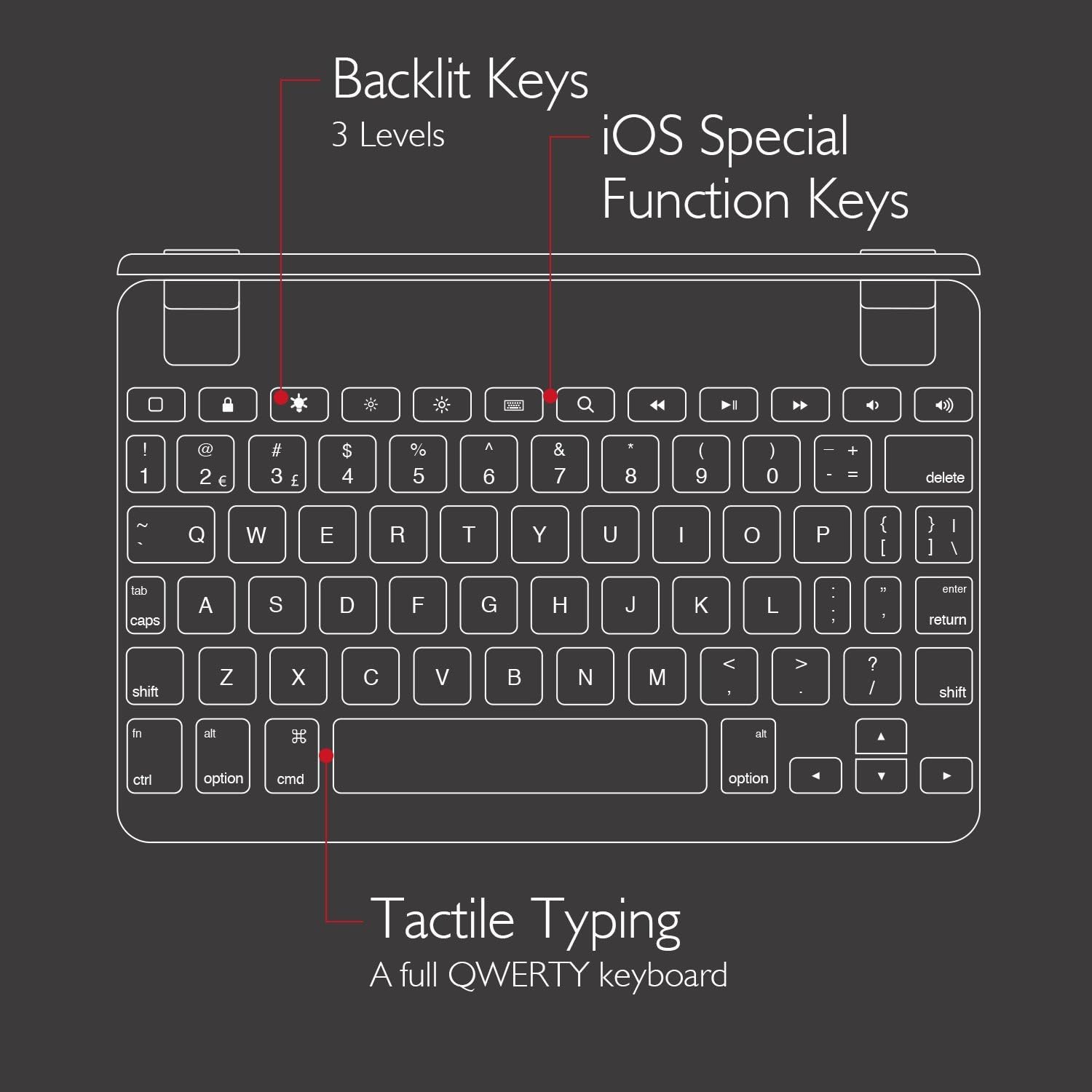
5.3 iOS Special Function Keys
The top row of the keyboard includes dedicated iOS special function keys for quick access to common iPad features, such as:
- Startbildschirm
- Einstellung der Bildschirmhelligkeit
- Suche
- Media playback controls (play/pause, next/previous track)
- Lautstärkeregelung
- Bildschirm sperren

5.4 180-Grad Viewing and Detachable Design
The keyboard's patented hinges allow the iPad to rotate up to 180 degrees, offering various viewing angles for typing, watching media, or presenting. The iPad can also be easily removed from the hinges if you prefer to use it as a standalone tablet.

6. Wartung
6.1 Reinigung
- Zum Reinigen der Tastatur verwenden Sie ein weiches, fusselfreies Tuch.
- Bei hartnäckigen Flecken leicht dampReinigen Sie das Tuch mit Wasser oder einem milden, nicht scheuernden Reinigungsmittel.
- Avoid spraying cleaners directly onto the keyboard.
- Ensure the keyboard is completely dry before use or charging.
6.2 Speicherung
When not in use, store the keyboard in a cool, dry place away from direct sunlight and extreme temperatures. If storing for an extended period, ensure the keyboard has a partial charge (around 50%) to preserve battery health.
7. Fehlerbehebung
7.1 Tastatur verbindet sich nicht über Bluetooth
- Stellen Sie sicher, dass die Tastatur eingeschaltet und vollständig aufgeladen ist.
- Vergewissern Sie sich, dass Bluetooth auf Ihrem iPad aktiviert ist.
- Versuchen Sie, die Tastatur über die Bluetooth-Einstellungen Ihres iPads zu entkoppeln und anschließend erneut zu koppeln.
- Restart both your iPad and the Brydge keyboard.
- Move the keyboard closer to your iPad to rule out interference.
7.2 Tasten reagieren nicht
- Prüfen Sie, ob die Tastatur ordnungsgemäß über Bluetooth verbunden ist.
- Stellen Sie sicher, dass die Tastatur aufgeladen ist.
- If specific keys are not working, try cleaning around the keys to remove any debris.
- Perform a hard reset on the keyboard (refer to manufacturer's website for specific instructions if needed, as this model may not have a dedicated reset button).
7.3 Hintergrundbeleuchtung funktioniert nicht
- Ensure the keyboard is sufficiently charged, as low battery can disable backlighting.
- Drücken Sie die Hintergrundbeleuchtungstaste, um durch die Helligkeitsstufen zu schalten.
8. Spezifikationen
| Marke | Brydge |
| Modellnummer | Bry5103. |
| Kompatible Geräte | iPad Mini (2019), iPad Mini 4 |
| Konnektivitätstechnologie | Bluetooth |
| Tastaturbeschreibung | Kabellos |
| Besondere Merkmale | Backlit, Rechargeable, 180-degree rotating hinges, Detachable |
| Material | 100% High-Grade Aluminum |
| Farbe | Gold (as per product listing, other colors may vary) |
| Artikelgewicht | Ungefähr 11 Unzen (312 Gramm) |
| Produktabmessungen (L x B x H) | 7.9 x 5.3 x 0.3 Zoll (20.07 x 13.46 x 0.76 cm) |
| Stromquelle | Batteriebetrieben (1 Lithium-Ionen-Akku im Lieferumfang enthalten) |

9. Garantie und Support
9.1 Garantieinformationen
Specific warranty details for your Brydge 7.9 Keyboard may vary by region and retailer. Please refer to the warranty card included with your product or visit the official Brydge webDie aktuellsten Garantieinformationen finden Sie auf unserer Website.
9.2 Kundendienst
For technical assistance, troubleshooting, or general inquiries, please contact Brydge customer support through their official website. You may also find additional resources, FAQs, and support articles online.


