1. Einleitung
This instruction manual provides detailed guidance for the safe and efficient installation, operation, and maintenance of your Chamberlain T1EML-05 Basic Timer. Please read this manual thoroughly before attempting to install or use the device. Retain this manual for future reference.
The Chamberlain T1EML-05 is an embedded timer designed for various electrical applications, offering reliable time-based control for your devices.
2. Wichtige Sicherheitshinweise
WARNUNG: Stromschlaggefahr!
- Always disconnect power at the circuit breaker or fuse box before installing or servicing the timer.
- Installation should only be performed by a qualified electrician or competent person in accordance with all local electrical codes and regulations.
- Do not use this device with loads exceeding its specified electrical ratings.
- Do not expose the timer to water or extreme moisture.
- Stellen Sie sicher, dass alle Kabelverbindungen sicher und ordnungsgemäß isoliert sind.
3. Packungsinhalt und Produktübersichtview
3.1 Packungsinhalt
- 1 x Chamberlain T1EML-05 Basic Timer
- Bedienungsanleitung (dieses Dokument)
3.2 Produktüberschussview
The Chamberlain T1EML-05 is a compact, embedded timer designed for flush-mounting. It features a digital display and three control buttons for easy programming.

Abbildung 1: Front view of the Chamberlain T1EML-05 Basic Timer. This image displays the timer's white casing, a central square digital screen, and three rectangular buttons positioned horizontally below the screen. The buttons appear to have symbols for 'Up', 'Mode/Select', and 'Down'.
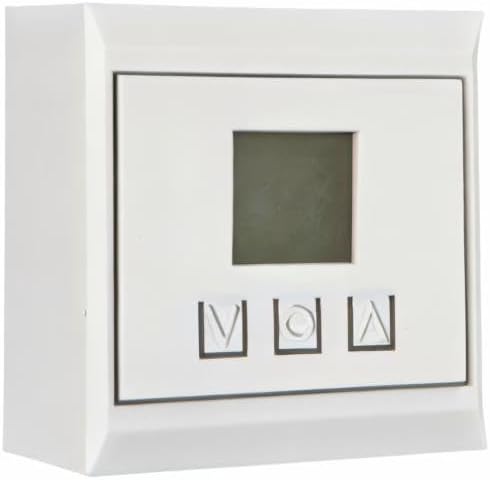
Abbildung 2: Seitenansicht view of the Chamberlain T1EML-05 Basic Timer. This image illustrates the depth of the timer unit, highlighting its design for embedded or flush installation within a wall or panel. The front face with the display and buttons is visible from an angle.
4. Installation und Einrichtung
This timer is designed for embedded installation. Ensure you have the necessary tools and electrical knowledge before proceeding. If unsure, consult a qualified electrician.
4.1 Erforderliches Werkzeug
- Schraubendreher (geeigneter Typ für Klemmschrauben)
- Abisolierzange
- Bandtagder tester
- Mounting box (if not already present)
4.2 Installationsschritte
- Stromabschaltung: Locate the circuit breaker or fuse controlling the power to the installation area and turn it OFF. Verify power is off using a voltage Tester.
- Verkabelung vorbereiten: Carefully remove the existing switch or outlet, if applicable. Strip the ends of the electrical wires (Live, Neutral, Load) to the appropriate length as indicated by the timer's terminals.
- Kabel anschließen: Connect the electrical wires to the corresponding terminals on the Chamberlain T1EML-05 timer. Refer to the wiring diagram provided with the product packaging (if available) or standard electrical wiring practices. Typically:
- Live (L) to Live input
- Neutral (N) to Neutral input
- Load (OUT) to the device being controlled
- Zeitschaltuhr montieren: Gently push the wired timer into the wall mounting box. Secure it with screws provided (if applicable) or by tightening the mounting clamps.
- Faceplate installieren: Attach the decorative faceplate (if separate) to the timer.
- Strom wiederherstellen: Schalten Sie die Stromzufuhr am Sicherungsautomaten oder Sicherungskasten wieder ein.
- Erster Test: The timer display should illuminate. Proceed to the operating instructions.
5. Bedienungsanleitung
The Chamberlain T1EML-05 timer features a digital display and three control buttons: Up (▲), Mode/Set (M), and Down (▼).
5.1 Einstellen der aktuellen Uhrzeit
- Halten Sie die Mode/Set (M) button for approximately 3 seconds until the time display starts flashing.
- Verwenden Sie die Nach oben (▲) or Runter (▼) Tasten zum Einstellen der Stunde.
- Drücken Sie die Mode/Set (M) button again to move to the minutes setting. Use Nach oben (▲) or Runter (▼) um die Minuten einzustellen.
- Drücken Mode/Set (M) once more to confirm and exit the time setting mode.
5.2 Programmierung von Ein-/Ausschaltzyklen
The timer allows you to set multiple ON/OFF programs. The exact number of programs may vary, but the general procedure is as follows:
- Drücken Sie die Mode/Set (M) button briefly to cycle through program settings (e.g., P1 ON, P1 OFF, P2 ON, P2 OFF, etc.).
- When you reach the desired program (e.g., "P1 ON"), the time will flash. Use the Nach oben (▲) or Runter (▼) buttons to set the desired ON time (hour and then minutes).
- Drücken Mode/Set (M) to confirm the ON time and move to the OFF time for that program (e.g., "P1 OFF").
- Verwenden Sie die Nach oben (▲) or Runter (▼) Tasten zum Einstellen der gewünschten Ausschaltzeit.
- Wiederholen Sie den Vorgang bei Bedarf für weitere Programme.
- After setting all programs, press the Mode/Set (M) Drücken Sie die Taste so lange, bis die Anzeige wieder die aktuelle Uhrzeit anzeigt.
5.3 Manuelle Übersteuerung
To manually switch the connected device ON or OFF outside of the programmed schedule, briefly press the Nach oben (▲) or Runter (▼) button while the timer is displaying the current time. This will typically cycle through ON, OFF, and AUTO modes. Select AUTO for programmed operation.
6. Wartung
The Chamberlain T1EML-05 Basic Timer requires minimal maintenance.
- Reinigung: Wipe the surface of the timer with a soft, dry cloth. Do not use abrasive cleaners, solvents, or excessive moisture, as these can damage the unit.
- Inspektion: Periodically check the timer for any visible damage or loose connections. If any issues are found, disconnect power and consult a qualified electrician.
7. Fehlerbehebung
If you encounter issues with your Chamberlain T1EML-05 timer, refer to the following common problems and solutions:
| Problem | Mögliche Ursache | Lösung |
|---|---|---|
| Die Timeranzeige ist leer. | Keine Stromversorgung. | Check circuit breaker/fuse. Ensure wiring connections are secure. |
| Das angeschlossene Gerät schaltet sich nicht wie programmiert ein/aus. | Incorrect program settings; Timer in manual mode; Wiring issue. | Verify program times. Ensure timer is in AUTO mode. Check load wiring. |
| Tasten reagieren nicht. | Vorübergehender Softwarefehler; Physischer Schaden. | Try cycling power to the timer (turn off/on at breaker). If issue persists, contact support. |
| Die Zeit ist ungenau. | Die Anfangszeit wurde nicht korrekt eingestellt. | Re-set the current time as per Section 5.1. |
If the problem persists after attempting these solutions, please contact Chamberlain customer support.
8. Technische Daten
| Besonderheit | Detail |
|---|---|
| Marke | Kammerherr |
| Modellnummer | T1EML-05 |
| Farbe | Weiß |
| Material | Plastik |
| Produktabmessungen (L x B x H) | 19.5 x 8.5 x 8 cm |
| Artikelgewicht | 12 g |
| Anzahl der Einstellungen | 14 (as per product specifications, likely referring to program slots) |
| International Article Number (EAN/UPC) | 04014243213833 |
| Ursprungsland | Deutschland |
9. Garantieinformationen
Chamberlain products are manufactured to high-quality standards. This product is covered by a limited warranty against defects in materials and workmanship. The specific terms and duration of your warranty may vary by region and purchase date. Please retain your proof of purchase for warranty claims. For detailed warranty information, refer to the documentation included with your product or visit the official Chamberlain webWebsite.
10. Kundendienst
If you have any questions, require technical assistance, or need to report a problem with your Chamberlain T1EML-05 Basic Timer, please contact Chamberlain customer support.
- Online-Hilfe: Visit the official Chamberlain webWebsite mit häufig gestellten Fragen, Hilfestellungen und Kontaktformularen.
- Telefonische Betreuung: Refer to your product packaging or the Chamberlain webWebsite für regionale Kontaktnummern.
When contacting support, please have your product model number (T1EML-05) and proof of purchase readily available.


