Einführung
This manual provides comprehensive instructions for the safe and proper installation, operation, and maintenance of your Vogel's MA4000 Flat Screen Wall Mount. Please read all instructions carefully before installation and retain this manual for future reference.
The Vogel's MA4000 is designed to securely mount flat screen televisions ranging from 40 to 80 inches (102-203 cm) with a maximum weight capacity of 80 kg (176 lbs). It features a slim profile and a tilt function to optimize viewWinkel anpassen und Blendung reduzieren.
Sicherheitshinweise
WARNUNG:
- Stellen Sie sicher, dass die Montagefläche das Gesamtgewicht der Halterung und des Fernsehers sicher tragen kann.
- Verwenden Sie stets geeignetes Werkzeug und befolgen Sie alle Installationsschritte genau.
- Die maximale Tragfähigkeit von 80 kg (176 lbs) darf nicht überschritten werden.
- Verify VESA compatibility with your television before installation.
- Wenn Sie sich bei irgendeinem Teil der Installation unsicher sind, konsultieren Sie einen qualifizierten Fachmann.
Packungsinhalt
Before beginning installation, please verify that all components are present and undamaged. Refer to the included parts list in your product packaging for a complete inventory.

Bildbeschreibung: Ein Overhead view of the Vogel's MA4000 Flat Screen Wall Mount, showing the main wall plate and the two vertical TV brackets. The mount is black and designed for flat panel televisions.
The image above displays the primary components of the Vogel's MA4000 wall mount: the wall plate and the two TV interface bars. Additional hardware such as screws, washers, and spacers are included in the retail package.
Technische Daten
| Modellnummer | MA4000 (8554000) |
| Marke | Vogel's |
| Montagetyp | Flat, Tilting |
| Material | Edelstahl |
| Farbe | Schwarz |
| Kompatible TV-Größen | 40 - 80 Zoll (102 - 203 cm) |
| Maximale Gewichtskapazität | 80 kg |
| VESA-Kompatibilität | Min 100x100 mm, Max 600x400 mm |
| Maximaler Neigungswinkel | 12 Grad |
| Wandabstand | Ungefähr 30 mm (1.2 Zoll) |
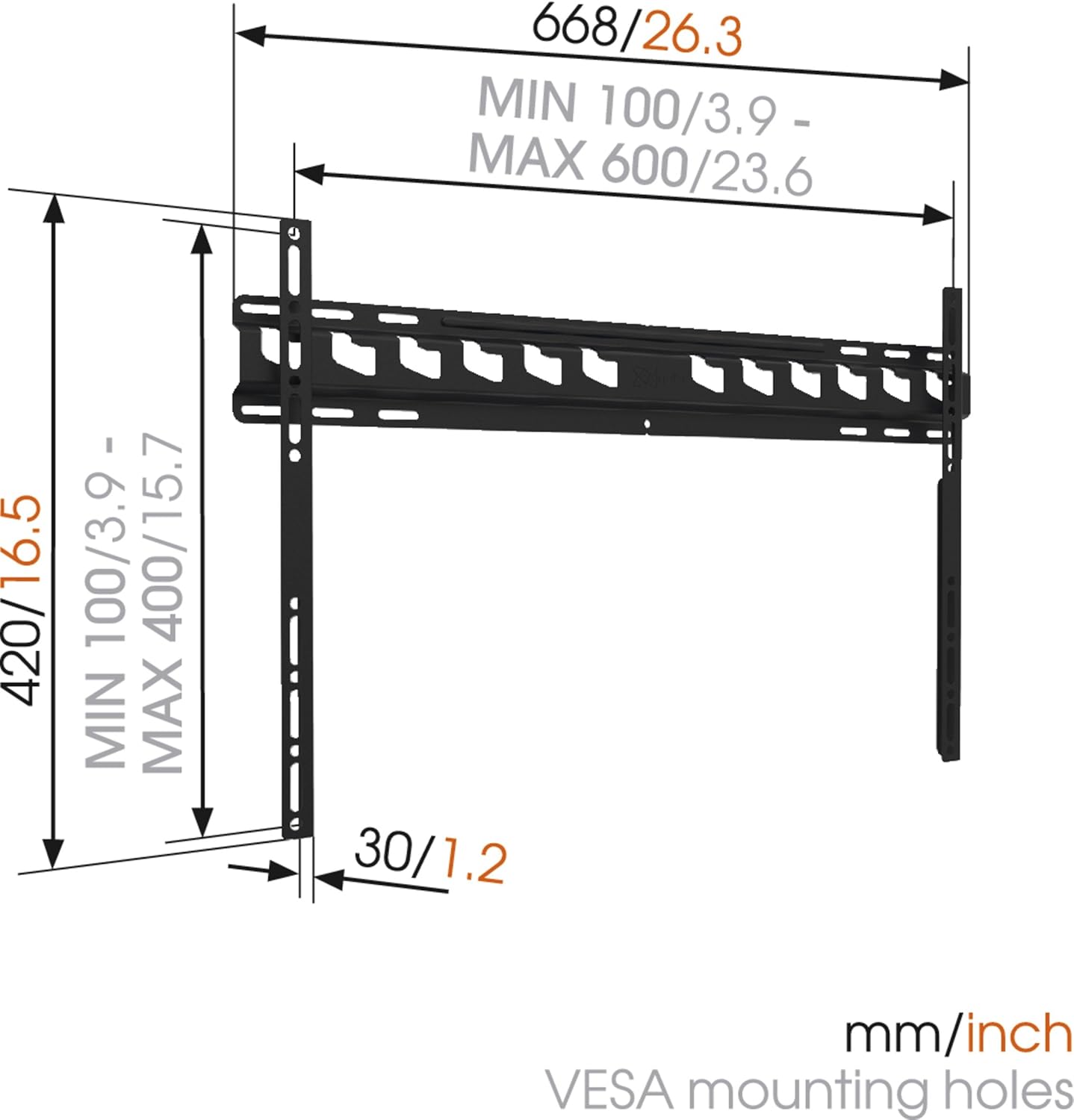
Bildbeschreibung: A technical diagram illustrating the dimensions of the Vogel's MA4000 wall mount. It shows the overall width (668mm / 26.3 inches), height (420mm / 16.5 inches), and the minimum and maximum VESA mounting hole patterns (100-600mm horizontally, 100-400mm vertically). The distance from the wall is indicated as 30mm (1.2 inches).
Setup und Installation
This section outlines the general steps for installing your Vogel's MA4000 wall mount. Always refer to the detailed graphical instructions included with your product for specific drilling templates and hardware usage.
Erforderliche Werkzeuge (nicht im Lieferumfang enthalten):
- Bohren
- Drill bits appropriate for your wall type (wood, concrete, brick, etc.)
- Balkensucher (für Holzständerwände)
- Ebene
- Bleistift
- Maßband
- Schraubendreher oder Schraubenschlüssel
Installationsschritte:
- Montageort bestimmen: Choose a suitable location on your wall, ensuring it is structurally sound and free from electrical wires or plumbing. Use a stud finder if mounting to wood studs.
- Bohrlöcher markieren: Hold the wall plate against the wall at the desired height and use a level to ensure it is straight. Mark the drilling holes with a pencil.
- Bohrlöcher: Drill pilot holes according to the marked positions and your wall type. Insert wall anchors if required.
- Wandplatte anbringen: Befestigen Sie die Wandplatte mit den mitgelieferten Schrauben und Unterlegscheiben an der Wand. Achten Sie darauf, dass sie fest sitzt und waagerecht ist.
- Befestigen Sie die TV-Halterungen am Fernseher: Attach the two vertical TV interface bars to the back of your television using the appropriate screws, washers, and spacers from the hardware kit. Ensure the brackets are centered and securely fastened to the VESA mounting points.
- Fernseher an der Wandplatte befestigen: Carefully lift the television and hook the TV brackets onto the wall plate. Ensure both brackets are properly seated.
- Sicheres Fernsehen: Engage the safety locking mechanism (if applicable) to prevent the TV from accidentally dislodging from the wall plate.

Bildbeschreibung: Ein Seitenprofifile view of a flat screen television mounted flush against a white wall, demonstrating the slim design and minimal wall distance achieved with the Vogel's MA4000 wall mount. The mount itself is barely visible behind the television.
Operating Instructions (Tilting Function)
The Vogel's MA4000 wall mount allows for a slight tilt to optimize your viewing experience and reduce glare.
- Neigung einstellen: Gently push or pull the bottom edge of the television to achieve the desired tilt angle. The mount supports a maximum tilt of 12 degrees.
- Securing Tilt: Some models may have a locking mechanism for the tilt. Refer to your product's specific instructions for details on securing the tilt position if available.
Wartung
The Vogel's MA4000 wall mount requires minimal maintenance to ensure long-term performance and safety.
- Regelmäßige Inspektion: Überprüfen Sie regelmäßig alle Schrauben und Verbindungen, um sicherzustellen, dass sie fest sitzen. Ziehen Sie sie gegebenenfalls nach.
- Reinigung: Reinigen Sie die Halterung mit einem weichen, trockenen Tuch. Vermeiden Sie scheuernde Reiniger oder Lösungsmittel, die die Oberfläche beschädigen könnten.
- Gewichtsbeschränkung: Die maximale Tragfähigkeit von 80 kg (176 lbs) darf niemals überschritten werden.
Fehlerbehebung
| Problem | Mögliche Ursache | Lösung |
|---|---|---|
| Der Fernseher hängt nach der Montage nicht waagerecht. | Wall plate was not installed level. | Remove TV, adjust wall plate, and remount. Ensure a level is used during installation. |
| Der Fernseher sitzt wackelig auf der Halterung. | Screws are loose; TV not properly seated; safety lock not engaged. | Ensure all screws are tightened. Verify TV brackets are fully engaged with the wall plate. Engage safety lock. Do not exceed weight capacity. |
| Cannot achieve desired tilt angle. | Obstruction; maximum tilt angle reached. | Check for cables or other obstructions. The mount has a maximum tilt of 12 degrees. |
Garantie und Support
For warranty information and customer support, please refer to the documentation included with your product or visit the official Vogel's webBewahren Sie Ihren Kaufbeleg für Garantieansprüche auf.
Vogel's Official WebWebsite: www.vogels.com


