1. Einleitung
This manual provides detailed instructions for the setup, operation, and maintenance of your Enover TS18 7-Day Programmable Digital Timer. This device is designed to automate the control of electrical appliances by setting specific ON/OFF times throughout the week, offering convenience and energy management.
2. Produktmerkmale
- Flexible Arbeitszeiten: Program up to 10 distinct ON/OFF cycles within a 7-day period. Each program repeats weekly.
- Energiemanagement: Automatically controls lamps, holiday lights, humidifiers, and other electrical devices. Includes a feature to protect devices from overcharge.
- Sicherheitsfunktion: Features a random ON/OFF option to vary lighting times, simulating occupancy when away from home.
- Benutzerfreundliche Oberfläche: Equipped with a large LCD display for clear visibility and a manual override switch for immediate control adjustments.
- Batterie-Backup: An integrated battery retains programmed settings during power outagDadurch entfällt die Notwendigkeit einer Neuprogrammierung.

Image: Enover TS18 Digital Timer highlighting key features for easy home automation.
3. Packungsinhalt
Das Paket enthält die folgenden Artikel:
- 1 x Enover Digital Timer Switch (Model TS18)
- 1 x Benutzerhandbuch

Image: Contents of the Enover TS18 Digital Timer package, including the timer and manual.
4. Produktüberschreitungview
The Enover TS18 Digital Timer features a clear LCD display and intuitive buttons for easy programming. It plugs directly into a standard electrical outlet.

Bild: Vorderseite view of the Enover TS18 Digital Timer, displaying the time and control buttons.
Tastenfunktionen:
- WOCHE: Sets the day(s) for programs.
- STUNDE: Passt die Stunde an die Zeit- und Programmeinstellungen an.
- MINUTE: Passt die Minute an die Zeit- und Programmeinstellungen an.
- RES/RCL: Setzt Einstellungen zurück oder ruft sie ab.
- UHR: Wechselt in den oder aus dem Uhreinstellungsmodus.
- TIMER: Cycles through program settings (P1 ON, P1 OFF, P2 ON, etc.).
- EIN/AUTO/AUS: Selects operating mode (Always ON, Automatic, Always OFF).
- ZUFÄLLIG: Aktiviert oder deaktiviert die zufällige EIN/AUS-Funktion.
- ZURÜCKSETZEN: Small button (requires a pointed object) to clear all settings and reset the device.
Video: A brief demonstration of the Enover Digital Timer's basic functions and display.
5. Einrichtung
5.1 Erstgebühr
Before first use, plug the timer into an electrical outlet for approximately 5-10 minutes to charge the internal battery. This ensures the display is active and settings can be retained.
5.2 Einstellen der aktuellen Uhrzeit und des Tages
- Halten Sie die UHR Taste.
- Halten Sie UHR, drücken Sie die WOCHE Durch wiederholtes Drücken der Taste wird der aktuelle Wochentag eingestellt.
- Halten Sie UHR, drücken Sie die STUNDE button repeatedly to set the current hour (AM/PM will display).
- Halten Sie UHR, drücken Sie die MINUTE Durch wiederholtes Drücken der Taste wird die aktuelle Minute eingestellt.
- Lassen Sie den UHR Schaltfläche, um die Einstellungen zu speichern.
6. Bedienungsanleitung
6.1 Programmierung von Ein-/Ausschaltzyklen
Der Timer ermöglicht bis zu 10 Ein-/Ausschaltprogramme. Gehen Sie wie folgt vor, um ein Programm einzustellen:
- Drücken Sie die TIMER Drücken Sie die Taste einmal. Im Display erscheint „1 EIN“.
- Drücken WOCHE to select the day(s) for this program (e.g., MO, TU, WE, TH, FR, SA, SU, MO TU WE TH FR, SA SU, MO TU WE TH FR SA SU, etc.).
- Drücken STUNDE um die gewünschte Einschaltzeit einzustellen.
- Drücken MINUTE die gewünschte Einschaltzeit einstellen.
- Drücken Sie die TIMER Drücken Sie erneut. Im Display erscheint die Meldung „1 AUS“.
- Repeat steps 2-4 to set the desired OFF time for Program 1. Ensure the correct day(s) are selected for the OFF time.
- Drücken Sie weiter TIMER to cycle through and set additional programs (2 ON, 2 OFF, up to 10 ON, 10 OFF).
- Nachdem Sie alle gewünschten Programme eingestellt haben, drücken Sie die Taste UHR Taste zum Zurückkehren zur aktuellen Zeitanzeige.
- Stellen Sie sicher, dass der Timer eingeschaltet ist. AUTO mode for programs to execute. Press EIN/AUTO/AUS zum Radfahren AUTO.
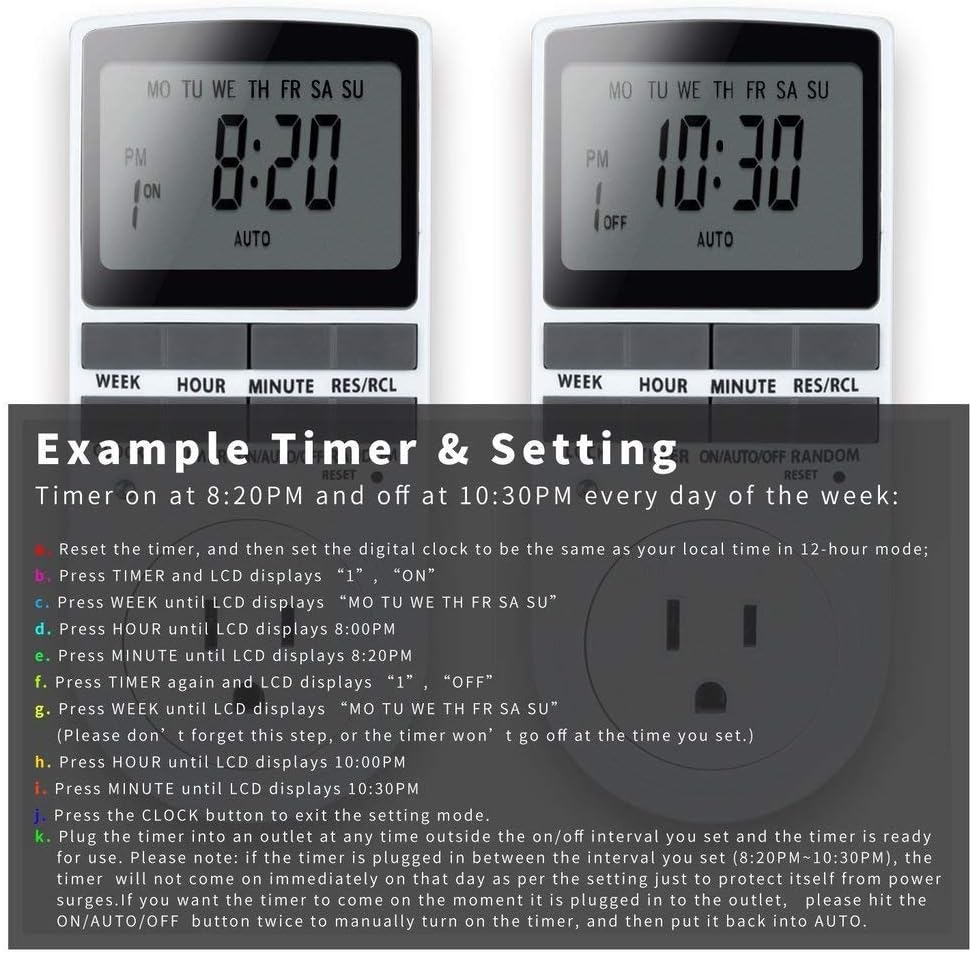
Image: Visual guide for setting an example timer program (ON at 8:20 PM, OFF at 10:30 PM daily).
6.2 Random Function (Anti-theft)
To activate the random ON/OFF feature:
- Drücken Sie die ZUFÄLLIG button. The word "RANDOM" will appear on the display.
- In random mode, the timer will turn ON and OFF at varying times within a set period, typically around the programmed ON/OFF times, to simulate occupancy.
- Zum Deaktivieren drücken Sie die Taste ZUFÄLLIG erneut die Taste.

Image: The anti-theft random feature of the Enover TS18 Digital Timer, designed to deter intruders.
6.3 Manuelle Übersteuerung
To manually switch the timer's output without affecting programmed settings:
- Drücken Sie die EIN/AUTO/AUS Taste, um durch die Modi zu blättern: ON (immer eingeschaltet), AUTO (follows programs), AUS (immer ausgeschaltet).
- Select the desired temporary mode. The timer will revert to AUTO mode at the next programmed ON/OFF event.
Video: A detailed demonstration of setting programs and using the manual override function on the Enover Digital Timer.
7. Anwendungen
The Enover TS18 Digital Timer can be used to automate various household devices, enhancing convenience and energy efficiency.
- Coffee Makers: Program your coffee maker to start brewing before you wake up.
- Aquarium Lights/Pumps: Automate the lighting and filtration cycles for your aquarium.
- Indoor Grow Lights: Maintain consistent light schedules for plants.
- Weihnachtsdekorationen: Set festive lights to turn on and off automatically.
- Fans/Humidifiers: Control environmental devices to operate only when needed.

Bild: Examples of automating daily routines with the Enover TS18 Digital Timer, such as a coffee maker and aquarium.
8. Spezifikationen
| Modellnummer | TS18 |
| Marke | Enover |
| Farbe | Weiß |
| Material | Plastik |
| Anzahl der Einstellungen | 10 (EIN/AUS-Programme) |
| Bandtage | 120 Volt |
| Wastage | 1800 Watt |
| Amperage Kapazität | 15 Amps |
| Installationsmethode | Plug-in |
| Montagetyp | Steckhalterung |
| Plug-Format | B – US-Ausführung mit Erdungsstecker |
| Besondere Merkmale | 3-wire grounded plug and 3-prong grounded outlet |
| Verwendung | Nur für den Innenbereich geeignet. |
| Artikelgewicht | 6.4 Unzen |
| Verpackungsabmessungen | 5.67 x 3.31 x 2.6 Zoll |
| Batteriezellentyp | NiMH |
| Akkulaufzeit | 100 days (backup) |
9. Fehlerbehebung
- Timer schaltet sich nicht wie programmiert ein/aus:
- Stellen Sie sicher, dass der Timer eingeschaltet ist. AUTO Modus.
- Überprüfen Sie, ob die aktuelle Uhrzeit und der aktuelle Tag korrekt eingestellt sind.
- Check that the ON and OFF times for the specific program are correctly entered and assigned to the desired days.
- Confirm the appliance connected to the timer is switched ON.
- Bildschirm ist leer oder dunkel:
- Plug the timer into an active electrical outlet for 5-10 minutes to charge the internal battery.
- Alle Einstellungen gehen nach Stromausfall verlorentage:
- The internal battery may not be sufficiently charged. Ensure the timer is regularly plugged in to maintain battery charge.
- To clear all settings:
- Verwenden Sie einen spitzen Gegenstand (z. B. eine Stiftspitze), um zu drücken. ZURÜCKSETZEN button. This will clear all programs and reset the clock. You will need to re-enter all settings.
10. Garantie und Support
For warranty information or technical support, please refer to the contact details provided on the product packaging or the official Enover webWebsite. Bewahren Sie Ihren Kaufbeleg für Garantieansprüche auf.


