1. Einleitung
The LAUNCH X431 PRO3 V+ Elite is an advanced automotive diagnostic scan tool designed for comprehensive vehicle analysis and maintenance. This device offers a wide range of functionalities, including J2534 programming, topology mapping, online coding, and extensive service functions, catering to a broad spectrum of vehicle makes and models.
2. Lieferumfang
Verify that all components are present in your LAUNCH X431 PRO3 V+ Elite package:
- LAUNCH X431 PRO3 V+ Elite Host (Tablet)
- SMARTLINCK C Host
- CANFD Connector
- Kurzanleitung
- Bedienungsanleitung
- Aufbewahrungskoffer
- 2 Sets of Full Connectors (various OBD1/OBD2 adapters)

The LAUNCH X431 PRO3 V+ Elite diagnostic tablet and SmartLink C module, along with various connectors, neatly organized in its protective carrying case.
3. Einrichtung und Erstkonfiguration
Before using your LAUNCH X431 PRO3 V+ Elite, ensure the device is charged and properly connected to your vehicle. The device operates on Android 10.0 and features dual wireless connection modes (WiFi & Bluetooth) for flexible use.
3.1. Verbindung zum Fahrzeug herstellen
- Locate your vehicle's OBD-II port.
- Connect the SmartLink C Host to the OBD-II port.
- Ensure the LAUNCH X431 PRO3 V+ Elite tablet is powered on and connected to the SmartLink C via Bluetooth or WiFi.
- Turn the vehicle's ignition key to the ON position (engine off).
3.2. AutoAuth Account Setup for FCA Vehicles
For 2018 and newer FCA (Chrysler/Dodge/Fiat/Jeep) vehicles, an AutoAuth account is required to access secure gateway (SGW) functions. Follow the instructions in the video below to set up your AutoAuth account.
This video demonstrates the step-by-step process for setting up an AutoAuth account, which is necessary for performing diagnostics and programming on newer FCA vehicles using the LAUNCH X431 PRO3 V+ Elite.
4. Bedienungsanleitung
The LAUNCH X431 PRO3 V+ Elite offers a comprehensive suite of diagnostic and service functions. Navigate the intuitive Android 10.0 interface to access the desired features.
4.1. J2534 Programming
The J2534 pass-thru device allows for ECU programming, firmware upgrades, and new module replacement for various brands including Toyota, Honda, VW, BMW, Ford, GM, Chrysler, and Benz. This functionality helps expand your diagnostic capabilities to dealership-level procedures.
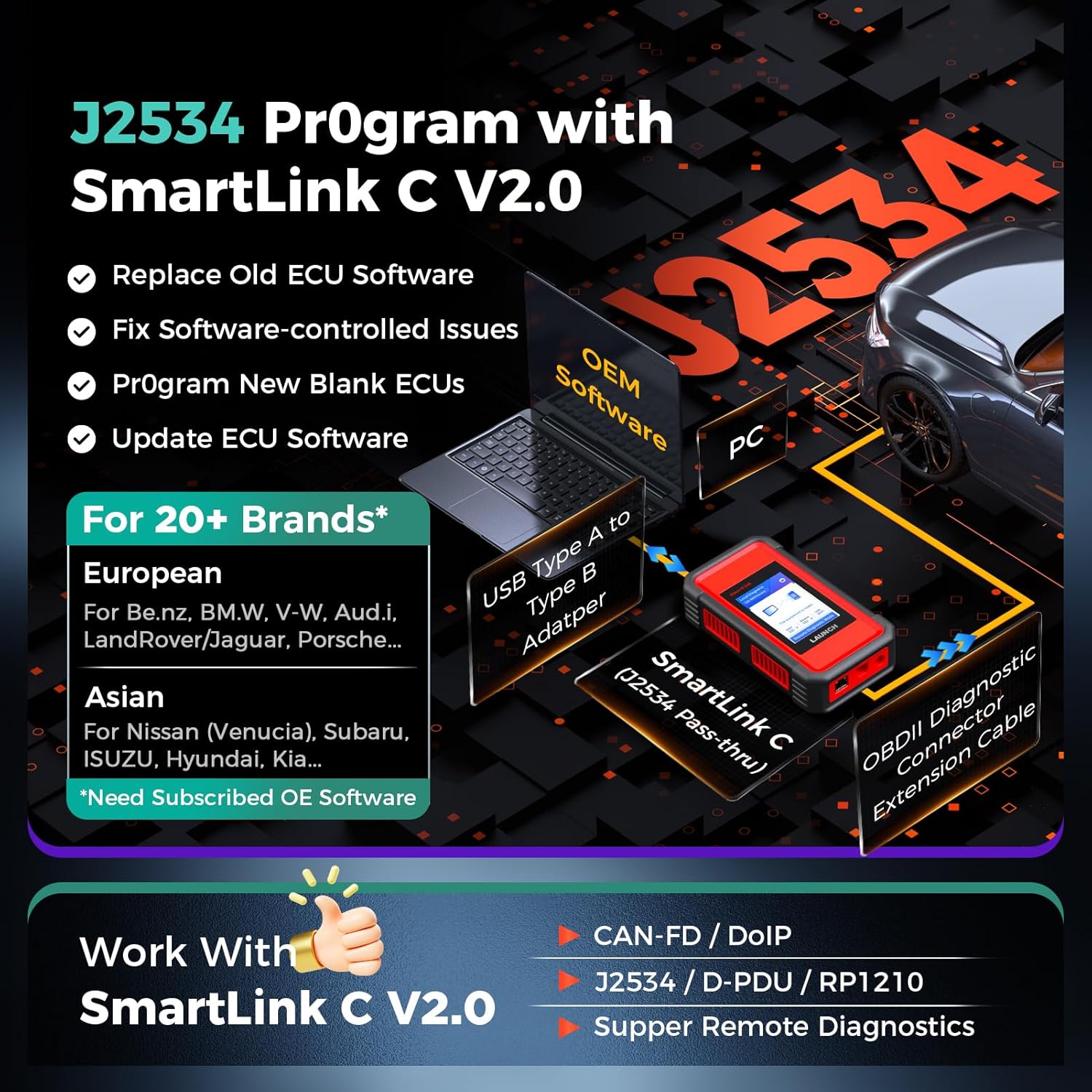
Illustration of the J2534 programming setup, connecting the SmartLink C module to a vehicle and a PC for OEM software access.
4.2. Topologieabbildung
The color-coded topology display provides an intuitive visual representation of the vehicle's electronic control units (ECUs) and their interconnections. This feature simplifies fault identification and helps understand the relationships between different vehicle systems.

A visual representation of a vehicle's ECU network, with color-coded modules indicating system status for quick fault analysis.
4.3. Online-Codierung des Steuergeräts
Perform advanced ECU coding functions such as resetting adaptive data for new components, enabling or disabling specific vehicle functions (e.g., beep sounds), and customizing original equipment (OE) settings. This tool supports online coding for a wide range of models.

A visual concept of ECU coding, showing the diagnostic tablet interacting with a vehicle's electronic control unit for programming and customization.
4.4. Service Functions and Active Tests
Access over 60 service functions, including ABS Bleeding, SAS Reset, Power Balance, and Throttle Matching. The device also supports over 3000 active tests, allowing for quick detection of issues by commanding actuators (e.g., A/C clutch, fuel pumps, windows) and observing their responses.

A collection of icons representing over 60 common service functions available on the diagnostic tool, such as Oil Reset, ABS Bleeding, and Throttle Adaptation.
4.5. Tastenprogrammierung
The LAUNCH X431 PRO3 V+ Elite supports key programming functions for various vehicle models. This typically involves adding new keys, deleting lost keys, or performing immobilizer resets. Specific procedures may vary by vehicle make and model.
This video demonstrates the key programming capabilities of the LAUNCH X431 V+ series, showcasing how to perform immobilizer functions and add new keys to a vehicle.
5. Wartung und Updates
To ensure optimal performance and access to the latest vehicle data, regular software updates are recommended. The device comes with 2 years of free software updates. After this period, previously updated software remains functional, but new updates will require a subscription.
Keep the device clean and store it in its protective case when not in use to prevent damage from dust and moisture.
6. Fehlerbehebung
Beachten Sie die folgenden häufig auftretenden Probleme und deren Lösungen:
- Registration Failure:
- Ensure the serial number and registration code are correctly entered.
- Überprüfen Sie die Netzwerkkonnektivität.
- If issues persist, contact support with the device's serial number (found on the back of the unit).
- Communication Error with Vehicle ECU:
- Check that the diagnostic connector is correctly and securely connected to the vehicle's OBD-II port.
- Confirm that the vehicle's ignition switch is in the ON position.
- If the problem continues, use the Diagnostic Feedback feature and provide the vehicle's year, make, model, and VIN number.
7. Spezifikationen
- Marke: START
- Modell: X431 PRO3 V+ ELITE
- Betriebssystem: Android 10.0
- Produktabmessungen: 17.3 Zoll L x 7 Zoll B x 14 Zoll H
- Artikelgewicht: 15 Pfund
- Batterien: 2 Lithium-Ionen-Batterien erforderlich
- Anzeige: 10.1-inch touchscreen with 1280x800 resolution
- Erinnerung: 4 GB RAM + 64 GB ROM
- Konnektivität: Dual Wireless Connection Modes (WiFi & Bluetooth)
- Fahrzeugabdeckung: 200+ car brands, including commercial and new energy vehicles
- Unterstützte Protokolle: J2534/D-PDU, CANFD/DoIP, FCA AutoAuth, VAG Guided Functions
8. Garantie und Support
The LAUNCH X431 PRO3 V+ Elite comes with 2 years of free software updates and lifetime technical support. After the initial 2-year period, previously updated software will remain functional, but new updates will require a separate purchase.
For any functional issues or technical assistance, please contact LAUNCH after-sales support at launch-aftersales@outlook.com or utilize the Diagnostic Feedback feature directly on the device.


