1. Einleitung
This manual provides essential instructions for the safe and efficient operation of your JVC LT-32EM75 32-inch 720p LED TV. Please read this manual thoroughly before using the television and retain it for future reference. Proper installation, setup, and maintenance are crucial for optimal performance and longevity of your device.
Wichtige Sicherheitsinformationen
- Blockieren Sie keine Lüftungsöffnungen. Sorgen Sie für ausreichend Platz um den Fernseher herum, um eine gute Luftzirkulation zu gewährleisten.
- Stellen Sie den Fernseher nicht in der Nähe von Wärmequellen wie Heizkörpern, Heizlüftern, Öfen oder anderen Geräten (einschließlich) auf. ampKonverter (Lüfter), die Wärme erzeugen.
- Schützen Sie das Netzkabel vor Beschädigungen oder Beschädigungen durch Fußgänger, insbesondere an den Steckern, Steckdosen und an der Stelle, an der es aus dem Gerät austritt.
- Verwenden Sie nur vom Hersteller angegebene Zusatzgeräte/Zubehör.
- Bei Gewitter oder längerer Nichtbenutzung des Geräts den Stecker ziehen.
- Überlassen Sie alle Wartungsarbeiten qualifiziertem Servicepersonal. Eine Wartung ist erforderlich, wenn das Gerät auf irgendeine Weise beschädigt wurde, z. B. wenn das Netzkabel oder der Stecker beschädigt sind, Flüssigkeit in das Gerät verschüttet wurde oder Gegenstände hineingefallen sind, das Gerät Regen oder Feuchtigkeit ausgesetzt war, nicht normal funktioniert oder fallengelassen wurde.
2. Packungsinhalt
Bevor Sie mit der Einrichtung fortfahren, überprüfen Sie bitte, ob alle unten aufgeführten Artikel in Ihrem Paket enthalten sind:
- JVC LT-32EM75 32-inch 720p LED TV
- TV-Ständer (Fuß und Hals)
- Fernbedienung
- Netzkabel
- Benutzerhandbuch (dieses Dokument)
- Schrauben für die Ständermontage
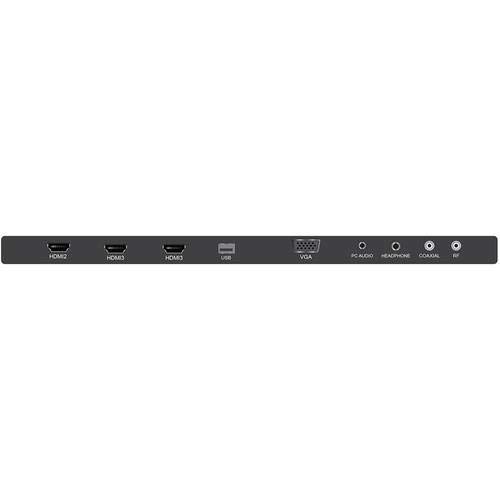
Figure 2.1: JVC LT-32EM75 32-inch 720p LED TV. This image shows the front view des Fernsehers mit seinem Ständer.
3. Einrichtung
3.1 Anbringen des TV-Ständers
- Legen Sie den Fernseher vorsichtig mit dem Bildschirm nach unten auf eine weiche, saubere Oberfläche, um Kratzer zu vermeiden.
- Richten Sie den Standfußhals an den Befestigungslöchern an der Unterseite des Fernsehers aus.
- Befestigen Sie den Standfußhals mit den mitgelieferten Schrauben am Fernseher.
- Attach the stand base to the stand neck, ensuring it clicks into place or is secured with screws if applicable.
- Heben Sie den Fernseher vorsichtig an und stellen Sie ihn auf eine stabile, ebene Fläche.
3.2 Externe Geräte anschließen
Your JVC LT-32EM75 TV features multiple input ports for connecting various devices. Ensure the TV is powered off before making any connections.

Abbildung 3.1: Rückseite view of the JVC LT-32EM75 TV showing input ports. This image illustrates the location of HDMI, USB, and other connection ports.
- HDMI-Geräte: Connect up to three HDMI-enabled devices (e.g., Blu-ray player, game console, cable box) to the HDMI ports. Use high-quality HDMI cables for best picture and sound.
- Antenne/Kabel: Connect an antenna or cable TV coaxial cable to the "ANT/CABLE" input for over-the-air or basic cable channels.
- USB-Geräte: Stecken Sie einen USB-Stick in den USB-Anschluss, um view Fotos oder kompatible Medien abspielen files.
- Audioausgang: Use the digital audio output (optical) or headphone jack to connect external audio systems or headphones.
3.3 Power Connection and Initial Scan
- Plug the power cord into the TV's power input, then into a standard electrical outlet (AC 120V, 60Hz).
- Press the Power button on the TV or remote control to turn on the TV.
- Follow the on-screen instructions to complete the initial setup, including language selection and channel scanning. This process will detect available channels from your antenna or cable connection.
4. Bedienung des Fernsehers
4.1 Fernbedienungsfunktionen
The included remote control allows you to access all TV functions. Ensure two AAA batteries are inserted with correct polarity.

Figure 4.1: JVC LT-32EM75 Remote Control. This image displays the layout of the remote control buttons, including power, volume, channel, input, and menu navigation.
- LEISTUNG: Schaltet den Fernseher ein oder aus.
- EINGANG: Selects the input source (HDMI 1, HDMI 2, HDMI 3, TV, USB).
- LAUTSTÄRKE +/-: Regelt die Lautstärke.
- CH +/-: Wechselt die Kanäle.
- SPEISEKARTE: Opens the main menu for settings adjustments.
- ARROW BUTTONS (Up/Down/Left/Right): Navigiert durch die Menüoptionen.
- ENTER/OK: Bestätigt die Auswahl.
- EXIT: Schließt das aktuelle Menü oder die aktuelle Bildschirmanzeige.
4.2 Grundlegende Operationen
- Eingabequelle ändern: Drücken Sie die EINGANG button on the remote repeatedly to cycle through available input sources, or press it once to bring up the input menu and select your desired source using the arrow buttons and EINGEBEN.
- Anpassen der Bildeinstellungen: Drücken SPEISEKARTE, navigate to "Picture" settings. Here you can adjust Brightness, Contrast, Color, Tint, Sharpness, and select Picture Modes (e.g., Standard, Dynamic, Movie).
- Anpassen der Toneinstellungen: Drücken SPEISEKARTE, navigate to "Sound" settings. Options include Bass, Treble, Balance, and Sound Modes (e.g., Standard, Music, Movie). Note that the built-in speakers may have limitations in sound quality.
5. Wartung
5.1 Reinigung des Fernsehbildschirms
- Vor der Reinigung immer den Netzstecker des Fernsehers ziehen.
- Verwenden Sie ein weiches, fusselfreies Tuch (z. B. ein Mikrofasertuch), um den Bildschirm vorsichtig abzuwischen.
- Bei hartnäckigen Flecken leicht andrücken.ampBefeuchten Sie das Tuch mit Wasser oder einem speziellen Bildschirmreiniger. Sprühen Sie den Reiniger niemals direkt auf den Bildschirm.
- Vermeiden Sie die Verwendung von Scheuermitteln, Alkohol, Benzol oder Verdünnern, da diese die Beschichtung des Siebs beschädigen können.
5.2 Reinigung des Fernsehers Casing
- Wischen Sie das casinmit einem weichen, trockenen Tuch abwischen.
- Verwenden Sie ggf. ein leicht damp cloth. Do not allow water to enter the TV's interior.
6. Fehlerbehebung
Bevor Sie sich an den Kundendienst wenden, konsultieren Sie bitte die folgende Anleitung zur Fehlerbehebung für häufig auftretende Probleme.
| Problem | Mögliche Ursache | Lösung |
|---|---|---|
| Kein Strom | Power cord not connected; Power outlet not working; TV is off. | Ensure power cord is securely plugged into TV and outlet. Test outlet with another device. Press the Power button on the TV or remote. |
| Kein Bild, aber Ton ist vorhanden | Falsche Eingangsquelle ausgewählt; Externes Gerät nicht eingeschaltet oder ordnungsgemäß angeschlossen. | Drücken Sie die EINGANG button to select the correct source. Check connections of external devices and ensure they are powered on. |
| Kein Ton, aber ein Bild ist vorhanden. | Volume is muted or too low; Incorrect audio output selected; External device audio issue. | Drücken LAUTSTÄRKE + or unmute the TV. Check audio settings in the menu. Ensure external device audio settings are correct. |
| Fernbedienung funktioniert nicht | Die Batterien sind leer oder falsch eingelegt; es gibt eine Blockade zwischen Fernbedienung und Fernseher; der Fernbedienungssensor am Fernseher ist blockiert. | Replace batteries with new ones, ensuring correct polarity. Remove any obstructions. Ensure the TV's remote sensor is clear. |
| Poor picture quality (e.g., blurry, grainy) | Weak antenna signal; Incorrect picture settings; Low-quality source material. | Adjust antenna position or check cable connection. Reset picture settings to default or adjust manually. Ensure source device is outputting high-quality signal. |
| Sound quality is not optimal | Built-in speaker limitations; Incorrect sound settings. | Adjust sound settings (Bass, Treble, Sound Mode) in the TV menu. Consider connecting external speakers or a soundbar for improved audio experience. |
7. Spezifikationen
| Besonderheit | Detail |
|---|---|
| Modellname | LT-32EM75 |
| Bildschirmgröße | 32 Zoll |
| Display-Technologie | LED |
| Auflösung | 720p |
| Bildwiederholrate | 60 Hz |
| Konnektivitätstechnologie | HDMI |
| HDMI-Anschlüsse | 3 |
| Bandtage | 120 Volt |
| Wastage | 45 Watt |
| Artikelgewicht | 10 Pfund (ca. 4.5 kg) |
| Produktabmessungen (L x B x H) | 40 x 10 x 25 Zoll (mit Ständer) |
| Montagetyp | Tischmontage |
8. Garantie und Support
8.1 Herstellergarantie
This JVC LT-32EM75 television typically comes with a 1 Jahr Herstellergarantie from the date of purchase. This warranty covers defects in materials and workmanship under normal use. Please retain your proof of purchase for warranty claims. For specific terms and conditions, refer to the warranty card included with your product or visit the official JVC support webWebsite.
8.2 Kundendienst
If you encounter issues not covered in the troubleshooting section or require further assistance, please contact JVC customer support. You can usually find contact information (phone number, email, or support website) on the official JVC webauf der Website oder in der Ihrem Fernseher beiliegenden Dokumentation.
Note: JVC does not sell extended warranties for this specific model.


