1. Einleitung
This manual provides essential instructions for the proper setup, operation, and maintenance of your YI YAS.1616.INT 4K Action Camera Kit. Please read this manual thoroughly before using the product to ensure optimal performance and safety. Keep this manual for future reference.
2. Produktüberschreitungview
2.1 Inhalt des Kits
The YI YAS.1616.INT 4K Action Camera Kit includes the following components:
- YI 4K Action Camera
- YI Monopod
- Bluetooth-Fernbedienung
- Wiederaufladbarer Akku
- USB-Kabel
- Bedienungsanleitung

Image 2.1: Contents of the YI 4K Action Camera Kit.
2.2 Kamerafunktionen
The YI 4K Action Camera is designed for high-quality video and photo capture, featuring:
- 4K/30fps Video Recording: Captures video at 60mbps, offering 4 times the quality of standard 1080p.
- Advanced Imaging Hardware: Equipped with an Amarelle A9SE75 chip, Sony IMX377 image sensor, and 7-layer optical glass lenses with an F2.8 large aperture for enhanced light intake.
- 2.19" LCD Touchscreen: A 640 x 360 high-resolution display with Gorilla Glass Retina for easy previewing, shooting, and scratch resistance.
- Lange Akkulaufzeit: A 1400mAh 4.4V lithium-ion battery provides up to 120 minutes of 4K/30fps video recording on a single charge.
- Effizientes Kühlsystem: Prevents overheating during extended recording sessions.
- Konnektivität: Built-in Wi-Fi for smartphone app control and Bluetooth for remote control.
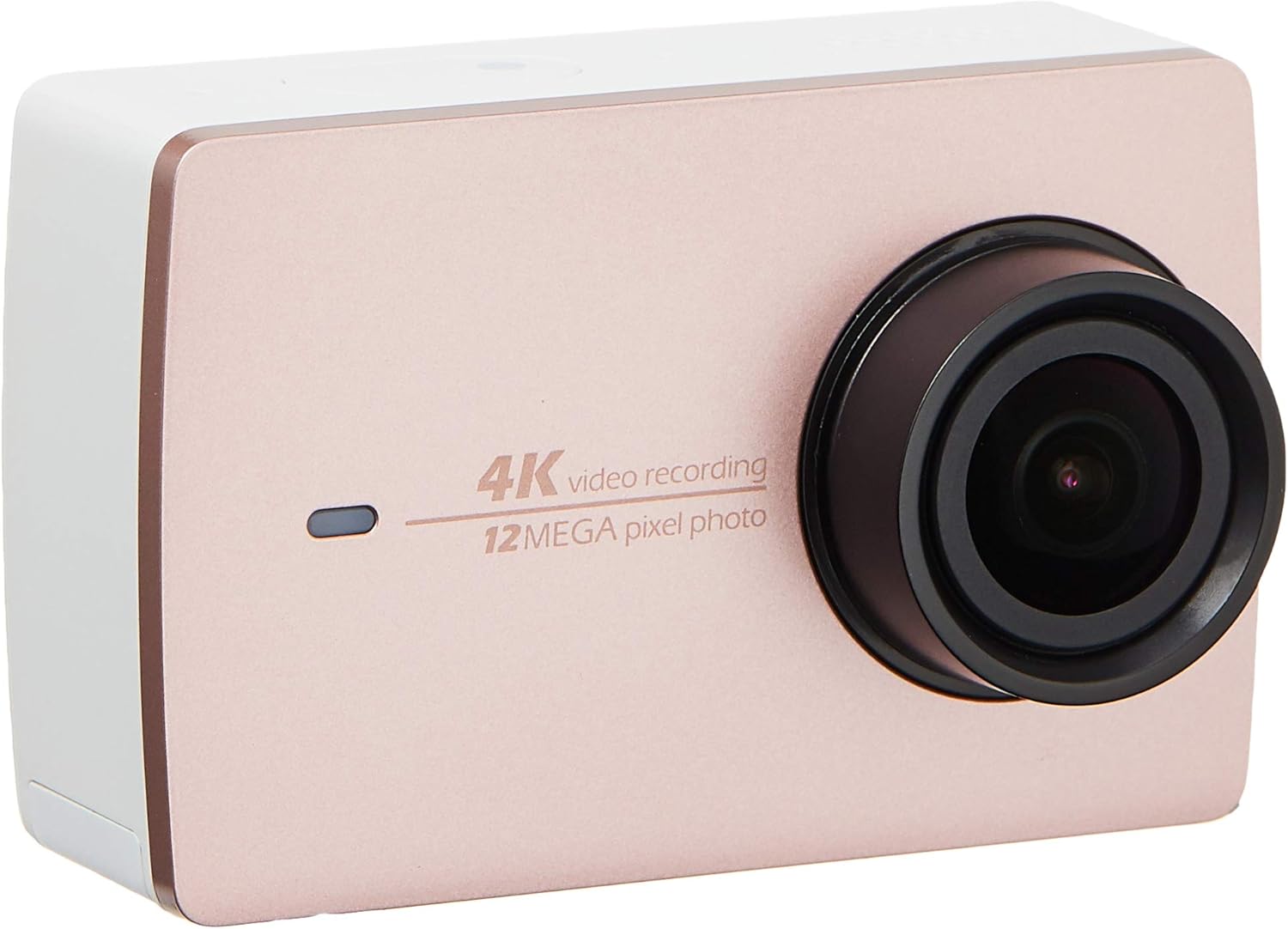
Bild 2.2: Vorderseite view of the YI 4K Action Camera.
3. Einrichtung
3.1 Einlegen und Laden der Batterie
- Suchen Sie das Batteriefach an der Kamera.
- Insert the 1400mAh lithium-ion battery, ensuring correct polarity.
- Verschließen Sie das Batteriefach fest.
- Schließen Sie die Kamera zum Aufladen mit dem mitgelieferten USB-Kabel an eine Stromquelle an. Die Ladeanzeige leuchtet auf.
3.2 Installation der Speicherkarte
The YI 4K Action Camera supports SDHC and SmartMedia flash memory types.
- Öffnen Sie die Abdeckung des Speicherkartensteckplatzes.
- Insert a compatible memory card (not included) into the slot with the contacts facing the correct direction. Push until it clicks into place.
- Schließen Sie die Abdeckung des Speicherkartensteckplatzes.
3.3 Ein-/Ausschalten
- So schalten Sie das Gerät ein: Halten Sie den Ein-/Ausschalter gedrückt, bis der Bildschirm aufleuchtet.
- So schalten Sie das Gerät aus: Halten Sie den Ein-/Ausschalter gedrückt, bis sich die Kamera ausschaltet.
3.4 Connecting the Bluetooth Remote
The included Bluetooth remote allows for convenient control of the camera.
- Stellen Sie sicher, dass die Kamera eingeschaltet ist.
- Activate Bluetooth pairing mode on the camera via the settings menu.
- Follow the remote's instructions to enter pairing mode.
- Once paired, the remote can be used to switch between video and photo modes and trigger recording/capture.

Image 3.1: The YI Monopod, included in the kit.
4. Bedienung der Kamera
4.1-Zoll-Touchscreen-Navigation
The 2.19" LCD touchscreen provides intuitive control:
- Wischen: Navigate through different modes (Video, Photo, Time-lapse, etc.) and settings.
- Klopfen: Select options, adjust settings, or start/stop recording.
- Vorview: View dein gefangener footage and photos directly on the screen.
4.2 Videoaufzeichnung
- Select the Video mode on the touchscreen.
- Adjust video resolution (e.g., 4K/30fps) and other settings as desired.
- Press the Shutter button or tap the record icon on the screen to start recording.
- Press the Shutter button or tap the record icon again to stop recording.
4.3 Fotoaufnahme
- Select the Photo mode on the touchscreen.
- Adjust photo settings such as resolution, exposure, and white balance.
- Press the Shutter button or tap the capture icon on the screen to take a photo.
4.4 WLAN-Konnektivität und App-Nutzung
The camera's built-in Wi-Fi allows connection to a smartphone app for remote control, live previewund Content-Management.
- Download the official YI Action Camera app from your device's app store.
- Aktivieren Sie WLAN an der Kamera über das Einstellungsmenü.
- Connect your smartphone to the camera's Wi-Fi network (SSID and password displayed on camera screen).
- Open the YI Action Camera app to control the camera, view footage und Transfer files.
5. Wartung
5.1 Reinigung
- Use a soft, lint-free cloth to clean the camera body and touchscreen.
- Verwenden Sie für die Linsenreinigung ein spezielles Linsenreinigungstuch und eine entsprechende Reinigungslösung. Vermeiden Sie scheuernde Materialien.
- Stellen Sie sicher, dass alle Anschlüsse frei von Staub und Schmutz sind.
5.2 Speicherung
- Bewahren Sie die Kamera an einem kühlen, trockenen Ort fern von direkter Sonneneinstrahlung und extremen Temperaturen auf.
- Um ein Auslaufen zu verhindern, sollte die Batterie bei längerer Lagerung entfernt werden.
5.3 Firmware-Updates
Periodically check the official YI website or the YI Action Camera app for available firmware updates. Keeping your camera's firmware updated ensures optimal performance and access to new features.
6. Fehlerbehebung
6.1 Häufige Probleme und Lösungen
- Kamera lässt sich nicht einschalten: Stellen Sie sicher, dass der Akku vollständig geladen und richtig eingelegt ist.
- Die Aufnahme wird unerwartet beendet: Check if the memory card has sufficient space or if it's a high-speed card suitable for 4K recording. Ensure the battery is not depleted.
- Touchscreen reagiert nicht: Try restarting the camera. If the issue persists, ensure the screen is clean and dry.
- Bluetooth-Fernbedienung verbindet sich nicht: Ensure both the camera and remote are in pairing mode and within range. Check the remote's battery.
- Probleme mit der Wi-Fi-Verbindung: Verify the camera's Wi-Fi is enabled and your smartphone is connected to the correct network. Try restarting both devices.
For further assistance, refer to the official YI support resources.
7. Spezifikationen
| Hersteller | YI |
| Modellnummer | 90010 |
| Technische Daten | 6.6 x 3 x 4.3 cm |
| Gewicht | 96.39 g |
| Fotosensor-Technologie | CMOS |
| Auflösung der Videoaufnahme | 4K |
| Maximale Brennweite | 1 |
| Maximale Blendenöffnung | 2.8 Millimeter |
| Flash-Speichertyp | SDHC, SmartMedia |
| Videoaufnahmeformat | MP4 |
| Unterstütztes Audioformat | AAC, MP3 |
| Bildschirmgröße | 2.19 Zoll |
| Konnektivitätstechnologie | W-lan |

Image 7.1: YI 4K Action Camera with monopod, illustrating approximate dimensions.
8. Garantie und Support
8.1 Garantieinformationen
Dieses Produkt wird mit einem 1 Year Local (Singapore) WarrantyBitte bewahren Sie Ihren Kaufbeleg für Garantieansprüche auf. Die Garantie deckt Herstellungsfehler bei normalem Gebrauch ab.
8.2 Kundendienst
For technical support, service, or warranty inquiries, please visit the official YI Technology website or contact their authorized service centers in Singapore. Contact information can typically be found on the product packaging or the official webWebsite.