Einführung
The Konftel EGO is a compact and portable personal speakerphone designed for crystal-clear audio conferencing. Featuring OmniSound audio technology, it is suitable for small meetings, individual use, and travel. This manual provides instructions for setting up, operating, and maintaining your Konftel EGO.
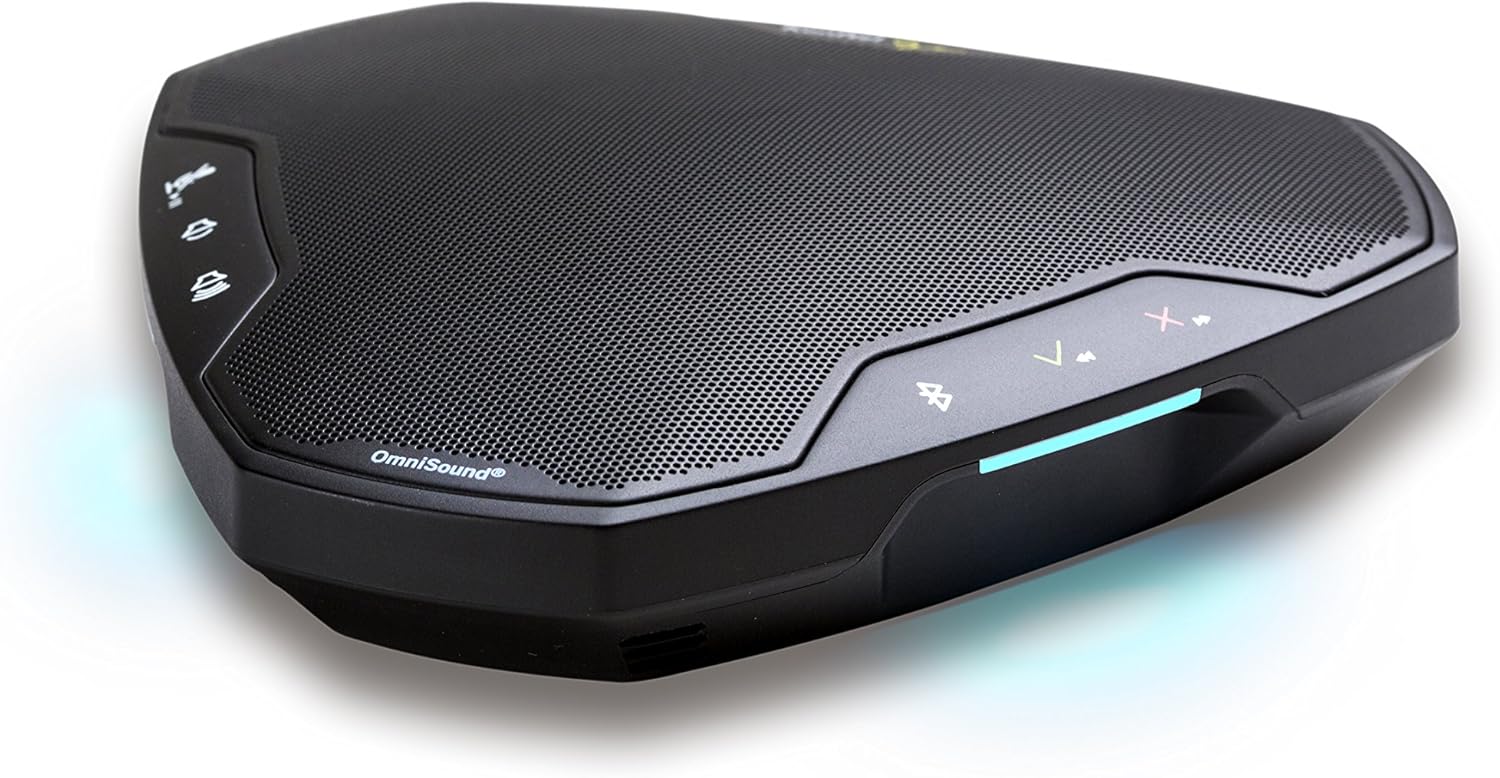
Image: The Konftel EGO in use during a small group meeting, demonstrating its portability and ease of integration into various environments.
Lieferumfang
- Konftel EGO Conferencing Unit
- Tragetasche
- USB-Kabel
- Benutzerhandbuch (dieses Dokument)
Produkt überview
The Konftel EGO features intuitive controls and essential ports for connectivity. Familiarize yourself with the device's layout before use.

Bild: Oben view of the Konftel EGO, highlighting the touch-sensitive control panel and OmniSound branding.

Bild: Rückseite view of the Konftel EGO, displaying the headset port, USB connection, and power button.
Schlüsselkomponenten:
- Touch-Steuerung: For call answer/end, volume up/down, mute, Bluetooth pairing.
- LCD Bildschirm: Zeigt Statusinformationen an.
- USB-Anschluss: For connecting to a computer and charging.
- Headset-Anschluss: For connecting a personal headset (disables internal microphone).
- Netzschalter: Zum Ein-/Ausschalten des Geräts.
- NFC Tag: Für schnelles Bluetooth-Pairing mit kompatiblen Geräten.
Aufstellen
1. Aufladen des Geräts
Before first use, fully charge your Konftel EGO. Connect the supplied USB cable to the USB port on the device and to a computer or a USB power adapter (not included). The LCD screen will indicate charging status. A full charge provides approximately 12 hours of talk time.
2. Verbindung über USB
- Connect the Konftel EGO to your computer using the supplied USB cable.
- The device will be recognized as an audio device. Select "Konftel EGO" as your speaker and microphone in your computer's audio settings or conferencing application.
- The device will draw power from the USB connection during use.
3. Koppeln über Bluetooth
The Konftel EGO supports Bluetooth pairing with mobile phones and other compatible devices.
Standardmäßige Bluetooth-Kopplung:
- Ensure the Konftel EGO is powered on.
- Halten Sie die Bluetooth-Taste on the device until the Bluetooth indicator flashes.
- On your mobile device, go to Bluetooth settings and select "Konftel EGO" from the list of available devices.
- Sobald die Kopplung hergestellt ist, leuchtet die Bluetooth-Anzeige dauerhaft.
NFC-Kopplung (Near Field Communication):
- Stellen Sie sicher, dass NFC auf Ihrem Mobilgerät aktiviert ist.
- Tap your NFC-enabled mobile device against the NFC tag on the Konftel EGO (located near the "Konftel Ego" logo).
- Bestätigen Sie die Kopplungsanfrage auf Ihrem Mobilgerät.
Operating the Konftel EGO
Anrufverwaltung:
- Anruf annehmen: Drücken Sie die Antworttaste (green phone icon).
- Anruf beenden: Drücken Sie die Schaltfläche „Anruf beenden“ (red phone icon).
- Mikrofon stumm schalten: Drücken Sie die Stummschalttaste (microphone icon). Press again to unmute.
- Lautstärkeregelung: Verwenden Sie die Lauter (+) Und Lautstärke runter (-) Schaltflächen.
Musik Streaming:
When connected via Bluetooth, the Konftel EGO can stream music in HD quality from your mobile device. Use your mobile device's controls for playback (play, pause, skip tracks).
Using a Headset:
Connect a 3.5mm headset to the headset port on the Konftel EGO for private conversations. When a headset is connected, the internal microphone and speaker of the EGO are disabled.
Wartung
Reinigung:
Wipe the device with a soft, dry cloth. Do not use liquid cleaners or abrasive materials, as these can damage the surface and internal components.
Batteriepflege:
- Vermeiden Sie häufiges vollständiges Entladen des Akkus.
- Bewahren Sie das Gerät an einem kühlen, trockenen Ort auf, wenn es längere Zeit nicht benutzt wird.
- Laden Sie das Gerät regelmäßig auf, wenn es längere Zeit gelagert wird, um die Batterieleistung zu erhalten.
Fehlerbehebung
| Problem | Mögliche Ursache | Lösung |
|---|---|---|
| Kein Ton oder geringe Lautstärke |
|
|
| Verbindung über Bluetooth nicht möglich |
|
|
| Das Mikrofon nimmt keinen Ton auf |
|
|
Technische Daten
- Modellnummer: 910101081
- Produktabmessungen: 5.71 x 5.31 x 1.26 Zoll
- Artikelgewicht: 8.1 Unzen
- Batterie: 1 Lithium-Ionen-Akku (im Lieferumfang enthalten)
- Konnektivität: Bluetooth with NFC, USB
- Audiotechnik: OmniSound with HD audio
- Hersteller: Konftel
Garantie und Support
For warranty information and technical support, please refer to the official Konftel website or contact your local Konftel reseller. Keep your proof of purchase for warranty claims.
Official Konftel WebWebsite: www.konftel.com


