Einführung
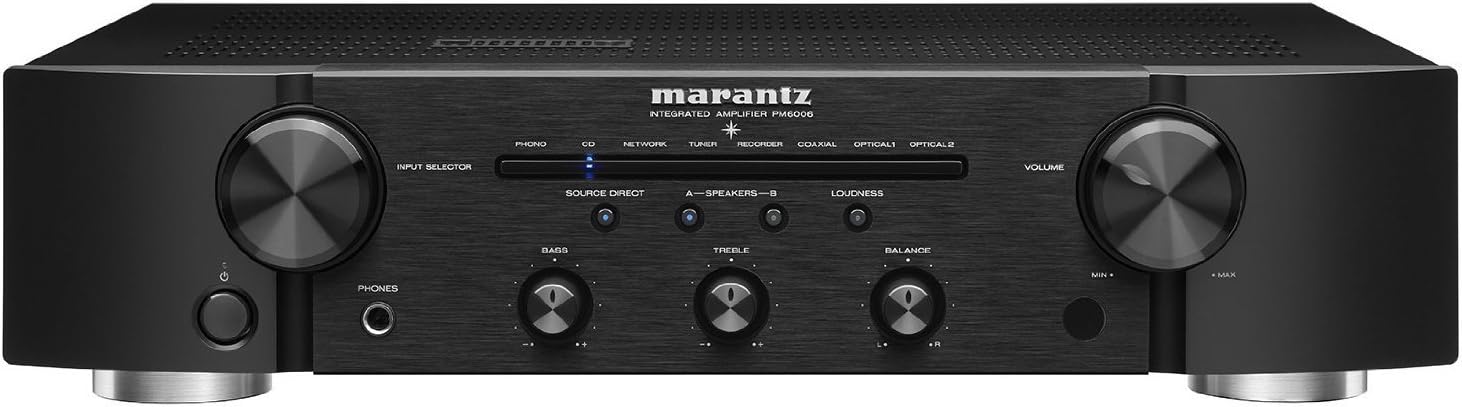
The Marantz PM6006 is an advanced integrated amplifier, serving as an upgraded successor to the acclaimed PM6005. This unit is designed to deliver superior sound quality from a wide range of audio sources, including high-resolution audio files. It features a high-current CS4398 DAC (24bit/192kHz), multiple digital inputs (2 optical, 1 coaxial), and a fully shielded digital section to prevent interference with analog signals. Key components include a lower impedance shielded Toroidal transformer, customized internal parts, and proprietary Marantz HDAM modules, all contributing to a powerful, dynamic, and detailed audio experience.
Lieferumfang
- Kurzanleitung
- CD-ROM (Owner's Manual)
- Sicherheitshinweise
- Garantie (für USA/für KANADA)
- Netzkabel
- Remote control unit (RC003PMCD)
- R03 / AAA-Batterien
- Audiokabel
- Remote-Anschlusskabel
Produkt überview
Hauptmerkmale
- Expanded Connection Possibilities: Upgraded for peak current at the amplifiertage, refining sound with greater detail.
- Flexible Operations: Features 3 digital inputs (1 coaxial, 2 optical), 5-line audio inputs including phono, and 45 watts per channel (45 x 2) suitable for medium-sized rooms.
- Wider Dynamic Range and Lower Audio Distortion: Enhanced audio clarity from various sources like CDs, turntables, and streaming audio. Includes high volume control, wide-bandwidth, and high-speed reproduction.
- Elegantly Crafted Precision Build Quality: Proprietary Marantz high-grade Hyper-Dynamic Amplifier Modules (HDAMs) provide powerful, dynamic, and detailed sound. A fully shielded extra metal housing prevents analog interferences.
- Efficient, Powerful, and Aesthetically Pleasing Upgrade: Built to handle peak currents at the amplifiertage with a massive energy reserve, encased in a cleaner design.
Visuelle Anleitung


Produktvideo
Aufstellen
1. Auspacken
Carefully remove the PM6006 from its packaging. Retain all packing materials for future transport or service.
2. Platzierung
Platzieren Sie die amplifier on a stable, level surface with adequate ventilation. Avoid direct sunlight, heat sources, and areas with high humidity or excessive vibration. Ensure sufficient space around the unit for proper airflow.
3. Lautsprecher anschließen
The PM6006 features two pairs of gold-plated speaker connections (A and B) for bi-wiring or connecting two sets of speakers. Connect your speakers using high-quality speaker cables. Ensure correct polarity (+ to + and - to -) for each speaker and channel. For bi-wiring, remove the jumper bars on your speakers and connect separate cables for high and low frequencies to the corresponding terminals on the ampschwerer.
4. Audioquellen anschließen
Connect your audio sources to the appropriate input terminals on the rear panel:
- Analog Inputs (RCA): Use for CD players, tuners, network players, recorders, and other analog devices. The PM6006 includes a dedicated PHONO input for turntables with MM (Moving Magnet) cartridges.
- Digitale Eingänge (optisch/koaxial): Connect digital audio sources such as TVs, Blu-ray players, or media streamers to the OPTICAL 1, OPTICAL 2, or COAXIAL inputs.
5. Stromanschluss
After all audio and speaker connections are made, connect the supplied power cord to the AC IN terminal on the rear panel and then to a wall outlet. Ensure the ampDer Netzschalter des Verstärkers befindet sich vor dem Anschließen an die Stromversorgung in der Position AUS.
6. Erstes Einschalten
Drücken Sie den Netzschalter an der Vorderseite oder auf der Fernbedienung, um das Gerät einzuschalten. amplifier. The power indicator will illuminate.
Bedienungsanleitung
1. Grundlegende Bedienung
- Ein-/Ausschalten: Drücken Sie den Netzschalter an der Vorderseite oder auf der Fernbedienung.
- Lautstärkeregelung: Rotate the large VOLUME knob on the front panel or use the VOLUME +/- buttons on the remote control to adjust the sound level.
2. Eingabeauswahl
Use the INPUT SELECTOR knob on the front panel or the corresponding input buttons on the remote control (e.g., PHONO, CD, NETWORK, TUNER, RECORDER, COAXIAL, OPTICAL 1, OPTICAL 2) to choose your desired audio source.
3. Klangregler
Adjust the BASS and TREBLE knobs on the front panel to fine-tune the low and high frequency response. The BALANCE knob allows you to adjust the left/right channel balance.
4. Source Direct Mode
Press the SOURCE DIRECT button to bypass the tone control circuits, providing the purest possible audio signal path for critical listening.
5. Kopfhörernutzung
Connect headphones to the PHONES jack on the front panel. When headphones are connected, speaker output will be muted.
6. Digital Audio Playback
When playing digital audio sources connected to the optical or coaxial inputs, the PM6006's internal DAC will process the signal for high-quality sound reproduction.
7. Phono Input
For turntables with a Moving Magnet (MM) cartridge, connect to the PHONO input. Ensure the turntable's ground wire is connected to the GND terminal on the ampVerstärker zur Minimierung von Brummgeräuschen.
8. Fernbedienung
The supplied remote control (RC003PMCD) allows for convenient operation of the amplifier from a distance. It also provides control over other compatible Marantz components.
Wartung
1. Reinigung
Reinigen Sie das Gerät, indem Sie die Außenflächen mit einem weichen, trockenen Tuch abwischen. Verwenden Sie keine Scheuermittel, Wachse oder Lösungsmittel, da diese die Oberfläche beschädigen können. Stellen Sie sicher, dass das Gerät ausgeschaltet und vom Stromnetz getrennt ist, bevor Sie es reinigen.
2. Speicherung
Bei der Speicherung der amplifier for an extended period, disconnect it from the power outlet and all connected devices. Store it in a cool, dry place, ideally in its original packaging to protect it from dust and physical damage.
Fehlerbehebung
If you experience issues with your Marantz PM6006, please refer to the following common troubleshooting steps:
- Kein Strom: Prüfen Sie, ob das Netzkabel fest mit beiden Anschlüssen verbunden ist. amplifier and the wall outlet. Ensure the power button is pressed.
- Kein Ton: Verify that the correct input source is selected. Check all speaker connections for proper polarity and secure fit. Ensure the volume is not set to minimum or muted. If headphones are connected, disconnect them to enable speaker output.
- Verzerrter Klang: Check speaker connections for loose wires or short circuits. Ensure the audio source is not overdriving the input. Try reducing the volume.
- Fernbedienung funktioniert nicht: Check the batteries in the remote control and replace them if necessary. Ensure there are no obstructions between the remote and the ampFernsensor des Verstärkers.
- Summendes Geräusch: For phono input, ensure the turntable's ground wire is properly connected to the amplifier's GND terminal. Check for interference from other electronic devices.
If the problem persists after trying these steps, consult the full owner's manual on the supplied CD-ROM or contact Marantz customer support.
Technische Daten
- Produktabmessungen: 17.3 x 14.14 x 4.14 Zoll
- Artikelgewicht: 17.3 Pfund
- Hersteller: Marantz
- ASIN: B01FWM4A0G
- Artikelmodellnummer: PM6006
- Batterien: 2 AAA-Batterien erforderlich (für die Fernbedienung)
- Datum der Erstveröffentlichung: 19. Mai 2016
Garantie und Support
The Marantz PM6006 Integrated Amplifier comes with a manufacturer's warranty. Please refer to the warranty information provided in the box or on the supplied CD-ROM for specific terms and conditions applicable to your region (USA/CANADA). For technical support, service, or additional product information, please visit the official Marantz webBesuchen Sie unsere Website oder wenden Sie sich an Ihren autorisierten Marantz-Händler.
Besuchen Sie auch die Marantz Store bei Amazon Für weitere Produkte und Informationen.


