Einführung
This manual provides instructions for the installation and operation of your Satechi Aluminum USB-C 2.5-inch HDD/SSD Enclosure. This enclosure allows you to convert any 2.5-inch SATA hard drive (HDD) or solid-state drive (SSD) into a portable external storage device, utilizing a USB-C connection for data transfer speeds up to 10 Gbps.
Packungsinhalt
- Satechi Aluminum USB-C 2.5-inch HDD/SSD Enclosure
- USB-C-auf-USB-C-Kabel
- Mini-Schraubendreher
- Befestigungsschrauben
Setup und Installation
Follow these steps to install your 2.5-inch HDD or SSD into the enclosure:
- Öffnen Sie das Gehäuse: Use the provided mini screwdriver to remove the two small screws located on the side of the enclosure. Carefully slide the internal tray out from the aluminum casing.
- Legen Sie das Laufwerk ein: Align your 2.5-inch SATA HDD or SSD with the SATA connector on the internal tray. Gently push the drive into the connector until it is firmly seated.
- Sichern Sie das Laufwerk: Use the provided mounting screws to secure the HDD/SSD to the internal tray. Ensure the drive is stable and does not move.
- Schließen Sie das Gehäuse: Carefully slide the internal tray, with the installed drive, back into the aluminum casing. Re-insert and tighten the two small screws to secure the enclosure.

Image: Enclosure disassembled, revealing the internal tray and screws.
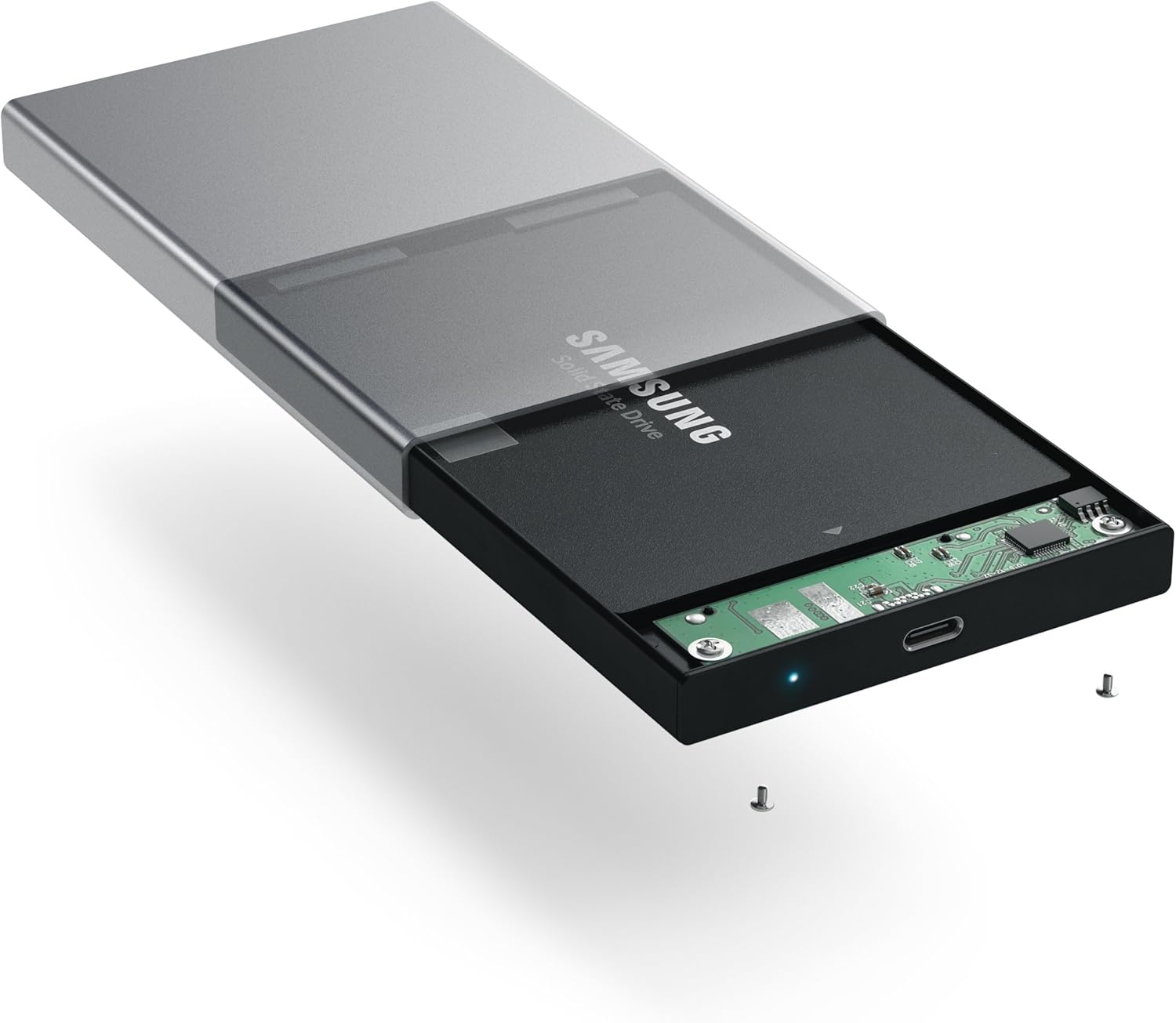
Image: Inserting a 2.5-inch SSD into the internal tray.

Image: SSD fully inserted and secured in the tray.
Bedienungsanleitung
- Mit Computer verbinden: Use the included USB-C to USB-C cable to connect the enclosure to an available USB-C port on your computer.
- Betriebsanzeige: A blue LED indicator light on the enclosure will illuminate when connected and powered, indicating readiness for use. The LED will blink during data transfer activity.
- Zugriff auf das Laufwerk: Your computer should automatically detect the external drive. If it is a new drive, you may need to format it before use. Refer to your operating system's documentation for drive formatting procedures.
- Datenübertragung: Ziehen und Ablegen files to and from the external drive as you would with any other storage device. The enclosure supports data transfer speeds up to 10 Gbps, depending on your drive and computer's USB-C port capabilities.
- Sichere Entfernung: Always safely eject the external drive from your operating system before disconnecting the cable to prevent data corruption.

Image: Enclosure connected to a laptop.

Image: Enclosure with cable connected, showing the blue LED.
Wartung
- Halten Sie das Gehäuse sauber und staubfrei. Verwenden Sie zum Reinigen ein weiches, trockenes Tuch.
- Setzen Sie das Gerät keinen extremen Temperaturen, Feuchtigkeit oder direkter Sonneneinstrahlung aus.
- Do not attempt to disassemble the enclosure beyond the initial drive installation, as this may void the warranty.
Fehlerbehebung
- Laufwerk nicht erkannt:
- Ensure the USB-C cable is securely connected to both the enclosure and your computer.
- Versuchen Sie, eine Verbindung zu einem anderen USB-C-Anschluss an Ihrem Computer herzustellen.
- Verify that the HDD/SSD is correctly seated within the enclosure's SATA connector.
- If it is a new drive, ensure it has been formatted for your operating system.
- Langsame Übertragungsgeschwindigkeiten:
- Ensure your computer's USB-C port supports USB 3.1 Gen 2 (10 Gbps) for optimal performance.
- The performance of the drive itself (HDD vs. SSD) will impact transfer speeds.
- Consider using a high-quality, certified USB-C cable, especially if experiencing intermittent disconnections or slower-than-expected speeds.
- Gehäuse trennt sich zufällig:
- This can sometimes be caused by an incompatible or low-quality USB-C cable. Try using a different, certified USB-C cable.
- Stellen Sie sicher, dass die Energieeinstellungen Ihres Computers nicht so konfiguriert sind, dass USB-Anschlüsse zur Energieeinsparung abgeschaltet werden.
Technische Daten
| Modellnummer | ST-TCDEM |
| UPC | 879961006242 |
| Material | Aluminium |
| Kompatibler Laufwerkstyp | 2.5-Zoll-SATA-HDD/SSD |
| Maximale Anzahl unterstützter Geräte | 1 |
| Datenübertragungsrate | Bis zu 10 Gigabit pro Sekunde (USB 3.1 Gen 2) |
| Konnektivitätstechnologie | USB-C |
| Artikelgewicht | 6.4 Unzen (181 Gramm) |
| Farbe | Space Grau |
Garantie und Support
For warranty information and technical support, please refer to the official Satechi webBesuchen Sie die Website oder kontaktieren Sie direkt den Kundenservice. Bewahren Sie Ihren Kaufbeleg für Garantieansprüche auf.


