Einführung
Vielen Dank für Ihren Einkauf.asing the Yaheetech Mobile Computer Desk. This manual provides detailed instructions for assembly, operation, and maintenance to ensure safe and efficient use of your new desk. Please read this manual thoroughly before assembly and retain it for future reference.
Sicherheitshinweise
Um Verletzungen und Schäden am Produkt zu vermeiden, beachten Sie bitte die folgenden Sicherheitsrichtlinien:
- Vor Gebrauch sicherstellen, dass alle Komponenten ordnungsgemäß montiert sind.
- Do not exceed the maximum weight limits for each shelf:
- Top: 30 kg (66.1 lb)
- Drawer: 2 kg (4.4 lb)
- Middle Shelf: 20 kg (44.1 lb)
- Bottom Shelf: 10 kg (22 lb)
- Use the locks on the casters to stabilize the desk when it is in place.
- Halten Sie Kleinteile während der Montage von Kindern fern.
- Vermeiden Sie es, heiße Gegenstände ungeschützt direkt auf die Tischoberfläche zu stellen.
- Stellen oder setzen Sie sich nicht auf den Schreibtisch.
Packungsinhalt
Please verify that all components listed in your product's included parts list are present before beginning assembly. If any parts are missing or damaged, please contact customer support.
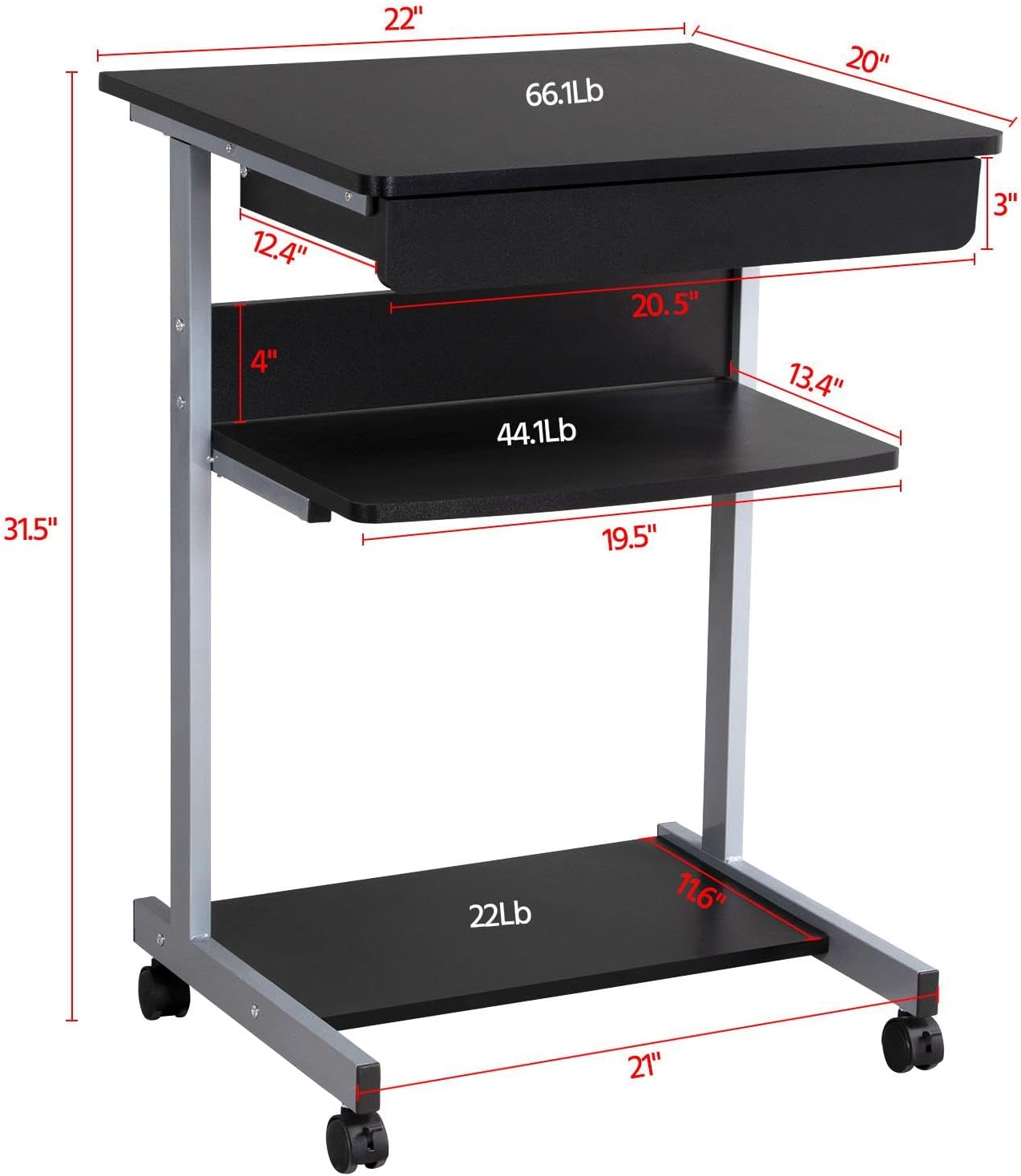
Image: Diagram showing the dimensions and weight capacities of the desk components.
Einrichtung und Montage
Die Montage ist bewusst einfach gehalten. Für die Montage wird ein freier und geräumiger Arbeitsbereich empfohlen. Alle benötigten Werkzeuge sind im Lieferumfang enthalten.
Montageschritte:
- Attach the side frames: Secure the horizontal bars to the vertical support frames using the provided screws.
- Install casters: Screw the four rolling casters into the bottom of the desk frame. Ensure the two lockable casters are placed at the front for easy access.
- Mount the bottom shelf: Attach the bottom shelf to the lower section of the frame using the designated screws.
- Attach the middle shelf: Secure the middle shelf to the frame at the desired height.
- Install the keyboard tray slides: Attach the drawer slides to the desk frame. Ensure they are correctly oriented for smooth operation.
- Assemble the keyboard tray: Connect the sides and back of the keyboard tray, then slide the bottom panel into place. Attach the remaining drawer slides to the keyboard tray.
- Insert the keyboard tray: Carefully slide the assembled keyboard tray into the installed drawer slides on the desk frame.
- Attach the top desktop panel: Secure the main desktop panel to the top of the frame.
Video: Detailed installation instructions for the Yaheetech Mobile Computer Desk.

Bild: Nahaufnahme view highlighting the heavy MDF boards, thickened frame, smooth steel ball drawer, open middle shelf, open bottom shelf, and lockable casters.
Bedienungsanleitung
Mobilität und Stabilität:
- The desk is equipped with four rolling casters for easy movement.
- To secure the desk in place, engage the locks on the two front casters. Push the lever down to lock and up to unlock.
Verwendung der Tastaturablage:
- The keyboard tray slides smoothly on metal runners. Gently pull the tray outwards to extend it for use.
- Push the tray inwards until it is fully retracted when not in use to save space.
Lagerregale:
- The top surface is suitable for a laptop or monitor, with a maximum load of 30 kg (66.1 lb).
- The middle shelf can hold items up to 20 kg (44.1 lb), such as books or accessories. The back plate helps prevent items from falling.
- The bottom shelf is designed for a printer or other larger items, with a maximum load of 10 kg (22 lb).
Video: Demonstration of the small rolling computer desk cart for home office use, highlighting mobility and storage.

Image: The desk in use with a laptop, showing its compact design and functionality.
Wartung
To maintain the appearance and longevity of your Yaheetech Mobile Computer Desk:
- Reinigung: Wischen Sie die Oberflächen mit Ad abamp Tuch. Vermeiden Sie aggressive Chemikalien oder Scheuermittel.
- Inspektion: Überprüfen Sie regelmäßig alle Schrauben und Verbindungen auf festen Sitz. Ziehen Sie sie gegebenenfalls nach.
- Rollen: Halten Sie die Rollen frei von Schmutz, um ein reibungsloses Rollen zu gewährleisten.
Fehlerbehebung
Sollten Sie Probleme mit Ihrem Schreibtisch haben, beachten Sie bitte die folgenden gängigen Lösungsansätze:
- Der Schreibtisch wackelt: Ensure all screws are securely tightened. Check that the desk is on a flat, even surface. Engage the locks on the casters.
- Keyboard tray not sliding smoothly: Check the drawer slides for any obstructions or debris. Ensure the slides are properly aligned and lubricated if necessary.
- Fehlende Teile: Falls bei der Ankunft Teile fehlen, kontaktieren Sie bitte umgehend den Kundendienst.
Bei Problemen, die hier nicht behandelt werden, wenden Sie sich bitte an den Yaheetech-Kundendienst.
Technische Daten
| Marke | Yaheetech |
| Modellnummer | YT-00009601 |
| Produktabmessungen (T x B x H) | 20"T x 22"B x 31.1"H (56 x 51 x 79 cm) |
| Artikelgewicht | 24.3 Pfund |
| Farbe | Schwarz |
| Materialtyp | Engineered Wood (MDF), Metal (Iron) |
| Maximale Gewichtsempfehlung (oben) | 30 Kilogramm (66.1 Pfund) |
| Maximale Gewichtsempfehlung (Schublade) | 2 Kilogramm (4.4 Pfund) |
| Maximale Gewichtsempfehlung (mittleres Fach) | 20 Kilogramm (44.1 Pfund) |
| Maximale Gewichtsempfehlung (unterste Ablage) | 10 Kilogramm (22 Pfund) |
| Anzahl der Schubladen | 1 |
| Anzahl der Einlegeböden | 2 (Open Shelves) |
| Besonderheit | Compact, Mobile with Lockable Casters |
| Erforderliche Montage | Ja |
| Enthält alle Montagewerkzeuge | Ja |
Garantie und Support
For warranty information, please refer to the documentation included with your purchase or contact Yaheetech directly. Yaheetech aims to provide quality products and customer satisfaction.
If you require further assistance, have questions about assembly, or need to report missing/damaged parts, please contact Yaheetech customer support through their official webWebsite oder den Händler, bei dem das Produkt gekauft wurde.


