Einführung
Thank you for choosing the Divoom Onbeat 500 Portable Wireless Bluetooth Speaker. This device is designed to deliver powerful sound with convenient wireless connectivity. This manual will guide you through the setup, operation, and maintenance of your speaker to ensure optimal performance and longevity.
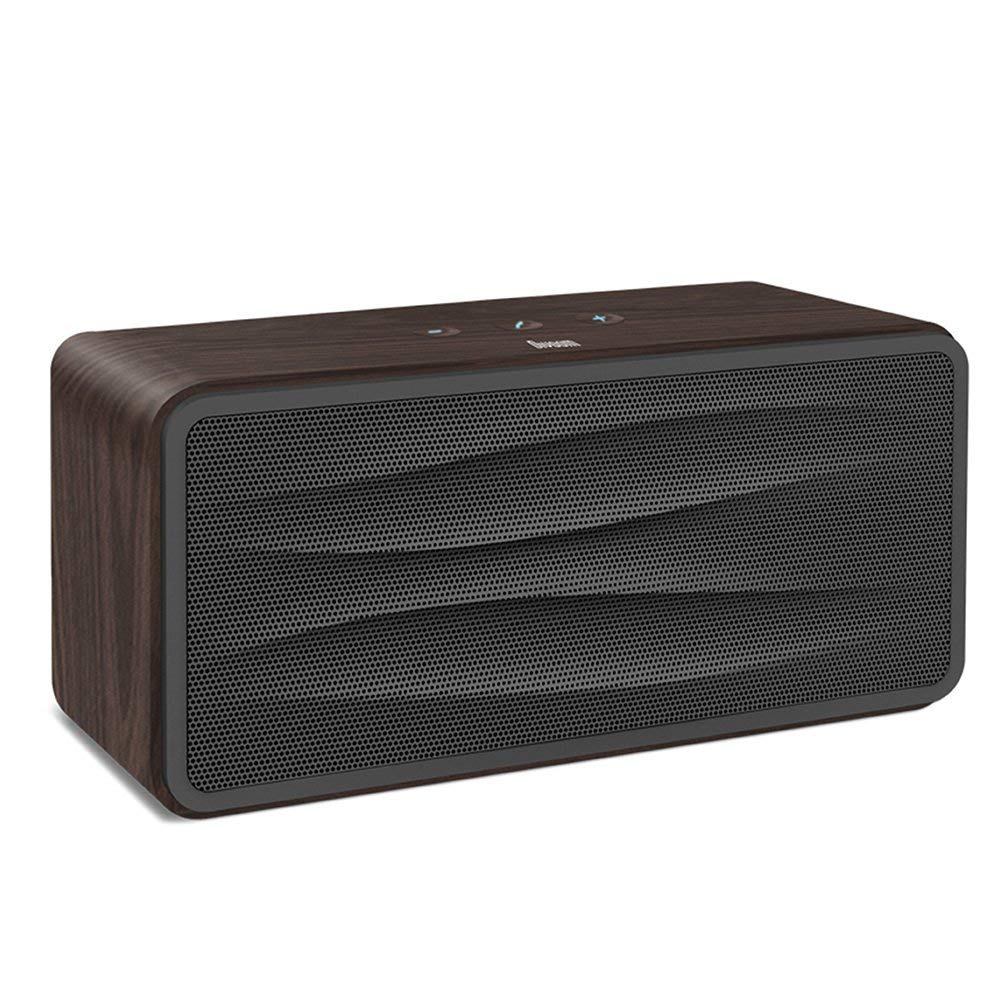
Abbildung 1: Front view of the Divoom Onbeat 500 speaker. This image displays the speaker's main grille and overall design.
Packungsinhalt
Bitte prüfen Sie das Paket auf folgende Artikel:
- Divoom Onbeat 500 Speaker
- Micro-USB-Ladekabel
- Hilfskabel
- Benutzerhandbuch (dieses Dokument)
- Garantiekarte
Produkteigenschaften
The Divoom Onbeat 500 speaker offers a range of features for an enhanced audio experience:
- Kraftvoller Sound: 2.1 channel design with a proprietary passive bass radiator for rich audio.
- NFC-Technologie: Tap-to-pair functionality for quick and easy Bluetooth connection.
- Bluetooth-Konnektivität: Wirelessly play and control music from up to 33 feet (10 meters) away.
- Integrierte Freisprecheinrichtung: Allows you to make and take calls directly from the speaker.
- Langlebige Batterie: Integrated 5000mAh battery provides extended playback time.
- Hilfseingang: Für kabelgebundene Verbindungen zu Geräten ohne Bluetooth-Funktion.
Aufstellen
1. Laden Sie den Lautsprecher auf
Before initial use, fully charge your Divoom Onbeat 500 speaker. Use the provided Micro USB charging cable to connect the speaker to a USB power source (e.g., computer USB port, USB wall adapter). The charging indicator light will illuminate during charging and turn off or change color when fully charged. A full charge typically provides 8-10 hours of playback.
2. Ein-/Ausschalten
- So schalten Sie das Gerät ein: Press and hold the Power button for a few seconds until you hear an audible prompt or see the indicator light illuminate.
- So schalten Sie das Gerät aus: Drücken und halten Sie den Ein-/Ausschalter erneut einige Sekunden lang, bis sich der Lautsprecher ausschaltet.
3. Bluetooth-Kopplung
The Onbeat 500 offers two methods for wireless connection:
NFC-Kopplung (Near Field Communication):
If your device supports NFC, you can pair quickly:
- Stellen Sie sicher, dass NFC auf Ihrem Smartphone oder Tablet aktiviert ist.
- With the Onbeat 500 powered on, gently tap your NFC-enabled device against the NFC area on the speaker.
- Confirm the pairing request on your device. The speaker will indicate a successful connection.
Standardmäßige Bluetooth-Kopplung:
For devices without NFC or for manual pairing:
- Power on the Divoom Onbeat 500 speaker. It will automatically enter Bluetooth pairing mode if no device is connected, or you may need to press a dedicated Bluetooth button (refer to speaker controls).
- On your audio device (smartphone, tablet, computer), go to the Bluetooth settings and enable Bluetooth.
- Suchen nach available devices. You should see "Divoom Onbeat 500" in the list.
- Select "Divoom Onbeat 500" to connect. The speaker will confirm the connection with an audible prompt.
4. AUX-Anschluss
To connect a device using the auxiliary cable:
- Connect one end of the provided auxiliary cable to the AUX-in port on the Divoom Onbeat 500.
- Verbinden Sie das andere Ende des Hilfskabels mit der Kopfhörerbuchse oder dem Audioausgang Ihres Geräts.
- The speaker will automatically switch to AUX mode, or you may need to select it manually (refer to speaker controls).

Abbildung 2: Seite view of the Divoom Onbeat 500, illustrating the location of the charging port, AUX input, and control buttons.
Bedienung des Lautsprechers
1. Musikwiedergabe
Once connected via Bluetooth or AUX, you can control music playback from your connected device. The speaker may also have integrated controls for volume adjustment, play/pause, and track skipping. Refer to the speaker's physical buttons for these functions.
2. Freisprechfunktion
When connected to a smartphone via Bluetooth, the Divoom Onbeat 500 can be used as a speakerphone:
- Anruf annehmen: Press the Call button (often indicated by a phone icon) on the speaker.
- Anruf beenden: Drücken Sie erneut die Anruftaste.
- Anruf ablehnen: Die Anruftaste gedrückt halten.

Abbildung 3: Hinteren view of the Divoom Onbeat 500, highlighting the passive bass radiator for enhanced low-frequency sound.
Wartung
1. Reinigung
Um das Aussehen und die Funktionalität Ihres Lautsprechers zu erhalten:
- Wischen Sie die Außenseite mit einem weichen, trockenen, fusselfreien Tuch ab.
- Verwenden Sie keine Scheuermittel, Alkohol, Benzol oder andere chemische Lösungsmittel, da diese die Oberfläche beschädigen können.
- Vermeiden Sie, dass Feuchtigkeit in die Öffnungen eindringt.
2. Batteriepflege
Um die Lebensdauer des eingebauten Lithium-Ionen-Akkus zu verlängern:
- Vermeiden Sie häufiges vollständiges Entladen des Akkus.
- Bewahren Sie den Lautsprecher an einem kühlen, trockenen Ort auf, wenn er längere Zeit nicht benutzt wird.
- Charge the speaker at least once every three months if stored for a long time to prevent deep discharge.
Fehlerbehebung
If you encounter issues with your Divoom Onbeat 500, please refer to the following common solutions:
| Problem | Mögliche Lösung |
|---|---|
| Der Lautsprecher lässt sich nicht einschalten | Ensure the battery is charged. Connect the speaker to a power source using the Micro USB cable and try again. |
| Kein Ton vom Lautsprecher | Check the volume level on both the speaker and your connected device. Ensure the speaker is correctly paired via Bluetooth or connected via AUX. Try re-pairing the Bluetooth device. |
| Die Bluetooth-Kopplung schlägt fehl | Stellen Sie sicher, dass sich der Lautsprecher im Kopplungsmodus befindet. Schalten Sie Bluetooth auf Ihrem Gerät aus und wieder ein. Bringen Sie Ihr Gerät näher an den Lautsprecher heran. Löschen Sie alle vorherigen Bluetooth-Verbindungen auf Ihrem Gerät und versuchen Sie es erneut. |
| Schlechte Tonqualität | Ensure the speaker and connected device are within range (for Bluetooth). Check for interference from other wireless devices. Try a different audio source or cable. |
Technische Daten
Detailed technical specifications for the Divoom Onbeat 500 speaker:
- Modellname: Divoom Onbeat 500
- Lautsprechertyp: Computerlautsprecher
- Konnektivitätstechnologie: Bluetooth
- Drahtlose Kommunikationstechnologie: Bluetooth
- Kontrollmethode: Berühren
- Energiequelle: Batteriebetrieben
- Batterie: 1 Lithium-Ionen-Akku (5000 mAh)
- Audio-Wattage: 20 Watt
- Maximale Ausgangsleistung des Lautsprechers: 100 Watt
- Konfiguration der Surround-Sound-Kanäle: 2.1
- Kompatible Geräte: Android, Windows, iPhone (iOS)
- Steckertyp: USB (zum Aufladen)
- Produktabmessungen: 22.5 x 7.49 x 10.49 cm (LxBxH)
- Artikelgewicht: 1.55 kg
- Farbe: Holzkohle
- Besondere Merkmale: NFC, Built-in Speakerphone, Passive Bass Radiator
Garantie und Support
Your Divoom Onbeat 500 speaker comes with a limited warranty. Please refer to the included Warranty Card for detailed terms and conditions, including warranty period and coverage.
For technical support, service inquiries, or further assistance, please visit the official Divoom website or contact their customer service department using the information provided on your Warranty Card or product packaging. Please have your model number (Onbeat 500) and purchase details ready when contacting support.


