Einführung
The Saramonic SR-TM7 is a professional super-cardioid broadcast shotgun condenser microphone designed to deliver clear, broadcast-quality audio. It is suitable for use with video cameras, audio recorders, and DSLR/mirrorless cameras equipped with XLR adapters. Its long-shotgun design is optimized for capturing sound from a distance. This manual provides detailed instructions for the proper use and maintenance of your SR-TM7 microphone.
Sicherheitshinweise
- Das Mikrofon darf weder Wasser noch übermäßiger Feuchtigkeit ausgesetzt werden.
- Vermeiden Sie es, das Mikrofon fallen zu lassen oder starken Stößen auszusetzen.
- Do not attempt to disassemble or modify the microphone.
- Halten Sie das Mikrofon von starken Magnetfeldern fern.
- Use only the specified charging cable for the built-in battery.
Packungsinhalt
Überprüfen Sie, ob alle Artikel in Ihrem Paket vorhanden sind:
- Saramonic SR-TM7 Microphone
- Micro-USB-Kabel
- Mic Clip with Camera Shoe Mount
- Schaumstoff-Windschutz
- XLR-Kabel
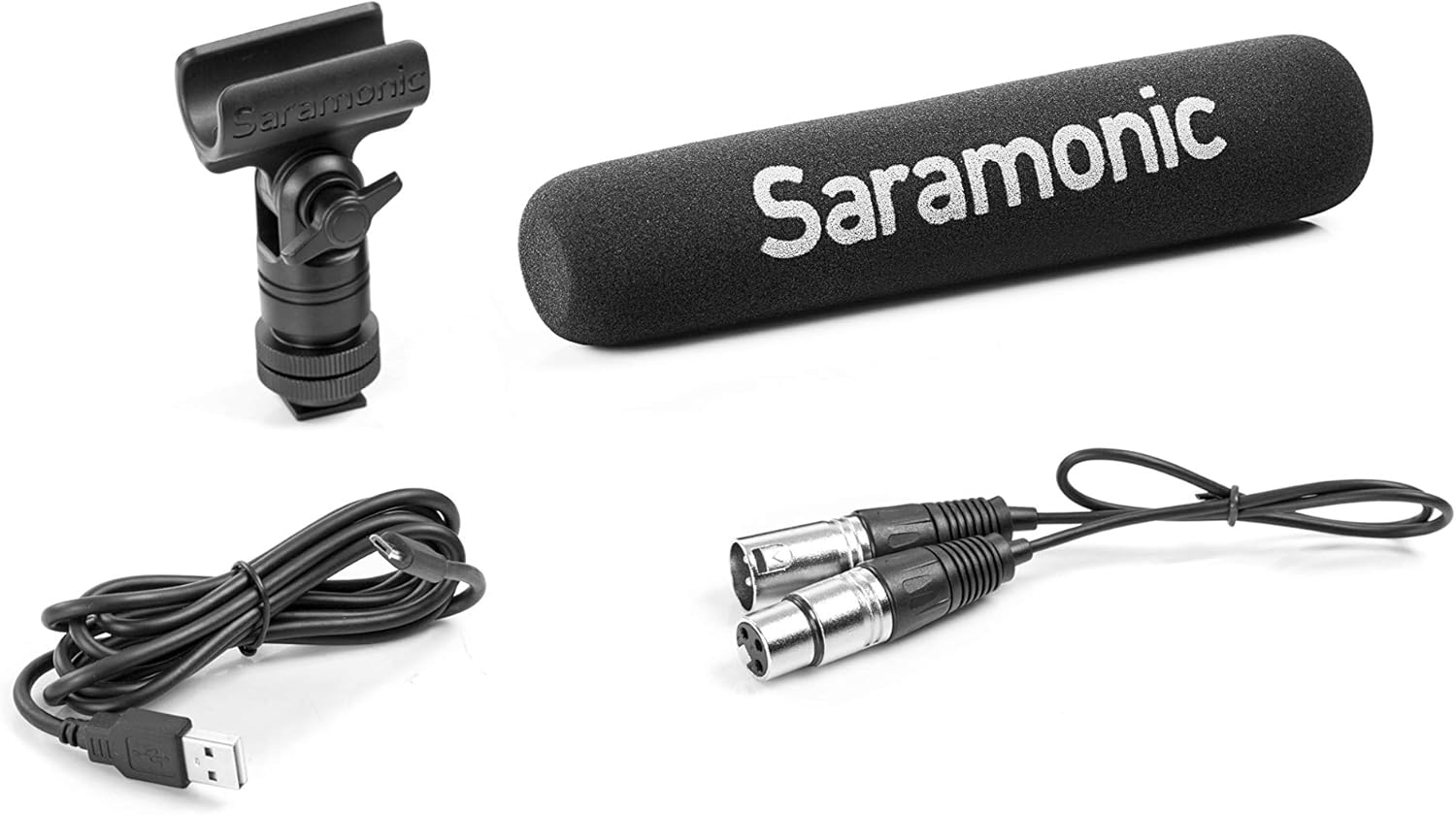
Image: Saramonic SR-TM7 microphone with its accessories, including an XLR cable, a Micro USB charging cable, a mic clip, and a foam windscreen.
Produkt überview
The SR-TM7 features several controls and indicators for optimal audio capture.

Image: Saramonic SR-TM7 microphone with foam windscreen. The image highlights the control panel with buttons for high-pass filter, PAD, high frequency boost, and power.
- Mikrofonkapsel: The primary sound capture component.
- Digital High-Pass Filter (75Hz/150Hz): Reduces low-frequency noise.
- -10dB PAD Switch: Attenuates input signal for loud sound sources.
- +6dB High Frequency Boost Switch: Enhances clarity and sharpness of audio.
- Ein-/Ausschalter: Aktiviert und deaktiviert das Mikrofon.
- XLR-Ausgang: Standard 3-pin XLR connector for audio output.
- Micro-USB-Ladeanschluss: Zum Aufladen des internen Akkus.
Aufstellen
- Mikrofonklemme anbringen: Secure the SR-TM7 microphone into the provided mic clip. The mic clip can then be mounted onto a camera shoe mount or other compatible stand.
- XLR-Kabel anschließen: Connect one end of the supplied XLR cable to the microphone's XLR output and the other end to your camera, audio recorder, or XLR adapter.
- Schaum-Windschutzscheibe anbringen: For indoor use or light wind conditions, slide the foam windscreen over the microphone capsule to reduce plosives and minor wind noise. For outdoor use in windy conditions, a high-wind furry windscreen (e.g., TM-WS7, sold separately) is recommended.
- Einschalten: Press the ON/OFF power button to activate the microphone. The button will illuminate to indicate power status and battery level.

Image: The Saramonic SR-TM7 microphone integrated into a camera setup, demonstrating its typical use for video production.
Bedienung des Mikrofons
Stromversorgung des Mikrofons
The SR-TM7 can be powered by its internal rechargeable lithium battery or by 48V phantom power from your connected device. The power button's illumination indicates the power source and battery life.
- Interne Batterie: Provides up to 150 hours of operation.
- Phantomspeisung: If connected to a device supplying 48V phantom power, the microphone will automatically draw power from it.
Verwenden der Steuertasten
The SR-TM7 features five illuminated buttons for easy adjustment, even in low-light conditions. The microphone digitally controls the on-board filters and saves your settings when powered off.
- -10 dB PAD: Press this button to reduce the input sensitivity by 10dB. This is useful when recording very loud sound sources to prevent distortion.
- +6dB High Frequency Boost: Activate this feature to enhance the sharpness and clarity of the audio, particularly useful for dialogue.
- Low-Cut Filters (75Hz and 150Hz): Two separate buttons allow you to engage a low-cut filter at either 75Hz or 150Hz. These filters help to eliminate distracting low-frequency noises such as rumble from vehicles, air conditioners, or footsteps, making dialogue more intelligible.
Akku und Laden
The SR-TM7 is equipped with a built-in lithium battery. The Micro-USB charging port is integrated into the XLR connector for convenience.
- Laden: Connect the supplied Micro-USB cable to the charging port on the microphone and to a standard USB power source (e.g., computer USB port, USB wall adapter).
- Ladeanzeige: The power button's color will change to indicate charging status and battery life. Refer to the microphone's specific LED indicators for detailed status.
- Akkulaufzeit: Eine vollständige Ladung ermöglicht einen ununterbrochenen Betrieb von etwa 150 Stunden.
Wartung
- Reinigung: Reinigen Sie das Mikrofongehäuse mit einem weichen, trockenen Tuch. Verwenden Sie keine flüssigen Reiniger oder Lösungsmittel.
- Lagerung: When not in use, store the microphone in a dry, dust-free environment, preferably in its original packaging or a protective case.
- Batteriepflege: For long-term storage, ensure the battery is partially charged (around 50%) to prolong its lifespan. Avoid fully discharging the battery for extended periods.
Fehlerbehebung
| Problem | Mögliche Ursache | Lösung |
|---|---|---|
| Keine Audioausgabe | Microphone not powered on; XLR cable not connected properly; Low battery; Phantom power not enabled on recording device. | Ensure microphone is powered on; Check XLR cable connections; Charge the battery; Enable 48V phantom power on your recording device if using. |
| Verzerrter Ton | Input signal too high (clipping); Microphone too close to sound source. | Activate the -10dB PAD switch; Increase distance from sound source; Adjust input gain on your recording device. |
| Excessive low-frequency noise | Environmental rumble; Proximity effect. | Engage the 75Hz or 150Hz low-cut filter; Move microphone away from noise sources. |
Technische Daten
- Mikrofon-Formfaktor: Schrotflinte
- Richtcharakteristik: Superniere
- Frequenzgang: 20 Hz - 20 kHz
- Signal-Rausch-Verhältnis: 80 dB
- Audioempfindlichkeit: 10 Dezibel
- Energiequelle: Built-in Lithium Ion Battery / 48V Phantom Power
- Akkulaufzeit: Approximately 150 hours (internal battery)
- Steckertyp: XLR, Micro USB (for charging)
- Abmessungen (L x B x H): 17.72 x 3.35 x 6.89 Zoll (Produktabmessungen)
- Artikelgewicht: 8.1 Unzen (0.23 Kilogramm)
- Material: Durable Metal Construction (body), Foam (windscreen)
- Enthaltene Komponenten: Micro USB cable, Mic Clip, Foam windshield, XLR cable
Garantie und Support
For warranty information and technical support, please refer to the official Saramonic webBesuchen Sie unsere Website oder wenden Sie sich an Ihren Händler vor Ort. Bewahren Sie Ihren Kaufbeleg für Garantieansprüche auf.
Saramonic Official WebWebsite: www.saramonic.com


