
1. Einleitung
The Amkette Trubeats S50 is a versatile smart wireless Bluetooth speaker designed to enhance your audio experience. It features multiple connectivity options including Bluetooth, USB, Micro SD card, and AUX input, along with an integrated FM radio. The speaker also includes a digital clock with alarm functions and can be controlled via a dedicated smartphone application. Additionally, it can function as a power bank to charge your mobile devices.
2. Packungsinhalt
Bitte kreuzen Sie das Kästchen für die folgenden Elemente an:
- Amkette Trubeats S50 Smart Wireless Bluetooth Speaker
- USB-Ladekabel
- AUX-Kabel
- Benutzerhandbuch (dieses Dokument)
3. Produktüberschreitungview
Familiarize yourself with the various parts and controls of your Amkette Trubeats S50 speaker.
3.1-Vorderseite View

Abbildung 1: Vorderseite view of the Amkette Trubeats S50 speaker, showing the speaker grille and LED display.
3.2 Oberes Bedienfeld

Figure 2: Labeled diagram of the Amkette Trubeats S50 speaker's top control buttons: Mode, Volume Down/Previous, Play/Pause/Answer Call, Volume Up/Next, Clock, and Microphone.
- MODE-Taste: Press to switch between Bluetooth, FM, AUX, USB, and Micro SD modes.
- K-/ Button: Press to decrease volume; long press for previous track/station.
- Play/Pause/Answer Call Button: Press to play/pause audio; press to answer/end calls.
- +/N Button: Press to increase volume; long press for next track/station.
- UHR-Taste: Press to set time and alarms.
- Mikrofon: Für Freisprechanrufe.
3.3 Rear Ports and Switch

Figure 3: Labeled diagram of the Amkette Trubeats S50 speaker's rear ports: AUX, Micro SD, USB Host, USB DC, and On/Off switch.
- AUX-Eingang: Externe Audiogeräte können über das 3.5-mm-AUX-Kabel angeschlossen werden.
- Micro-SD-Kartensteckplatz: Insert a Micro SD card for audio playback.
- USB-Host-Port: Insert a USB drive for audio playback or use as a power bank.
- USB DC Input: Connect the USB charging cable to power the speaker.
- Ein / Aus Schalter: Schalten Sie den Lautsprecher ein oder aus.
4. Einrichtung
4.1 Aufladen des Lautsprechers
- Connect the small end of the USB charging cable to the USB DC Input Anschlussöffnung an der Rückseite des Lautsprechers.
- Verbinden Sie das breite Ende des USB-Ladekabels mit einem USB-Netzteil (nicht im Lieferumfang enthalten) oder einem USB-Anschluss Ihres Computers.
- Die LED-Anzeige zeigt den Ladestatus an. Eine vollständige Ladung dauert in der Regel etwa 4 Stunden.
Notiz: The speaker does not have a visible battery level indicator. It is recommended to charge fully before first use and when the battery is low.
4.2 Ein-/Ausschalten
- Zum Einschalten schieben Sie den EIN/AUS-Schalter on the rear of the speaker to the 'ON' position.
- Zum Ausschalten den Schieberegler drücken EIN/AUS-Schalter in die Position „AUS“.
5. Bedienungsanleitung
5.1 Bluetooth-Kopplung

Figure 4: Speaker in Bluetooth pairing mode, indicated by 'BT' on the display.
- Power on the speaker. It will automatically enter Bluetooth pairing mode, indicated by 'BT' flashing on the LED display.
- Aktivieren Sie Bluetooth auf Ihrem Smartphone oder einem anderen Gerät.
- Suchen nach available devices and select "Amkette S50" from the list.
- Once paired, the speaker will emit a confirmation tone, and 'BT' will stop flashing.
- Sie können nun Audio von Ihrem Gerät über den Lautsprecher abspielen.
5.2 Verwendung des AUX-Eingangs

Figure 5: Speaker connected to a smartphone via AUX cable for wired audio playback.
- Verbinden Sie ein Ende des 3.5-mm-AUX-Kabels mit dem/der AUX-Eingang Anschlussöffnung an der Rückseite des Lautsprechers.
- Connect the other end of the AUX cable to the audio output jack of your external device (e.g., smartphone, MP3 player, laptop).
- Drücken Sie die MODE-Taste repeatedly until the speaker enters AUX mode.
- Spiele Audio von deinem angeschlossenen Gerät ab.
5.3 Using USB/Micro SD Card
- Stecken Sie einen USB-Stick in den USB-Host-Port oder eine Micro-SD-Karte in den Micro SD-Kartensteckplatz auf der Rückseite des Lautsprechers.
- Stellen Sie sicher, dass Ihr Audio files (MP3 format recommended) are stored on the drive/card.
- Drücken Sie die MODE-Taste repeatedly until the speaker enters USB or Micro SD mode. Playback will begin automatically.
- Verwenden Sie die K-/ Und +/N Tasten zur Titelnavigation und Lautstärkeregelung.
5.4 FM-Radiobetrieb

Figure 6: Speaker displaying FM frequency, with app control for station selection.
- Drücken Sie die MODE-Taste repeatedly until the speaker enters FM radio mode.
- Automatischer Scan: Im FM-Modus die Taste lange drücken Abspielen/Pause Durch Drücken dieser Taste wird ein automatischer Sendersuchlauf nach verfügbaren FM-Sendern gestartet. Der Lautsprecher speichert die gefundenen Sender.
- Manuelle Abstimmung: Verwenden Sie die K-/ Und +/N -Tasten, um durch gespeicherte Sender zu navigieren.
- For precise tuning and station management, use the Amkette Trubeats Smart Speaker App (see section 5.7).
5.5 Digital Clock and Alarm Setup

Figure 7: Speaker displaying the current time on its LED screen.
- Abbindezeit: Halten Sie die UHR-Taste. The hour display will flash. Use the K-/ Und +/N Tasten zum Einstellen der Stunde. Drücken Sie die UHR-Taste again to set minutes, and adjust with K-/ Und +/N. Drücken Sie UHR-Taste Zur Bestätigung noch einmal.
- Alarme einstellen: Drücken Sie kurz die UHR-Taste to cycle through Alarm 1 and Alarm 2 settings. When an alarm time is displayed, long press the UHR-Taste to enter alarm setting mode. Adjust hour and minute using K-/ Und +/N, confirming each with a short press of the UHR-Taste. You can also set the alarm source (FM/SD Card/USB) via the app.
5.6 Verwendung als Powerbank
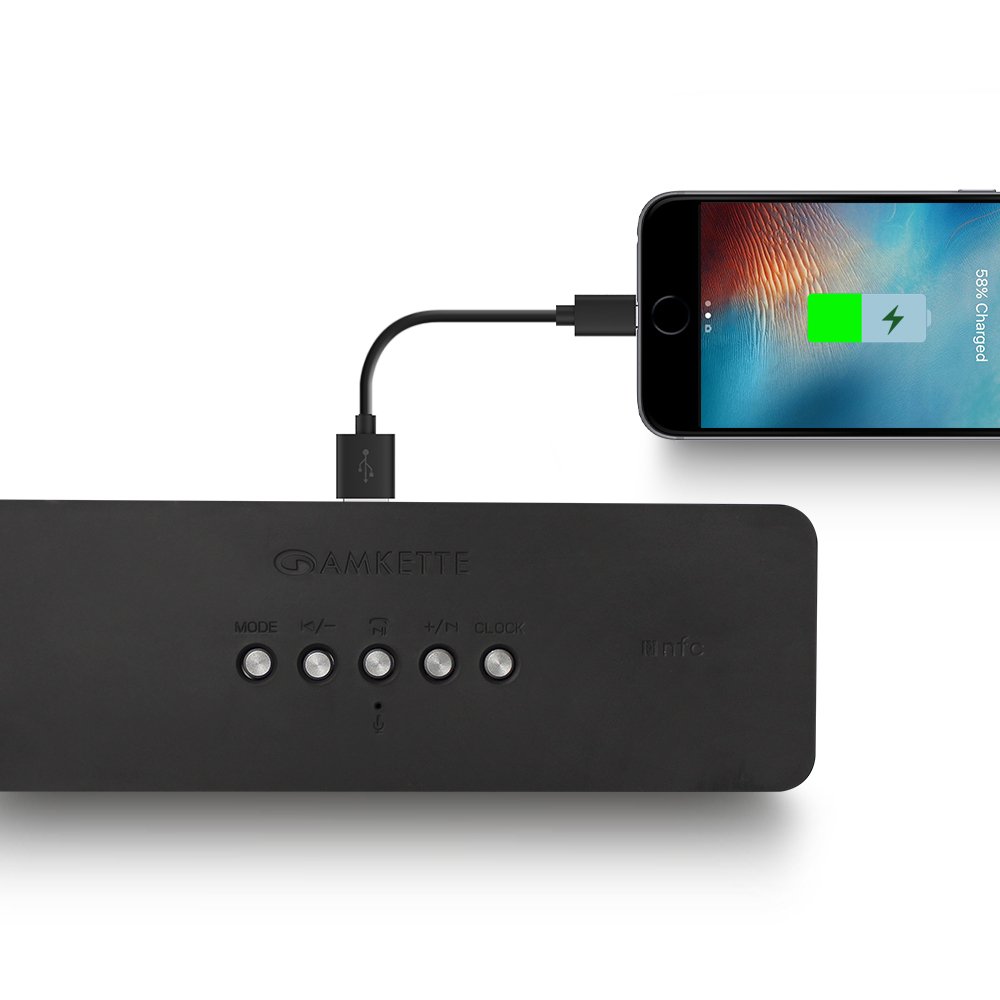
Figure 8: Speaker providing power to a smartphone through its USB Host port.
The Amkette Trubeats S50 can charge your smartphone or other USB-powered devices. Connect your device's charging cable to the USB-Host-Port on the rear of the speaker. The speaker's internal battery will then supply power to your device.
5.7 App Control (Android Only)

Figure 9: Smartphone displaying the Amkette Trubeats Smart Speaker App interface.
For enhanced control, download the Amkette Trubeats Smart Speaker App from the Google Play Store (for Android phones). The app allows you to:
- Zwischen verschiedenen Audiomodi wechseln.
- Control volume and track playback.
- Manage FM radio stations and perform precise tuning.
- Set and customize alarms, including alarm source.
Ensure your speaker is connected via Bluetooth to your smartphone for app functionality.
5.8 Anrufbearbeitung
When connected via Bluetooth to a smartphone, the speaker can be used for hands-free calling:
- Anruf annehmen: Drücken Sie die Play/Pause/Answer Call Button einmal.
- Anruf beenden: Drücken Sie die Play/Pause/Answer Call Button einmal während eines Anrufs.
- Anruf ablehnen: Drücken Sie lange die Play/Pause/Answer Call Button.
6. Wartung
- Schützen Sie den Lautsprecher vor extremen Temperaturen, direkter Sonneneinstrahlung und Feuchtigkeit.
- Reinigen Sie den Lautsprecher mit einem weichen, trockenen Tuch. Verwenden Sie keine Scheuermittel oder Lösungsmittel.
- Vermeiden Sie es, den Lautsprecher fallen zu lassen oder starken Stößen auszusetzen.
- Wenn der Lautsprecher längere Zeit nicht benutzt wird, sollte er an einem kühlen, trockenen Ort aufbewahrt und regelmäßig aufgeladen werden, um die Batterieleistung zu erhalten.
7. Fehlerbehebung
| Problem | Mögliche Ursache | Lösung |
|---|---|---|
| Der Lautsprecher lässt sich nicht einschalten. | Batterie ist leer. | Laden Sie den Lautsprecher vollständig auf. |
| Aus dem Lautsprecher kommt kein Ton. | Die Lautstärke ist zu niedrig; der falsche Modus wurde ausgewählt; das Gerät ist nicht richtig angeschlossen. | Increase speaker and source device volume. Ensure correct mode (Bluetooth, AUX, etc.) is selected. Reconnect the device. |
| Die Bluetooth-Kopplung schlägt fehl. | Lautsprecher nicht im Kopplungsmodus; Gerät zu weit entfernt; Störungen. | Ensure speaker is in pairing mode ('BT' flashing). Move device closer to speaker. Turn off other Bluetooth devices. |
| Schlechter FM-Radioempfang. | Schwaches Signal; Umwelteinflüsse. | Relocate the speaker to an area with better reception. Perform an auto-scan again. |
| Die App verbindet sich nicht mit dem Lautsprecher. | Bluetooth not connected; app issue. | Ensure speaker is paired via Bluetooth to your phone. Restart the app and try again. |
8. Spezifikationen
- Modell: Staffel 50
- Marke: Amkette
- Lautsprechertyp: Portable Bluetooth Speaker (Outdoor)
- Konnektivität: Bluetooth, USB, Micro-SD-Kartensteckplatz, AUX-Anschluss, FM-Radio
- Drahtlose Kommunikationstechnologie: Bluetooth
- Kontrollmethode: Buttons, App (Android)
- Audioausgabemodus: Stereo
- Audio-Wattage: 10 Watt
- Energiequelle: Batteriebetrieben
- Akkulaufzeit: Bis zu 12 Stunden (durchschnittlich)
- Ladezeit: Ungefähr 4 Stunden
- Kompatible Geräte: Laptop, Mobile, Tablet
- Abmessungen (LxBxH): 26.7 x 10.9 x 7.9 cm
- Artikelgewicht: 703 Gramm
- Wasserdicht: Ja
- Montageart: Tischhalterung
9. Garantie und Support
The Amkette Trubeats S50 Smart Wireless Bluetooth Speaker comes with a 1 Jahr Garantie Ab Kaufdatum. Diese Garantie deckt Herstellungsfehler bei normalem Gebrauch ab.
For warranty claims, technical assistance, or any other support inquiries, please contact Amkette customer support through their official webWebsite oder die Kontaktinformationen, die Sie mit Ihren Kaufunterlagen erhalten haben.
Bitte bewahren Sie Ihren Kaufbeleg als Kaufnachweis für Garantiezwecke auf.