1. Einleitung
This manual provides detailed instructions for the setup, operation, and maintenance of your Wisi OR 397 A Irdeto HDTV Satellite Receiver. This receiver is designed for digital satellite television and radio reception, supporting both DVB-S2 (HDTV) and DVB-S standards. It features an integrated Irdeto card reader for ORF cards, HDMI output for high-definition viewing, and USB recording capabilities.
Packungsinhalt:
- Wisi OR 397 A HD Irdeto Satellite Receiver
- Infrarot-Fernbedienung (mit Batterien)
- Bedienungsanleitung
Hauptmerkmale:
- Integrated Irdeto card reader for ORF, ATV, Puls4, etc.
- Reception of DVB-S2 (HDTV) and DVB-S TV and radio programs
- USB Recording (PVR function) to external hard drive (requires ORF card for encrypted channels)
- Pre-programmed with Austrian channel list
- Powerful Electronic Program Guide (EPG) with multi-day preview
- USB Media Player for JPEG photos, MP3 music, and MP4 videos
- Energy-saving standby mode (0.5 W)
- Software updates via ASTRA satellite
- Parental control and Unicable function
2. Produktüberschreitungview
Vorderseite

Abbildung 2.1: Frontplattenlayout
This image displays the front panel of the Wisi OR 397 A receiver. It shows the power button, channel up/down buttons, a USB input port, and the smartcard slot.
- Ein-/Ausschalten: Button to switch the device on or off.
- Channel Down: Button to switch to the previous channel.
- Channel Up: Button to switch to the next channel.
- USB Eingang: Port for connecting USB devices, such as external hard drives for recording or USB sticks for media playback.
- Smartcard Slot: Insert for your ORF+ Smartcard. Ensure the smartcard is inserted with the chip facing downwards.
Rückseite
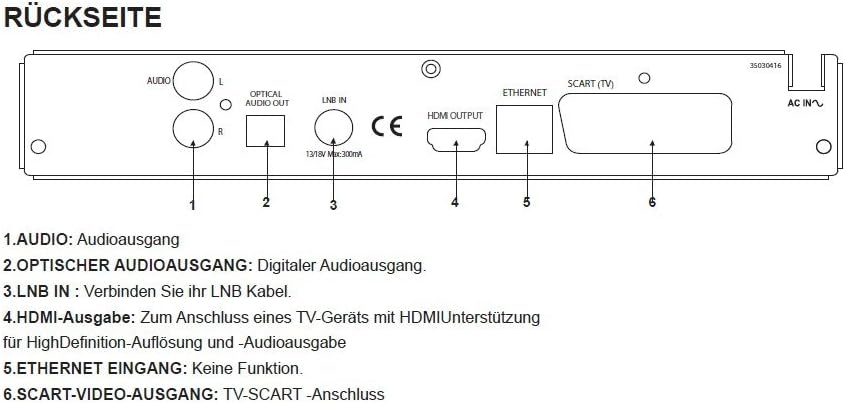
Abbildung 2.2: Anschlüsse auf der Rückseite
This image illustrates the rear panel of the Wisi OR 397 A receiver, highlighting various input and output ports for audio, video, and satellite signal.
- AUDIO (L/R): Analog audio output ports (RCA) for connecting to an ampVerstärker oder Stereoanlage.
- OPTICAL AUDIO OUTPUT: Digital audio output (S/PDIF) for high-quality digital audio connection.
- LNB-EINGANG: Connect your LNB cable from the satellite dish to this input.
- HDMI-Ausgang: Connects to an HDMI-enabled TV for high-definition video and audio output.
- ETHERNET INPUT: This port is present but has no active function for this model.
- SCART VIDEO OUTPUT: SCART connection for older televisions or video recorders.
3. Einrichtung
3.1 Erste Verbindungen
- Satellitenschüsselanschluss: Verbinden Sie das LNB-Kabel Ihrer Satellitenschüssel mit dem LNB-Eingang Anschluss an der Rückseite des Receivers.
- TV-Anschluss:
- For High Definition (HD) viewing, connect an HDMI cable from the HDMI-Ausgang port on the receiver to an HDMI input on your television.
- Alternatively, for standard definition (SD) viewing or older TVs, connect a SCART cable from the SCART VIDEO OUTPUT Verbinden Sie den Receiver mit dem SCART-Eingang Ihres Fernsehers.
- Anschluss des Audiosystems (optional):
- Für digitale Audioausgabe schließen Sie ein optisches Kabel an den/die/das an. OPTISCHER AUDIOAUSGANG to your audio receiver or soundbar.
- For analog audio, connect RCA cables from the AUDIO (L/R) ports to your audio system.
- Smartcard Insertion: Carefully insert your ORF+ Smartcard into the Smartcard Slot on the front panel, ensuring the chip faces downwards.
- Stromanschluss: Connect the power cable to the receiver and then to a power outlet.
3.2 Ersteinrichtung
Upon powering on the receiver for the first time, it will guide you through an initial setup process. Follow the on-screen prompts to configure language, time zone, and perform a channel scan. The receiver comes pre-programmed with the current Austrian channel list, simplifying this process.
4. Bedienungsanleitung
4.1 Grundfunktionen
- Leistung: Use the power button on the front panel or the remote control to turn the receiver on or off.
- Kanalauswahl: Use the Channel Up/Down buttons on the front panel or the remote control to navigate through channels. You can also enter channel numbers directly using the remote.
- Lautstärkeregelung: Passen Sie die Lautstärke mit der Fernbedienung an.
- Menüführung: Use the 'Menu' button on the remote to access settings and features. Navigate using arrow keys and confirm with 'OK'.
4.2 Elektronischer Programmführer (EPG)
The receiver features a powerful EPG that provides a multi-day program preview. Press the 'EPG' button on your remote control to access it. You can view program schedules, read program information, and set reminders or recordings directly from the EPG.
4.3 USB-Aufnahme (PVR)
To use the PVR function, connect an external USB hard drive to the USB-Eingang port on the front panel. Ensure the hard drive is formatted correctly (FAT32 or NTFS). You can schedule recordings via the EPG or initiate instant recordings while watching a program. Please note that USB recording of encrypted channels (e.g., ORF) is only possible with an inserted and active ORF smartcard. Program providers may impose additional restrictions on recording.
4.4 Mediaplayer
The integrated USB Media Player allows you to play various media files from a connected USB storage device. Connect a USB stick or hard drive to the USB-Eingang. Navigate to the Media Player section in the main menu to browse and play JPEG photos, MP3 music, and MP4 videos.
4.5 Kindersicherung
The parental control function allows you to restrict access to certain channels or programs based on age ratings. Access this feature through the main menu settings and follow the instructions to set up a PIN and configure restrictions.
5. Wartung
5.1 Softwareaktualisierungen
The Wisi OR 397 A receiver supports software updates via the ASTRA satellite. It is recommended to periodically check for and install available updates to ensure optimal performance and access to the latest features. Consult the system settings menu for options related to software updates.
5.2 Reinigung
To clean the receiver, use a soft, dry cloth. Do not use liquid or aerosol cleaners, as they may damage the device. Ensure the receiver is unplugged before cleaning.
6. Fehlerbehebung
If you encounter issues with your Wisi OR 397 A receiver, please refer to the following common solutions before contacting support:
- Kein Bild/Ton:
- Check all cable connections (HDMI, SCART, LNB, audio).
- Ensure the TV is set to the correct input source (HDMI 1, AV, etc.).
- Prüfen Sie, ob der Empfänger eingeschaltet ist.
- Kein Signal:
- Check the LNB cable connection.
- Ensure the satellite dish is correctly aligned.
- Perform a channel scan from the menu.
- Encrypted Channel Issues (e.g., ORF):
- Ensure your ORF smartcard is correctly inserted (chip facing down).
- Verify your smartcard subscription is active.
- Check for any service messages on screen.
- Fernbedienung funktioniert nicht:
- Replace the batteries (2x AAA).
- Stellen Sie sicher, dass sich keine Hindernisse zwischen Fernbedienung und Empfänger befinden.
- Empfänger reagiert nicht:
- Perform a power cycle: unplug the receiver from the power outlet, wait 30 seconds, then plug it back in.
7. Spezifikationen

Image 7.1: Technical Specifications and Remote Control
This image provides a comprehensive table of the Wisi OR 397 A's technical data, including dimensions, weight, and supported audio/video formats, alongside a visual of the remote control.
| Besonderheit | Beschreibung |
|---|---|
| Marke | Wisi |
| Modellnummer | OR 397 A |
| Farbe | Schwarz |
| Reception Standards | DVB-S2 (HDTV), DVB-S |
| Kartenleser | Integrated Irdeto Secure Card Reader (for ORF, ATV, Puls4, etc.) |
| Videoausgang | 1x HDMI 1.4, 1x SCART (TV), 1x Cinch-Video (RCA yellow) |
| Audioausgang | Analog (RCA L/R), Digital (Optical S/PDIF), Dolby Digital (AC3) |
| USB-Anschlüsse | 1x USB 2.0 (compatible with USB 1.1/2.0, 5V DC, max. 500mA) |
| Memory Slots | 5000 for TV and Radio channels |
| Energieaufnahme | 0.5 Watt in Standby mode |
| Bandtage | 12 Volt (DC) |
| Abmessungen (LxBxH) | 230 x 160 x 45 mm |
| Gewicht | 0.7 kg |
| Betriebstemperatur | 0°C bis +45°C |
| Lagertemperatur | -10°C bis +70°C |
8. Garantie und Support
For warranty information, please refer to the documentation provided at the time of purchase or contact your retailer. For technical support or further assistance, please consult the official Wisi website or contact their customer service department. Keep your purchase receipt and product model number (OR 397 A) readily available when seeking support.


