Einführung
This instruction manual provides essential information for the safe and efficient operation of your SONY CFD-S70 Portable CD Cassette Boombox. Please read this manual thoroughly before using the unit and retain it for future reference. This unit allows playback of CDs, CD-R/RW, MP3 CDs, cassette tapes, and features an FM/AM radio tuner.
Produkt überview
The SONY CFD-S70 is a versatile portable audio system designed for various media playback. Below are images illustrating the unit's main components.
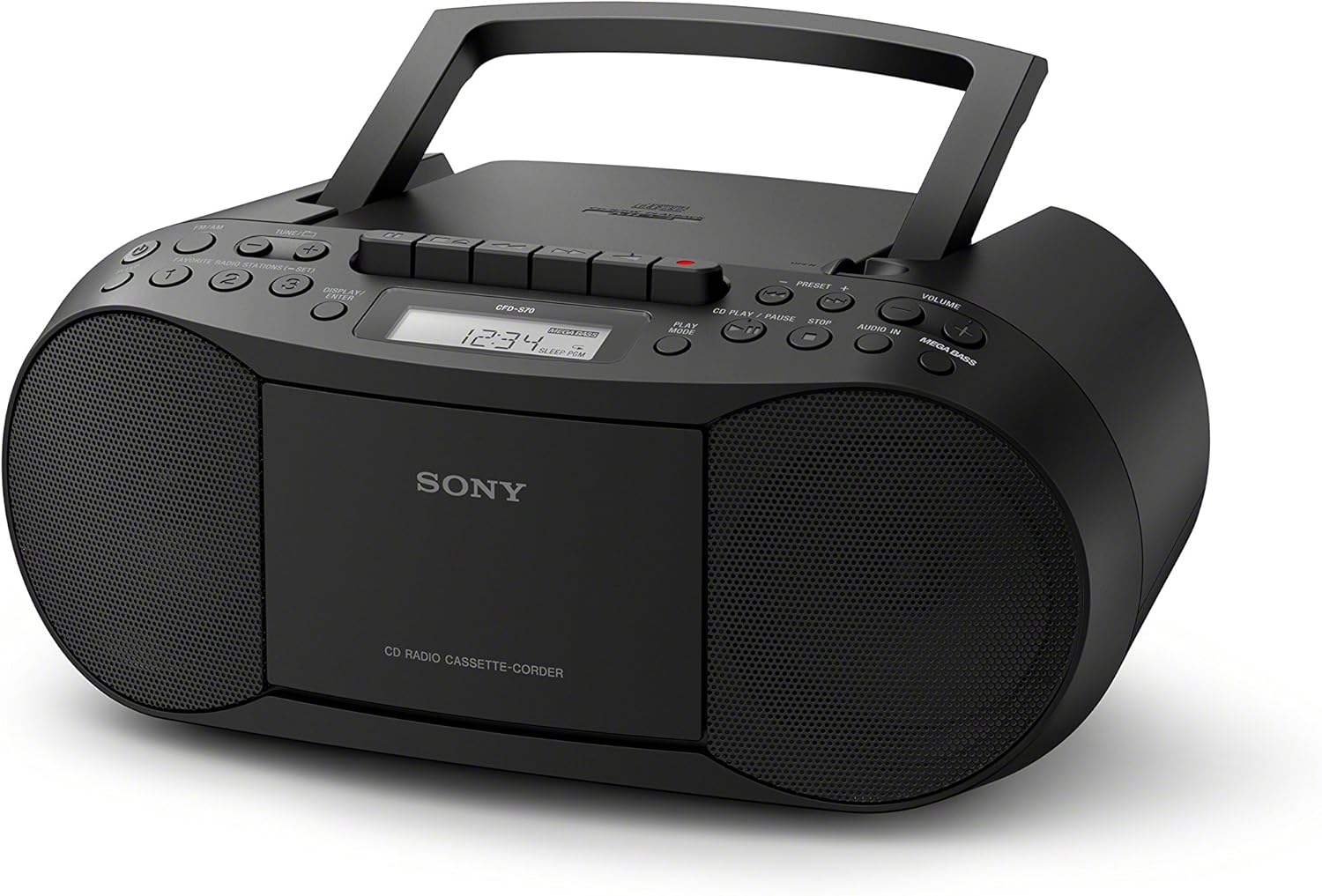
Abbildung 1: Front view of the SONY CFD-S70 Portable CD Cassette Boombox with the handle in the upright position. This image shows the CD compartment, cassette deck controls, radio tuner, volume knob, and speakers.

Abbildung 2: Front view of the SONY CFD-S70 Portable CD Cassette Boombox with the handle in the down position. This image provides a clear view of the control panel, including the display, function buttons, and speaker grilles.
Aufstellen
1. Stromversorgung des Geräts
The CFD-S70 can be powered using either AC power or batteries.
Wechselstromanschluss:
- Stellen Sie sicher, dass das Gerät ausgeschaltet ist.
- Schließen Sie das mitgelieferte Netzkabel an die AC IN-Buchse des Geräts an.
- Stecken Sie das andere Ende des Netzkabels in eine normale Wandsteckdose.
Einlegen der Batterie:
The unit requires 6 C-size batteries (not supplied).
- Öffnen Sie den Batteriefachdeckel an der Unterseite des Geräts.
- Insert 6 C-size batteries, ensuring correct polarity (+/-) as indicated inside the compartment.
- Schließen Sie den Batteriefachdeckel fest.
- Notiz: Um ein Auslaufen zu verhindern, entfernen Sie die Batterien, wenn das Gerät längere Zeit nicht benutzt wird.
2. Antenneneinstellung
For optimal FM radio reception, extend the telescopic antenna. For AM reception, the unit has a built-in ferrite bar antenna; rotate the unit itself for best reception.
3. Connecting External Devices (AUX IN)
You can connect an external audio device (e.g., smartphone, MP3 player) to the unit using an audio cable (not supplied) with a 3.5mm stereo mini plug.
- Connect one end of the audio cable to the headphone jack or line-out jack of your external device.
- Connect the other end to the AUDIO IN jack on the CFD-S70.
- Select the AUDIO IN function on the boombox.
- Adjust the volume on both the boombox and the external device.
Bedienungsanleitung
1. CD-Wiedergabe
- Drücken Sie die CD Taste zur Auswahl der CD-Funktion.
- Öffnen Sie die CD-Fachabdeckung durch Drücken der Taste ÖFFNEN/SCHLIESSEN Taste.
- Legen Sie eine CD mit der beschrifteten Seite nach oben in das Fach ein.
- Close the CD compartment cover. The total number of tracks will appear on the display.
- Drücken Sie die WIEDERGABE/PAUSE button (►/⏸) to start playback.
- Zum Anhalten drücken Sie WIEDERGABE/PAUSE Drücken Sie erneut, um fortzufahren.
- Um die Wiedergabe zu stoppen, drücken Sie die Taste STOPPEN button (⏹).
- Um Titel zu überspringen, drücken Sie die Taste NACH VORNE (⏵) or RÜCKWÄRTS (⏶) buttons.
- Programmablauf: While stopped, press the PROGRAMM button to select tracks in a desired order.
- Zufallswiedergabe: Drücken Sie die SHUFFLE Taste zum Abspielen der Titel in zufälliger Reihenfolge.
2. Kassettenwiedergabe und -aufnahme
- Drücken Sie die BAND button to select the Cassette function.
- Öffnen Sie die Klappe des Kassettenfachs.
- Legen Sie eine Musikkassette so ein, dass die gewünschte Seite nach vorne zeigt.
- Schließen Sie die Klappe des Kassettenfachs.
- Wiedergabe: Drücken Sie die SPIELEN Schaltfläche (►).
- Schneller Vorlauf/Rücklauf: Drücken Sie die FFWD or REW Tasten. Drücken Sie STOP/AUSWERFEN anzuhalten.
- Stopp/Auswerfen: Drücken Sie die STOP/AUSWERFEN button (⏹) to stop playback or eject the tape.
- Aufnahme:
- Insert a blank cassette tape with the record-prevention tab intact.
- Wählen Sie die gewünschte Quelle (CD, Radio oder AUX IN).
- Drücken Sie die AUFZEICHNEN button (⏺). The SPIELEN Die Schaltfläche wird ebenfalls automatisch aktiviert.
- Um die Aufnahme zu stoppen, drücken Sie die STOP/AUSWERFEN Taste.
3. Radiobetrieb
- Drücken Sie die RADIO Taste zur Auswahl der Radiofunktion.
- Drücken Sie die BAND Taste zum Umschalten zwischen FM- und AM-Bändern.
- Manuelle Abstimmung: Verwenden Sie die TUNE + or TUNE - Tasten zum manuellen Einstellen eines Senders.
- Automatische Sendereinstellung: Drücken und halten TUNE + or TUNE - einige Sekunden lang wird automatisch nach dem nächsten verfügbaren Sender gesucht.
- Voreingestellte Sender:
- To store a station: Tune to the desired station, then press and hold a numbered preset button (1-30) until the preset number flashes on the display.
- To recall a station: Press the corresponding numbered preset button briefly.
4. Klanganpassung
- Volumen: Drehen Sie den VOLUMEN knob to increase or decrease the sound level.
- MEGA BASS: Drücken Sie die Mega-Bass Taste zum Aktivieren oder Deaktivieren der Bassverstärkungsfunktion.
Wartung
1. Reinigung des Geräts
- Wischen Sie die Außenseite des Geräts mit einem weichen, trockenen Tuch ab.
- Bei hartnäckigen Flecken ein Tuch leicht andrücken.ampMit einer milden Reinigungsmittellösung abspülen und anschließend trocken wischen.
- Do not use abrasive pads, scouring powder, or solvents such as alcohol or benzene, as they may damage the finish.
2. CD and Cassette Care
- Fassen Sie CDs an ihren Kanten an, um Fingerabdrücke auf der Abspieloberfläche zu vermeiden.
- Bewahren Sie CDs in ihren Hüllen auf, wenn Sie sie nicht benutzen.
- Keep cassette tapes away from strong magnetic fields and direct sunlight.
- Periodically clean the cassette deck's head and pinch rollers with a cotton swab lightly moistened with tape head cleaner.
3. Batteriewechsel
When the unit's performance degrades or the display dims during battery operation, replace all six C-size batteries with new ones. Do not mix old and new batteries, or different types of batteries.
Fehlerbehebung
Sollten Sie Probleme mit Ihrer Boombox haben, finden Sie in der folgenden Tabelle mögliche Lösungen.
| Problem | Mögliche Ursache | Lösung |
|---|---|---|
| Kein Strom | Netzkabel nicht angeschlossen; Batterien leer oder falsch eingelegt. | Stellen Sie sicher, dass das Netzkabel fest eingesteckt ist. Tauschen Sie die Batterien aus oder überprüfen Sie die Polarität. |
| Die CD spielt nicht ab oder springt. | CD is dirty, scratched, or inserted incorrectly; Unit is subject to vibration. | Clean the CD with a soft cloth. Insert CD with label side up. Place unit on a stable surface. |
| Schlechter Radioempfang | Antenna not extended/adjusted; Interference from other devices. | Extend and adjust the FM telescopic antenna. Rotate the unit for AM reception. Move unit away from other electronic devices. |
| Cassette tape does not play or sounds distorted | Tape is tangled or damaged; Tape heads are dirty. | Check tape condition. Clean tape heads and pinch rollers. |
| Kein Ton vom AUX-IN-Eingang | Cable not connected properly; Incorrect function selected; Volume too low. | Ensure audio cable is fully inserted. Select AUDIO IN function. Increase volume on both boombox and external device. |
Technische Daten
| Besonderheit | Detail |
|---|---|
| Modellnummer | CFD-S70 |
| Marke | Sony |
| Medienwiedergabe unterstützt | CD, CD-R/RW, MP3 CD, Cassette Tape |
| Tuner | FM/AM Digital Tuner with 30 Presets |
| Konnektivität | Auxiliary Audio Input (3.5mm stereo mini jack) |
| Lautsprechertyp | Doppellautsprecher |
| Klangverbesserung | MEGA BASS boost circuitry |
| Energieoptionen | AC Power, 6 x C-size Batteries (up to 19 hours battery life) |
| Abmessungen (L x B x H) | 13.68 x 6.12 x 9 Zoll (ca.) |
| Gewicht | 2.5 Pfund (ca.) |
| Drahtlose Fernbedienung | NEIN |
Garantieinformationen
This SONY CFD-S70 Portable CD Cassette Boombox comes with a 90-day limited warranty. For specific terms and conditions, please refer to the warranty documentation provided with your purchase or visit the official Sony support webWebsite.
Kundenservice
Für weitere Hilfe, technischen Support oder Serviceanfragen besuchen Sie bitte die offizielle Sony-Supportseite. website or contact their customer service hotline. Have your model number (CFD-S70) and purchase information ready when contacting support.
- Online-Hilfe: Besuchen www.sony.com/electronics/support
- Telefonische Betreuung: Refer to your product packaging or the Sony webWebsite für regionale Kontaktnummern.


