Einführung
This manual provides essential information for the safe and efficient operation of your Sony SHAKEX10 High Power Home Audio System with Bluetooth. Please read this manual thoroughly before using the system and retain it for future reference.
The SHAKEX10 system is designed to deliver powerful audio with features like Bluetooth connectivity, LED speaker lights, DJ effects, and karaoke functions.
Wichtige Sicherheitsinformationen
- Sorgen Sie für ausreichende Belüftung, um eine Überhitzung zu vermeiden.
- Setzen Sie das Gerät weder Regen noch Feuchtigkeit aus, um die Gefahr von Feuer oder Stromschlag zu verringern.
- Stellen Sie keine mit Flüssigkeiten gefüllten Gegenstände, wie z. B. Vasen, auf das Gerät.
- Do not install in a confined space, such as a bookcase or built-in cabinet.
- Überlassen Sie sämtliche Wartungsarbeiten qualifiziertem Servicepersonal.
Lieferumfang
Upon unpacking your Sony SHAKEX10 system, please verify that all components are present:
- Main Unit (SHAKEX10)
- Speaker Units (2)
- FM-Antenne
- Fernbedienung
- Netzkabel
- Bedienungsanleitung (dieses Handbuch)
Installationshandbuch
1. Platzierung
Place the main unit and speaker units on a stable, flat surface. Ensure there is adequate space around the unit for proper ventilation. Avoid direct sunlight, heat sources, and excessive dust or moisture.

Image: The Sony SHAKEX10 system, consisting of a main unit and two speakers, set up in a room with ambient lighting.

Abbildung: Eine umfassende view of the Sony SHAKEX10 High Power Home Audio System, showcasing its main unit and two large speaker components.
2. Anschließen der Lautsprecher
Connect the speaker cables from the main unit to the corresponding terminals on each speaker. Ensure correct polarity (red to red, black to black) for optimal sound quality.

Bild: Eine Nahaufnahme view of the speaker terminals, showing the connection points for audio cables.
3. Stromanschluss
Connect the power cord to the AC IN jack on the rear of the main unit, then plug it into a wall outlet.
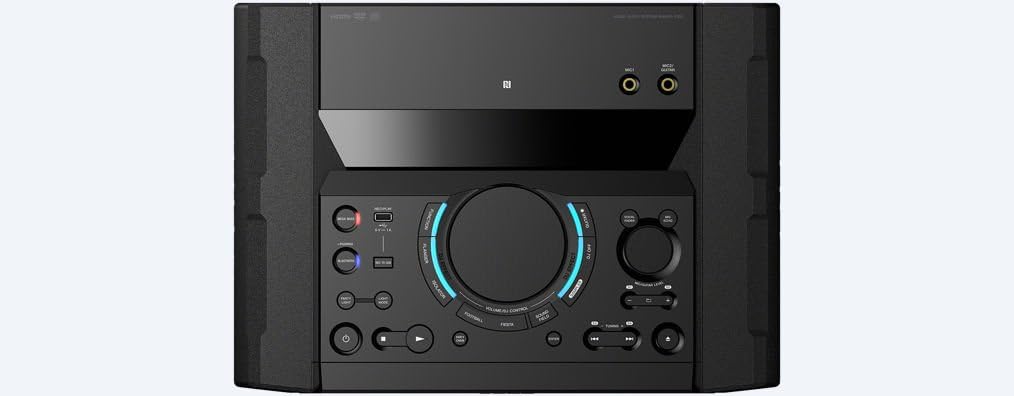
Image: The rear panel of the main unit, displaying various input and output ports, including the power input.
4. FM-Antennenanschluss
Connect the supplied FM antenna to the FM ANTENNA terminal on the rear of the unit for radio reception.
Bedienungsanleitung
1. Ein-/Ausschalten
Drücken Sie die LEISTUNG Taste am Hauptgerät oder an der Fernbedienung zum Ein- und Ausschalten des Systems.
2. Quellenauswahl
Verwenden Sie die FUNKTION button to cycle through available input sources such as CD, USB, Bluetooth, FM, and Audio In.

Image: The main control panel of the audio system, featuring buttons for power, function selection, volume, and DJ effects.
3. Bluetooth-Konnektivität
So verbinden Sie ein Bluetooth-Gerät:
- Wählen Sie die BLUETOOTH function on the system.
- Aktivieren Sie Bluetooth auf Ihrem Smartphone oder Tablet.
- Select "SHAKEX10" from the list of available devices.
- For one-touch pairing, touch your NFC-compatible device to the NFC logo on the system.
The system supports LDAC, AAC, A2DP (SINK), AVRCP (Ver1.5), and SPP Bluetooth profiles for high-quality streaming.

Image: A smartphone being tapped against the NFC logo on the audio system, demonstrating the one-touch pairing feature.
4. LED Speaker Lights
Enhance your audio experience with dynamic LED speaker lights. Use the LICHTMODUS button on the remote or main unit to select different lighting patterns and colors.

Image: A close-up of one of the speaker units, highlighting its illuminated LED lights, creating a vibrant visual effect.

Image: A group of people dancing and enjoying music with the Sony SHAKEX10 system, demonstrating its party atmosphere capabilities.
5. DJ Effects and Karaoke
The system includes built-in DJ effects to customize your tracks. Additionally, a guitar input and karaoke features allow for interactive entertainment.
- Connect a microphone or guitar to the dedicated input jacks.
- Use the DJ effect controls on the main unit to add various sound effects.

Image: A person's hands interacting with the DJ effect controls on the main unit, demonstrating the system's creative audio manipulation features.

Image: A person singing into a microphone, utilizing the karaoke feature of the Sony SHAKEX10 system.
6. Using Sony Music Center & Fiestable Apps
Download the Sony Music Center and Fiestable apps to your compatible smartphone for enhanced control and additional features, including advanced sound settings and party functions.
Wartung
Reinigen des Geräts
Wipe the exterior surfaces of the unit with a soft, dry cloth. For stubborn stains, use a cloth lightly dampened with a mild detergent solution, then wipe dry. Avoid using abrasive pads, scouring powder, or solvents such as alcohol or benzene, as these may damage the finish.
Lautsprecherpflege
Keep the speaker cones free from dust and debris. Do not press on the speaker cones as this can cause damage.

Bild: Eine detaillierte view of a speaker cone, illustrating its construction and material.
Fehlerbehebung
If you experience issues with your SHAKEX10 system, please consult the following common solutions before contacting customer support:
- Kein Strom: Ensure the power cord is securely connected to both the unit and the wall outlet.
- Kein Ton: Check speaker connections, volume level, and selected input source.
- Probleme mit der Bluetooth-Kopplung: Make sure the system is in Bluetooth pairing mode and your device's Bluetooth is enabled and discoverable. Try restarting both devices.
- Schlechter Radioempfang: Passen Sie die Position der UKW-Antenne an.
For more detailed troubleshooting, refer to the comprehensive guide available on the Sony support webWebsite oder wenden Sie sich an den Kundendienst.
Technische Daten
| Besonderheit | Detail |
|---|---|
| Produktabmessungen (L x B x H) | 42.25 x 15.44 x 21.81 Zoll |
| Artikelgewicht | 75 Pfund |
| Modellnummer | SHAKEX10 |
| Konnektivitätstechnologie | Bluetooth, NFC |
| Kompatible Geräte | Smartphone, Tablet |
| Bluetooth Profiles | LDAC, AAC, A2DP (SINK), AVRCP (Ver1.5), SPP |
| FM-Abstimmbereich | 87.5–108 MHz/100 kHz |
| Energieaufnahme | 0.5 W (Standby) |
| Hersteller | Sony |
| Datum der ersten Verfügbarkeit | 11. Juni 2017 |
Garantie und Support
For warranty information, product registration, or technical assistance, please visit the official Sony support website or contact Sony customer service. Details can typically be found in the separate warranty document included with your product.
Online support resources may include FAQs, software updates, and additional troubleshooting guides.


