1. Einleitung
This manual provides essential instructions for the safe and efficient operation of your Altec Lansing LifeJacket XL IMW789 Bluetooth Speaker. Please read this manual thoroughly before using the product and retain it for future reference.
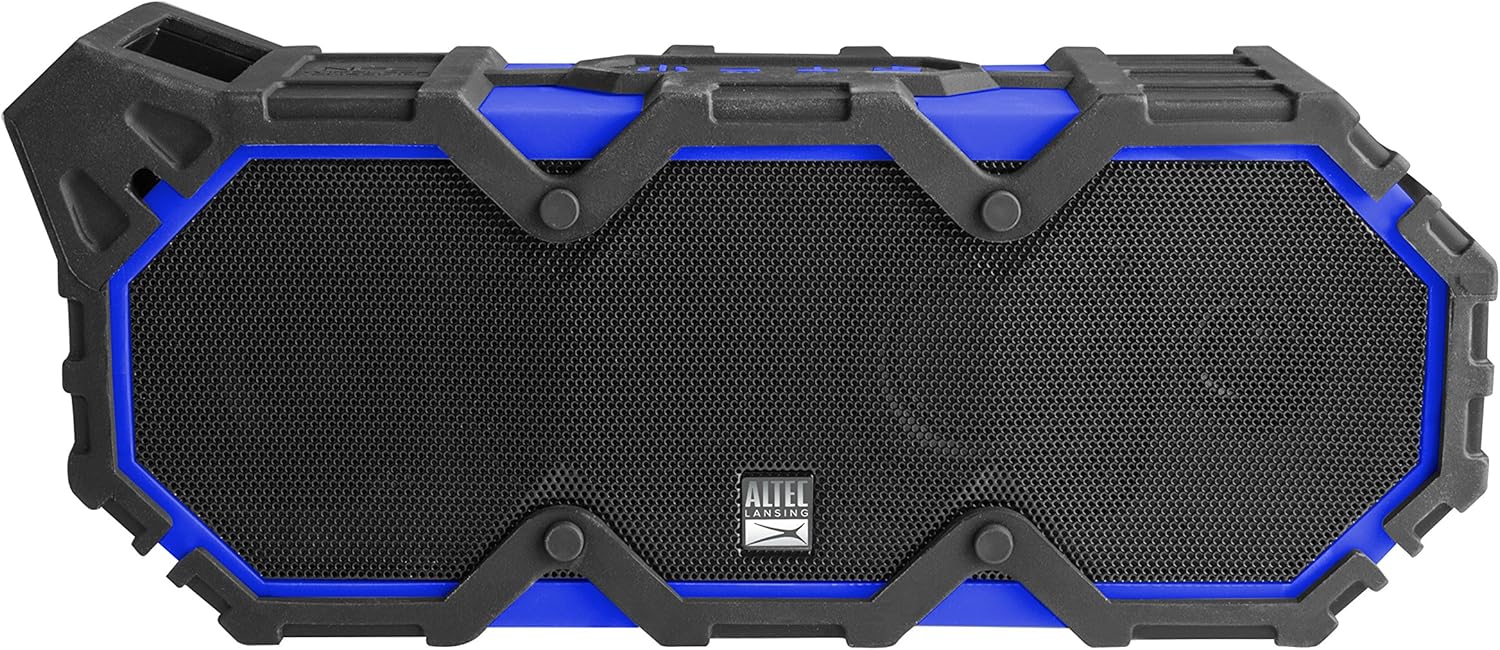
Abbildung 1: Vorderseite view of the Altec Lansing LifeJacket XL IMW789 Bluetooth Speaker.
2. Hauptmerkmale
- Bluetooth-Konnektivität: Connects wirelessly to compatible devices up to 100 feet away.
- Langlebiges Design: Certified IP67 rated for waterproof, shockproof, snowproof, and dustproof performance.
- Verlängerte Akkulaufzeit: Provides an estimated 40 hours of audio playback on a single charge.
- Integrated Voice Assistant: Supports Siri and Google Assistant via speakerphone.
- Rich Audio: Delivers stereo sound with deep bass and clear audio.
- Powerbank-Funktionalität: USB port allows charging of external smart devices.
3. Lieferumfang
- Altec Lansing LifeJacket XL IMW789 Bluetooth Speaker
- USB-Ladekabel
- Benutzerhandbuch (dieses Dokument)
4. Einrichtung
4.1 Aufladen des Lautsprechers
- Locate the charging port on the side of the speaker, typically protected by a rubber flap.
- Open the rubber flap to expose the USB charging port.
- Connect the provided USB cable to the speaker's charging port and the other end to a USB power adapter (not included) or a computer's USB port.
- Die LED-Anzeige signalisiert den Ladestatus. Eine vollständige Ladung ermöglicht etwa 40 Stunden Wiedergabezeit.

Figure 2: Side panel with charging and auxiliary ports.
4.2 Koppeln mit einem Bluetooth-Gerät
- Stellen Sie sicher, dass der Lautsprecher vollständig aufgeladen ist.
- Halten Sie die Ein-/Aus-Taste (⏻) on the speaker until the LED indicator flashes blue, indicating pairing mode.
- On your smart device (smartphone, tablet, laptop), navigate to the Bluetooth settings.
- Select "LifeJacket XL" from the list of available devices.
- Once connected, the LED indicator on the speaker will turn solid blue.
- Sie können nun Audio von Ihrem Gerät über den Lautsprecher abspielen.
5. Bedienungsanleitung
5.1 Grundlegende Bedienelemente
- Power-Taste (⏻): Zum Ein-/Ausschalten gedrückt halten. Kurz drücken, um die Audiowiedergabe zu starten/pausieren.
- Lauter (+): Kurz drücken, um die Lautstärke zu erhöhen.
- Lautstärke runter (-): Kurz drücken, um die Lautstärke zu verringern.
- Track Skip (>>): Press and hold Volume Up to skip to the next track.
- Track Back (<<): Press and hold Volume Down to go to the previous track.
- Anruf annehmen/beenden: Drücken Sie während eines eingehenden Anrufs kurz die Ein-/Aus-Taste.
- Sprachassistenten aktivieren: Short press the dedicated voice assistant button (if available, refer to speaker diagram).
5.2 Using the Altec Lansing App
Download the Altec Lansing app from your device's app store to access additional features, including equalizer adjustments for customized sound profiles (Pop, Rock, Classical, Dance, etc.).
5.3 Powerbank-Funktionalität
The speaker features a USB-A output port (located under the rubber flap) that allows you to charge other USB-powered devices, such as smartphones or tablets, using the speaker's internal battery.
6. Wartung
- Reinigung: Wischen Sie den Lautsprecher mit einem weichen, damp Tuch. Verwenden Sie keine scharfen Chemikalien oder Scheuermittel.
- Wassereinwirkung: Ensure all rubber flaps covering ports are securely closed before exposing the speaker to water. After exposure to saltwater or chlorinated water, rinse the speaker with fresh water and allow it to dry completely before charging or opening ports.
- Lagerung: Bewahren Sie den Lautsprecher an einem kühlen, trockenen Ort fern von direkter Sonneneinstrahlung und extremen Temperaturen auf.
- Batteriepflege: Für eine optimale Akkulaufzeit laden Sie den Lautsprecher regelmäßig auf, auch wenn Sie ihn nicht häufig benutzen. Vermeiden Sie es, den Akku über längere Zeiträume vollständig zu entladen.

Figure 3: The speaker is designed to float and be used in water.
7. Fehlerbehebung
| Problem | Mögliche Ursache | Lösung |
|---|---|---|
| Der Lautsprecher lässt sich nicht einschalten. | Schwache Batterie. | Laden Sie den Lautsprecher mit dem mitgelieferten USB-Kabel auf. |
| Kopplung mit Bluetooth-Gerät nicht möglich. | Lautsprecher nicht im Kopplungsmodus; Gerät zu weit entfernt; Störungen. | Ensure speaker is in pairing mode (flashing blue LED). Move device closer to speaker. Turn off other Bluetooth devices. |
| Kein Ton oder geringe Lautstärke. | Lautstärke am Lautsprecher oder Gerät zu niedrig; falsche Audioquelle. | Increase volume on both speaker and connected device. Verify correct audio output on your device. |
| Der Ton setzt aus oder ist verzerrt. | Device too far from speaker; obstacles between devices; low battery. | Move device closer to speaker. Remove obstacles. Charge the speaker. |
8. Spezifikationen
- Modellname: IMW789-CB
- Lautsprechertyp: Im Freien
- Konnektivität: Bluetooth, Wi-Fi (Note: Wi-Fi connectivity may refer to app control or specific features, primary audio is Bluetooth)
- Bluetooth-Reichweite: Bis zu 100 Fuß
- Wasserbeständigkeit: IP67 (Waterproof, Shockproof, Snowproof, Dustproof)
- Akkulaufzeit: Estimated 40 hours
- Energiequelle: Batteriebetrieben (1 Lithium-Ionen-Akku im Lieferumfang enthalten)
- Audioausgabemodus: Stereo
- Maximale Ausgangsleistung des Lautsprechers: 10 Watt
- Abmessungen: 10 x 6.3 x 4.3 Zoll
- Artikelgewicht: 4.1 Pfund
- Hersteller: Sakar International
9. Garantieinformationen
The Altec Lansing LifeJacket XL IMW789 Bluetooth Speaker comes with a Limited Warranty. For specific terms and conditions, please refer to the warranty card included with your product or visit the official Altec Lansing webWebsite.
10. Kundendienst
For further assistance, technical support, or to inquire about replacement parts, please contact Altec Lansing customer service. Contact details can typically be found on the product packaging or the official Altec Lansing webWebsite.


