Einführung
Vielen Dank für Ihren Einkauf.asing the POWERFLEX PF-AZ01-Z003 Portable Bluetooth Speaker. This device is designed to provide high-quality audio playback and hands-free calling capabilities. Please read this manual carefully before using the speaker to ensure proper operation and to maximize its performance.

Bild: The POWERFLEX PF-AZ01-Z003 Portable Bluetooth Speaker is shown from an angled perspective, highlighting its black finish, front grille, and the touch-sensitive control panel on its top surface, which features illuminated volume controls.
Packungsinhalt
Bitte kreuzen Sie das Kästchen für die folgenden Elemente an:
- POWERFLEX PF-AZ01-Z003 Portable Bluetooth Speaker
- Micro-USB-Ladekabel
- AUX-Kabel
- Bedienungsanleitung

Bild: This image displays the POWERFLEX PF-AZ01-Z003 Portable Bluetooth Speaker alongside its accessories: a Micro USB charging cable, an AUX cable, and the instruction manual. These are the items typically found inside the product packaging.
Funktionen überview
The POWERFLEX PF-AZ01-Z003 speaker offers several key features for an enhanced audio experience:
- Überlegener Klang: Equipped with dual five-watt drivers for clear highs, detailed mid-ranges, and deep bass.
- Bluetooth 3.0-Konnektivität: Bietet eine stabile drahtlose Verbindung bis zu 10 Meter (33 Fuß).
- Freisprechen: Integrated microphone allows for clear phone calls.
- Mehrere Wiedergabeoptionen: Supports Bluetooth, AUX input, and TF (MicroSD) card playback.
- Touch-Steuerung: Intuitive touch-sensitive panel for easy music and call management.
- Tragbares Design: Compact build for easy transport.

Bild: This image presents a cutaway view of the POWERFLEX PF-AZ01-Z003 speaker, revealing its internal components, specifically the dual five-watt drivers. The visual emphasizes the speaker's design for delivering vibrant highs, detailed mid-ranges, and deep bass for true stereo sound.

Bild: This image showcases the POWERFLEX PF-AZ01-Z003 speaker positioned in front of a collection of diverse iOS and Android Bluetooth-enabled devices, including smartphones and tablets. The arrangement visually confirms the speaker's broad compatibility with various mobile operating systems.

Bild: This image demonstrates the compact design of the POWERFLEX PF-AZ01-Z003 speaker, showing it being easily placed into a backpack. The accompanying text highlights its portability and specific dimensions (190 x 58 x 70mm), indicating it fits conveniently into bags.
Aufstellen
1. Laden Sie den Lautsprecher auf
The speaker is powered by an internal 1800 mAh rechargeable battery. Before first use, fully charge the speaker.
- Connect the Micro USB charging cable to the DC5V port on the speaker.
- Verbinden Sie das andere Ende des USB-Kabels mit einem USB-Netzteil (nicht im Lieferumfang enthalten) oder einem USB-Anschluss Ihres Computers.
- The charging indicator light will illuminate. Once fully charged, the light will change color or turn off (refer to LED indicator section in the full manual for details).
2. Ein-/Ausschalten
To power on the speaker, slide the ON/OFF switch to the 'ON' position. To power off, slide the switch to the 'OFF' position.
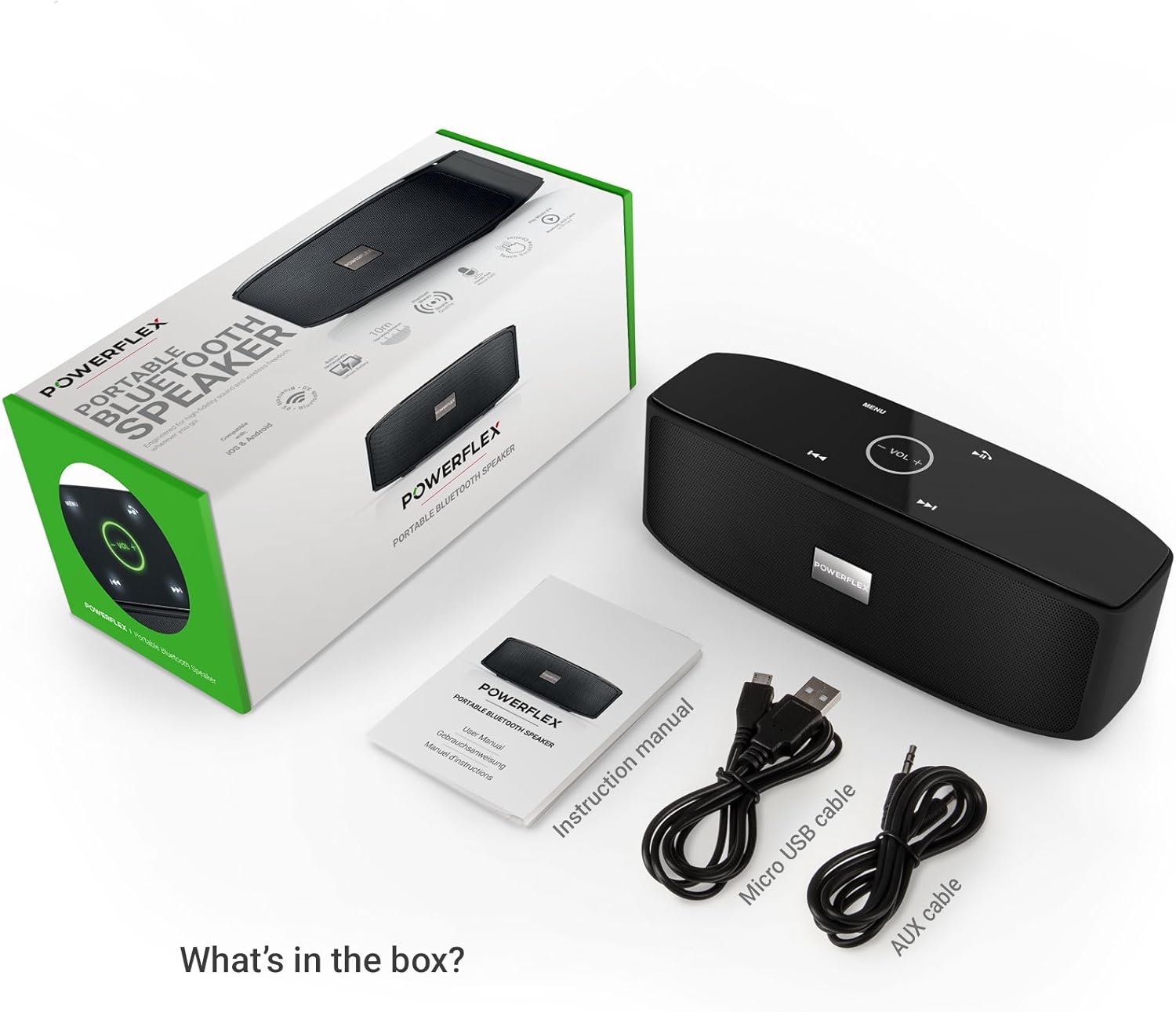
Bild: Dieses Bild liefert eine detaillierte Ansicht. view of the speaker's rear panel, highlighting the physical ON/OFF switch, the DC5V port for charging, the AUX input jack for wired connections, and the TF (MicroSD) card slot for direct media playback.
Bedienungsanleitung
1. Bluetooth-Kopplung
- Stellen Sie sicher, dass der Lautsprecher eingeschaltet ist und sich innerhalb von 10 Metern (33 Fuß) von Ihrem Bluetooth-fähigen Gerät befindet.
- The speaker will automatically enter Bluetooth pairing mode, indicated by a flashing LED light (refer to LED indicator section in the full manual).
- Gehen Sie auf Ihrem Gerät (Smartphone, Tablet usw.) zu den Bluetooth-Einstellungen und suchen Sie nach verfügbaren Geräten.
- Select "PF-AZ01-Z003" from the list.
- Once paired, the speaker will emit an audible confirmation, and the LED light will become solid.

Bild: This image demonstrates the speaker's Bluetooth connectivity, showing a smartphone wirelessly streaming music to the POWERFLEX PF-AZ01-Z003. Blue concentric circles emanate from the phone towards the speaker, symbolizing the wireless connection, and text indicates playback from up to 10 meters.
2. Musik abspielen
Once connected via Bluetooth, you can play music from your device. The speaker also supports AUX cable and TF card playback.
- Bluetooth: Spiele Musik direkt von deinem gekoppelten Gerät ab.
- AUX-Eingang: Schließen Sie ein Audiogerät mithilfe des mitgelieferten 3.5-mm-AUX-Kabels an den AUX-Anschluss an. Der Lautsprecher schaltet automatisch in den AUX-Modus.
- TF-Karte: Legen Sie eine TF-Karte (MicroSD-Karte) mit MP3-Dateien ein. fileStecken Sie die TF-Karte in den Steckplatz. Der Lautsprecher beginnt automatisch mit der Musikwiedergabe von der Karte.
3. Tippen Sie auf Steuerung
The speaker features touch-sensitive controls on its top panel for easy operation.
- Abspielen/Pause: Tap the Play/Pause button (usually indicated by a triangle or two vertical bars).
- Lautstärke erhöhen/verringern: Tap the '+' or '-' buttons to adjust the volume.
- Nächster Titel: Tippen Sie auf die Schaltfläche '>>|'.
- Vorheriges Lied: Tippen Sie auf die Schaltfläche '|<<'.
- Modus/Menü: Tap the 'MENU' button to switch between input modes (Bluetooth, AUX, TF).

Bild: This image shows a hand interacting with the touch-sensitive controls on the top surface of the POWERFLEX PF-AZ01-Z003 speaker. A finger is pressing the 'VOL +' button, which is illuminated in green, while a smartphone displaying music playback is visible in the foreground, emphasizing the ease of control.
4. Freisprechen
The speaker includes a built-in microphone, allowing you to answer phone calls when connected via Bluetooth.
- Bei einem eingehenden Anruf wird die Musik pausiert.
- Tap the Play/Pause button to answer the call.
- Speak into the speaker.
- Tap the Play/Pause button again to end the call.

Bild: This image depicts a smartphone displaying an incoming call, positioned next to the POWERFLEX PF-AZ01-Z003 speaker. The text "Make hands free calls with the built-in microphone" is prominently displayed, indicating the speaker's capability for hands-free communication.
Wartung
To ensure the longevity and optimal performance of your POWERFLEX PF-AZ01-Z003 speaker, follow these maintenance guidelines:
- Reinigung: Wischen Sie die Oberfläche des Lautsprechers mit einem weichen, trockenen Tuch ab. Verwenden Sie keine Scheuermittel, Alkohol oder chemische Lösungsmittel.
- Lagerung: Bewahren Sie den Lautsprecher an einem kühlen, trockenen Ort fern von direkter Sonneneinstrahlung und extremen Temperaturen auf.
- Wassereinwirkung: Dieser Lautsprecher ist nicht wasserdicht. Vermeiden Sie den Kontakt mit Wasser oder übermäßiger Feuchtigkeit.
- Batteriepflege: Um die Akkulaufzeit zu verlängern, vermeiden Sie häufiges vollständiges Entladen des Akkus. Laden Sie den Lautsprecher regelmäßig auf, auch wenn er längere Zeit nicht benutzt wird.
Fehlerbehebung
If you encounter issues with your POWERFLEX PF-AZ01-Z003 speaker, refer to the following common problems and solutions:
| Problem | Mögliche Ursache | Lösung |
|---|---|---|
| Der Lautsprecher lässt sich nicht einschalten. | Batterie ist leer. | Laden Sie den Lautsprecher mit dem Micro-USB-Kabel auf. |
| Kopplung via Bluetooth nicht möglich. | Speaker is not in pairing mode; device is too far; Bluetooth is off on device. | Ensure speaker is in pairing mode (flashing LED). Move device closer. Enable Bluetooth on your device. Forget previous pairings and try again. |
| Kein Ton oder geringe Lautstärke. | Volume too low on speaker or device; incorrect input mode; loose AUX cable. | Increase volume on both speaker and connected device. Press 'MENU' to select correct input mode. Ensure AUX cable is securely connected. |
| Klangverzerrung. | Lautstärke zu hoch; Gerät zu weit vom Lautsprecher entfernt. | Reduce volume on speaker and/or connected device. Move device closer to the speaker. |
Technische Daten
| Besonderheit | Detail |
|---|---|
| Modellname | PF-AZ01-Z003 |
| Marke | POWERFLEX |
| Konnektivitätstechnologie | Bluetooth, USB |
| Bluetooth-Version | 3.0 |
| Besonderheit | Portable, Built-in Microphone |
| Kompatible Geräte | Universal (iOS & Android Bluetooth enabled devices) |
| Montagetyp | Tischplatte |
| Stromquelle | Batterie |
| Batteriekapazität | 1800 mAh |
| Batterieenergieinhalt | 6.66 Wattstunden |
| Lithium Ion Cells | 1 |
| Technische Daten | 23 x 10.6 x 9.6 cm |
| Produktgewicht | 760 g |
| Farbe | Schwarz |
Garantie und Support
For warranty information and technical support, please refer to the documentation included with your purchase or contact POWERFLEX customer service. Keep your proof of purchase for warranty claims.
Hersteller: POWERFLEX
Produkt ASIN: B074M8W712


