Einführung
This manual provides detailed instructions for the setup, operation, and maintenance of your Yamaha NPS303 B Network Audio Player. The NPS303 B is a sophisticated digital music system designed to stream music from various sources, including PCs, smartphones, and streaming services, with Yamaha's renowned Hi-Fi audio quality. It features MusicCast compatibility, built-in Wi-Fi, Bluetooth, AirPlay, and a front-panel USB terminal for versatile audio playback.
Lieferumfang
- Yamaha NPS303 B Network Audio Player
- Fernbedienung
- AAA-Batterien (x2) für die Fernbedienung
- Netzkabel
- Cinch-Audiokabel
- Bedienungsanleitung (dieses Dokument)
Produkt überview
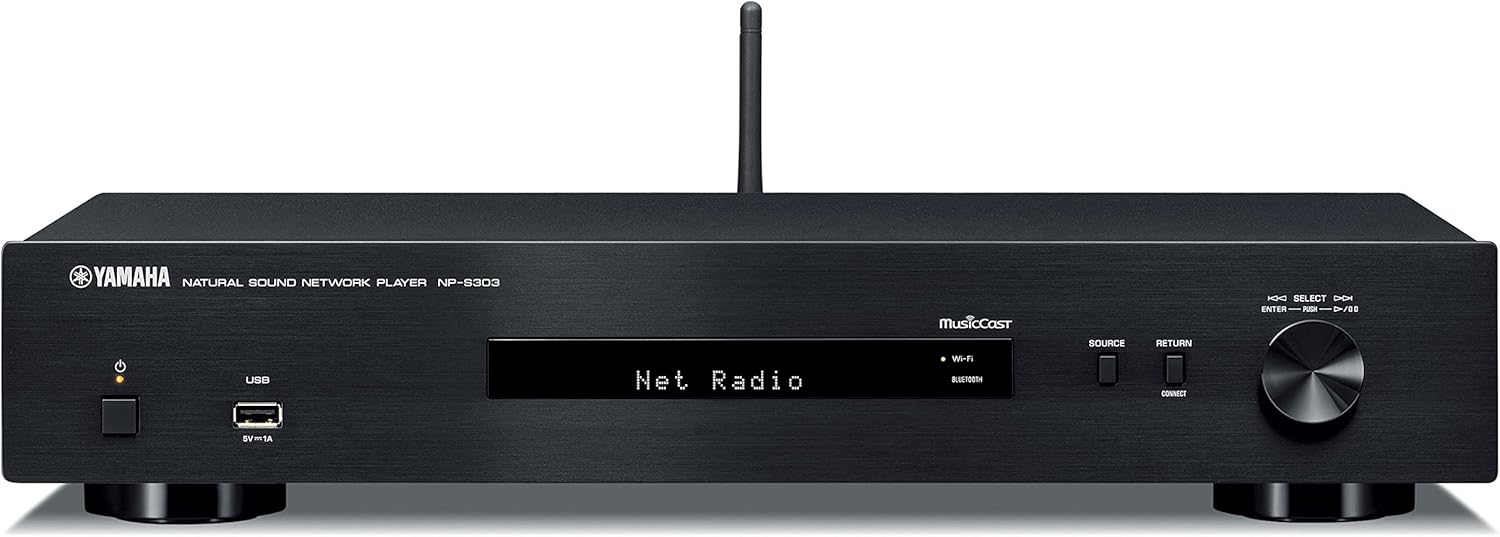
Abbildung 1: Vorderseite. Shows the power button, USB port, display, source selection buttons, and rotary encoder.

Abbildung 2: Rückseite. Displays analog audio outputs (RCA), digital audio outputs (coaxial and optical), network port, and AC power input.

Abbildung 3: Fernbedienung. Features buttons for power, mute, dimmer, presets, navigation, playback controls, and input selection.
Aufstellen
1. Auspacken und Aufstellen
- Entnehmen Sie vorsichtig alle Komponenten aus der Verpackung.
- Place the NPS303 B on a stable, flat surface, away from direct sunlight, heat sources, and excessive dust or vibration. Ensure adequate ventilation around the unit.
2. Verbindung zu einem Ampschwerer
Connect the NPS303 B to your amplifier using either the analog or digital audio outputs.
- Analoger Anschluss (RCA): Use the supplied RCA audio cable to connect the ANALOG OUT (L/R) jacks on the NPS303 B to the corresponding analog input jacks on your ampschwerer.
- Digital Connection (Coaxial/Optical): For higher fidelity, connect either the COAXIAL or OPTICAL digital output on the NPS303 B to a compatible digital input on your amplifier or external DAC.
3. Netzwerkverbindung
The NPS303 B supports both wired and wireless network connections.
- Kabelgebunden (Ethernet): Connect an Ethernet cable from the NETWORK port on the rear panel of the NPS303 B to your router or network hub.
- Drahtlos (Wi-Fi): The unit has built-in Wi-Fi. For initial setup, it is recommended to use the MusicCast Controller app on your smartphone or tablet.
4. Stromanschluss
Connect the supplied power cord to the AC IN terminal on the rear panel of the NPS303 B, then plug the other end into a wall outlet.
5. Batterien für die Fernbedienung
Insert the two supplied AAA batteries into the remote control, ensuring correct polarity.
Bedienungsanleitung
1. Ein-/Ausschalten
Drücken Sie die LEISTUNG Zum Ein- und Ausschalten des Geräts dient eine Taste an der Vorderseite oder auf der Fernbedienung.
2. Initial Network Setup (Wi-Fi)
For wireless network setup, download the "MusicCast Controller" app from your device's app store (iOS or Android). Follow the on-screen instructions within the app to connect your NPS303 B to your Wi-Fi network.
3. Musikwiedergabe
- Streaming-Dienste: Access popular music streaming services (e.g., Spotify) through the MusicCast Controller app.
- USB-Wiedergabe: Connect a USB storage device to the front-panel USB terminal. Use the remote control or MusicCast app to navigate and play audio files. The NPS303 B supports FLAC and MP3 files from external USB drives.
- Bluetooth: Pair your smartphone or other Bluetooth-enabled device with the NPS303 B to stream audio wirelessly. Select "Bluetooth" as the source.
- AirPlay: For Apple devices, use AirPlay to stream audio directly to the NPS303 B.
- Netzwerk-Audio: Stream music from your PC or NAS (Network Attached Storage) server connected to the same network.
4. Verwendung der Fernbedienung
Die Fernbedienung ermöglicht den Zugriff auf verschiedene Funktionen:
- Quellenauswahl: Buttons like NET, USB, BLUETOOTH allow direct selection of input sources.
- Navigation: Use the arrow keys and ENTER button to navigate menus on the unit's display.
- Wiedergabesteuerung: Play, Pause, Stop, Skip Forward/Backward buttons control audio playback.
- Dimmer: Adjusts the brightness of the front panel display.
Wartung
- Reinigung: Wischen Sie das Gerät mit einem weichen, trockenen Tuch ab. Verwenden Sie keine Scheuermittel, Wachse oder Lösungsmittel.
- Belüftung: Stellen Sie sicher, dass die Lüftungsöffnungen nicht blockiert sind.
- Netzkabel: Überprüfen Sie das Netzkabel regelmäßig auf eventuelle Beschädigungen.
- Firmware-Updates: Yamaha may release firmware updates to improve performance or add features. Check the Yamaha website or the MusicCast app for available updates.
Fehlerbehebung
| Problem | Mögliche Ursache | Lösung |
|---|---|---|
| Kein Strom | Das Netzkabel ist nicht richtig angeschlossen. | Stellen Sie sicher, dass das Netzkabel fest mit dem Gerät und der Steckdose verbunden ist. |
| Kein Ton | Falsche Eingabe ausgewählt am amplifier; cables not connected properly; volume too low. | Wählen Sie den richtigen Eingang an Ihrem amplifier. Check all audio cable connections. Increase volume on both the NPS303 B and ampschwerer. |
| Keine Verbindung zum WLAN möglich | Falsches WLAN-Passwort; Gerät zu weit vom Router entfernt; Netzwerkstörungen. | Verify Wi-Fi password. Move unit closer to router. Try restarting router. Use the MusicCast app for guided setup. |
| Fernbedienung funktioniert nicht | Die Batterien sind leer oder falsch eingelegt; es befindet sich ein Hindernis zwischen Fernbedienung und Gerät. | Replace batteries, ensuring correct polarity. Remove any obstacles. Ensure you are within range and pointing the remote at the unit's sensor. |
| USB-Wiedergabeprobleme | Nicht unterstützt file Formatierung; USB-Gerät nicht erkannt. | Sicherstellen files are in supported formats (FLAC, MP3). Try a different USB device or reformat the current one (FAT32 recommended). |
Technische Daten
| Modell | NPS303 B |
| Marke | Yamaha Audio |
| Abmessungen (B x H x T) | 43.5 x 8.57 x 28.89 cm (17.13 x 3.37 x 11.37 Zoll) |
| Gewicht | 2.72 kg |
| Konnektivität | WLAN, Bluetooth, USB, Ethernet |
| Audioausgabemodus | Stereo, Surround (5.1-Kanal-Konfiguration) |
| Kompatible Geräte | Smartphone, Amplifier, External DAC |
| Besondere Merkmale | Wireless, Built-In Bluetooth, MusicCast compatibility |
| Stromquelle | Kabelgebundene Elektrik |
| Mitgeliefertes Zubehör | Remote control, Batteries (AAA x2), Power cord, RCA audio cable |
Garantie und Support
Garantieinformationen
For detailed warranty information, please refer to the warranty card included with your product or visit the official Yamaha Audio webDie Garantiebedingungen können je nach Region variieren.
Kundenservice
If you encounter any issues or have questions not covered in this manual, please contact Yamaha customer support. You can find contact information on the official Yamaha Audio weboder über Ihren Händler vor Ort.
Online-Ressourcen:


