1. Einleitung
Vielen Dank für Ihren Einkauf.asing the auna TT-Classic Turntable. This manual provides important information regarding the setup, operation, and maintenance of your device. Please read it thoroughly before use to ensure proper functionality and to prevent damage.
The auna TT-Classic is a stylish belt-drive turntable designed to play your favorite vinyl records at 33, 45, and 78 RPM. It features an integrated AudioTechnica MM pickup system for high-quality sound reproduction, built-in stereo speakers, and a USB port for digitizing your vinyl collection to MP3 files.
2. Sicherheitshinweise
- Lesen Sie alle Anweisungen sorgfältig durch, bevor Sie das Gerät in Betrieb nehmen.
- Bewahren Sie dieses Handbuch zum späteren Nachschlagen auf.
- Das Gerät darf weder Regen, Feuchtigkeit noch direkter Sonneneinstrahlung ausgesetzt werden.
- Stellen Sie sicher, dass das Gerät auf einer stabilen, ebenen Fläche steht.
- Blockieren Sie keine Belüftungsöffnungen.
- Verwenden Sie nur das mit dem Gerät mitgelieferte Netzteil.
- Trennen Sie das Gerät während eines Gewitters oder bei längerer Nichtbenutzung vom Stromnetz.
- Überlassen Sie sämtliche Wartungsarbeiten qualifiziertem Servicepersonal.
3. Packungsinhalt
Packen Sie alle Artikel sorgfältig aus und vergewissern Sie sich, dass Sie Folgendes erhalten haben:
- 1 x auna TT-Classic Turntable Unit
- 1 x Filzmatte
- 1 x Dust Cover (removable)
- 1 x Netzteil (DC 12V)
- 1 x User Manual (German and English)
- 1 x Removable Stylus Lift
Note: This unit may include a pre-installed EU-UK power converter for your convenience.
4. Produktüberschreitungview
Familiarize yourself with the components of your auna TT-Classic turntable:

Abbildung 4.1: Spitze view of the auna TT-Classic turntable with the dust cover open, revealing the platter, tonearm, and volume control knob.

Abbildung 4.2: Frontwinkel view of the auna TT-Classic turntable with the transparent dust cover closed, highlighting its elegant design.

Abbildung 4.3: Detail of the volume control knob located on the front right side of the turntable.

Abbildung 4.4: Close-up of the tonearm assembly, featuring the AudioTechnica MM pickup system.
Schlüsselkomponenten:
- Teller: Die drehbare Plattform, auf der die Schallplatten platziert werden.
- Tonarm: Hält die Tonabnehmerkassette und den Abtaststift, der die Rillen der Schallplatte abtastet.
- Stift (Nadel): Die Spitze des Tonabnehmers, die mit der Schallplatte in Kontakt kommt.
- Staubschutzhülle: Schützt den Plattenspieler vor Staub, wenn er nicht benutzt wird.
- Geschwindigkeitswähler: Ermöglicht die Auswahl von 33, 45 oder 78 U/min.
- Lautstärkeregelung: Adjusts the output level of the integrated speakers.
- USB-Anschluss: For connecting to a computer for digitization.
- Cinch-Ausgang: Zum Anschluss an externe Geräte ampVerstärker oder Lautsprecher.
- Leistungsaufnahme: For connecting the DC 12V power adapter.
- Ein / Aus Schalter: Schaltet das Gerät ein oder aus.
5. Einrichtung
Befolgen Sie diese Schritte, um Ihren Plattenspieler einzurichten:
5.1 Auspacken und Aufstellen
- Nehmen Sie den Plattenspieler vorsichtig aus der Verpackung.
- Stellen Sie den Plattenspieler auf eine stabile, ebene Fläche, fern von direkten Wärmequellen, Staub und Vibrationen.
- Remove any protective packaging materials from the platter and tonearm.
- Place the felt mat onto the platter.
- Bringen Sie die Staubschutzhaube an, indem Sie ihre Scharniere mit den Schlitzen auf der Rückseite des Plattenspielers ausrichten.
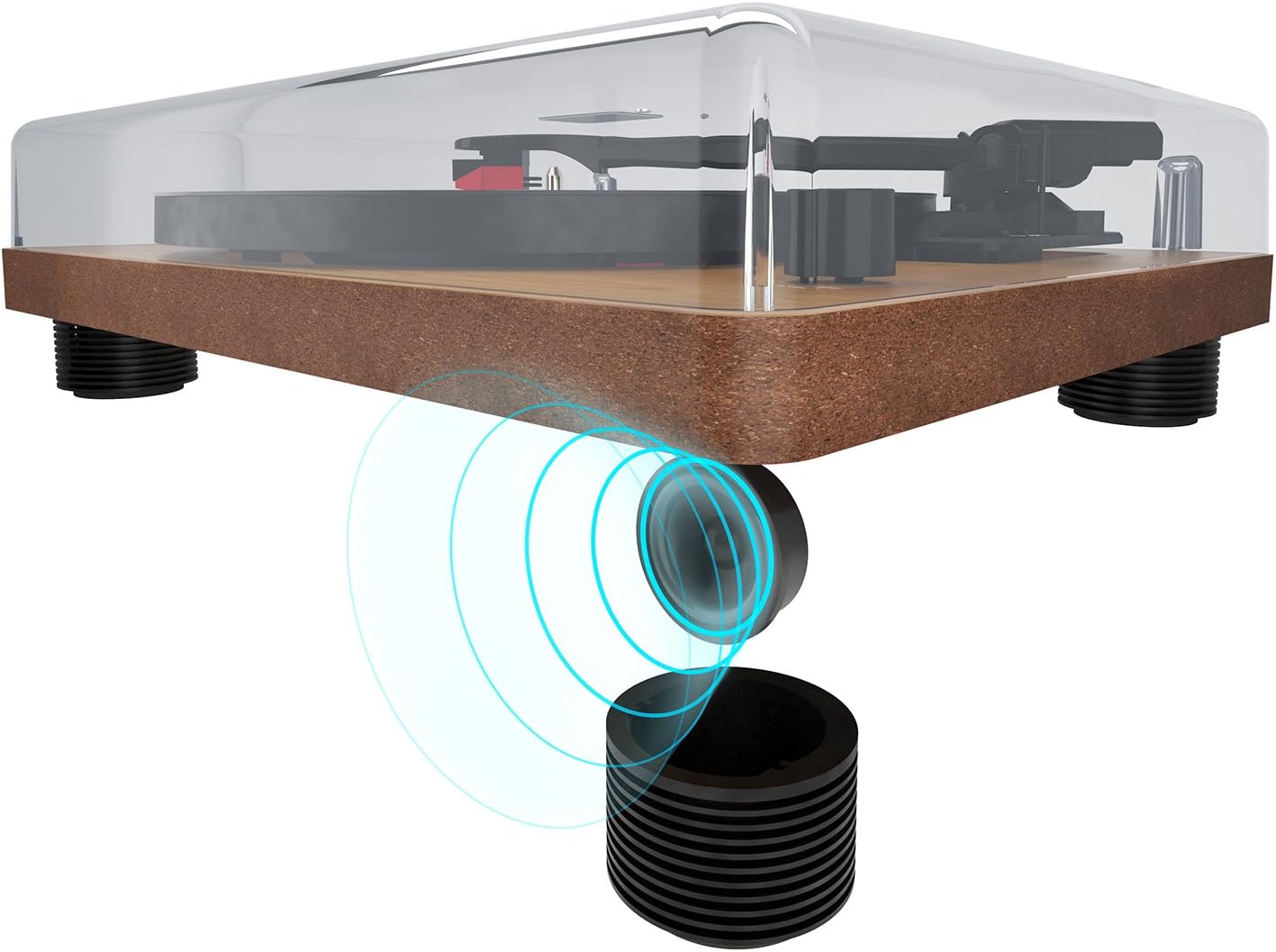
Abbildung 5.1: The turntable's feet are designed to minimize vibrations for optimal sound.
5.2 Stromanschluss
- Stellen Sie sicher, dass sich der EIN/AUS-Schalter auf der Rückseite in der Position AUS befindet.
- Connect the DC 12V power adapter to the 'DC 12V' input port on the rear of the turntable.
- Stecken Sie das Netzteil in eine geeignete Steckdose.
5.3 Audio Connections (Optional)
If you wish to connect the turntable to an external amplifier or powered speakers, use the RCA output ports:
- Connect an RCA cable (not included) to the 'AUDIO' RCA output ports (red for right, white for left) on the rear of the turntable.
- Connect the other end of the RCA cable to the corresponding input on your ampVerstärker oder Aktivlautsprecher.

Abbildung 5.2: Rear panel connections: AUDIO (RCA), USB, DC 12V power input, and ON/OFF switch.

Abbildung 5.3: Detail of the RCA stereo audio output ports.
6. Bedienungsanleitung
6.1 Abspielen einer Schallplatte
- Schalten Sie den Plattenspieler mit dem EIN/AUS-Schalter auf der Rückseite ein.
- Place a record on the platter, ensuring it is centered on the spindle.
- Wählen Sie die gewünschte Drehzahl (33, 45 oder 78 U/min) mit dem Drehzahlwahlschalter.
- Heben Sie den Tonarm vorsichtig mit dem Cueing-Hebel an.
- Positionieren Sie den Tonarm über der gewünschten Startrille der Schallplatte.
- Senken Sie den Tonarm langsam mithilfe des Tonarmlifts ab. Die Nadel setzt die Schallplatte in Kontakt, und die Wiedergabe beginnt.
- Adjust the volume using the volume control knob on the front of the unit.
- Um die Wiedergabe zu stoppen, heben Sie den Tonarm mithilfe des Tonarmlifts an und führen Sie ihn in die Tonarmstütze zurück.

Abbildung 6.1: The speed selector switch allows you to choose between 33, 45, and 78 RPM.
6.2 Digitizing Records to MP3 (USB Function)
The auna TT-Classic allows you to convert your vinyl records into MP3 digital files benutzt einen Computer.
- Connect the turntable to your computer using a USB cable (not included) via the 'USB' port on the rear panel.
- Download and install suitable audio recording software on your computer (e.g., Audacity, available for free online).
- Follow the instructions of your chosen software to configure it for recording from the turntable (it will typically appear as a USB audio device).
- Start recording in the software, then begin playing your record on the turntable as described in section 6.1.
- Once the record has finished playing, stop the recording in your software and save the audio file im MP3-Format.

Abbildung 6.2: The USB port for connecting to a computer for digitization.
7. Wartung
7.1 Reinigung des Plattenspielers
- Vor der Reinigung immer den Plattenspieler vom Stromnetz trennen.
- Use a soft, dry cloth to wipe the dust cover and cabinet. Do not use abrasive cleaners or solvents.
- The platter and tonearm should be handled with extreme care. Use a soft brush or lint-free cloth for delicate areas.
7.2 Stiftpflege
- A dirty or worn stylus can damage your records and degrade sound quality.
- Clean the stylus regularly using a soft stylus brush, brushing gently from back to front.
- The stylus should be replaced after approximately 300-500 hours of playback, or if you notice a significant drop in sound quality or increased record wear.
7.3 Wartung des Riemenantriebs
The auna TT-Classic uses a belt drive system. The drive belt is typically located under the platter. If the platter stops spinning or spins inconsistently, the belt may need to be inspected or replaced. Refer to a qualified technician if you suspect an issue with the belt drive.

Abbildung 7.1: Illustration of the belt drive system, responsible for rotating the platter.
8. Fehlerbehebung
If you encounter any issues with your turntable, consult the following table before seeking professional service:
| Problem | Mögliche Ursache | Lösung |
|---|---|---|
| Kein Strom | Power adapter not connected; ON/OFF switch is off; power outlet malfunction. | Ensure power adapter is securely connected and plugged into a working outlet. Turn ON/OFF switch to ON. |
| Kein Ton von den Lautsprechern | Volume too low; external amplifier/speakers not connected or off; stylus not making contact. | Increase volume. Check external audio connections and ensure external devices are powered on. Ensure tonearm is lowered correctly. |
| Ton verzerrt oder setzt aus | Record is dirty or damaged; stylus is dirty or worn; turntable not level; excessive vibration. | Clean the record. Clean or replace the stylus. Ensure turntable is on a stable, level surface. Reduce external vibrations. |
| Teller dreht sich nicht | Belt dislodged or broken; motor issue. | Inspect the drive belt (under the platter). If dislodged, carefully re-seat it. If broken, replace it. If problem persists, contact support. |
| USB-Aufnahme funktioniert nicht | USB cable not connected; software not configured correctly; driver issues. | Ensure USB cable is connected. Check software settings to ensure the turntable is selected as the input device. Try restarting your computer. |
9. Spezifikationen
| Besonderheit | Spezifikation |
|---|---|
| Marke | auna |
| Modellname | TT-Classic |
| Laufwerkstyp | Riemenantrieb |
| Unterstützte Geschwindigkeiten | 33 1/3, 45, 78 U/min |
| Tonabnehmersystem | AudioTechnica MM (Moving Magnet) |
| Anschlüsse | 1 x USB Port, RCA Stereo Output |
| Besondere Merkmale | Automatic Start Function (can be deactivated), Removable Dust Cover, Integrated Stereo Speakers, Pitch Control |
| Stromversorgung | DC 12V (Netzteil im Lieferumfang enthalten) |
| Material | Plastic, Wood Veneer Finish |
| Abmessungen (B x T x H) | 41 x 33 x 12 cm (16.1 x 13 x 4.7 Zoll) |
| Gewicht | 3.2 kg |
| Kompatible Geräte | Sehr geehrte Referenten, Amplifizierer |
10. Garantie und Support
auna products are designed and manufactured to the highest quality standards. For warranty information and technical support, please refer to the documentation provided with your purchase or visit the official auna webBewahren Sie Ihren Kaufbeleg für eventuelle Garantieansprüche auf.
For further assistance, please contact auna customer service.


