1. Einleitung
This manual provides detailed instructions for the installation, operation, and maintenance of your THINKWARE F100 Dash Cam. Please read this manual thoroughly before using the product to ensure proper functionality and to prevent damage.
The THINKWARE F100 is a full 1080p front car camera designed to record driving footage, offering features such as night vision enhancement and parking mode monitoring.
2. Packungsinhalt
Verify that all items listed below are included in your product package. If any items are missing or damaged, please contact your retailer.
- THINKWARE F100 Dashcam
- Car Charger (Cigarette Plug)
- 16 GB MicroSD-Karte
- Kurzanleitung und Garantieinformationen
- Cable Tidy Clips
- 3M Sticky Mounting Pad
- Spare 3M Sticky Mounting Pad

Image: The package contents for the THINKWARE F100 Dash Cam, including the camera unit, car charger, memory card, quick start guide, cable clips, and mounting pads.
3. Produktüberschreitungview
The THINKWARE F100 Dash Cam is designed for reliable vehicle recording. Key features include:
- Full HD 1080p Recording: Captures clear video at 30 frames per second with a 135-degree wide-angle lens.
- Nighttime Enhancement Technology: Utilizes Sony CMOS image sensors for improved video clarity in low-light conditions.
- Parking Mode Monitoring: Monitors vehicle activity via a G-sensor when parked, with integrated battery drain prevention.
- Format Free Technology: Fortschrittlich file allocation table software extends the lifespan of the memory card and reduces the need for manual formatting.
- Driver Safety Features: Includes G-sensor incident detection and an emergency record button. Optional GPS antenna enables speed camera alerts.
- PC/Mac Viewäh: Free software for configuring settings, viewing, downloading, and updating firmware.

Bild: Eine Nahaufnahme view of the THINKWARE F100 Dash Cam, showing its cylindrical design and front-facing camera lens.
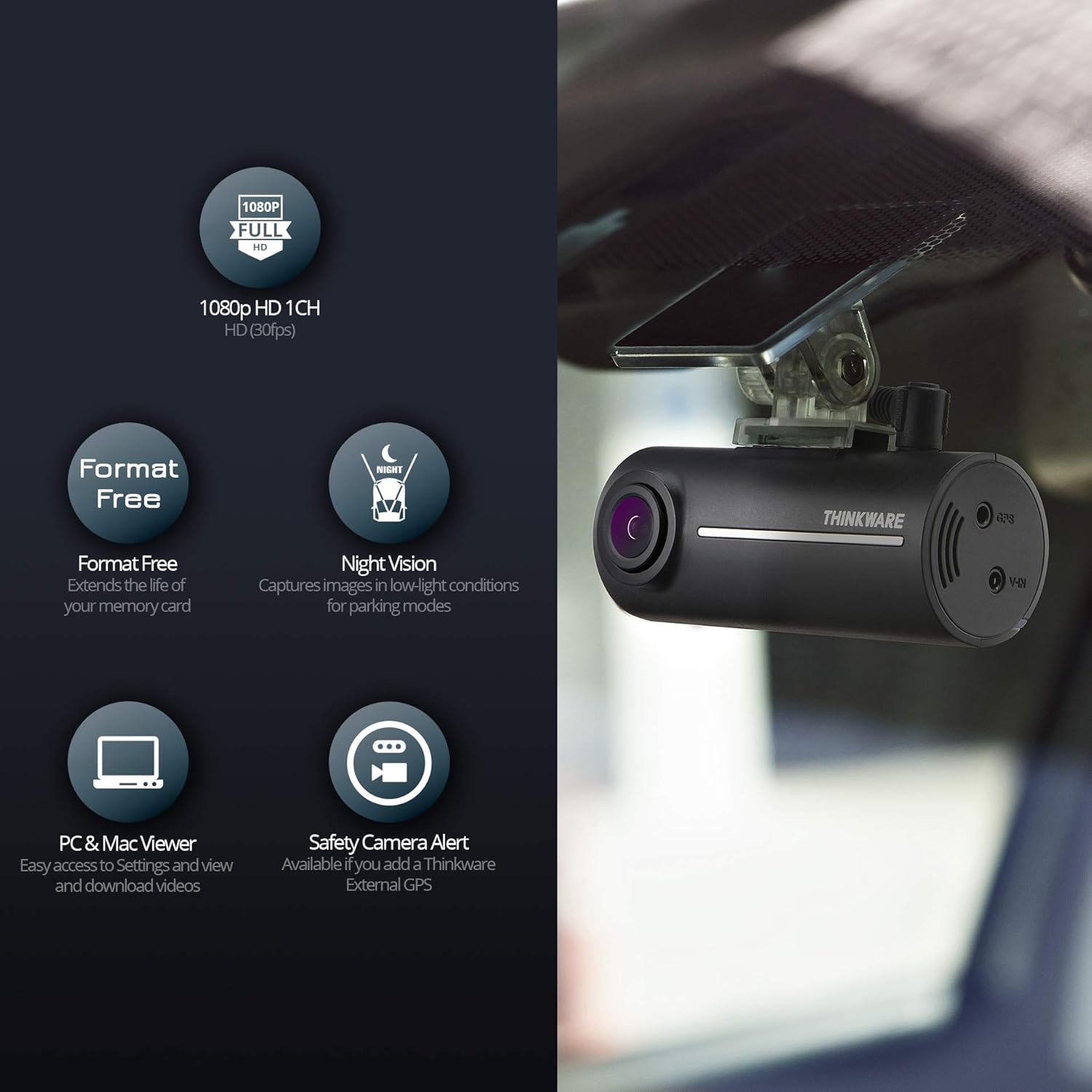
Image: A graphic illustrating key features of the F100 Dash Cam, including 1080p Full HD, Format Free technology, Night Vision, PC & Mac Viewer compatibility, and Safety Camera Alert (with optional GPS).
4. Einrichtung und Installation
4.1 Einlegen der MicroSD-Karte
- Suchen Sie den MicroSD-Kartensteckplatz an der Dashcam.
- Schieben Sie die mitgelieferte 16-GB-MicroSD-Karte in den Steckplatz, bis sie hörbar einrastet. Achten Sie auf den korrekten Sitz der Karte, um Beschädigungen zu vermeiden.
4.2 Montage der Dashcam
The F100 uses an adhesive mount for secure placement on your vehicle's windshield.
- Clean the chosen area on your windshield thoroughly to ensure proper adhesion.
- Attach one of the 3M sticky mounting pads to the dash cam bracket.
- Peel off the protective film from the mounting pad and firmly press the dash cam onto the windshield, ensuring the camera has a clear view der Straße.
- Passen Sie den Kamerawinkel nach Bedarf an.

Image: The THINKWARE F100 Dash Cam is shown mounted discreetly on the interior of a car's windshield, positioned to capture the road ahead.
4.3 Stromversorgung anschließen
The dash cam operates by connecting to your vehicle's 12V power outlet.
- Connect the provided car charger cable to the power input port on the dash cam.
- Stecken Sie das andere Ende des Autoladegeräts in die 12-V-Zigarettenanzünderbuchse Ihres Fahrzeugs.
- Use the cable tidy clips to route the power cable neatly along the windshield trim to avoid obstructing your view.

Image: A diagram illustrating the simple 'Plug & Play' installation process, showing the dash cam connected to a car's 12V power outlet.
Notiz: For Parking Mode functionality, a hardwire connection is typically required. The standard plug-and-play setup does not support Parking Mode.
4.4 Optional GPS Antenna
To enable speed camera alerts and location data recording, an optional GPS antenna is required. Refer to the GPS antenna's separate instructions for installation.
5. Bedienungsanleitung
5.1 Automatische Aufnahme
Once connected to power and the vehicle engine is started, the F100 Dash Cam will automatically power on and begin continuous recording.
5.2 Notfallaufnahme
The dash cam features two methods for emergency recording:
- G-Sensor-Erkennung: In the event of a sudden impact or collision, the built-in G-sensor will automatically trigger an emergency recording, saving the footage to a protected folder on the MicroSD card.
- Manuelle Aufnahme: Press the emergency record button on the dash cam to manually initiate an emergency recording. This footage will also be saved to a protected folder.
5.3 Parking Mode (Requires Hardwire Connection)
If the dash cam is hardwired to your vehicle's power supply, Parking Mode will activate when the ignition is turned off. In Parking Mode, the dash cam monitors for impacts or motion, recording events to a dedicated folder while preventing vehicle battery drain.
5.4 ViewVerwaltung und Management von Footage (PC/Mac Viewäh)
To access and manage recorded footage, you will need to use the THINKWARE PC/Mac Viewäh Software.
- Remove the MicroSD card from the dash cam.
- Insert the MicroSD card into your computer's card reader.
- Launch the THINKWARE PC/Mac Viewer software (available for free download from the THINKWARE webSeite? ˅).
- Innerhalb der viewer, you can configure dash cam settings, view recorded videos, download specific clips to your computer, or delete unwanted footage.

Image: A laptop screen showing the THINKWARE PC/Mac Viewer interface, which allows users to configure dash cam settings, view, download, or delete footage, and send updates to the dash cam.
6. Wartung
6.1 MicroSD-Kartenverwaltung
The F100 features Format Free technology, which optimizes the MicroSD card's lifespan and reduces the need for frequent manual formatting. However, it is recommended to periodically back up important footage and, if necessary, format the card using the PC/Mac Viewer software or the dash cam's internal function (if available) to maintain optimal performance.
6.2 Reinigung der Dashcam
To ensure clear video recording, regularly clean the dash cam's lens with a soft, dry, lint-free cloth. Avoid using abrasive cleaners or solvents.
6.3 Firmware-Updates
Periodically check the THINKWARE website for firmware updates. Firmware updates can improve performance, add new features, or resolve issues. Updates are typically applied via the PC/Mac Viewäh Software.
7. Fehlerbehebung
If you encounter issues with your THINKWARE F100 Dash Cam, refer to the following common troubleshooting steps:
- Dashcam lässt sich nicht einschalten: Ensure the car charger is securely plugged into both the dash cam and the vehicle's 12V outlet. Check if the vehicle's 12V outlet is receiving power.
- Aufnahmeprobleme: Verify that the MicroSD card is inserted correctly. If the card is full, consider formatting it (after backing up important data). Ensure the card is not damaged.
- Schlechte Videoqualität: Clean the camera lens. Ensure the dash cam is securely mounted and not vibrating excessively. Check for any obstructions in the camera's field of view.
- Parking Mode not working: Confirm that the dash cam is hardwired to the vehicle's power supply, as Parking Mode is not available with standard plug-and-play connections.
For more detailed troubleshooting or persistent issues, consult the Quick Start Guide or contact THINKWARE customer support.
8. Spezifikationen
| Besonderheit | Spezifikation |
|---|---|
| Modellnummer | F100UKNC16GB |
| Auflösung der Videoaufnahme | 1080p |
| Bereich View | 135 Grad |
| Optische Sensorik | CMOS |
| Konnektivitätstechnologie | USB, Kabellos |
| Montagetyp | Klebebefestigung |
| Kontrollmethode | Berühren |
| Technische Daten | 3.07 x 1.24 x 1.34 Zoll |
| Artikelgewicht | 1.49 Unzen (0.04 Kilogramm) |
| Im Lieferumfang enthaltene Komponenten | Car Charger, Memory Card |
9. Garantie und Support
For warranty information, please refer to the 'Quick Start Guide & Warranty Information' document included in your product package. THINKWARE provides a free technical helpline for customer assistance.
THINKWARE also offers a professional national installation service for those who prefer expert setup. Details regarding this service can be found on the official THINKWARE webWebsite oder durch Kontaktaufnahme mit dem Kundendienst.


