1. Einleitung
This manual provides instructions for the installation, operation, and maintenance of the Nexxt Solutions Naxos800 8-Port Fast Ethernet Network Switch. The Naxos800 is an unmanaged compact desktop switch designed for small office/home office (SOHO) environments, student dormitories, and small enterprises, offering reliable network connectivity.
2. Hauptmerkmale
- 8 Fast-Ethernet-Anschlüsse: Provides 8 UTP/STP 10/100Mbps ports with auto MDI/MDIX.
- Plug-and-Play: Simple setup requiring no software configuration.
- Nicht verwalteter Switch: Operates without requiring complex management interfaces.
- Store-and-Forward Technology: Ensures efficient packet transmission.
- Lernen von MAC-Adressen: Supports auto-learning and aging with a built-in 1000 MAC address table.
- Kompaktes Design: Suitable for desktop or wall mounting.
- Energieeinsparung: Design mit geringem Stromverbrauch.
- Flusskontrolle: Full duplex and half duplex back pressure flow control.
- Haltbarkeit: Integrated lightning protection and a sturdy metal case.
- Leiser Betrieb: Fanless design for silent performance.
3. Packungsinhalt
Überprüfen Sie, ob Ihr Paket die folgenden Artikel enthält:
- One (1) Nexxt Solutions Naxos800 8-Port Fast Ethernet Switch
- Ein (1) Netzteil

Image: The Nexxt Solutions Naxos800 switch, its power adapter, and product packaging.
4. Produktüberschreitungview

Bild: Vorderseite view of the Naxos800 switch, showing the Nexxt logo and eight green LED indicators for port activity.
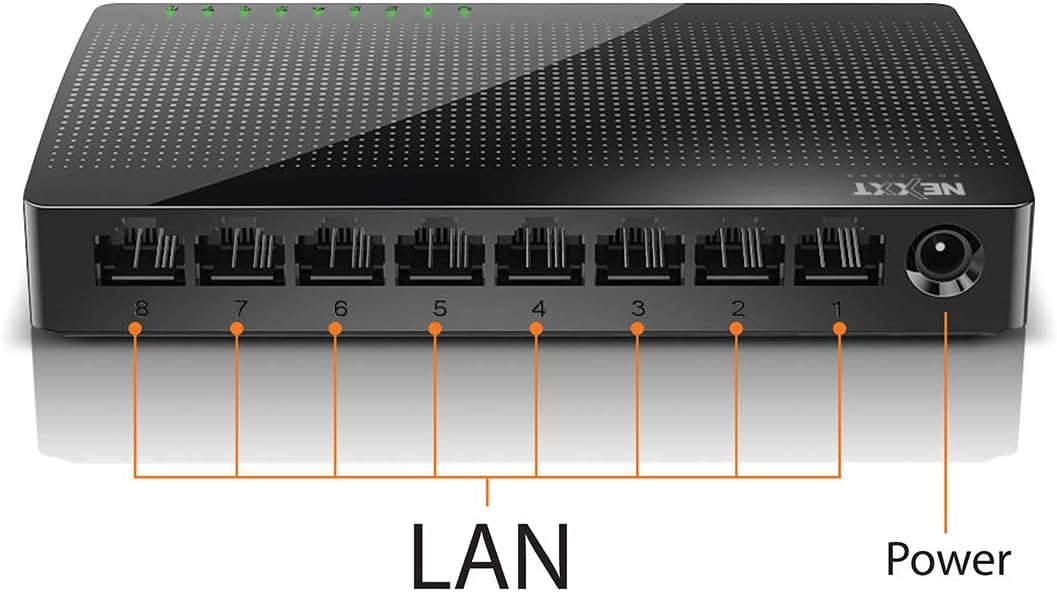
Bild: Rückseite view of the Naxos800 switch, highlighting the eight LAN ports (numbered 1-8) and the power input port.
LED-Anzeigen
The front panel features LED indicators for each port, providing visual status:
- Grüne LED (durchgehend leuchtend): Indicates a stable link connection.
- Grüne LED (blinkend): Indicates data activity on the corresponding port.
- LED aus: No link or connection detected.
5. Einrichtung und Installation
The Naxos800 switch is designed for simple plug-and-play installation. No software or complex configuration is required.
- Platzierung: Stellen Sie den Schalter auf eine stabile, ebene Fläche oder montieren Sie ihn mit geeignetem Befestigungsmaterial (nicht im Lieferumfang enthalten) an der Wand. Sorgen Sie für ausreichende Belüftung um das Gerät herum.
- An die Stromversorgung anschließen: Connect the provided power adapter to the power input port on the switch and then plug the adapter into a standard electrical outlet. The power LED (if present, or the port LEDs will light up) should illuminate.
- Mit Netzwerk verbinden:
- Connect your router or modem to any of the 8 LAN ports on the Naxos800 switch using an Ethernet cable.
- Connect your network devices (e.g., computers, gaming consoles, IP cameras, Smart TVs, printers) to the remaining LAN ports on the Naxos800 switch using an Ethernet cable.
- Verbindung überprüfen: Once devices are connected, the corresponding LED indicators on the switch's front panel should light up green (solid for link, flashing for activity).

Image: Diagram illustrating a typical network setup. An ADSL or Cable Modem connects to a Router, which then connects to the Naxos800 switch. Various devices like laptops, media players, game consoles, IP cameras, Smart TVs, and IP phones are connected to the Naxos800 switch.
6. Bedienung des Schalters
The Naxos800 is an unmanaged switch, meaning it operates automatically without user intervention once connected. It functions as an internet splitter, expanding the number of wired network connections available from your router or modem.
- Automatische Geschwindigkeitserkennung: Each port automatically detects the speed of the connected device (10Mbps or 100Mbps) and adjusts accordingly.
- Auto MDI/MDIX: Eliminates the need for crossover cables; the switch automatically detects and corrects for straight-through or crossover cable types.
- Datenübertragung: Data packets are forwarded between connected devices at Fast Ethernet speeds. The store-and-forward architecture ensures data integrity.
7. Wartung
The Naxos800 switch requires minimal maintenance.
- Reinigung: Reinigen Sie die Außenseite des Schalters mit einem weichen, trockenen Tuch. Verwenden Sie keine flüssigen oder Aerosolreiniger.
- Belüftung: Stellen Sie sicher, dass die Belüftungsöffnungen nicht blockiert sind, um eine Überhitzung zu vermeiden.
- Aus- und Wiedereinschalten: If the device experiences issues, a simple power cycle (unplugging and replugging the power adapter) can often resolve minor problems.
8. Fehlerbehebung
If you encounter issues with your Naxos800 switch, refer to the following common problems and solutions:
| Problem | Mögliche Ursache | Lösung |
|---|---|---|
| Kein Strom / Gerät lässt sich nicht einschalten. | Netzteil nicht angeschlossen oder defekt; Steckdose funktioniert nicht. | Vergewissern Sie sich, dass das Netzteil fest mit dem Schalter und einer funktionierenden Steckdose verbunden ist. Versuchen Sie es mit einer anderen Steckdose. |
| No link light for a connected device. | Ethernet-Kabel defekt oder falsch angeschlossen; Gerät nicht eingeschaltet oder defekt; falscher Anschluss. |
|
| Langsame Netzwerkgeschwindigkeiten. | Network congestion; faulty cable; device limitations. |
|
9. Spezifikationen
| Attribut | Wert |
|---|---|
| Modellnummer | ASIDT084U3 |
| Häfen | 8 x 10/100Mbps Fast Ethernet (UTP/STP) |
| Backplane-Bandbreite | 1.6 Gbit/s |
| MAC-Adresstabelle | 1000 Einträge |
| Zugriffskontrolle | CDMA |
| Durchflussregelung | Full duplex and half duplex back pressure |
| Abmessungen (L x B x H) | 12.4 x 5.9 x 2.3 cm |
| Gewicht | 140 g |
| Leistungsaufnahme | Externes Netzteil (im Lieferumfang enthalten) |
Hinweis: Spezifikationen können ohne vorherige Ankündigung geändert werden.
10. Garantie und Support
The Nexxt Solutions Naxos800 8-Port Fast Ethernet Network Switch comes with a 5 Jahr eingeschränkte Garantie. For warranty claims or technical support, please contact Nexxt Solutions customer service. Refer to the official Nexxt Solutions webAuf dieser Website finden Sie die aktuellsten Supportinformationen und Kontaktdaten.
Nexxt Solutions is a US company committed to quality and customer service.


