1. Einleitung
This manual provides essential information for setting up, operating, and maintaining your RCA 40-Inch Full HD 1080p Roku Smart LED TV. This television integrates the Roku TV platform, offering a simple and intuitive interface to access broadcast TV, streaming channels, gaming consoles, and other devices. Experience content with Full HD 1080p resolution and enjoy a user-friendly experience with the included remote and dual-band wireless connectivity.
2. Packungsinhalt
Stellen Sie sicher, dass alle Artikel in der Box vorhanden sind:
- RCA 40-Inch Full HD 1080p Roku Smart LED TV
- Roku-Fernbedienung
3. Körperliche Übergriffeview

Abbildung 3.1: Front view of the RCA Roku Smart TV, showcasing the intuitive home screen with quick access to streaming services and inputs.

Abbildung 3.2: Seitenprofifile of the television, demonstrating its sleek and slender design suitable for various placements.

Abbildung 3.3: Back panel of the TV, illustrating the arrangement of input/output ports and the standard VESA mounting pattern.

Abbildung 3.4: Dimensional drawing of the television, providing measurements for planning placement or wall mounting.
4. Einrichtung
4.1 Ständermontage (optional)
If not wall-mounting, attach the included quad-pedestal stands to the bottom of the TV using the provided screws. Ensure they are securely fastened for stability.
4.2 Wandmontage (optional)
The TV is lightweight and supports VESA wall mounts. Refer to the wall mount manufacturer's instructions for proper installation. Ensure the wall mount is compatible with the TV's VESA pattern and weight.
4.3 Stromanschluss
Connect the power cord to the TV and then to a standard electrical outlet.
4.4 Ersteinrichtung
- Schalten Sie den Fernseher mit der Fernbedienung ein.
- Folgen Sie den Anweisungen auf dem Bildschirm, um Ihre Sprache und Ihr Land auszuwählen und sich mit Ihrem WLAN-Netzwerk zu verbinden.
- Activate your Roku account or create a new one if you don't have one.
5. Bedienungsanleitung
5.1 Navigating the Roku TV Home Screen
The Roku TV home screen provides a centralized interface for all your entertainment. Use the directional pad on your remote to navigate between options:
- Streaming-Kanäle: Access popular streaming services like Netflix, Hulu, Prime Video, Disney+, and more.
- Eingänge: Switch between connected devices such as cable boxes, game consoles, or an HD antenna.
- Live-TV: Access over-the-air broadcast channels if an antenna is connected.

Abbildung 5.1: Detaillierte view of the Roku TV interface, showing various streaming applications and input selections.
5.2 Verwenden der Fernbedienung
The included Roku remote is designed for simple navigation. Dedicated buttons provide quick access to popular streaming services. The Roku mobile app (available for iOS and Android) can also be used as a remote, offering additional features like voice search.

Abbildung 5.2: The physical Roku remote control, featuring dedicated buttons for popular streaming services and essential navigation.
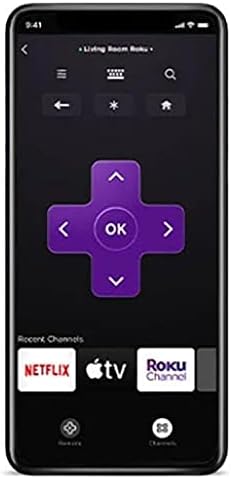
Abbildung 5.3: The Roku mobile application, which can serve as an alternative remote control with voice search capabilities.
5.3 Roku Search and Voice Search
Utilize Roku Search to find movies, TV shows, and content across various streaming channels. Voice search is available through the Roku mobile app for quick and convenient content discovery.
5.4 Live TV Features
If an over-the-air antenna is connected, you can enjoy broadcast TV. The Live TV Pause feature allows you to pause and playback live antenna TV. You can also create a list of Favorite Channels for easy access.
5.5 Privates Zuhören
For private viewing, use the Roku mobile app with headphones while watching streaming content on your Roku TV. This feature is exclusively for streaming content.
6. Smart TV Features & Connectivity
6.1 Streaming-Inhalte
The Roku TV platform provides access to over 500,000 streaming channels, including popular services like Netflix, Vudu, YouTube, Hulu, Prime Video, and Disney+. Enjoy a vast library of movies, TV episodes, live sports, news, and music.

Abbildung 6.1: Ein Überview of the Roku streaming platform, highlighting the extensive content library and diverse channel offerings.
6.2 Kompatibilität mit Sprachassistenten
The RCA Roku TV is compatible with popular voice assistants such as Siri, Alexa, and Google Assistant, allowing for convenient voice control of your television.

Abbildung 6.2: Visual representation of the TV's compatibility with major voice assistant platforms for enhanced control.
6.3 Casting and Screen Mirroring (AirPlay)
Share photos, videos, and music directly from your compatible smartphone or tablet to your Roku TV using the free Roku mobile app or AirPlay for Apple devices. This allows for easy viewing of personal media on the large screen.
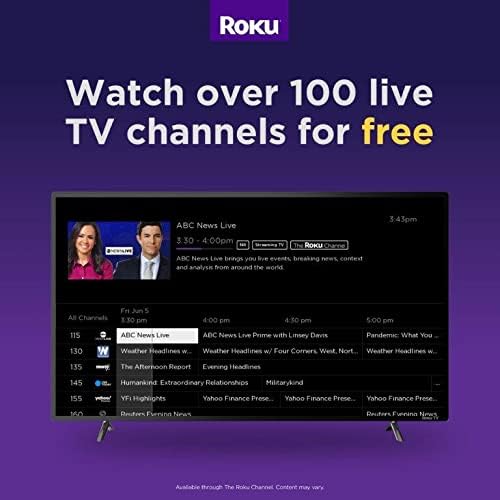
Abbildung 6.3: Explanation of AirPlay features, enabling seamless content sharing from Apple devices to your Roku TV.
6.4 Anschlussmöglichkeiten
The TV features multiple input options for connecting various external devices:
- HDMI: Three HDMI inputs for connecting game consoles, cable boxes, Blu-ray players, etc.
- RF: For connecting an HD antenna for over-the-air broadcasts.
- USB: Zur Medienwiedergabe von USB-Speichergeräten.
- VGA: Zum Anschließen älterer Computer oder Geräte.
- W-lan: Dual-band wireless for internet connectivity.
7. Spezifikationen
| Besonderheit | Spezifikation |
|---|---|
| Marke | Cinch |
| Modellnummer | RTR4061 |
| Bildschirmgröße | 40 Zoll |
| Display-Technologie | LED |
| Auflösung | 1080p Full HD |
| Bildwiederholrate | 60 Hz |
| Seitenverhältnis | 16:9 |
| Konnektivitätstechnologie | HDMI, RF, USB, VGA, Wi-Fi |
| Lautsprechertyp | Eingebaut |
| Farbe | Schwarz |
| Technische Daten | 22"T x 22"B x 22"H |
| Artikelgewicht | 0.01 Unzen (ca. 0.28 Gramm) |
| Bandtage | 110 Volt |
| Wastage | 8 Watt |
8. Fehlerbehebung
If you encounter issues with your RCA Roku TV, consider the following general troubleshooting steps:
- Kein Strom: Ensure the power cord is securely connected to both the TV and the electrical outlet. Try a different outlet.
- Kein Bild/Ton: Verify that the correct input source is selected on the TV. Check all cable connections (HDMI, RF) for looseness.
- Netzwerkverbindungsprobleme: Restart your Wi-Fi router and modem. Go to the TV's settings menu to re-establish the Wi-Fi connection.
- Fernbedienung reagiert nicht: Tauschen Sie die Batterien in der Fernbedienung aus. Stellen Sie sicher, dass sich keine Hindernisse zwischen Fernbedienung und Fernseher befinden.
- App-Probleme: If a specific app is not working, try restarting the app or reinstalling it from the Roku Channel Store.
- Werkseinstellungen zurückgesetzt: As a last resort, a factory reset can resolve many software-related issues. This will erase all settings and installed apps, returning the TV to its original state. Access this option through the TV's settings menu.
9. Pflege und Wartung
- Reinigen des Bildschirms: Verwenden Sie ein weiches, fusselfreies Tuch, das speziell für Elektronikgeräte entwickelt wurde. Verwenden Sie keine scharfen Chemikalien oder scheuernden Materialien.
- Reinigung des Körpers: Wischen Sie die Außenseite des Fernsehers mit einem weichen, trockenen Tuch ab.
- Belüftung: Sorgen Sie für ausreichende Luftzirkulation um den Fernseher herum, um eine Überhitzung zu vermeiden. Blockieren Sie die Lüftungsöffnungen nicht.
- Ausschalten: Ziehen Sie bei Gewittern oder wenn der Fernseher längere Zeit unbeaufsichtigt bleibt, den Netzstecker.
10. Offizielles Produktvideo
Video 10.1: An official video introducing the features and benefits of RCA Roku TVs, provided by Curtis International LTD.
11. Garantie und Support
Informationen zur Garantie und zum technischen Support finden Sie in der Ihrem Produkt beiliegenden Dokumentation oder auf der offiziellen RCA-Supportseite. webWebsite. Bewahren Sie Ihren Kaufbeleg für Garantieansprüche auf.


