Einführung
This manual provides essential information for the safe and effective use of your KMC 8-Outlet Metal Power Strip Surge Protector. Please read these instructions carefully before installation and operation, and retain them for future reference.
Sicherheitshinweise
Um das Risiko von Stromschlägen, Bränden oder Verletzungen zu verringern, befolgen Sie stets die grundlegenden Sicherheitsvorkehrungen:
- Do not exceed the electrical ratings of 125V/15A/1875W.
- Dieses Gerät ist nur für den Gebrauch in Innenräumen bestimmt. Vor Feuchtigkeit schützen.
- Do not disassemble or modify the unit. There are no user-serviceable parts inside.
- Ensure the power cord is fully inserted into a grounded outlet.
- Halten Sie Kinder von der Steckdosenleiste fern.
- Do not use in conjunction with aquariums or other water-related products.
- If the circuit breaker trips, reduce the load by unplugging some devices before resetting.
Produkteigenschaften
The KMC 8-Outlet Metal Power Strip Surge Protector is designed for reliable power distribution and protection.
- 8 Steckdosen: Provides power to multiple devices simultaneously.
- 1800 Joule Überspannungsschutz: Shields connected electronics from power surges.
- 15A Resettable Circuit Breaker: Schützt vor Überlastung.
- Robustes Metallgehäuse: Ensures longevity and suitability for various environments.
- Integrated Mounting Brackets: Allows for secure installation on racks, walls, or under desks.
- 6-Fuß-Netzkabel: Bietet flexible Einsatzmöglichkeiten.
- UL/ETL Certified: Entspricht den Sicherheitsstandards.
Aufstellen
Montageanleitung
The power strip features integrated metal mounting brackets for versatile installation. It can be mounted to server racks, walls, desks, cabinets, or workbenches.
- Identify a suitable mounting location that is dry, stable, and within reach of the power cord.
- Use appropriate screws or bolts (not included) to secure the mounting brackets to the desired surface. Ensure the mounting hardware is strong enough to support the power strip and any connected devices.
- The brackets allow for 180-degree flexible mounting orientation, enabling you to position the power strip as needed.

Image: Close-up of the metal mounting brackets, illustrating their design for flexible installation.
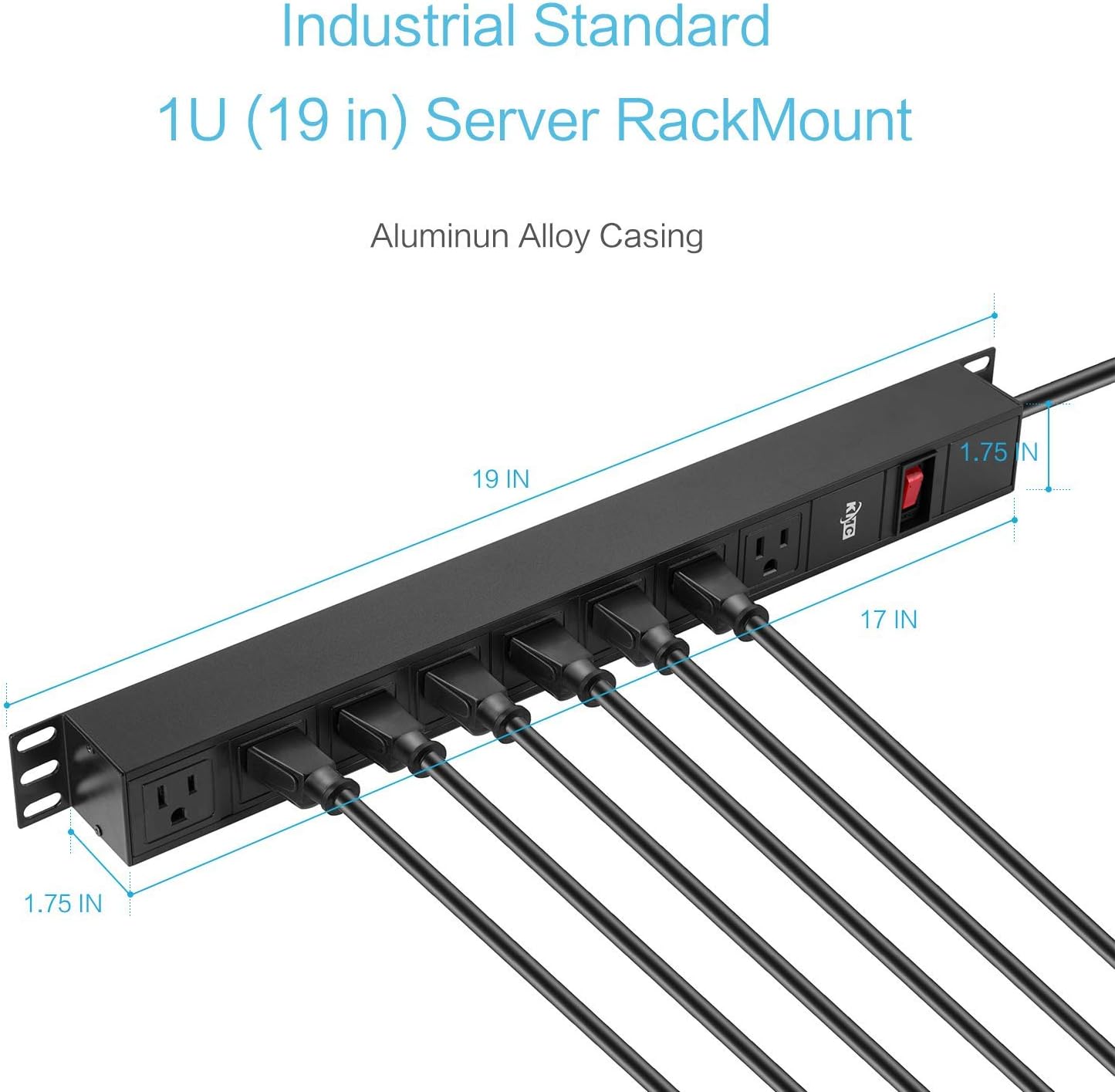
Image: Diagram illustrating the dimensions of the power strip and its industrial standard 1U (19 inch) server rack mount compatibility.
Anschließen von Geräten
Once mounted, plug your electronic devices into the 8 AC outlets on the power strip. Ensure all plugs are fully inserted.

Bild: Nahaufnahme view of the 8 AC outlets on the power strip.
Netzkabel
The power strip comes with a 6-foot SJT insulated 14 AWG extension cord. Plug this cord into a standard 125V grounded wall outlet.
Bedienungsanleitung
Ein-/Ausschalten
The power strip features a master ON/OFF switch. Press the switch to the 'ON' position to supply power to the outlets and to the 'OFF' position to cut power.

Image: Close-up of the power strip's ON/OFF switch and integrated 15A resettable circuit breaker.
Überspannungs- und Überlastschutz
This power strip provides 1800 Joules of surge protection to safeguard your electronics from voltage spikes. It also includes a 15A resettable circuit breaker. If the total current draw from connected devices exceeds 15 amps, the circuit breaker will trip, cutting power to prevent overload. To reset, unplug some devices and then press the circuit breaker button.
Wartung
To ensure optimal performance and longevity of your power strip:
- Keep the unit clean and free of dust. Use a dry cloth for cleaning.
- Avoid placing the power strip in areas with high humidity or extreme temperatures.
- Regularly inspect the power cord and plugs for any signs of damage. Do not use if damaged.
Fehlerbehebung
- Keine Stromversorgung der Steckdosen:
- Check if the power strip's ON/OFF switch is in the 'ON' position.
- Verify that the power strip's cord is securely plugged into a working wall outlet.
- Check if the circuit breaker has tripped. If so, reduce the load and press the reset button.
- Ensure the wall outlet itself is receiving power by testing it with another device.
- Devices Not Charging/Powering On:
- Ensure the device's power cord is fully inserted into the power strip outlet.
- Test the device by plugging it directly into a wall outlet to rule out device malfunction.
Technische Daten
| Besonderheit | Spezifikation |
|---|---|
| Modellnummer | 8541545282 |
| Technische Daten | 19 x 1.75 x 1.75 Zoll |
| Nennvolumentage | 125V~ / 60Hz |
| Max Current | 15 A |
| Maximal Watttage | 1875 W |
| Überspannungsschutz | 1800 Joule |
| Insgesamt Steckdosen | 8 |
| Länge des Netzkabels | 6 Fuß |
| Zertifizierungen | ETL-zertifiziert |
| Betriebstemperatur | -10℃ bis +40℃ |
| Lagertemperatur | -10℃ bis +60℃ |
| Arbeitsfeuchtigkeit | 5% (0℃) ~ 90% (40℃) |
Garantieinformationen
This KMC Power Strip Surge Protector is backed by a Lifetime Warranty. For warranty claims or further details, please contact KMC Customer Support.
Kundenservice
For any questions, technical assistance, or support regarding your KMC product, please contact our US-based Customer Support team. Refer to the product packaging or the KMC official webWebsite für aktuelle Kontaktinformationen.


