1. Einleitung
This manual provides comprehensive instructions for the assembly, operation, and maintenance of your Zinus Tresa Metal Desk with Storage and Monitor Stand, Large. Designed for home office or den use, this desk features a durable metal frame, an espresso wood-like finish tabletop, a movable monitor stand, a hanging hook, a side storage tray, and a built-in cable organizer. Please read all instructions carefully before assembly and use to ensure proper function and safety.

Figure 1: Zinus Tresa Metal Desk, Large. This image shows the assembled desk with a monitor, lamp, and small plant, highlighting its functional design.
2. Sicherheitshinweise
Bitte beachten Sie die folgenden Sicherheitsrichtlinien, um Verletzungen oder Schäden am Produkt zu vermeiden:
- Bauen Sie den Schreibtisch stets gemäß der beiliegenden Anleitung zusammen.
- Überschreiten Sie nicht die Gewichtsgrenze von 100 kg.
- Vor der Benutzung sicherstellen, dass der Schreibtisch stabil und sicher steht.
- Keep the work area clear of obstacles to prevent accidents.
- Stellen oder setzen Sie sich nicht auf den Schreibtisch.
- Halten Sie Kleinteile während der Montage von Kindern fern.
3. Packungsinhalt
Bitte prüfen Sie vor Beginn der Montage, ob alle Komponenten vorhanden sind. Sollten Teile fehlen oder beschädigt sein, wenden Sie sich bitte an den Kundendienst.

Figure 2: Product Packaging. The desk components are efficiently packed in one compact box for shipping.
Enthaltene Komponenten:
- Desk Tabletop (Espresso Finish)
- Desk Legs and Frame (Steel)
- Monitor Stand
- Side Storage Tray
- Aufhängehaken
- Cable Management Organizer
- Montagezubehör (Schrauben, Bolzen usw.)
- Assembly Tools (ratchet tool)
- Bedienungsanleitung
4. Montageanleitung
Assembly is designed to be straightforward and typically takes under 30 minutes with one person. All necessary tools are included.
- Komponenten auspacken: Nehmen Sie alle Teile vorsichtig aus der Verpackung und legen Sie sie auf eine saubere, weiche Unterlage, um Kratzer zu vermeiden. Überprüfen Sie anhand der Packungsinhaltsliste, ob alle Teile vorhanden sind.
- Beine am Rahmen befestigen: Securely attach the desk legs to the main frame using the provided hardware. Ensure all connections are tight but do not overtighten.
- Tischplatte montieren: Carefully place the tabletop onto the assembled frame. Align the pre-drilled holes and secure the tabletop using the designated screws.
- Zubehör installieren: Attach the monitor stand, side storage tray, hanging hook, and cable organizer to their respective positions as indicated in the detailed assembly diagram (refer to the included printed manual for specific diagrams).
- Endkontrolle: Once assembled, gently lift and move the desk to its desired location. Ensure all connections are secure and the desk is stable before placing any items on it.
5. Nutzung
Monitor Stand
The movable monitor stand helps elevate your screen to an ergonomic height, reducing neck and back strain. It can be positioned anywhere on the desk surface to suit your setup.
Side Storage Tray
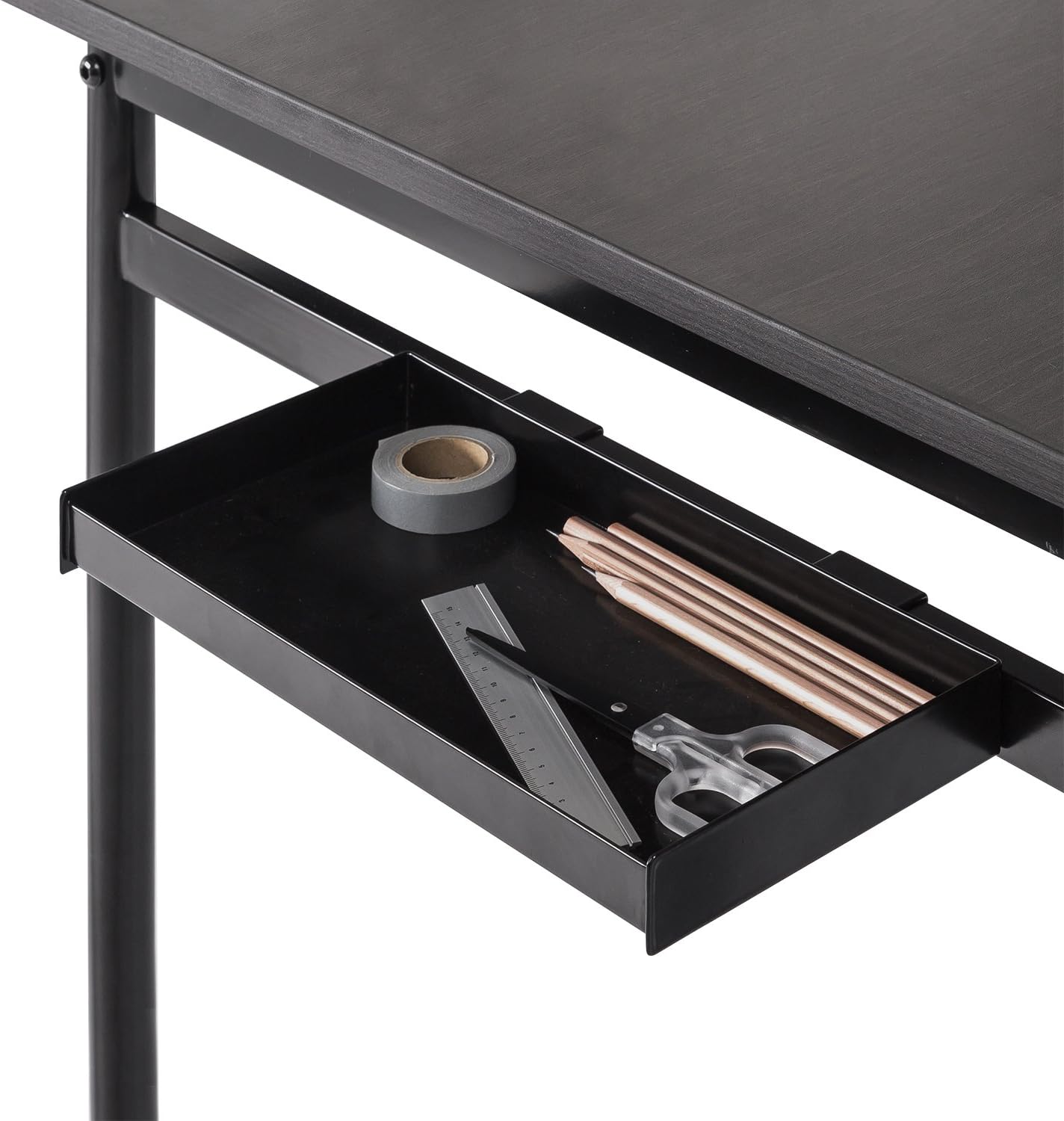
Figure 3: Side Storage Tray. This tray provides convenient access for small office supplies like pens, pencils, and rulers.
The integrated side storage tray is ideal for keeping small office essentials, such as pens, pencils, and other accessories, within easy reach.
Aufhängehaken

Figure 4: Hanging Hook. A bag is shown hanging from the hook, demonstrating its use for personal items.
Utilize the hanging hook to keep bags, headphones, or other items off the floor and within easy access, helping to maintain a tidy workspace.
Cable Management Organizer

Figure 5: Cable Management Organizer. This image illustrates how cables can be routed through the organizer to keep them neat and prevent tangling.
The built-in cable organizer helps manage and route power cords and other cables, preventing clutter and ensuring a clean, organized desk surface.
6. Wartung
To maintain the appearance and longevity of your Zinus Tresa Metal Desk, follow these simple care instructions:
- Reinigung: Wischen Sie die Schreibtischoberflächen mit einem Tuch ab.amp Mit einem Tuch abwischen. Vermeiden Sie die Verwendung von scharfen Chemikalien oder Scheuermitteln, da diese die Oberfläche beschädigen können.
- Inspektion: Überprüfen Sie regelmäßig alle Schrauben und Verbindungen, um sicherzustellen, dass sie fest sitzen. Ziehen Sie sie gegebenenfalls nach.
- Vermeiden Sie übermäßige Feuchtigkeit: Do not expose the desk to excessive moisture or direct sunlight for prolonged periods.
7. Fehlerbehebung
Sollten Sie Probleme mit Ihrem Schreibtisch haben, beachten Sie bitte die folgenden gängigen Lösungsansätze:
- Schreibtisch wackelt: Ensure all bolts and screws are securely tightened. Check that the desk is on a level surface. If the floor is uneven, consider using furniture pads to stabilize.
- Fehlende Teile: If any parts were missing upon unboxing, please contact Zinus customer support immediately for assistance.
- Beschädigung während der Montage: If a part was damaged during assembly, cease assembly and contact customer support.
8. Spezifikationen

Figure 6: Desk Dimensions. This image provides a visual representation of the desk's key measurements in centimeters.
| Besonderheit | Detail |
|---|---|
| Marke | Zinus |
| Modellname | Tresa |
| Modellnummer | OLB-DS-PL55 |
| Produktabmessungen (L x B x H) | 55"D x 22.53"W x 32.52"H (approx. 139.7 cm x 57.2 cm x 82.6 cm) |
| Artikelgewicht | 53.73 Pfund (ca. 24.37 kg) |
| Maximalgewichtsempfehlung | 100 Pfund (ca. 45 kg) |
| Materialtyp | Holzwerkstoffe, Stahl |
| Ausführung | Steel frame, Espresso wood-like tabletop |
| Besondere Merkmale | Adjustable Monitor Stand, Side Storage Tray, Hanging Hook, Cable Organizer |
| Montage erforderlich | Yes (Tools included, 1 person recommended) |
| Zimmertyp | Dormitory, Office, Study Room |
9. Garantie und Support
Garantieinformationen
The Zinus Tresa Metal Desk is covered by a 1 Jahre Sorglos-Garantie Diese Garantie gilt ab Kaufdatum und deckt Material- und Verarbeitungsfehler ab. Bitte bewahren Sie Ihren Kaufbeleg für Garantieansprüche auf.
Kundenservice
For any questions, missing parts, or warranty claims, please contact Zinus customer support. Refer to the contact information provided in your product packaging or visit the official Zinus webWebsite für Unterstützung.


