1. Einleitung
This manual provides comprehensive instructions for the installation, operation, and maintenance of your BitFenix Spectre Pro RGB LED 140mm Case Fan with Controller. Please read this manual thoroughly before installation and retain it for future reference.
2. Packungsinhalt
Überprüfen Sie, ob alle unten aufgeführten Komponenten in Ihrem Paket enthalten sind:
- 1x BitFenix Spectre Pro RGB LED 140mm Case Fan
- 1x RGB LED Controller Box
- 1x RGB Control Button (with magnetic backing)
- 1x Motherboard RGB Sync Cable (for ASUS Aura Sync compatibility)
- 1x Power Cable (Molex to Controller)
- 4x Fan Mounting Screws
- 4x Anti-Vibration Rubber Mounts

Abbildung 2.1: All components included in the BitFenix Spectre Pro RGB LED 140mm Case Fan package. This includes the 140mm fan, the RGB controller box, various connection cables, mounting screws, and rubber anti-vibration mounts.
3. Funktionen
The BitFenix Spectre Pro RGB LED Case Fan offers the following key features:
- TriBright LED Technology: Provides vibrant and uniform RGB illumination.
- ASUS Aura Sync Ready: Compatible with ASUS Aura Sync motherboards for synchronized RGB lighting control.
- Reinforced Fan Blades: Designed for durability and optimal airflow, with centered LED lighting for enhanced aesthetics.
- High Pressure/CFM Design: Engineered to deliver significant airflow and static pressure for effective cooling.
- Focused Airflow: Optimized blade design ensures efficient cooling performance.
- Leiser Betrieb: Designed to minimize noise levels during operation.
- Lange Lebensdauer: Constructed for extended operational lifespan.
4. Einrichtung und Installation
Follow these steps to properly install your BitFenix Spectre Pro RGB LED Case Fan.
4.1 Sicherheitsvorkehrungen
- Stellen Sie sicher, dass Ihr Computer ausgeschaltet und vom Stromnetz getrennt ist, bevor Sie mit der Installation beginnen.
- Vor der Handhabung der Bauteile muss eventuell vorhandene statische Elektrizität durch Berühren eines geerdeten Metallgegenstands abgeleitet werden.
- Gehen Sie vorsichtig mit den Komponenten um, um Schäden zu vermeiden.
4.2 Lüftermontage
- Ermitteln Sie den gewünschten Montageort innerhalb Ihres PC-Gehäuses (z. B. vorne, hinten, oben, unten).
- Align the fan with the screw holes in your case.
- Optionally, place the anti-vibration rubber mounts between the fan and the case to reduce noise.
- Secure the fan using the four provided mounting screws. Do not overtighten.
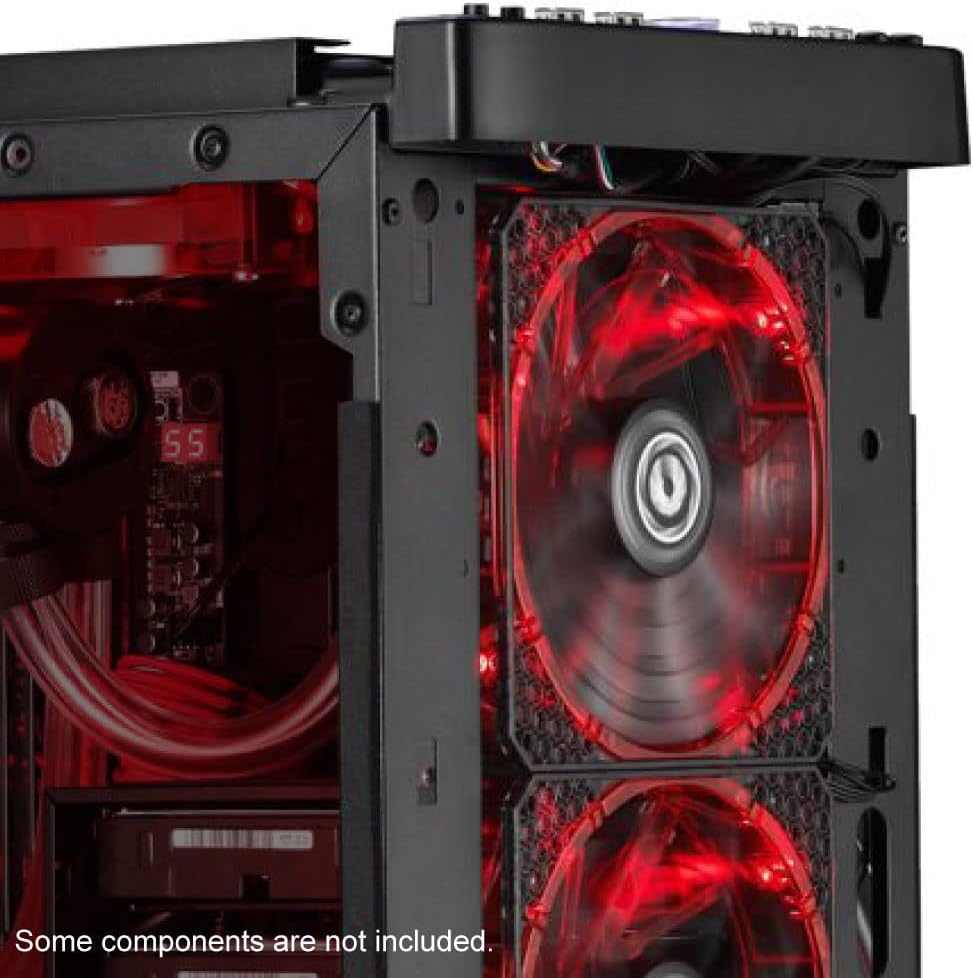
Abbildung 4.1: Ein Example of the BitFenix Spectre Pro RGB LED fan installed within a PC case, demonstrating its placement and illumination.
4.3 Controller and Cable Connections
The Spectre Pro RGB fan utilizes a dedicated controller for power and RGB effects. Refer to the image below for a visual guide to the fan and controller unit.

Abbildung 4.2: The BitFenix Spectre Pro RGB LED fan and its accompanying RGB controller box, highlighting its compatibility with ASUS Aura Sync.
- Lüfter an Steuerung anschließen: Plug the 4-pin fan cable from the Spectre Pro RGB fan into an available fan header on the RGB LED Controller Box. The controller supports multiple fans; ensure a secure connection.
- Schalten Sie den Controller ein: Connect the provided Molex power cable to the RGB LED Controller Box and to an available Molex connector from your power supply unit (PSU).
- RGB Control Options:
- Manuelle Kontrolle: Connect the RGB Control Button to the designated port on the RGB LED Controller Box. This button allows you to cycle through various lighting modes and colors. The button has a magnetic backing for convenient placement inside or outside your case.
- Motherboard Sync (ASUS Aura Sync): If your motherboard supports ASUS Aura Sync, connect the provided Motherboard RGB Sync Cable from the RGB LED Controller Box to your motherboard's 4-pin RGB header. This allows software control of the fan's RGB lighting.
- Kabelmanagement: Verlegen Sie alle Kabel ordentlich, um eine optimale Luftzirkulation und ein sauberes Erscheinungsbild zu gewährleisten.
5. Bedienungsanleitung
Once installed and connected, power on your computer to begin operation.
5.1 Lüfterbetrieb
The fan will begin spinning once power is supplied to the controller. The fan speed is constant at 1500 RPM.
5.2 RGB-Beleuchtungssteuerung

Abbildung 5.1: The BitFenix Spectre Pro RGB LED fan showcasing its vibrant, multi-color illumination.
- Using the RGB Control Button: Press the connected RGB Control Button to cycle through various pre-programmed lighting effects, colors, and modes.
- Using Motherboard Software (ASUS Aura Sync): If connected to a compatible ASUS motherboard, use the ASUS Aura Sync software to customize and synchronize the fan's RGB lighting with other compatible components in your system. Refer to your motherboard's manual for specific software instructions.
6. Wartung
Regelmäßige Wartung trägt dazu bei, eine optimale Leistung und Langlebigkeit Ihres Ventilators zu gewährleisten.
- Reinigung: Reinigen Sie die Lüfterflügel und das Gehäuse regelmäßig, um Staubablagerungen zu entfernen. Verwenden Sie dazu eine weiche Bürste oder Druckluft. Stellen Sie sicher, dass der Lüfter vor der Reinigung ausgeschaltet und vom Stromnetz getrennt ist.
- Inspektion: Prüfen Sie die Kabel auf festen Sitz und Anzeichen von Verschleiß.
7. Fehlerbehebung
If you encounter issues with your Spectre Pro RGB fan, refer to the following troubleshooting guide:
| Problem | Mögliche Ursache | Lösung |
|---|---|---|
| Lüfter dreht sich nicht | No power to controller; Fan cable loose; Faulty controller/fan | Check Molex power connection to controller; Ensure fan cable is securely plugged into controller; Test with another fan/controller if available. |
| RGB LEDs not lighting up | RGB cable loose; Incorrect RGB header connection; Software conflict; Faulty LEDs | Verify RGB cable connection to controller and motherboard (if applicable); Ensure correct 4-pin RGB header is used; Check motherboard software settings; Try manual control with the button. |
| Der Ventilator ist übermäßig laut. | Loose mounting; Obstruction; Bearing issue | Ensure fan is securely mounted; Check for cables or objects interfering with fan blades; If noise persists, contact support. |
8. Spezifikationen
Detailed technical specifications for the BitFenix Spectre Pro RGB LED 140mm Case Fan:
| Besonderheit | Spezifikation |
|---|---|
| Marke | BITFENIX |
| Modellnummer | BFF-SRGB-14025C-RP |
| Lüftergröße | 140 mm |
| Typ des Stromanschlusses | 4-Pin (Fan), Molex (Controller) |
| Bandtage | 12 Volt |
| Wastage | 125W (System Power Consumption, not fan specific) |
| Kühlmethode | Lüfter |
| Kompatible Geräte | Desktop-Computer |
| Geräuschpegel | 22.8 Dezibel |
| Material | Copper (likely referring to internal motor components, fan blades are plastic) |
| Maximale Drehzahl | 1500 U/min |
| Artikelgewicht | 8.6 Unzen |
| Produktabmessungen (L x B x H) | 8 x 1 x 1.5 inches (Note: This dimension seems incorrect for a 140mm fan, typically 140x140x25mm. Please refer to product packaging for exact dimensions.) |
| UPC | 886027015353 |
9. Garantie und Support
For warranty information and technical support, please refer to the official BitFenix webBesuchen Sie die Website oder kontaktieren Sie den Kundendienst. Bewahren Sie Ihren Kaufbeleg für Garantieansprüche auf.
10. Offizielle Produktvideos
Vom Verkäufer sind keine offiziellen Produktvideos zur Einbettung in dieses Handbuch verfügbar.


