1. Einleitung
Der MOOER Micro Preamp M013 Matchbox is a compact digital preamp pedal designed to accurately recreate the sound and feel of a Matchless amplifier. It features dual channels (Clean and Gain), a 3-band EQ, and an integrated cabinet simulator, making it suitable for direct recording, practice, or integration into a pedalboard setup.
2. Sicherheitshinweise
- Verwenden Sie ausschließlich das angegebene 9V-Gleichstromnetzteil (Mittelkontakt negativ).
- Das Gerät darf weder Wasser, Feuchtigkeit noch extremen Temperaturen ausgesetzt werden.
- Vermeiden Sie es, das Pedal fallen zu lassen oder starken Stößen auszusetzen.
- Versuchen Sie nicht, das Gerät zu zerlegen oder zu modifizieren.
- Außerhalb der Reichweite von Kindern aufbewahren.
3. Produktüberschreitungview
The M013 Matchbox pedal features a robust metal casing and intuitive controls for shaping your tone.

Abbildung 1: Draufsicht view des MOOER Micro Preamp M013 Matchbox pedal, illustrating the layout of controls and jacks.
Steuerung:
- VOL (Lautstärke): Passt den Gesamtausgangspegel des ausgewählten Kanals an.
- TRE (Diskant): Steuert den Hochfrequenzgang.
- MITTEL: Steuert den Mittelfrequenzgang.
- BASS (Bass): Steuert das Niederfrequenzverhalten.
- DAZUGEWINNEN: Passt den Grad der Verzerrung/des Overdrives für den ausgewählten Kanal an.
- CH/CAB-Schalter: This toggle switch has two functions:
- In normal operation, it switches between the Clean and Gain channels.
- When holding down the footswitch, it toggles the cabinet simulator on/off.
- Fußschalter: Toggles between the two channels (Clean/Gain) or bypasses the pedal.
Verbindungen:

Figure 2: Input Jack (left side)

Figure 3: Output Jack (right side)
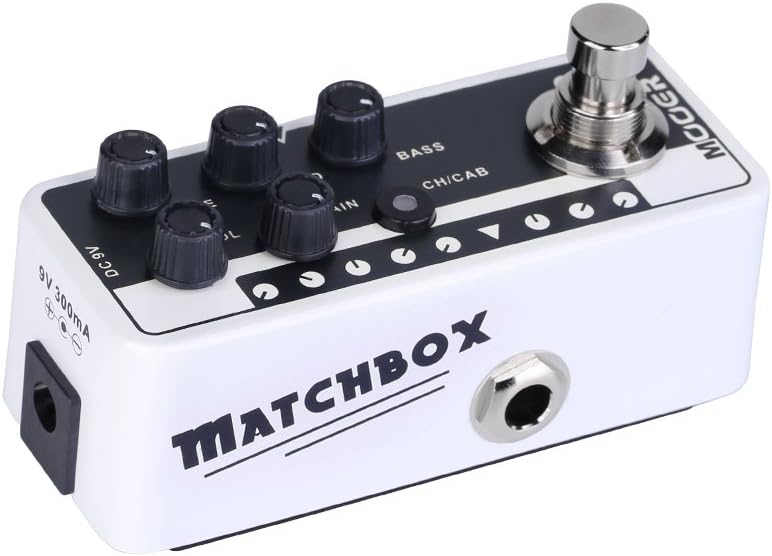
Abbildung 4: Gleichstromeingang 9 V
- Eingangsbuchse: Schließen Sie hier Ihre Gitarre oder ein anderes Instrument an.
- Ausgangsbuchse: Verbinden Sie sich mit Ihrem ampVerstärker, Mixer oder Audio-Interface.
- Gleichstrom 9V: Stromeingang für ein 9V DC-Netzteil (Mitte negativ).
4. Einrichtung
- Verbinde deine Gitarre mit dem Eingangsbuchse auf der rechten Seite des Pedals.
- Verbinden Sie Ausgangsbuchse on the left side of the pedal to your amplifier's input, a mixer, or an audio interface.
- Schließen Sie ein 9V-Gleichstromnetzteil (Mittelkontakt negativ) an das Gleichstrom 9 V Eingang.
- Stellen Sie sicher, dass alle Verbindungen sicher sind, bevor Sie Ihr ampVerstärker oder Audiosystem.
5. Bedienungsanleitung
Kanalauswahl:
The M013 Matchbox offers two distinct channels: Clean and Gain. Use the CH/CAB switch to toggle between these channels. The LED indicator will change color to show the active channel (typically blue for Clean, red for Gain).
Cabinet Simulator:
The integrated cabinet simulator can be toggled on or off. To activate or deactivate the cabinet simulator, press and hold the Footswitch for approximately 1 second. The LED will flash to indicate the change in status.
Tonformung:
Passen Sie die VOL, TRE, MITTE, BASS, Und GEWINNEN knobs to achieve your desired tone for each channel. Experiment with different settings to explore the full range of sounds this pedal can produce.
Fußschalterfunktionalität:
A quick press of the Footswitch will toggle between the currently selected channel and bypass mode. The LED will indicate whether the pedal is active or bypassed.
Demonstrationsvideo:
Video 1: Official MOOER demonstration of the Micro Preamp M013 Matchbox, showcasing both Clean and Gain channels with and without cabinet simulation. This video provides examples of the pedal's tonal capabilities.
6. Wartung
- Clean the pedal with a soft, dry cloth. Do not use abrasive cleaners or solvents.
- Lagern Sie das Pedal an einem trockenen Ort, geschützt vor direkter Sonneneinstrahlung und extremen Temperaturen.
- Regularly check cable connections for wear and tear.
7. Fehlerbehebung
Kein Strom:
- Stellen Sie sicher, dass das 9V-Gleichstromnetzteil korrekt angeschlossen ist und funktioniert.
- Stellen Sie sicher, dass die Steckdose aktiv ist.
Kein Ton:
- Überprüfen Sie alle Kabelverbindungen (Gitarre an Eingang, Ausgang an amp/mixer).
- Ensure the pedal is not in bypass mode (check LED indicator).
- Verify that the volume knobs on the pedal and your ampDie Verstärker sind aufgedreht.
- Testen Sie es nach Möglichkeit mit anderen Kabeln und einem anderen Netzteil.
Unerwünschte Geräusche/Brummen:
- Ensure you are using a regulated 9V DC (center negative) power supply. Unregulated power supplies can introduce noise.
- Check for ground loops by trying different power outlets or isolating the pedal's power.
- Keep the pedal away from other electronic devices that may cause interference.
8. Spezifikationen
- Artikelgewicht: 5.8 Unzen (165 Gramm)
- Produktabmessungen: 3.58 x 1.26 x 1.42 Zoll
- Energiequelle: Kabelgebundene Elektrik
- Bandtage: 9 Volt Gleichstrom
- Ausgang Wattage: 30 Watts (referring to the amp model it simulates, not the pedal's power output)
- Steckertyp: 6.35-mm-Buchse
- Kompatible Geräte: Gitarre
- Farbe: Schwarz
9. Garantie und Support
Informationen zur Garantie und zum technischen Support finden Sie auf der offiziellen MOOER-Website. website or contact your local dealer. Keep your purchase receipt as proof of purchase for any warranty claims.